
Linksys Max-Stream WiFi Range Extender RE7310 User Manual
Content
Linksys Max-Stream WiFi Range Extender RE7310: Complete Product Manual and Review
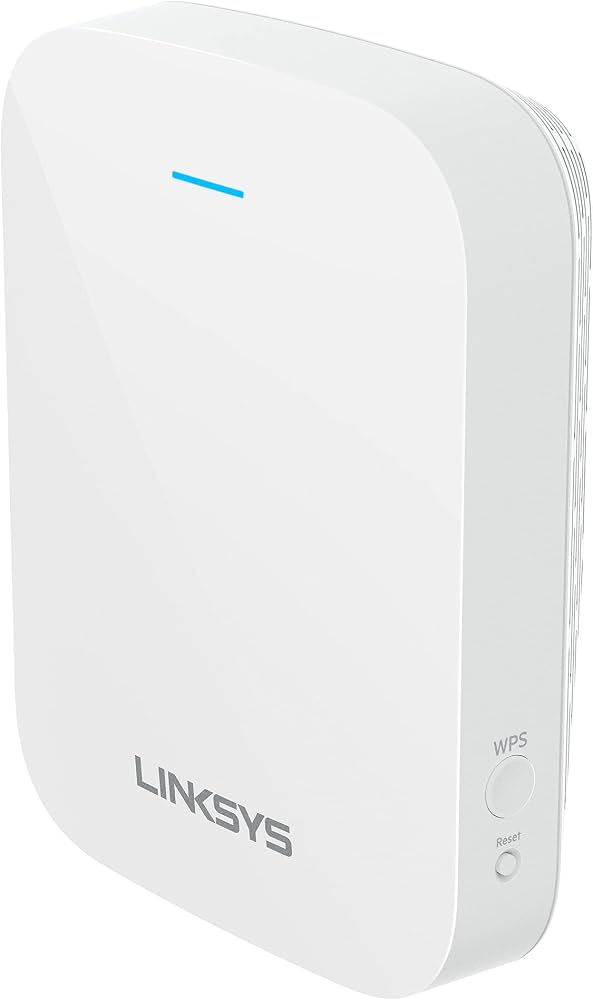
The Linksys Max-Stream WiFi Range Extender RE7310 is a Wi-Fi 6 range extender designed to eliminate dead zones, improve wireless coverage, and keep smart homes running smoothly. Built on AX1800 dual-band technology, it delivers up to 1.8 Gbps combined wireless speeds and is a strong fit for households that need faster, more stable connectivity in bedrooms, basements, home offices, and multi-story layouts. The extender supports 2.4 GHz and 5 GHz bands, WPA3 security, WPS setup, and seamless roaming, making it a practical upgrade for users who want better whole-home coverage without replacing their router.
This model is especially useful for streaming 4K video, video calls, online classes, cloud backups, and gaming in rooms where the main router signal is weak. The Linksys Max-Stream WiFi Range Extender RE7310 is also a good option for families with multiple devices because it uses dual-band Wi-Fi 6 and MU-MIMO support to handle more traffic efficiently. In real-world use, it is aimed at homeowners, apartment users, and remote workers who need stronger wireless performance and simple plug-in installation. Typical pricing generally falls in the budget-to-midrange category, with current market listings often seen around $30 to $90 depending on the seller, condition, and promotions. Availability is wide through major online retailers and electronics marketplaces, though pricing can fluctuate frequently.
Pros and Cons of the Linksys Max-Stream WiFi Range Extender RE7310
Pros
- Wi-Fi 6 AX1800 performance provides up to 1.8 Gbps combined speeds for modern homes that need stronger coverage.
- Dual-band support helps balance older 2.4 GHz devices and faster 5 GHz devices for better overall flexibility.
- Easy setup with WPS and a compact wall-plug design makes installation simple in most rooms.
- Supports WPA3 security, which is a valuable advantage for households that want stronger wireless protection.
- Good value for money when compared with higher-priced mesh systems for users who only need to extend coverage, not rebuild the network.
Cons
- No Ethernet ports, so wired device connections are limited compared with some competing extenders.
- Best performance depends heavily on placement, so poor outlet location can reduce real-world speed.
- Not ideal for very large homes where a full mesh Wi-Fi system may deliver more consistent roaming and coverage.
- Some alternatives offer more advanced app controls, more ports, or broader whole-home networking features.
For buyers comparing the Linksys Max-Stream WiFi Range Extender RE7310 with mesh kits or premium extenders, this model stands out for affordability, Wi-Fi 6 support, and straightforward everyday use. It is best for users who want a simple signal booster rather than a complete network overhaul.
Customer Reviews and User Feedback for Linksys Max-Stream WiFi Range Extender RE7310
Customer feedback is generally positive, with many users giving the RE7310 around 4 out of 5 stars for ease of use, improved coverage, and reliable performance in medium-sized homes. A common compliment is that it helps stabilize streaming and video calls in rooms that previously had weak signal. One typical testimonial reads, “Setup was quick, and my upstairs office finally gets strong Wi-Fi.”
Frequent complaints focus on placement sensitivity and the lack of Ethernet ports. Some users also note that speeds can drop if the extender is too far from the router. Buyers who expect mesh-like whole-home performance may feel underwhelmed, but users seeking a simple Wi-Fi booster often recommend it. For most shoppers, the Linksys Max-Stream WiFi Range Extender RE7310 is a solid purchase if the goal is affordable dead-zone elimination rather than advanced multi-node networking.
Key Specifications of the Linksys RE7310 WiFi Extender
- Wi-Fi class: AX1800
- Wireless bands: 2.4 GHz and 5 GHz
- Standards support: 802.11ax, ac, a, n, g, b
- Security: WPA2, WPA3/WPA2 mixed, WPA3-Personal
- Setup: WPS and standard extender installation
- Power: Internal AC/DC power supply
- Use case: Wi-Fi range extension for home coverage improvement
- Best suited for: Streaming, browsing, smart home devices, and remote work
How to Use the Linksys Max-Stream WiFi Range Extender RE7310
Step 1: Choose the right location
Plug the extender in halfway between your router and the weak-signal area. A location with a stable existing signal usually produces better results than placing it too far away.
Step 2: Connect using WPS or manual setup
Use the WPS button on your router and extender for quick pairing, or follow the manual setup process if your router does not support WPS.
Step 3: Check signal strength
Use the front status light to confirm a strong connection. If the light indicates a weak link, move the extender closer to the router.
Step 4: Test performance in target rooms
Run speed tests in the rooms where coverage matters most, such as an office, bedroom, or entertainment area, to confirm improved signal quality.
Who Should Buy the Linksys Max-Stream WiFi Range Extender RE7310?
- Home users who want stronger Wi-Fi in dead zones without buying a full mesh system.
- Remote workers who need more stable video calls and cloud access.
- Families streaming on multiple devices at once.
- Apartment and townhouse residents needing better coverage across rooms or floors.
- Buyers looking for a budget-friendly Wi-Fi 6 extender with modern security support.
Frequently Asked Questions About the Linksys RE7310
Is the Linksys RE7310 worth it?
Yes, for users who need a dependable Wi-Fi 6 range extender at a reasonable price, the RE7310 offers strong value and simple setup.
How fast is the RE7310?
It is rated as AX1800, with combined wireless speeds up to 1.8 Gbps under ideal conditions.
Does it support WPA3?
Yes, it supports WPA3-Personal and mixed WPA2/WPA3 security modes for improved network protection.
Is it better than a mesh system?
For a single dead zone or small coverage problem, yes in terms of cost. For large homes with multiple weak areas, a mesh system may be the better choice.
Faqs
How do I set up the linksys Max-Stream WiFi Range Extender RE7310 for the first time?
Why is my linksys Max-Stream WiFi Range Extender RE7310 not connecting to the router?
What WiFi standards and router types are compatible with the linksys Max-Stream WiFi Range Extender RE7310?
How can I improve the speed and coverage of the linksys Max-Stream WiFi Range Extender RE7310?
Can I use the linksys Max-Stream WiFi Range Extender RE7310 with smart TVs, consoles, and streaming devices?
What should I do if the linksys Max-Stream WiFi Range Extender RE7310 keeps dropping the connection?
How do I reset the linksys Max-Stream WiFi Range Extender RE7310 without losing the setup steps I need?
How should I maintain the linksys Max-Stream WiFi Range Extender RE7310 for long-term reliability?
More linksys manuals
- Linksys RE9000 Wi-Fi Range Extender User Manual
- How to Setup: Linksys Cable/DSL Router BEFSR41, BEFSR81, BEFSX41, BEFVP41 (EU/LA) User Manual
- Setup & Features: Linksys Atlas Max WiFi 6E System AXE8400 MX8500 Series User Manual
- Setup: Linksys WRT 1900 AC Dual Band Gigabit Wi-Fi Router User Manual
- Specifications: Linksys AC1200 Max Wi-Fi Range Extender RE6500 User Guide
Leave a Comment