
Linksys RE9000 Wi-Fi Range Extender User Manual
Content
Linksys RE9000 Wi-Fi Range Extender Manual and Review
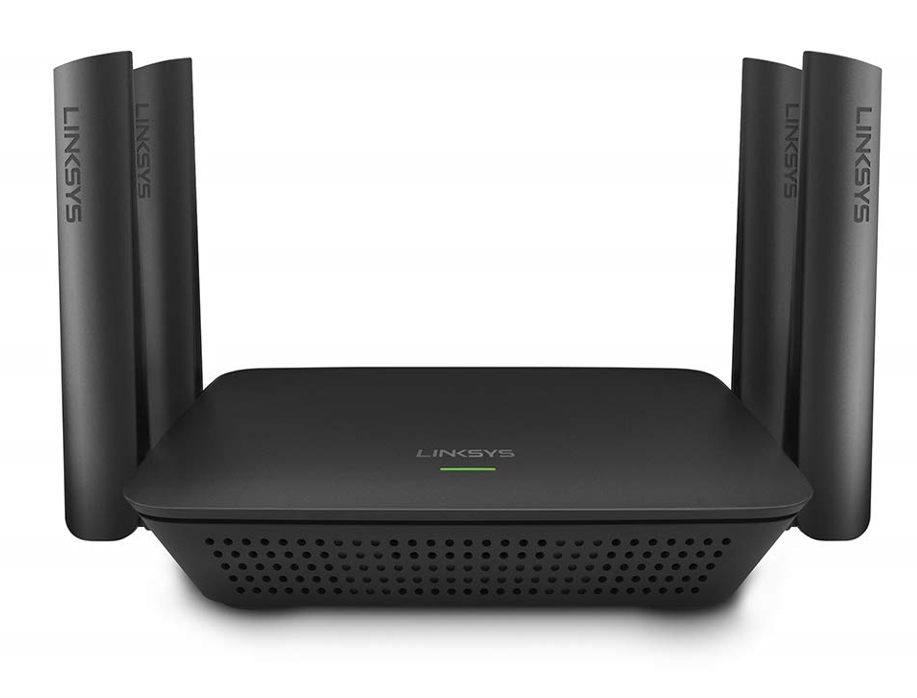
The linksys RE9000 Wi-Fi Range Extender is a tri-band AC3000 range extender built to eliminate dead zones and improve coverage in larger homes, multi-floor layouts, and busy households with many connected devices. It combines a dedicated 5 GHz backhaul with dual-band Wi-Fi to help maintain stronger performance than basic single-band extenders, making it a smart choice for streaming, gaming, video calls, and smart home devices. With up to four Gigabit Ethernet ports, it also works well for wired devices such as smart TVs, desktop PCs, and game consoles.
This model is designed for users who want better coverage without replacing their existing router. It supports Wi-Fi 5 technology, MU-MIMO, Seamless Roaming, and spot-finding tools that help optimize placement for stronger signal performance. In practical use, the RE9000 is well suited for homes where one router cannot reliably cover bedrooms, basements, patios, or home offices. It is especially useful for households that need stable connections across multiple devices at the same time.
The estimated price range for the linksys RE9000 Wi-Fi Range Extender typically falls between about $80 and $150 depending on condition, retailer, and availability. New stock can be inconsistent because this is an older Wi-Fi 5 product, but it is still commonly available through major online marketplaces and select electronics retailers. For shoppers looking for an AC3000 extender with wired ports and wide-area coverage, it remains a competitive option when found at the right price.
Pros & Cons of the Linksys RE9000 AC3000 Tri-Band Extender
Pros
- Strong coverage for large homes: The tri-band design helps extend Wi-Fi farther than basic extenders, making it useful for hard-to-reach rooms and multiple floors.
- Dedicated backhaul band: The extra 5 GHz band reduces congestion and can improve real-world performance when compared with budget dual-band alternatives.
- Four Gigabit Ethernet ports: Ideal for wired devices like smart TVs, gaming consoles, and desktop computers that need stable connections.
- Good for streaming and multitasking: MU-MIMO and AC3000-class speeds make it suitable for 4K streaming, video conferencing, and everyday smart home use.
- Useful placement tools: Spot-finder style guidance helps users position the extender in a location with a strong signal from the main router.
- Solid value when discounted: Compared with premium mesh kits, the RE9000 can be a cost-effective way to improve coverage without a full network upgrade.
Cons
- Older Wi-Fi 5 technology: It lacks Wi-Fi 6 and Wi-Fi 6E features, so newer mesh systems may deliver better efficiency in crowded networks.
- Setup can feel dated: Some users find the installation process less polished than newer plug-and-play extenders.
- Price varies widely: Because availability changes, the value proposition depends heavily on whether it is purchased new, refurbished, or secondhand.
- Bulky design: It is larger than many compact extenders, which may matter in tight spaces near a wall outlet.
For buyers comparing alternatives, the RE9000 is often a better fit than low-cost single-band extenders, but it may not be as future-proof as modern mesh Wi-Fi systems. If maximum long-term performance matters, a Wi-Fi 6 mesh kit may be a stronger investment. If the goal is to extend an existing network affordably, the linksys RE9000 Wi-Fi Range Extender still offers a balanced mix of coverage, speed, and Ethernet flexibility.
Customer Reviews for Linksys RE9000 Wi-Fi Range Extender
Customer feedback is generally positive, with many users rating the RE9000 around 4.4 out of 5 stars in major retail listings. Buyers often praise its ability to eliminate dead zones, improve signal in upstairs bedrooms, and support streaming on multiple devices without frequent drops. A common positive comment is that the extender performs especially well when placed between the router and the weak-signal area.
Typical complaints focus on setup complexity, occasional connection dropoffs if placed too far from the main router, and the fact that it is not a Wi-Fi 6 device. Some users also note that the hardware feels oversized compared with newer extenders. A common recommendation is to buy it if you need strong Wi-Fi 5 coverage and wired Ethernet ports, but to consider a mesh system if you want the easiest setup and the newest wireless standard.
- Example praise: “Great for my basement office and streaming setup. The signal is much more stable now.”
- Example complaint: “Works well, but the setup took longer than expected and placement matters a lot.”
- Purchase recommendation: Best for homes that need wider coverage on a budget, especially when discounted.
Key Specifications and Features of the Linksys RE9000 Wi-Fi Range Extender
- Wi-Fi standard: 802.11ac / Wi-Fi 5
- Speed class: AC3000 tri-band
- Bands: 2.4 GHz and dual 5 GHz bands
- Ethernet ports: 4 Gigabit ports
- Coverage potential: Up to 10,000 sq. ft. in ideal conditions
- Wireless features: MU-MIMO, Seamless Roaming, spot-finder guidance
- Best use cases: Streaming, gaming, home offices, smart home devices, and large homes
Who Should Buy the Linksys RE9000?
The linksys RE9000 Wi-Fi Range Extender is a strong fit for users who want to improve Wi-Fi coverage without replacing their router. It is especially useful for medium to large homes, households with multiple connected devices, and anyone who needs reliable wired ports in an area with weak signal. It is also a practical choice for users who want better performance than a basic plug-in extender but do not need the expense of a full mesh system.
If you are looking for a dependable Wi-Fi range booster for streaming, work-from-home use, and dead-zone elimination, the RE9000 remains a capable option. If your priority is the newest wireless standard, simpler setup, or long-term mesh expandability, newer alternatives may be a better match.
Faqs
How do I set up the Linksys RE9000 Wi-Fi Range Extender for the first time without losing my existing network settings?
Why is my Linksys RE9000 Wi-Fi Range Extender not connecting to the router, and how can I fix it?
What features make the Linksys RE9000 Wi-Fi Range Extender a better choice for larger homes?
How far should I place the Linksys RE9000 Wi-Fi Range Extender from my router for the best performance?
Can the Linksys RE9000 Wi-Fi Range Extender work with any router, and what compatibility issues should I check?
Why is the Wi-Fi speed slower after installing the Linksys RE9000 Wi-Fi Range Extender, and how can I improve it?
How do I reset the Linksys RE9000 Wi-Fi Range Extender when setup fails or settings become corrupted?
What maintenance steps help keep the Linksys RE9000 Wi-Fi Range Extender working reliably over time?
More linksys manuals
- Linksys Max-Stream WiFi Range Extender RE7310 User Manual
- How to Setup: Linksys Cable/DSL Router BEFSR41, BEFSR81, BEFSX41, BEFVP41 (EU/LA) User Manual
- Setup & Features: Linksys Atlas Max WiFi 6E System AXE8400 MX8500 Series User Manual
- Setup: Linksys WRT 1900 AC Dual Band Gigabit Wi-Fi Router User Manual
- Specifications: Linksys AC1200 Max Wi-Fi Range Extender RE6500 User Guide
Leave a Comment