
Lippert OneControl Monitor Panel X180T User Manual
Content
lippert OneControl Monitor Panel X180T Overview
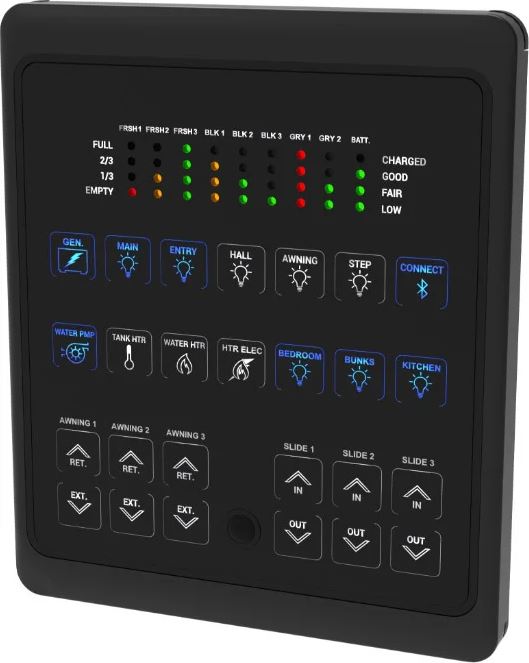
The lippert OneControl Monitor Panel X180T is a centralized RV control interface designed to make everyday campsite management easier, faster, and more intuitive. Built to work with Lippert’s OneControl X180T controller, the panel lets users monitor battery status and operate key coach systems such as lighting, water pump, water heater, awnings, and slide rooms from one location. Its motion-activated display helps reduce power draw by staying in sleep mode until approached, then waking automatically for quick access.
This monitor panel is especially valuable for RV owners who want a cleaner, more convenient way to manage onboard systems without relying on multiple switches. It is a strong fit for travel trailers, fifth wheels, and motorhomes equipped with compatible OneControl hardware. The interface is practical for both new RV owners and experienced users who want a simple command center for common functions. The panel’s battery-level LEDs also provide at-a-glance charging information, which is useful during storage, boondocking, and off-grid travel.
In terms of pricing, the lippert OneControl Monitor Panel X180T typically falls in the mid-range RV replacement and upgrade category, often landing around the low hundreds depending on seller, RV compatibility, and bundled hardware. Availability is generally good through RV parts retailers, Lippert support channels, and component distributors, though exact stock can vary by season and model fitment.
Specifications and Key Features of lippert OneControl Monitor Panel X180T
- Compatible controller platform: Lippert OneControl X180T and related OneControl systems
- System interface: CANbus data network harness with dedicated 2-pin power and 2-pin data connections
- Primary controls: lighting, water pump, gas/electric water heater, awning extend/retract, and slide room in/out functions
- Battery monitoring: LED-based status indication for charged, fair, and low battery conditions
- Wake behavior: motion-activated display with automatic sleep mode after inactivity
- User feedback: illuminated button indicators for active functions and fault signaling
- Installation style: wall-mounted panel with bezel and screw retention
- Typical performance advantage: centralized control reduces the need to manage separate switches across the RV
Compared with basic OEM rocker-switch setups, the lippert OneControl Monitor Panel X180T offers a more integrated and user-friendly control experience. Compared with larger touchscreen RV control centers, it is simpler, faster to read, and often easier to service because its hardware and wiring are more straightforward.
How to Set Up lippert OneControl Monitor Panel X180T: Step-by-Step Guide
Start by confirming that the RV is equipped with the correct OneControl controller and compatible harnessing. Before installation, disconnect power to avoid accidental activation. Mount the panel securely to the wall, reconnect the 2-pin power harness, 2-pin data harness, and terminating resistor, then reinstall the bezel.
After physical installation, restore power and verify that the panel wakes when motion is detected nearby. Test each major function one at a time, including lights, pump, water heater, awning, and slide controls. If your RV uses app-based OneControl connectivity, complete the pairing process in the Lippert app and ensure the smart device is within Bluetooth range.
Configuration options may include system labeling, controller pairing, and verifying which buttons are enabled for your specific RV build. If the panel does not respond, check harness seating, confirm battery voltage, and inspect the CANbus connection. Safety precautions include keeping fingers clear of moving slides and awnings, never operating mechanical systems while standing in a pinch point, and avoiding setup while the vehicle is unstable or parked on uneven ground.
Troubleshooting the lippert OneControl Monitor Panel X180T
One common issue is a blank panel. In many cases, this is caused by sleep mode, a disconnected power lead, or a low RV battery. Wake the panel with motion first, then verify voltage and wiring if the screen remains inactive. If all buttons flash white for about five seconds after pressing a slide or awning control, that usually indicates a fault in the data network or a communication interruption.
Other common problems include unresponsive slide controls, incorrect battery readings, or a system that works intermittently. Reseat the harnesses, confirm the terminating resistor is installed correctly, and inspect for damaged wiring or loose connectors. If Bluetooth pairing fails in the companion app, make sure Bluetooth is enabled, permissions are granted, and the phone is within typical range.
Preventive maintenance includes checking connectors periodically, keeping the panel area dry, and avoiding stress on the harness during wall movement or service work. For support, Lippert customer care can be reached at 432-547-7378 or customerservice@lci1.com. Warranty coverage and service eligibility depend on the original RV build and the retailer or manufacturer’s purchase terms.
Pros and Cons of lippert OneControl Monitor Panel X180T
Pros
- Centralizes essential RV controls in one easy-to-use panel
- Motion-activated wake function helps conserve power
- Battery status LEDs make monitoring simple at a glance
- Reduces clutter compared with multiple separate switches
- Works well for RV owners who want quick access to lighting, water, and slide controls
Cons
- Requires compatible OneControl hardware, so it is not a universal replacement
- Faults can appear if the CANbus connection is interrupted
- Users wanting larger touchscreen features may prefer a more advanced control center
- Installation and troubleshooting are easier with basic technical knowledge
For value for money, the lippert OneControl Monitor Panel X180T is strongest when it replaces a worn or missing OEM panel in a compatible coach. It is less compelling if the RV lacks the proper controller or if the owner wants app-first, fully wireless management. Compared with alternative RV control panels, it offers a practical balance of simplicity, reliability, and system visibility.
Customer Reviews for lippert OneControl Monitor Panel X180T
Typical user feedback is positive, with many owners rating it around 4 out of 5 stars for convenience and ease of use. Common praise includes the simple layout, the clear battery indicators, and the convenience of controlling lights, pumps, and slides from one place. Many users describe it as a helpful upgrade that makes campsite setup and teardown faster.
Frequent complaints focus on wiring sensitivity, compatibility limits, and occasional communication faults when connectors are loose or the coach battery is weak. One typical testimonial says, “It made our RV much easier to manage, but I had to double-check the harness connections during installation.” Another common comment is, “Great system when everything is connected correctly.”
Purchase recommendation: choose the lippert OneControl Monitor Panel X180T if your RV is already OneControl-ready or if you are replacing a compatible panel. If your coach uses a different control architecture, verify compatibility before buying to avoid installation issues.
Frequently Asked Questions About lippert OneControl Monitor Panel X180T
What does the lippert OneControl Monitor Panel X180T control? It typically manages lighting, water pump, water heater, awning, and slide room functions in compatible RVs.
Why is the panel not turning on? The most common causes are sleep mode, low battery voltage, disconnected harnesses, or a CANbus communication issue.
Is it easy to replace? Replacement is straightforward for compatible systems, but correct wiring and controller matching are essential.
Does it work with the app? It can be used with OneControl-connected systems that support app pairing and Bluetooth communication.
Faqs
How do I set up the lippert OneControl Monitor Panel X180T for the first time?
What should I do if the lippert OneControl Monitor Panel X180T is not responding or connecting to the app?
Why are the LEDs flashing on my lippert OneControl Monitor Panel X180T?
What features can I control with the lippert OneControl Monitor Panel X180T?
Is the lippert OneControl Monitor Panel X180T compatible with any RV, or does it require specific equipment?
How do I improve Bluetooth performance on the lippert OneControl Monitor Panel X180T?
What maintenance does the lippert OneControl Monitor Panel X180T need?
Can I replace or reprogram the lippert OneControl Monitor Panel X180T if it stops working?
More lippert manuals
Leave a Comment