
Logitech Blue Yeti X USB Condenser Microphone 988-000105 User Manual
Content
Logitech Blue Yeti X USB Condenser Microphone 988-000105 Overview
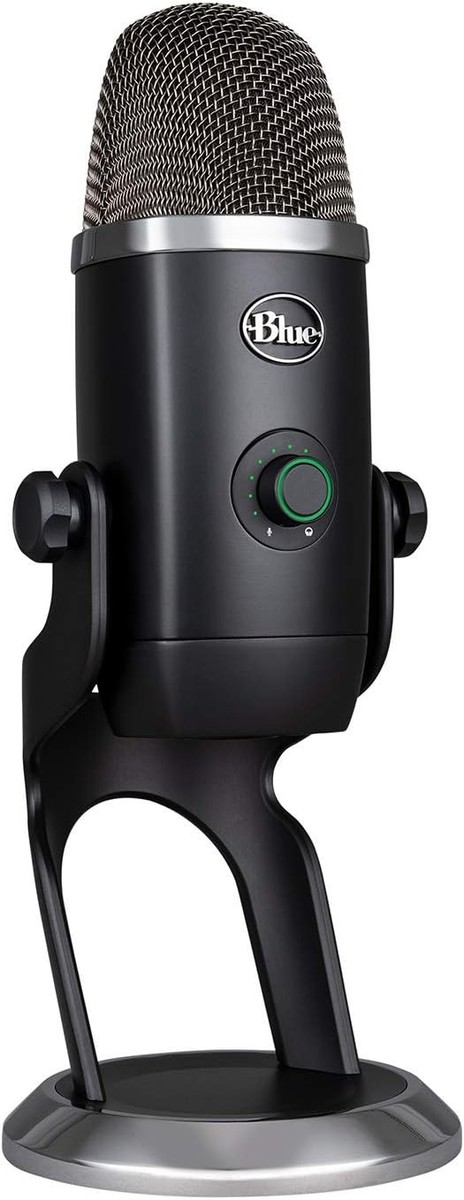
The logitech Blue Yeti X USB Condenser Microphone 988-000105 is a premium desktop microphone designed for creators who want broadcast-style audio without the complexity of an XLR setup. Built for streaming, podcasting, voice-over work, gaming, online meetings, and content creation, it delivers a clean, detailed sound with multiple pickup patterns and simple USB connectivity. Its 4-capsule condenser array, 24-bit audio, and 48 kHz sample rate make it a strong choice for users who want studio-quality performance from a plug-and-play microphone.
One of its biggest strengths is flexibility. The microphone supports cardioid, omnidirectional, bidirectional, and stereo modes, allowing users to adapt to solo recording, interviews, group discussions, or immersive stereo capture. It also includes a built-in stand, onboard controls, and a 3.5 mm headphone jack for zero-latency monitoring. For creators who value convenience, the Blue Yeti X also integrates well with desktop software for gain control, lighting, and voice presets.
In terms of price, the Blue Yeti X typically falls in the mid-to-premium USB microphone range, often around $140 to $170 USD depending on retailer, stock, and promotions. Availability remains good through major electronics stores and online marketplaces. If you are looking for a versatile USB condenser mic with strong voice clarity and professional features, this model remains one of the most recognizable options in its class.
Technical Specifications for Blue Yeti X USB Condenser Microphone 988-000105
- Microphone type: USB condenser microphone
- Polar patterns: Cardioid, omnidirectional, bidirectional, stereo
- Audio resolution: 24-bit
- Sample rate: 48 kHz
- Frequency response: 20 Hz to 20 kHz
- Maximum SPL: 122 dB
- Capsules: 4 condenser capsules
- Connectivity: USB wired connection
- Headphone monitoring: 3.5 mm headphone output
- Cable length: Approximately 2 m
- Weight: About 519 g for the microphone, around 1.28 kg with stand
- Dimensions: Approx. 289 x 122 x 110 mm with stand
Compared with entry-level USB microphones, the Blue Yeti X offers stronger build quality, more refined audio controls, and better versatility. Compared with simpler streaming mics, it provides more advanced onboard features and a wider pickup pattern range. It is positioned above basic plug-and-play models, but below fully modular professional XLR systems.
Setup Guide: How to Set Up the Blue Yeti X USB Microphone
Setting up the logitech Blue Yeti X USB Condenser Microphone 988-000105 is straightforward. First, place the microphone on a stable desk surface or mount it on a compatible boom arm using the standard thread support. Next, connect the USB cable directly to your computer. The microphone is designed for Windows and macOS systems, and it should be recognized automatically in most cases.
- Choose the desired polar pattern based on your recording setup.
- Set input gain to a moderate level before speaking.
- Use the headphone jack for live monitoring if you need to hear your voice without delay.
- Adjust microphone position so the front face points toward your mouth.
- Install any companion software if you want access to advanced lighting and voice settings.
If audio sounds distorted, reduce gain and move farther from the microphone. If the microphone is not detected, reconnect the USB cable, try another port, and verify the system sound settings. Keep the unit away from liquid, heat, and unstable surfaces. Avoid plugging into unpowered hubs when possible, since direct computer connection usually provides the most reliable performance.
Troubleshooting Blue Yeti X USB Condenser Microphone Problems
Most issues with the Blue Yeti X are related to connection, input selection, or gain settings. If no sound is recorded, confirm that the microphone is selected as the active input device in your operating system and inside your recording app. If the sound is too quiet, raise the gain and speak closer to the capsule. If the sound is muddy or echoey, switch to cardioid mode and reduce room noise.
- Problem: Microphone not detected. Fix: Reconnect USB, change port, restart computer.
- Problem: Audio crackling or clipping. Fix: Lower gain and avoid speaking too close.
- Problem: Background noise too high. Fix: Use cardioid mode and record in a quieter space.
- Problem: Headphone monitoring not working. Fix: Check headphone plug and system output settings.
- Problem: App settings not saving. Fix: Update software and restart the application.
Preventive care improves long-term reliability. Keep the microphone clean, use stable mounting hardware, and store it safely when not in use. Warranty coverage and customer support are typically available through the retailer or Logitech support channels. For help, contact the official Logitech support website or the retailer where the unit was purchased.
Pros and Cons of the Logitech Blue Yeti X USB Condenser Microphone 988-000105
Pros
- Excellent audio clarity for streaming, podcasting, and voice recording.
- Multiple pickup patterns offer strong versatility for solo and group use.
- 24-bit / 48 kHz capture gives it a more polished sound than many entry-level USB mics.
- Built-in monitoring and onboard controls improve usability for beginners and creators.
- Solid desktop design with a premium feel and dependable USB connectivity.
Cons
- Higher price than basic USB condenser microphones.
- Larger desk footprint may not suit compact setups.
- Best results depend on room acoustics and proper gain adjustment.
- Not as flexible as an XLR microphone chain for advanced studio workflows.
For value for money, the Blue Yeti X is strong if you want convenience, quality, and multi-pattern recording in one package. Compared with cheaper alternatives, it sounds more refined and offers more control. Compared with professional XLR models, it is easier to use but less expandable.
Customer Reviews and User Feedback
Users generally rate the Blue Yeti X highly, often around 4 to 4.5 out of 5 stars, especially for streaming and voice work. Many praise its crisp sound, easy setup, and flexible pattern selection. A common positive comment is that it produces “broadcast-ready” voice quality with minimal setup.
Common complaints include its size, sensitivity to room noise, and the need to adjust gain carefully to avoid clipping. Some buyers also note that it performs best when paired with a quiet room and good mic placement. Overall, it is widely recommended for creators who want a premium USB microphone without moving to a full studio rig.
- Best for: Streamers, podcasters, YouTubers, remote workers, and voice-over creators.
- Not ideal for: Users needing a very small microphone or a fully modular studio setup.
- Purchase recommendation: Buy it if you want a reliable, feature-rich USB condenser microphone with strong voice quality.
Faqs
How do I set up logitech Blue Yeti X USB Condenser Microphone 988-000105 for the first time on a Windows or Mac computer?
Why is logitech Blue Yeti X USB Condenser Microphone 988-000105 not being detected by my PC or Mac?
What makes logitech Blue Yeti X USB Condenser Microphone 988-000105 different from a standard USB microphone?
Which recording mode should I use on logitech Blue Yeti X USB Condenser Microphone 988-000105 for streaming, podcasts, or interviews?
How can I reduce background noise when using logitech Blue Yeti X USB Condenser Microphone 988-000105?
What software do I need for the full feature set of logitech Blue Yeti X USB Condenser Microphone 988-000105?
How do I fix distorted or too-quiet audio on logitech Blue Yeti X USB Condenser Microphone 988-000105?
How should I maintain and clean logitech Blue Yeti X USB Condenser Microphone 988-000105 for long-term use?
More logitech manuals
Leave a Comment