
Logitech C270 HD Webcam User Manual
Content
Logitech C270 HD Webcam: Complete Product Manual and Buyer Guide
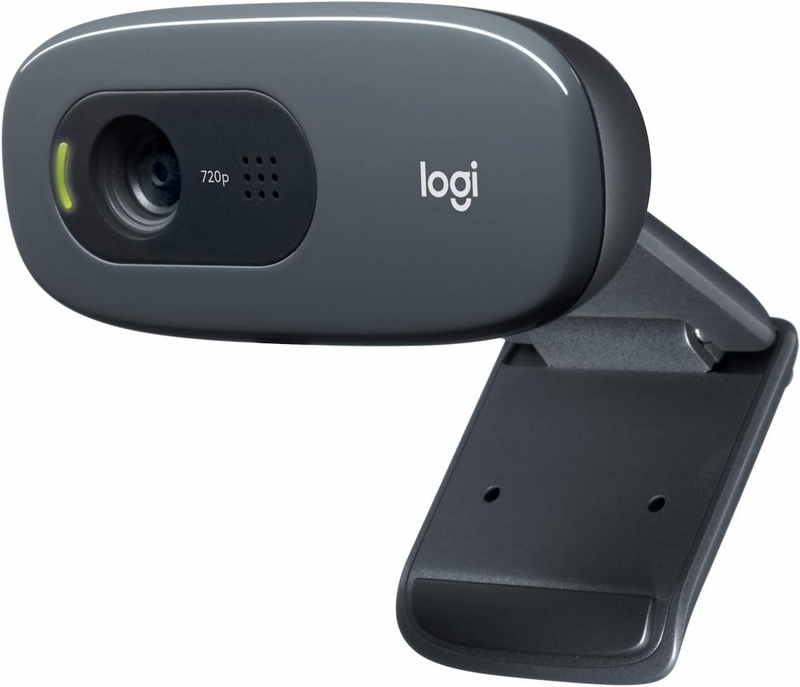
The Logitech C270 HD Webcam is a popular budget webcam designed for everyday video calls, online classes, remote work, and basic content capture. Known for its simple plug-and-play setup, compact design, and reliable 720p video, it remains one of the most accessible entry-level webcams for users who need a straightforward camera without a steep learning curve. The Logitech C270 HD Webcam is especially appealing to students, home office users, first-time streamers, and anyone upgrading from a laptop’s built-in camera.
Its biggest strengths are ease of use, wide software compatibility, and built-in automatic light correction that helps improve image clarity in ordinary indoor lighting. The integrated noise-reducing microphone also makes voice capture more usable for meetings and calls. While it does not offer premium features such as Full HD, autofocus, or a privacy shutter, it delivers dependable performance at a very affordable price point.
As of 2026, the estimated price range is typically around $20 to $30, depending on retailer availability and sales. It is widely available through major online stores and electronics retailers, making it one of the most commonly recommended low-cost webcams for basic communication needs.
Logitech C270 HD Webcam Specifications: Key Features, Performance, and Comparison
- Maximum video resolution: 720p HD at 30 frames per second
- Camera megapixels: 0.9 MP
- Field of view: 55 degrees diagonal
- Focus type: Fixed focus
- Lens material: Plastic
- Microphone: Built-in mono or noise-reducing mic, depending on listing region
- Microphone range: Up to about 1 meter for clear pickup
- Connection: USB-A plug-and-play
- Cable length: 1.5 m
- Weight: About 75 g
- Compatibility: Windows 8 or later, macOS 10.10 or later, ChromeOS
- Mounting: Fixed clip for monitors and laptop screens
In real-world use, the webcam performs best for 720p video calls in well-lit rooms. It is not designed for advanced streaming or professional video production, but it is solid for Zoom, Skype, Google Meet, and similar conferencing platforms. Compared with many low-cost alternatives, the Logitech C270 HD Webcam stands out for its consistent autofocus-free simplicity and dependable software support. It is less advanced than 1080p models like the Logitech C920, but it is also significantly more affordable and easier to set up.
How to Fix Logitech C270 HD Webcam Problems: Troubleshooting Guide
- No camera detected: Check the USB-A connection, try a different port, and confirm the webcam is selected in your video app.
- Black screen in calls: Close other apps using the camera, restart the conferencing software, and reconnect the webcam.
- Low video quality: Improve room lighting, position your face toward the light source, and clean the lens gently with a microfiber cloth.
- Audio too quiet or unclear: Move closer to the webcam, reduce background noise, and select the correct microphone input in system settings.
- Blurry image: Remember that the fixed-focus lens works best at a normal seated distance; avoid holding objects too close to the camera.
- App error messages: Update your video conferencing app and operating system, then reconnect the device.
There are no widely documented error codes specific to this webcam model, but common USB or device permission errors usually resolve by changing ports, granting camera access in privacy settings, or reinstalling drivers through your operating system. To prevent issues, keep the cable untangled, avoid placing the webcam in direct glare, and disconnect it safely rather than pulling it from the port.
The product is typically covered by Logitech support and a limited warranty period that may vary by region. For help, users can visit Logitech support through the official support portal or contact Logitech customer care via the brand’s support channels listed for their region.
Logitech C270 HD Webcam Pros and Cons: Is It Worth Buying?
Pros
- Very affordable for a branded webcam with HD video calling support
- Easy plug-and-play setup with USB-A connectivity
- Compact and lightweight for monitors, laptops, and small desks
- Automatic light correction improves image quality in typical indoor lighting
- Built-in microphone is convenient for meetings and classes
- Good value for money for basic communication use
Cons
- 720p resolution is modest compared with newer 1080p webcams
- No autofocus, so it is less flexible for close-up or moving subjects
- No privacy shutter or advanced security features
- Fixed clip and basic lens design limit premium positioning options
- Not ideal for streaming, studio work, or sharp professional-quality video
For users who only need a reliable webcam for calls and classes, the Logitech C270 HD Webcam is a strong budget choice. Compared with more advanced alternatives, it trades video sharpness and feature depth for simplicity and low cost. That makes it a practical buy for shoppers who want dependable basics instead of premium extras.
Logitech C270 HD Webcam Customer Reviews: Common Praise and Complaints
Customer feedback for the Logitech C270 HD Webcam is generally positive, especially from buyers who wanted an inexpensive webcam for everyday use. Many users rate it around 4 out of 5 stars for value, ease of setup, and stable video-call performance. A common praise is that it works quickly with popular conferencing apps and does not require complicated installation.
Frequent complaints include the lack of autofocus, average image quality in dim rooms, and the absence of a privacy cover. Some users also note that skin tones can look less accurate under poor lighting. Still, most reviews agree that it is a dependable entry-level webcam for home offices, school, and basic virtual meetings.
Purchase it if you want an affordable webcam for meetings, remote learning, or casual video chat. Skip it if you need crisp 1080p video, better low-light performance, or advanced creator-focused features.
Faqs
How do I set up logitech C270 HD WEBCAM on a Windows or Mac computer for the first time?
Why is my logitech C270 HD WEBCAM showing a black screen, and how can I fix it?
What video quality can I expect from logitech C270 HD WEBCAM during calls and recordings?
Is logitech C270 HD WEBCAM compatible with Zoom, Microsoft Teams, and Google Meet?
How can I improve the picture quality of my logitech C270 HD WEBCAM in low light?
What should I do if the microphone on logitech C270 HD WEBCAM sounds quiet or distorted?
How do I keep logitech C270 HD WEBCAM clean and working properly over time?
Can I use logitech C270 HD WEBCAM with a laptop lid closed or on an external monitor?
More logitech manuals
- Logitech G705 Wireless Gaming Mouse User Manual
- Installation: Logitech HD Pro Webcam C920 User Manual
- Logitech MK360 Wireless Combo User Manual
- How to Use: Logitech C920s Pro HD Webcam User Manual
- Logitech Blue Yeti X USB Condenser Microphone 988-000105 User Manual
- How to Use: Logitech C920 Pro HD Webcam User Manual
Leave a Comment