
Logitech MK360 Wireless Combo User Manual
Content
Logitech MK360 Wireless Combo Product Manual
Introduction
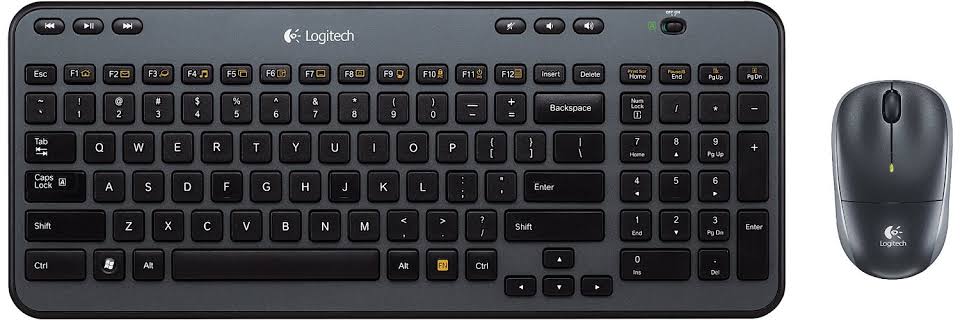
The Logitech MK360 Wireless Combo is a compact keyboard-and-mouse bundle designed for users who want dependable wireless performance without a complicated setup. Built around a 2.4 GHz USB receiver, it offers plug-and-play convenience for everyday computing, whether you are working from home, handling office tasks, or setting up a simple desktop station. Its full-size keyboard includes a numeric keypad, multimedia hotkeys, and adjustable tilt legs, making it a practical choice for productivity-focused users who still want a streamlined footprint.
One of the biggest advantages of the Logitech MK360 Wireless Combo is battery efficiency. The keyboard is designed for long-lasting use, while the included wireless mouse adds smooth optical tracking and comfortable everyday navigation. The compact receiver helps keep your desk uncluttered, and the wireless range is strong enough for most standard workstation setups. This makes the MK360 especially appealing for students, remote workers, and home-office users who need a reliable keyboard and mouse combo at a reasonable price.
In the current market, the Logitech MK360 Wireless Combo typically falls in the budget to mid-range category, with pricing often influenced by seller availability, region, and whether the item is new, refurbished, or renewed. Availability can vary because this is an older but still commonly listed model on major retail platforms and marketplace stores. For users searching for a straightforward wireless keyboard and mouse combo with familiar Logitech build quality, the MK360 remains a practical and cost-effective option.
Specifications
- Connection type: 2.4 GHz wireless with USB receiver
- Wireless range: Greater than 10 meters in typical use
- Keyboard layout: Full-size design with numeric keypad
- Keyboard battery life: Up to 36 months with 2 AAA batteries
- Mouse battery life: Up to 12 months with 1 AA battery
- Keyboard features: Deep-profile keys, hotkeys, adjustable tilt legs, power switch
- Mouse features: 3 buttons, optical tracking, line-by-line scrolling, power switch
- Receiver size: Ultra-compact USB dongle for travel and desk use
- Keyboard dimensions: Approximately 380 mm wide, 156 mm deep, 25 mm high
- Mouse dimensions: Approximately 99 mm long, 60 mm wide, 39 mm high
- Color: Black
Compared with newer wireless keyboard and mouse combos, the MK360 stands out for its simple design and long battery life rather than advanced features like Bluetooth, backlighting, or rechargeable batteries. Compared with compact travel sets, it offers a more comfortable full-size typing layout and dedicated number pad, which is useful for data entry and spreadsheet work. In performance terms, it is best suited for general productivity, browsing, and office tasks rather than gaming or specialized creative workflows.
Troubleshooting
If the keyboard or mouse is not working, start by checking the USB receiver. Make sure it is firmly inserted into a working USB port and try a different port if necessary. Replace the batteries if the device becomes unresponsive, and confirm that the on/off switches on both devices are set to the active position. Wireless interference can also affect performance, so keep the receiver away from other USB 3.0 devices, metal surfaces, and large wireless hubs.
Common symptoms include delayed typing, skipped mouse movement, or a complete connection failure. There are no user-facing error codes for the MK360, so troubleshooting is usually based on connection behavior rather than displayed messages. If the combo still does not respond, remove and reinsert the receiver, restart the computer, and test the devices on another system to isolate the problem.
Preventive care includes turning devices off when not in use, storing spare batteries, and keeping the receiver in a protected USB port or travel compartment. Warranty coverage for the Logitech MK360 Wireless Combo is commonly listed as a 3-year limited warranty, though terms may vary by seller and region. For help, users should contact Logitech Support through the official support portal or the retailer where the product was purchased. Keep the model number and proof of purchase ready when requesting service.
Pros and Cons
Pros
- Simple plug-and-play setup with no software required for basic use
- Long battery life for both keyboard and mouse
- Full-size keyboard with numeric keypad for office productivity
- Compact USB receiver helps reduce desk clutter
- Good value for money for users who need reliable everyday input devices
- Comfortable for typing, data entry, and general home-office work
Cons
- No Bluetooth support, so it requires a USB port
- No rechargeable batteries or built-in charging system
- No backlighting for low-light environments
- Mouse is basic and not ideal for precision tasks or gaming
- Older model design means fewer modern features than premium alternatives
For buyers who want a low-maintenance wireless keyboard and mouse combo, the Logitech MK360 Wireless Combo offers strong value. It is a better fit than many ultra-compact kits for users who type frequently and want a number pad. However, users who need Bluetooth, silent keys, or a more premium mouse may prefer newer alternatives with modern connectivity and ergonomic upgrades.
Customer Reviews
Customer feedback for the Logitech MK360 Wireless Combo is generally positive, with many users rating it around 4 out of 5 stars for everyday reliability and easy setup. Common praise includes the comfortable full-size keyboard, long battery life, and stable wireless connection. A typical testimonial is: “It worked immediately after plugging in the receiver, and the battery life has been excellent.”
Frequent complaints focus on the basic mouse design, lack of advanced features, and limited appeal for users who want a modern premium feel. Some customers also mention that the product is harder to find in local stores because it is an older model. Overall, it is a solid recommendation for budget-conscious buyers, office users, and anyone looking for a dependable wireless keyboard and mouse combo for daily work.
Faqs
How do I set up the Logitech MK360 Wireless Combo for the first time?
Why is my Logitech MK360 Wireless Combo not responding after I plug in the receiver?
Can I use the Logitech MK360 Wireless Combo with any Windows or Mac computer?
What are the main features of the Logitech MK360 Wireless Combo keyboard and mouse?
How do I use the Logitech MK360 Wireless Combo hotkeys and function keys effectively?
What should I do if the Logitech MK360 Wireless Combo has lag or cursor skipping?
How long do the batteries last in the Logitech MK360 Wireless Combo?
How should I clean and maintain the Logitech MK360 Wireless Combo?
More logitech manuals
- Logitech Blue Yeti X USB Condenser Microphone 988-000105 User Manual
- Logitech G705 Wireless Gaming Mouse User Manual
- Logitech C270 HD Webcam User Manual
- Installation: Logitech HD Pro Webcam C920 User Manual
- How to Use: Logitech C920s Pro HD Webcam User Manual
- How to Use: Logitech C920 Pro HD Webcam User Manual
Leave a Comment