
Logitech G705 Wireless Gaming Mouse User Manual
Content
Logitech G705 Wireless Gaming Mouse Review and User Manual
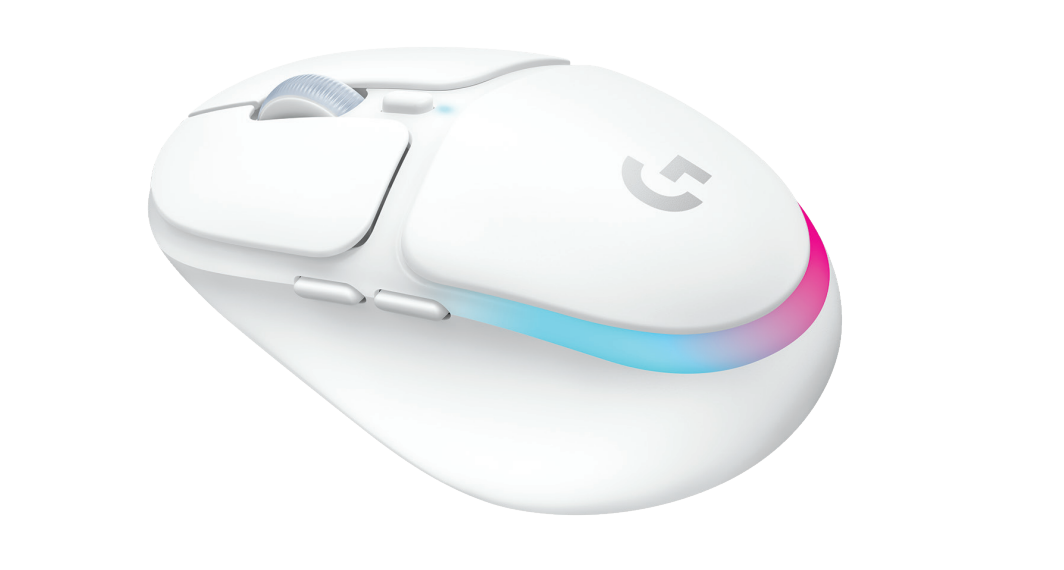
The Logitech G705 Wireless Gaming Mouse is a compact, lightweight wireless mouse designed for gamers and everyday users who want a comfortable fit, reliable performance, and stylish RGB lighting. It is especially well suited for smaller hands, palm-to-claw grip users, and anyone who wants a portable mouse that works across gaming setups, workstations, and travel use. With dual wireless connectivity, customizable buttons, and a responsive gaming sensor, the Logitech G705 Wireless Gaming Mouse balances practical everyday usability with competitive gaming features.
One of its biggest strengths is versatility. It supports LIGHTSPEED 2.4 GHz wireless for low-latency gaming, Bluetooth for convenient multi-device use, and USB-C wired use when charging or when a direct connection is preferred. The mouse also includes LIGHTSYNC RGB lighting with three zones, six programmable buttons, and a battery that can last up to 40 hours with lighting on or up to 145 hours with lighting off. That makes it a strong option for users who want style without sacrificing function.
At launch, the Logitech G705 Wireless Gaming Mouse has been positioned around the $99.99 price point, with availability in major regions including the US, UK, and Australia. In 2026, it remains broadly available through Logitech and major retailers, making it an accessible choice for buyers looking for a premium compact wireless gaming mouse.
Detailed Specifications and Performance Features
- Sensor: Logitech LIGHTSPEED/LightSync gaming sensor with up to 8,200 DPI
- Polling rate: 1,000 Hz for responsive cursor tracking
- Buttons: 6 programmable buttons for gaming macros and productivity shortcuts
- Connectivity: LIGHTSPEED 2.4 GHz wireless, Bluetooth, and USB-C wired mode
- Battery life: Up to 40 hours with RGB enabled, up to 145 hours with RGB off
- Weight: 85 g, making it light enough for fast movement and travel
- Dimensions: 105.8 x 68.1 x 39.4 mm
- Lighting: LIGHTSYNC RGB with 3 lighting zones
- Design: Compact right-handed shape optimized for smaller hands
Compared with larger gaming mice such as the Logitech G Pro Wireless or Razer DeathAdder series, the G705 is more compact and easier to control for users with smaller hands. It is less focused on ultra-light esports minimalism and more focused on comfort, style, and everyday flexibility. In practical use, it delivers stable wireless performance, smooth tracking, and enough customization for most gamers and office users.
Troubleshooting Logitech G705 Wireless Gaming Mouse Problems
If the mouse is not connecting, first make sure the receiver is plugged in securely or that Bluetooth pairing is active. If LIGHTSPEED mode is unstable, move the receiver closer to the mouse and avoid USB hubs that can introduce interference. If the cursor skips or lags, check battery level, update Logitech G HUB, and test on a different surface.
- Mouse not detected: Re-pair via Bluetooth or reconnect the LIGHTSPEED receiver
- RGB not working: Open Logitech G HUB and verify lighting settings are enabled
- Buttons not responding: Reset button assignments inside the software
- Battery drains too quickly: Reduce brightness or turn off RGB lighting
- Cursor stutter: Clean the sensor area and use a non-reflective mouse pad
There are no widely reported numeric error codes for the Logitech G705 Wireless Gaming Mouse, but software sync issues usually clear after reinstalling Logitech G HUB or updating the mouse firmware. Preventive care includes charging regularly, keeping the sensor clean, and updating software after major system changes. Warranty coverage is handled through Logitech support, and users can check their regional warranty terms through Logitech’s support portal or contact Logitech customer care for repair and replacement assistance.
Pros and Cons of the Logitech G705 Wireless Gaming Mouse
Pros
- Excellent fit for smaller hands and compact desk setups
- Three-way connectivity adds flexibility for gaming and work
- LIGHTSPEED wireless offers low-latency performance
- Long battery life when RGB is turned off
- LIGHTSYNC RGB gives a premium, customizable look
- Six programmable buttons improve control in games and apps
Cons
- 8,200 DPI is sufficient for most users, but lower than some flagship competitors
- 85 g weight may feel a little heavy for ultra-light esports enthusiasts
- Best shape and comfort are biased toward smaller hands
- Price is competitive, but not budget-friendly for entry-level buyers
Overall, the Logitech G705 Wireless Gaming Mouse offers strong value for users who want a stylish, reliable compact mouse rather than a stripped-down esports model. It compares well against similar wireless mice when comfort, aesthetics, and multi-device support matter more than maximum DPI or ultra-low weight.
Customer Reviews and Real-World User Impressions
User feedback is generally positive, with many buyers giving it around 4 out of 5 stars for comfort, design, and wireless reliability. Common praise includes the mouse’s compact shape, pleasant click feel, and attractive RGB lighting. Many users say it is especially good for small hands and for people who want a mouse that works equally well for gaming and daily productivity.
Common complaints focus on the battery life with RGB enabled and the fact that the shape may not suit larger hands. Some users also mention that the price feels high compared with basic wireless mice, though most agree the feature set justifies the cost for the right audience. A typical recommendation is to buy it if you want a premium small wireless gaming mouse with Bluetooth, LIGHTSPEED, and customizable lighting.
Frequently Asked Questions
Is the Logitech G705 Wireless Gaming Mouse good for gaming?
Yes. It offers 8,200 DPI tracking, 1,000 Hz polling, and LIGHTSPEED wireless, which is more than enough for casual and competitive gaming.
Does it work with Bluetooth?
Yes. It supports Bluetooth in addition to LIGHTSPEED wireless and USB-C wired operation.
Who should buy it?
It is best for users with smaller hands, gamers who want a compact wireless mouse, and anyone who values RGB lighting and multi-device flexibility.
Faqs
How do I set up the logitech G705 Wireless Gaming Mouse for the first time on Windows or Mac?
What should I do if the logitech G705 Wireless Gaming Mouse is not connecting or keeps disconnecting?
Can the logitech G705 Wireless Gaming Mouse work with Bluetooth and LIGHTSPEED at the same time?
How do I customize buttons and DPI on the logitech G705 Wireless Gaming Mouse?
Is the logitech G705 Wireless Gaming Mouse good for small hands and long gaming sessions?
How long does the battery last on the logitech G705 Wireless Gaming Mouse, and how can I extend it?
What is the best way to clean and maintain the logitech G705 Wireless Gaming Mouse?
Why is the cursor tracking on my logitech G705 Wireless Gaming Mouse inconsistent, and how can I fix it?
More logitech manuals
- Logitech MK360 Wireless Combo User Manual
- Logitech C270 HD Webcam User Manual
- Logitech Blue Yeti X USB Condenser Microphone 988-000105 User Manual
- Installation: Logitech HD Pro Webcam C920 User Manual
- How to Use: Logitech C920s Pro HD Webcam User Manual
- How to Use: Logitech C920 Pro HD Webcam User Manual
Leave a Comment