
Pairing: Logitech H390 USB Headset User Manual
Content
Logitech H390 USB Headset
Introduction: Clear Audio for Every Task
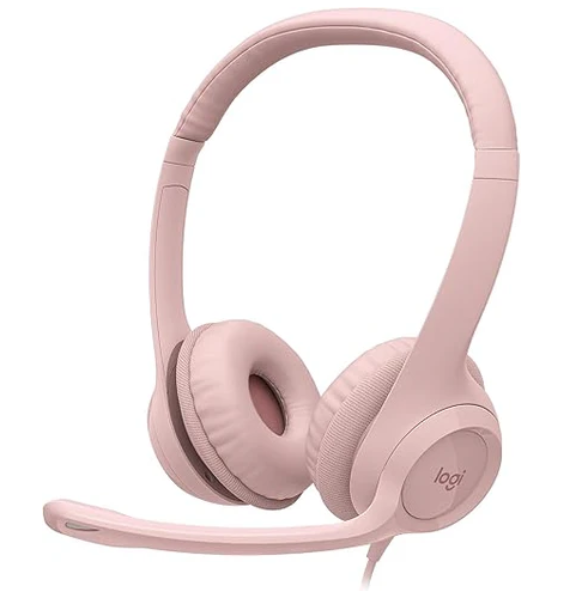
The Logitech H390 USB Headset is a reliable, plug-and-play solution designed for professionals, students, and casual users who need dependable audio for video calls, online meetings, and multimedia. With its noise-canceling microphone, comfortable padded headband, and inline controls, this headset delivers clear communication and immersive sound without breaking the bank. Whether you're working from home, attending virtual classes, or gaming, the Logitech H390 USB Headset offers a hassle-free experience with no software installation required. Its lightweight design and soft ear cushions make it ideal for extended use, while the tuck-away microphone ensures privacy when not in use. Priced around $25, the Logitech H390 USB Headset is widely available and offers excellent value for entry-level users seeking quality audio and comfort.
Specifications: What Makes the Logitech H390 USB Headset Stand Out
- Plug-and-play USB-A connection for PC and Mac (adapter may be needed for Mac)
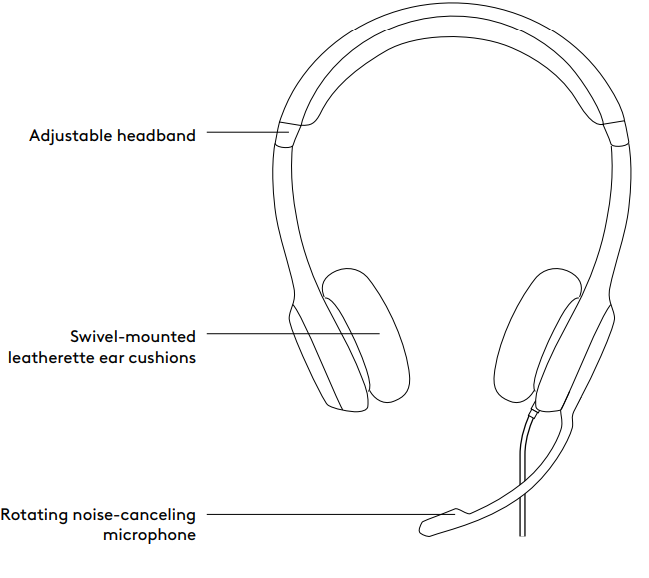
- Noise-canceling microphone with adjustable boom
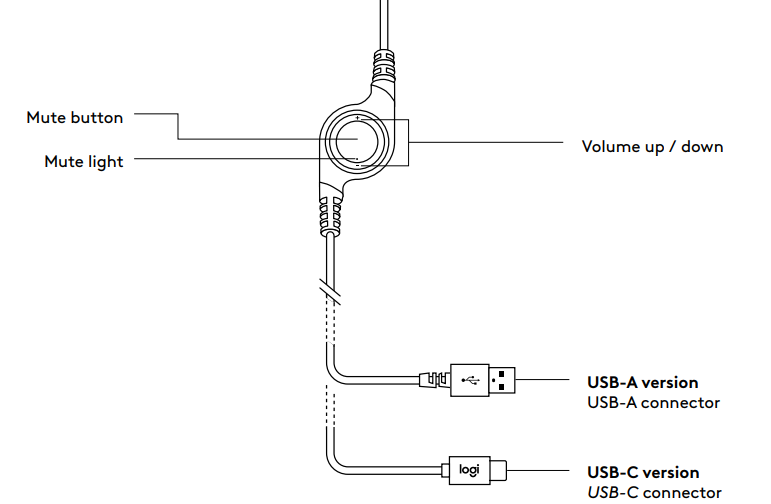
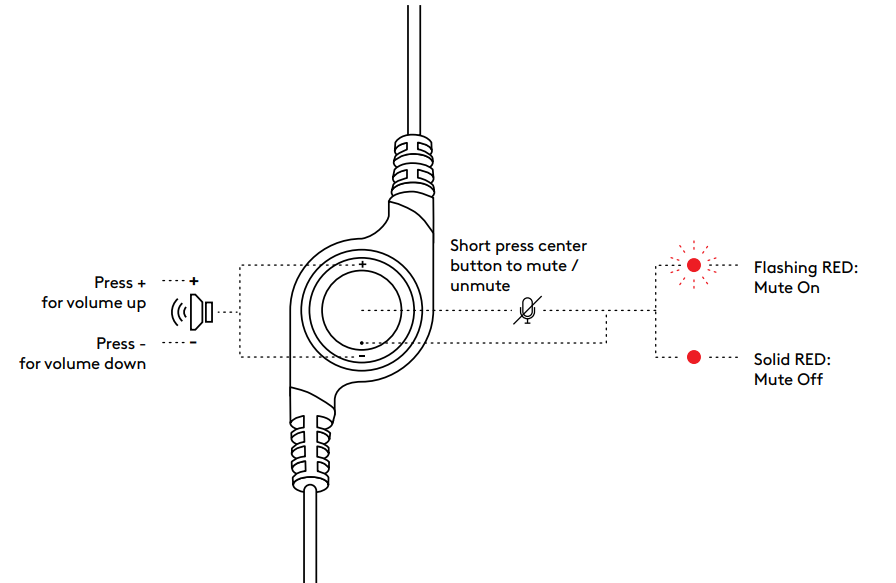
- Inline volume and mute controls for easy access
- Padded, adjustable headband for comfort during long sessions
- Soft ear cushions and swivel-mounted ear speakers
- 30mm audio drivers for clear stereo sound
- Frequency response: 20 Hz – 20 kHz (headphones), 100 Hz – 10 kHz (microphone)
- 6.2-foot (1.9m) cable for flexible positioning
- Available in Graphite, Off-White, and Rose
- 2-year warranty for peace of mind
- Compatible with major calling apps (Skype, Zoom, Teams, etc.)
Compared to similar headsets in its price range, the Logitech H390 USB Headset stands out for its comfort, noise cancellation, and ease of use, making it a top choice for everyday communication.
Setup Guide: How to Get Started with Your Logitech H390 USB Headset
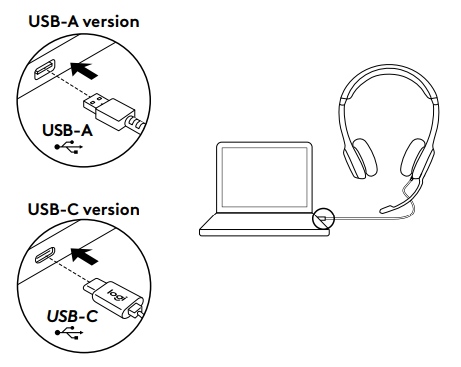
Setting up the Logitech H390 USB Headset is simple and requires no additional software. Plug the USB connector into your computer’s USB port. The headset will be automatically recognized by your operating system. Adjust the headband and ear cups for a comfortable fit. Tuck the microphone boom into position near your mouth for optimal voice pickup. Use the inline controls to adjust volume and mute the microphone as needed. For Mac users, a USB-A to USB-C adapter may be required. If the headset is not detected, try a different USB port or restart your computer. Always ensure the mute button is off when you want to be heard. Avoid exposing the headset to extreme temperatures or moisture to prolong its lifespan.
KNOW YOUR PRODUCT
IN-LINE CONTROLLER
CONNECTING THE HEADSET
Plug the USB connector into the computer's USB port.
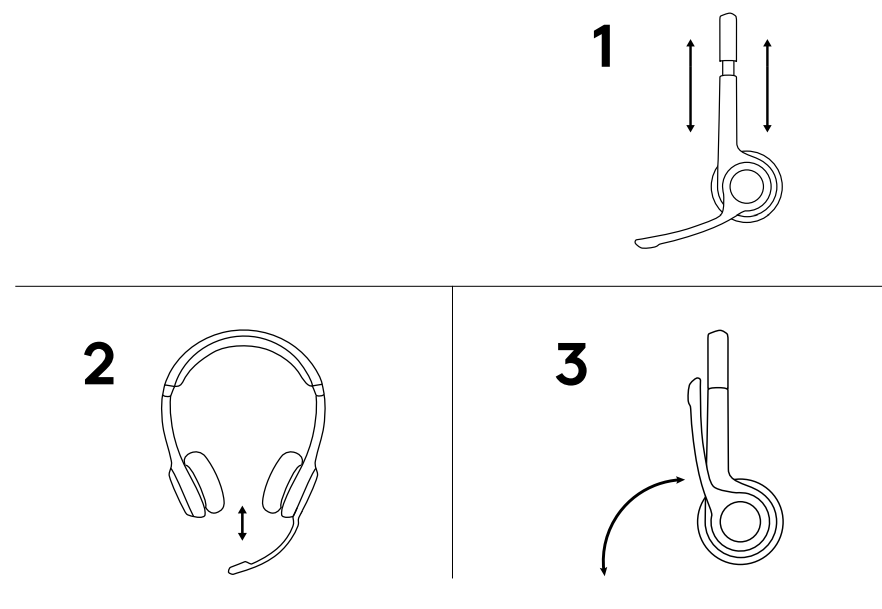
HEADSET FIT
- To adjust headset size, move the headband up and down until it fits comfortably.
- Move the microphone boom up or down until it is level with your mouth for better voice capture.
- The boom can be tucked out of the way when not being used.
CONTROLS
Troubleshooting: Common Issues and Solutions
- No sound: Check if the headset is properly plugged in and set as the default audio device in your system settings.
- Microphone not working: Ensure the mute button is off and the headset is selected as the input device.
- Poor audio quality: Adjust the microphone position and check for background noise.
- Headset not recognized: Try a different USB port or restart your computer.
- Warranty and support: Logitech offers a 2-year warranty. Contact Logitech support for assistance with defective units or technical issues.
Regular cleaning and proper storage can prevent most issues. If problems persist, consult the official Logitech support website or contact customer service.
Pros & Cons: Balanced Assessment of the Logitech H390 USB Headset
Pros
- Comfortable padded headband and ear cushions
- Effective noise-canceling microphone
- Easy-to-use inline controls
- Plug-and-play USB connectivity
- Affordable price point
- 2-year warranty
Cons
- Basic audio quality, not ideal for audiophiles
- Wired design limits mobility
- A microphone may pick up some background noise in noisy environments
The Logitech H390 USB Headset offers excellent value for money, especially for users who prioritize comfort and reliability over premium audio features.
Customer Reviews: What Users Are Saying
The Logitech H390 USB Headset has received positive feedback for its comfort, ease of use, and clear audio. Many users praise the noise-canceling microphone and inline controls, noting that it’s perfect for work-from-home setups and online learning. Common complaints include average sound quality for music and occasional issues with microphone sensitivity in noisy environments. The headset consistently earns 4- and 5-star ratings on major retail sites, with users recommending it for everyday use and as a budget-friendly option for video conferencing and calls.
More logitech manuals
- Pairing: Logitech Zone Wired 2 for Business Headset User Manual
- Pairing: Logitech G321 LightSpeed Wireless Gaming Headset User Manual
- How to Use: Logitech C920 Pro HD Webcam User Manual
- Logitech MX Master 2S Mouse & Keyboard User Guide
- How to Use: Logitech C920s Pro HD Webcam User Manual
- Logitech Harmony Smart Control 915-000194 User Guide
Leave a Comment