
Pairing: Logitech G321 LightSpeed Wireless Gaming Headset User Manual
Content
Logitech G321 LightSpeed Wireless Gaming Headset
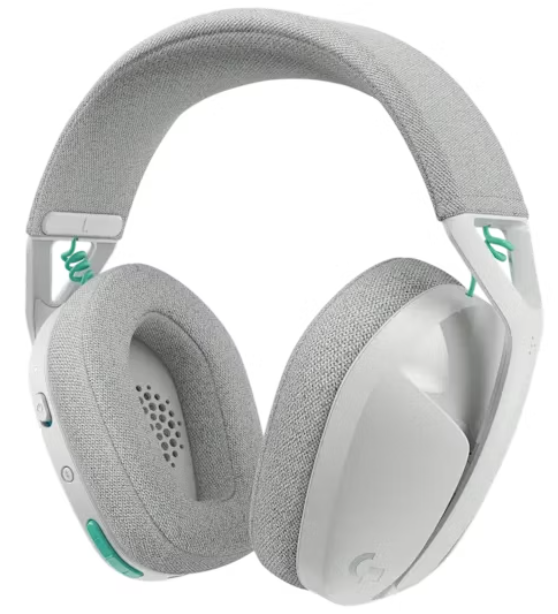
Introduction
The Logitech G321 LightSpeed Wireless Gaming Headset is engineered for gamers seeking a seamless blend of performance, comfort, and wireless freedom. Featuring Logitech’s acclaimed LIGHTSPEED technology, it delivers a lag-free, robust 2.4 GHz audio connection ideal for competitive and casual gaming alike. Boasting over 20 hours of battery life, this headset ensures uninterrupted gameplay during extended sessions, making it perfect for marathon gaming or streaming.
Designed with lightweight materials weighing only 210 grams, it offers dynamic comfort through memory foam ear cups, a thick cushioned headband, and high-elasticity knit fabric, which combine to reduce fatigue during long use. The headset includes a crisp 16 kHz flip-to-mute boom microphone that allows effortless muting with a simple flip, ensuring clear team communication with minimal distraction. Additionally, the G321 supports Bluetooth 5.2 connectivity, enabling quick pairing with mobile devices for Discord chats, music, or gaming on the go.
This headset targets PC gamers, PlayStation 5, and Nintendo Switch users looking for immersive sound and reliable wireless performance without compromise. It retails in the mid-range price segment, typically between $90 and $130, widely available through online retailers and electronics stores.
Specifications of Logitech G321 LightSpeed Wireless Gaming Headset
- Driver Size: 40 mm high-performance audio drivers for rich, immersive stereo sound
- Frequency Response: 20 Hz – 20 kHz for full-range audio clarity
- Microphone: Omni-directional boom mic, 16 kHz sampling rate, flip-to-mute functionality
- Wireless Connectivity: LIGHTSPEED 2.4 GHz and Bluetooth 5.2 dual-mode wireless technology
- Wireless Range: Up to 10 meters (32.8 ft) line of sight
- Battery Life: 20+ hours continuous use on a full charge via USB-C charging
- Weight: 210 grams (7.41 oz), lightweight and comfortable for prolonged wear
- Compatibility: Windows, macOS, PlayStation 5, Nintendo Switch, Bluetooth-compatible mobile devices
- Build Quality: Memory foam ear cushions, padded headband with high elasticity knit fabric
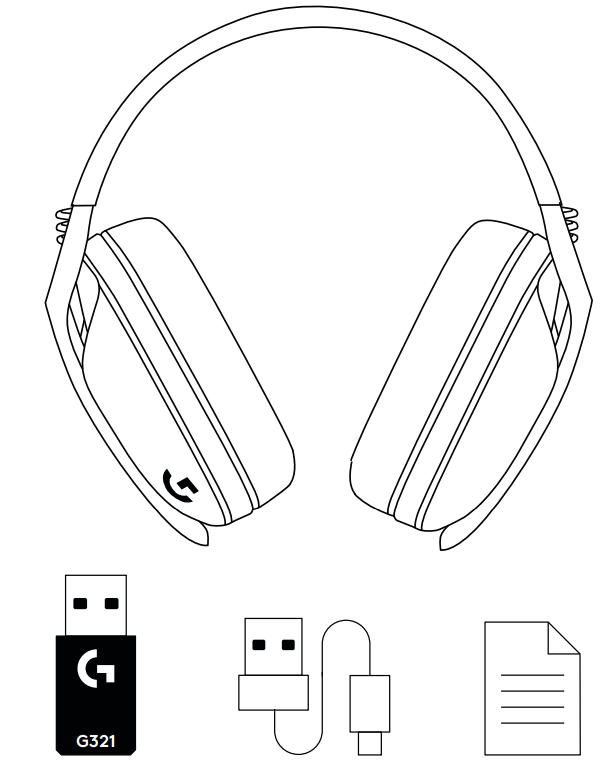
- Included Accessories: USB-A LIGHTSPEED wireless receiver, USB-C to USB-A charging cable, user documentation
Compared to similar wireless gaming headsets in its price range, such as the SteelSeries Arctis 1 Wireless or Razer BlackShark V2 Pro, the Logitech G321 excels with its ultra-lightweight design and dual wireless connectivity, offering flexibility for both console and mobile gamers.
In Box
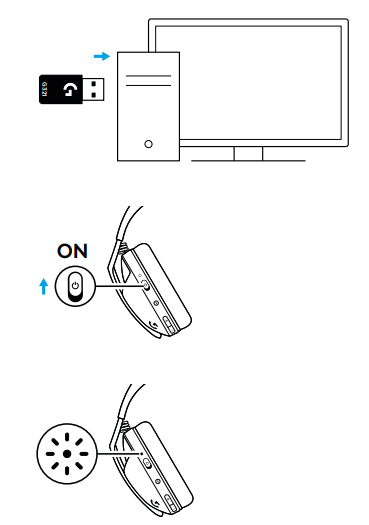
LIGHTSPEED CONNECTION
Connect to your PC, Mac, PlayStation 5,, or 4 with LIGHTSPEED Wireless Technology
- Insert the receiver into the USB port of your device.
- Slide up to power on.
- The LED turns white once connected.
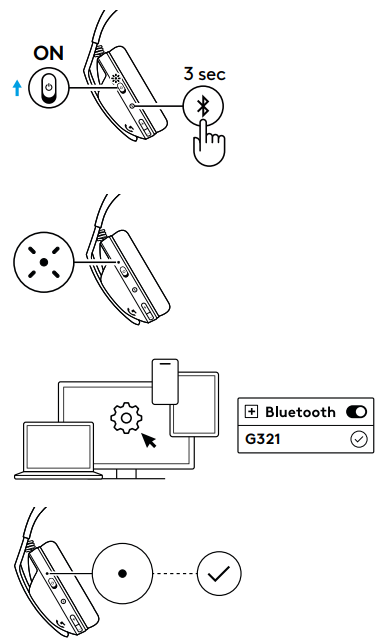
Bluetooth® CONNECTION
- Slide the Power button up to turn the headset on.
- Press and hold the Bluetooth button for 3 seconds to enter pairing mode, to pair a new device.
- The LED will turn white and quickly blink to indicate it is ready to pair.
- Connect to your preferred device.
- The LED will turn solid white when successfully paired.
BATTERY CHECK
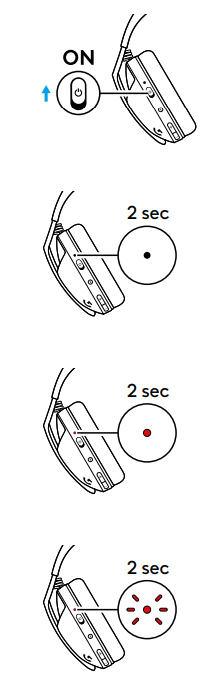
When the headset is OFF:
- Slide the Power button up to turn the headset on.
- When the battery is 31% to 100, % LED will be solid white for 2 seconds.
- When the battery is 16% to 30%, the LED will be solid red for 2 seconds.
- When the battery is <15%, the LED will slowly blink red for 2 seconds.
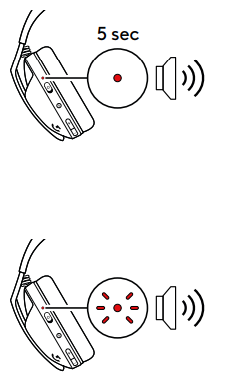
When the headset is ON:
- When the battery drops to <30%, a sound notification will play and the LED will be solid red for 5 seconds.
- When the battery drops to <15%, a sound notification will play and the LED will slowly blink red until the battery drops to 0% or it is connected to the charging cable.
SPARE PARTS
- Earpads
- Wireless USB Receiver
- Charging Cable
Setup Guide for Logitech G321 LightSpeed Wireless Gaming Headset
- Unbox your headset and locate the USB-A LIGHTSPEED wireless receiver and USB-C charging cable.
- Plug the LIGHTSPEED receiver into an available USB 2.0 or higher port on your Windows or macOS computer or console.
- Turn on the headset by sliding the power switch upward. The headset will automatically connect to the receiver, indicated by a solid white LED.
- To switch to Bluetooth mode, press and hold the Bluetooth button on the left ear cup for 3 seconds. The LED will blink rapidly, signaling pairing mode.
- On your mobile device or Bluetooth-enabled system, search for “Logitech G321” and pair accordingly.
- Adjust volume and microphone settings using the volume rocker and flip-to-mute boom mic on the headset.
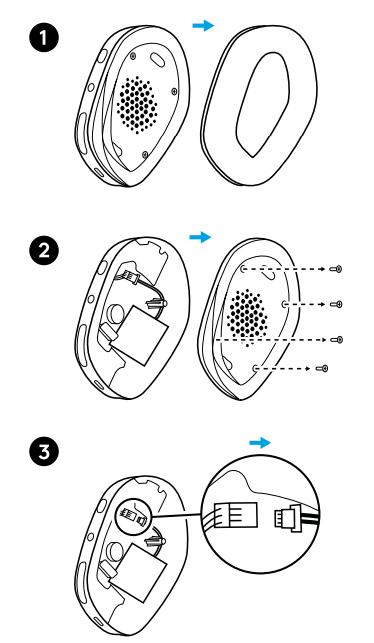
BATTERY REMOVAL
Troubleshooting Tips: If the headset does not connect, ensure the receiver is firmly plugged in and the headset is charged. For Bluetooth pairing issues, restart your device’s Bluetooth and retry.
Safety Precautions: Avoid exposing the headset to moisture or extreme temperatures. Use only the provided USB-C charging cable to prevent damage.
Troubleshooting Logitech G321 LightSpeed Wireless Gaming Headset
- No sound or audio dropouts: Ensure the LIGHTSPEED receiver is properly connected and within range (max 10 meters). Move closer if needed and check battery charge.
- Microphone not working: Confirm the boom mic is flipped down (unmuted). Check system audio input settings.
- Bluetooth connection issues: Reset Bluetooth pairing by removing the device from your Bluetooth list and re-pairing. Hold the Bluetooth bthe button until the LED blinks rapidly to enter pairing mode.
- Battery drains quickly: Fully charge the headset using the USB-C cable. Avoid using non-certified chargers.
- Error codes: The headset does not display,, error codes but LED indicators provide statuthe the s; refer to user manual for LED signals.
- Preventive Measures: Keep firmware updated via Logitech G HUB software for Windows/macOS to enhance stability and performance.
The Logitech G321 comes withmanufacturer'smanufacturer warranty. For technical support, contact Logitech customer service via their official website or authorized retailers.
Pros & Cons of Logitech G321 LightSpeed Wireless Gaming Headset
- Pros:
- Exceptional wireless performance with LIGHTSPEED and Bluetooth dual connectivity
- Lightweight (210 g) and comfortable memory foam ear cushions suitable for long sessions
- Long battery life exceeding 20 hours per charge
- Flip-to-mute boom microphone offers quick, unobtrusive muting
- Compatible with multiple le platforms, including PC, PS5, Nintendo Switch, and mobile devices
- Easy setup with USB-C charging and plug-and-play receiver
- Cons:
- Stereo sound only; lacks surround sound features in higher-end models
- No active noise cancellation (ANC) which some competing headphones offer
- Microphone qua,,lity is good but not studio-grade
- Limited customization options in Logitech G HUB compared to pr.e premium headsets
Overall, the Logitech G321 LightSpeed Wireless Gaming Headset offers strong value for money, especially for gamers prioritizing wireless freedom and comfort over advanced audio effects.
Customer Reviews of Logitech G321 LightSpeed Wireless Gaming Headset
Users consistently praise the Logitech G321 for its lightweight comfort and reliable wireless connection, often highlighting the impressive 20+ hour battery life and ease of Bluetooth switching. Gamers appreciate the clear microphone and the convenience of the flip-to-mute feature during team play. Common complaints include the lack of surround sound and some reports of minor connectivity interference in crowded wireless environments.
Many reviewers give the headset a solid 4 to 4.5-star rating, recommending it as a budget-friendly wireless option for casual to mid-level gamers. Frequent buyers note quick setup and compatibility with multiple devices as strong selling points. The headset is often recommended for those who want solid audio performance without the premium price tag or bulk of heavier models.
More logitech manuals
- Pairing: Logitech H390 USB Headset User Manual
- Logitech MX Master 2S Mouse & Keyboard User Guide
- Pairing: Logitech Zone Wired 2 for Business Headset User Manual
- Logitech Harmony Smart Control 915-000194 User Guide
- How to Use: Logitech C920 Pro HD Webcam User Manual
- Logitech Trackman Marble Mouse User Manual | Features
Leave a Comment