
Pairing: Logitech Zone Wired 2 for Business Headset User Manual
Content
Logitech Zone Wired 2 for Business Headset
Introduction
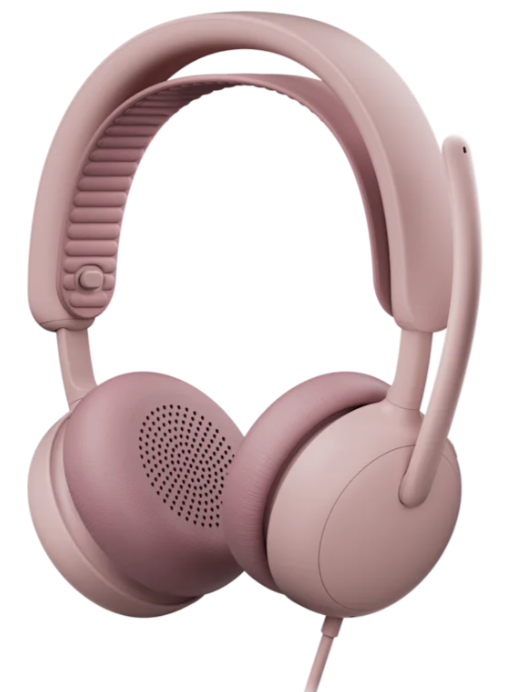
The Logitech Zone Wired 2 for Business Headset is a professional-grade, corded audio device designed to enhance productivity and communication in busy work environments. Featuring adaptive hybrid active noise cancellation (ANC), this headset dynamically reduces background noise, enabling users to stay focused in open offices or remote workspaces. Equipped with powerful 40 mm drivers and dual noise-canceling microphones enhanced by AI algorithms, it delivers crystal-clear voice quality and immersive sound for calls, music, and multimedia content.
Ideal for business professionals, call center agents, and remote workers, the Zone Wired 2 supports seamless collaboration by providing certified compatibility with major communication platforms such as Zoom, Google Meet, Microsoft Teams, and Google Voice. Its ergonomic design includes comfortable on-ear cushions and a gaming-inspired adjustable headband, making it suitable for extended all-day wear.
Priced around $129.99 USD, the headset is widely available through major retailers and certified Logitech dealers. Its wired USB-C or USB-A connection ensures reliable plug-and-play functionality without battery concerns, while sustainability is emphasized through recyclable materials and easily replaceable parts. Whether used for professional meetings or focused work sessions, the Logitech Zone Wired 2 for Business Headset stands out as a robust and eco-conscious choice.
Specifications of Logitech Zone Wired 2 for Business Headset
- Connection Type: Wired via USB-C or USB-A (adapter included)
- Audio Drivers: Custom 40 mm drivers optimized for calls, music, and ANC
- Frequency Response: 20 Hz – 20 kHz for headphones; 100 Hz – 8 kHz for microphones
- Microphones: Dual noise-canceling mics with AI-based noise suppression and Mic EQ for clear voice transmission
- Active Noise Cancellation: Adaptive hybrid ANC with 5 modes (High ANC, Low ANC, Adaptive ANC, Transparency, Off)
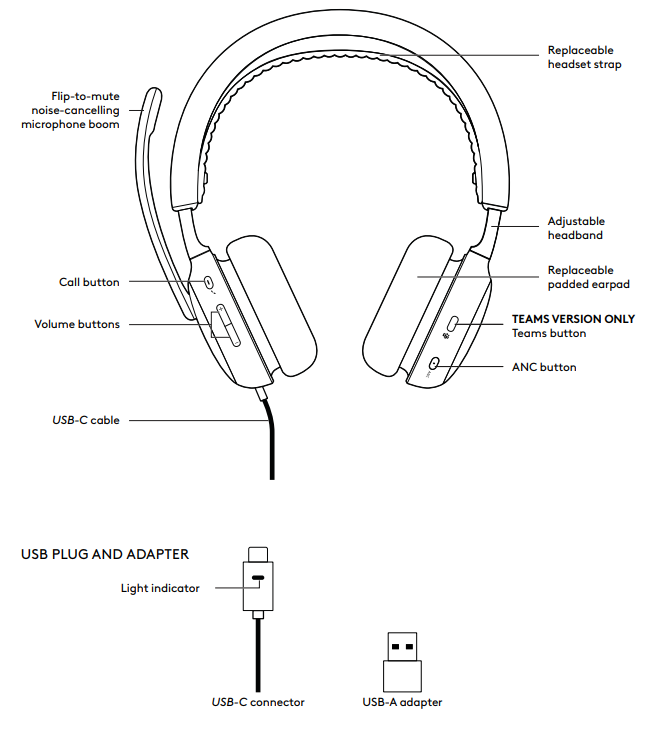
- Controls: On-ear intuitive controls for call management, volume, ANC toggle, and mute via mic boom rotation
- Design: On-ear headset with adjustable, padded headband and rotatable ear cushions
- Cable Length: 1.9 meters (6.23 feet)
- Compatibility: Certified for Zoom, Microsoft Teams, Google Meet, Google Voice; works with Windows, macOS, and ChromeOS
- Additional Features: LED indicators, voice prompts for mute and ANC modes, remote management via Logitech Sync
Compared to similar business headsets, the Zone Wired 2 offers superior hybrid ANC performance and AI-enhanced microphone clarity without the need for battery charging, differentiating it from wireless models in its class.
KNOW YOUR PRODUCT
WHAT’S IN THE BOX
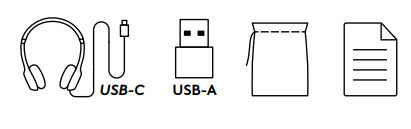
- Headset
- USB-A adapter
- Travel bag
- User documentation
CONNECT YOUR HEADSET
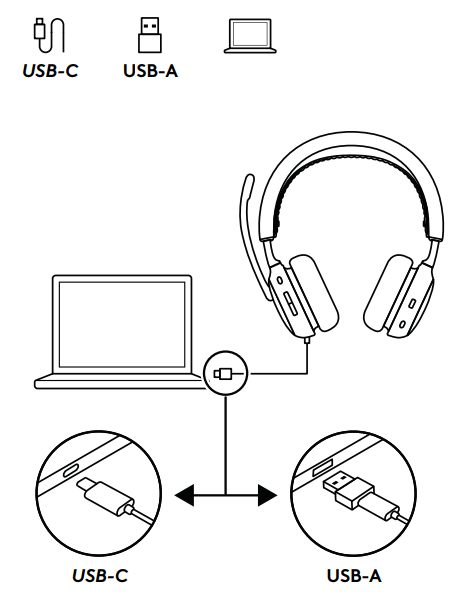
Plug the USB-C connector into the computer's USB-C port. Or use the provided USB-A adapter to plug the headset into the computer USB-A port.
Note: Only use the USB-A adapter with the provided headset.
ADJUSTING HEADSET
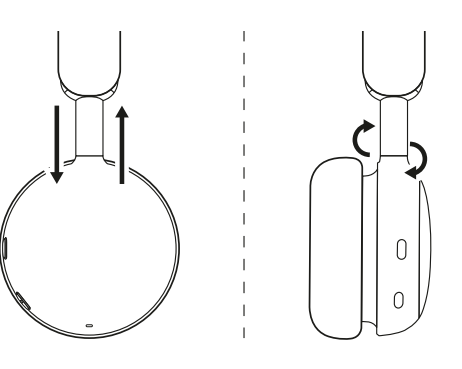
- Adjust the headset by sliding the earcups up and down the headband.
- Swivel earcups to fit on your ear.
- It may be easier to adjust the headset on your head.
Move the earcups up and down the headband until they sit comfortably on your ears.
ADJUSTING THE MICROPHONE BOOM
The microphone boom rotates 270 degrees. Wear it on either the left or right side. The audio channel will switch automatically, depending on the direction you are wearing the microphone.
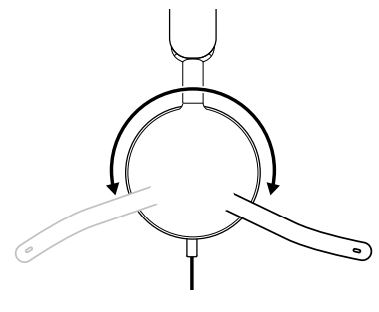
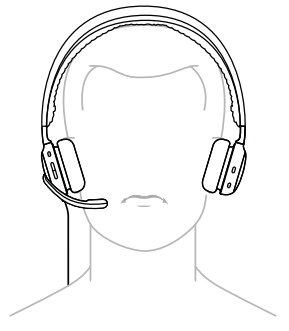
The micboom should be placed close to or next to your mouth, aligned with the corner of your mouth.
HEADSET CONTROLS
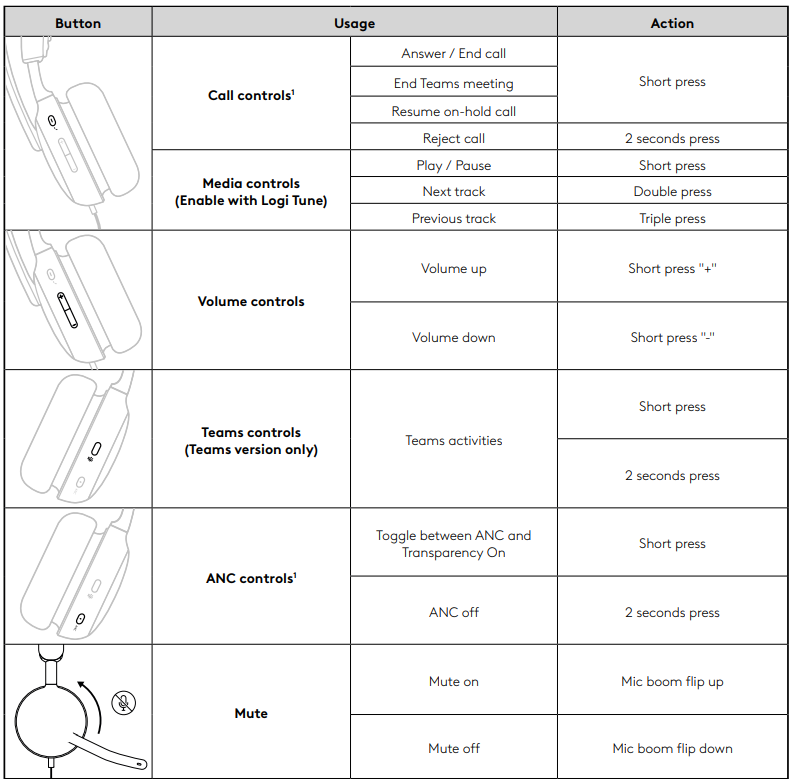
Note:
- Teams activities are only functional when Teams is running on an unlocked PC or Mac.
- To know more about the Teams button, visit the Microsoft Support page: Use the Microsoft Teams button on your certified Teams device.
- Voice prompts indicate when the mic is muted on/off.
DIMENSIONS
Headset:
- Height x Width x Depth:
- 185.2 x 183.6 x 73.0 mm
Weight:
- 223.5 g
Adapter:
- Height x Width x Depth:
- 24.5 x 15.4 x 8.7 mm
Troubleshooting Common Issues with Logitech Zone Wired 2 for Business Headset
- No sound or microphone not detected: Check USB connection and port functionality; try reconnecting or switching ports.
- Audio is distorted or low volume: Adjust volume via headset controls or computer settings; update Logi Tune app for firmware fixes.
- Microphone muted or unresponsive: Ensure mic boom is fully rotated down (unmute position); confirm mute indicators via LED or voice prompts.
- ANC not working as expected: Cycle through ANC modes using on-ear controls; update device firmware.
- Error codes: Usually resolved by reconnecting the headset or reinstalling the Logi Tune software.
Preventive measures include regularly updating firmware via Logi Tune, handling the headset gently during cable connection, and storing it in a dry, clean place.
Logitech provides a standard limited warranty covering manufacturing defects. For extended support, contact Logitech customer service or authorized dealers.
Pros & Cons of Logitech Zone Wired 2 for Business Headset
- Pros:
- Advanced adaptive hybrid ANC effectively reduces background noise in office and home settings.
- High-quality dual noise-canceling microphones with AI noise suppression enhance voice clarity for calls.
- Plug-and-play USB connectivity with USB-C and USB-A adapters ensures broad compatibility.
- Comfortable design with adjustable headband and breathable ear cushions for all-day wear.
- Certified for major business platforms like Zoom, Microsoft Teams, and Google Meet.
- Remote management and firmware updates via Logitech Sync facilitate IT administration.
- Eco-friendly materials and replaceable parts support sustainability and longevity.
- Cons:
- Being a wired headset, it limits mobility compared to wireless alternatives.
- On-ear design may be less isolating than over-ear models for some users.
- Price point is moderately high for wired headset,s but justified by features.
Customer Reviews for Logitech Zone Wired 2 for Business Headset
Users have praised the Logitech Zone Wired 2 for Business Headset for its excellent noise cancellation and microphone clarity, noting significant improvement in call quality in noisy environments. The comfortable fit and intuitive controls receive frequent positive mentions, with many recommending the headset for remote workers and busy office professionals.
Common complaints include the limitation of a wired connection and occasional difficulty in mastering ANC mode switching. Overall, the headset averages a 4.5-star rating out of 5, with buyers valuing its reliability, sound performance, and platform certifications.
Many reviewers highlight the headset’s exceptional value for mon, ey given its blend of audio performance, comfort, and business-grade features, making it a strong recommendation for users seeking a professional wired headset.
Faqs
How do I set up the Logitech Zone Wired 2 for Business Headset on my computer?
What should I do if the microphone on my Logitech Zone Wired 2 for Business Headset isn’t picking up my voice clearly?
Can I use Logitech Zone Wired 2 for Business Headset with Microsoft Teams and Zoom?
How does the adaptive hybrid Active Noise Cancellation (ANC) work on Logitech Zone Wired 2?
What are the best practices to maintain and clean the Logitech Zone Wired 2 for Business Headset?
How can I update the firmware and software for my Logitech Zone Wired 2 for Business Headset?
What are the controls available on the Logitech Zone Wired 2 for Business Headset and how do I use them?
Is the Logitech Zone Wired 2 for Business Headset comfortable for all-day use?
More logitech manuals
- How to Use: Logitech C920 Pro HD Webcam User Manual
- Pairing: Logitech H390 USB Headset User Manual
- How to Use: Logitech C920s Pro HD Webcam User Manual
- Pairing: Logitech G321 LightSpeed Wireless Gaming Headset User Manual
- Installation: Logitech HD Pro Webcam C920 User Manual
- Logitech MX Master 2S Mouse & Keyboard User Guide
Leave a Comment