
How to Setup: Netgear WiFi 7 Extender EXS18, EXS25, EXS27 User Manual
Content
Netgear WiFi 7 Extender EXS18, EXS25, EXS27: Complete Product Manual and Buying Guide
Introduction
The netgear WiFi 7 Extender EXS18, EXS25, EXS27 line is designed to eliminate dead zones and bring next-generation wireless performance to homes that need stronger, more reliable coverage. These wall-plug extenders use WiFi 7 technology to deliver faster speeds, lower latency, and better stability for streaming, gaming, video calls, smart home devices, and multi-user households. With universal compatibility, they work with most modern routers and gateways, including WiFi 6, WiFi 6E, and WiFi 7 systems, making them a practical upgrade for users who want better coverage without replacing their entire network.
The main appeal of the netgear WiFi 7 Extender EXS18, EXS25, EXS27 is the combination of easy setup, compact design, and advanced performance features. Depending on the model, users can expect coverage for up to 1,500 sq. ft., support for dozens of connected devices, and wired connectivity through a multi-gig Ethernet port on higher-tier versions. This makes the series especially useful for apartments, large homes, home offices, and entertainment areas where consistent connectivity matters most.
Estimated pricing generally starts around the lower end of the premium extender market for EXS18 and rises for EXS25 and EXS27, with EXS27 commonly positioned around the $129.99 to $149.99 range and EXS18 appearing in the roughly $90 to $125 range depending on retailer and promotions. Availability is strongest through major online electronics stores and Netgear’s own product channels. For buyers searching for a high-speed WiFi 7 range extender with simple installation, this series offers strong value and future-ready networking.
Specifications
- WiFi standard: WiFi 7 dual-band or BE-class extender, depending on model.
- Coverage: Up to 1,500 sq. ft. on the EXS27 and similar coverage targets across the series.
- Speed class: Up to 3.6 Gbps on EXS18 and up to 5 Gbps on EXS27.
- Device support: Up to 45 connected devices on the EXS27.
- Ethernet: EXS27 includes a 2.5 GbE multi-gig port for high-speed wired connections.
- Antennas: Three internal antennas for signal extension and improved coverage.
- Processor: 1.0 GHz dual-core processor on EXS27-class hardware.
- Security: WPA, WPA2, and WPA3 with 128-bit AES encryption.
- Compatibility: Backward compatible with 2.4 GHz and 5 GHz routers, including older WiFi generations.
- Form factor: Wall-plug design for compact placement and minimal cable clutter.
Compared with typical WiFi 6 extenders, the netgear WiFi 7 Extender EXS18, EXS25, EXS27 family offers higher theoretical throughput, better efficiency under congestion, and stronger support for future devices. Compared with entry-level extenders, it also adds more advanced radio performance and, on select models, a much faster Ethernet port for gaming consoles, PCs, and smart TVs.
Detailed Description
The netgear WiFi 7 Extender EXS18, EXS25, EXS27 works by receiving your existing router’s wireless signal and rebroadcasting it into areas where coverage is weak or inconsistent. Instead of forcing devices to stay connected to a distant router, the extender creates a stronger local signal and helps reduce buffering, dropouts, and dead zones. In practice, this improves everyday tasks such as UHD streaming, cloud backups, online meetings, and low-latency gaming.
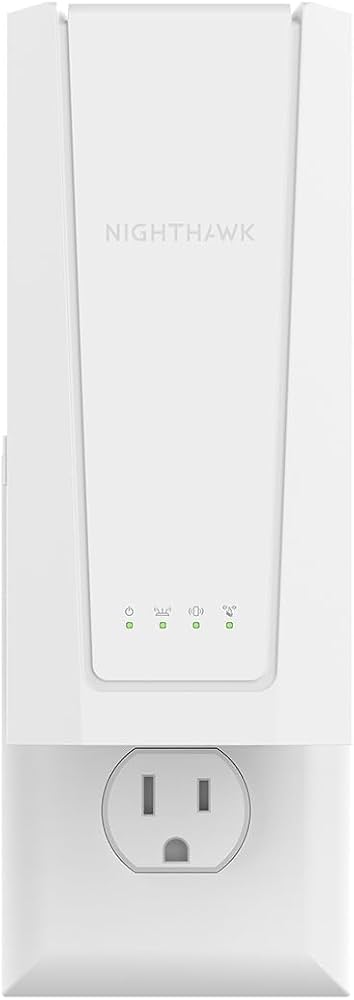
The wall-plug design keeps installation simple and avoids the need for bulky desktop hardware. Internal antennas and modern WiFi 7 features help the extender manage multiple devices more efficiently, especially in homes where phones, laptops, tablets, and smart home devices all compete for bandwidth. The EXS27 stands out with its 2.5 GbE port, which is especially useful when you want a stable wired link for a console or TV.
Build quality is in line with premium consumer networking gear, with a compact plastic enclosure and a clean white finish that blends into most interiors. User experience is generally straightforward: pairing is guided, the interface is simple, and the extender is designed for quick placement near a router or between the router and a problem area. For users who want better room-to-room coverage without adding a mesh system, this product family is a strong option.
Setup Guide
Setting up the netgear WiFi 7 Extender EXS18, EXS25, EXS27 is designed to be simple, even for beginners. Start by plugging the extender into a wall outlet near your router. Wait for the status lights to stabilize, then use the WPS button on your router and extender if supported, or follow the guided setup through the browser or mobile configuration flow.
- Plug the extender into a power outlet near the main router.
- Wait for the power and link indicators to show readiness.
- Press the router’s WPS button, then press the extender’s WPS button if available.
- Alternatively, connect to the extender’s setup network and complete configuration in a browser.
- Choose the WiFi network you want to extend and enter the router password.
- Move the extender to a halfway point between the router and the weak-signal area.
- Test coverage and adjust placement until the signal is stable.
For best results, avoid placing the extender near microwaves, thick concrete walls, or large metal objects. Keep it in a ventilated outlet and do not cover it with furniture. If pairing fails, power-cycle the router and extender, then try again. If the extender is used in a busy network, separate high-bandwidth devices onto the 5 GHz band for better performance.
Troubleshooting
Common issues with the netgear WiFi 7 Extender EXS18, EXS25, EXS27 usually relate to placement, pairing, or router compatibility. If the signal is weak, move the extender closer to the router and then gradually reposition it toward the target room. If the extender fails to connect, confirm that your router WiFi is active and that the password was entered correctly.
- No connection: Restart both the router and extender, then reconnect using WPS or manual setup.
- Poor performance: Reposition the extender and make sure it is not blocked by walls or appliances.
- Ethernet port not working: Check cable quality and confirm the connected device supports the negotiated speed.
- Device keeps roaming: Use the same network name and password settings where possible for smoother transitions.
- Status light issue: If lights do not indicate a healthy link, relocate the unit and repeat setup.
Preventive care includes using the latest firmware, keeping the device in a clean outlet location, and avoiding overloaded power strips. Warranty terms vary by retailer and region, but Netgear typically provides product support through its official support channels, online documentation, and serial-number-based assistance. If help is needed, contact Netgear support or the retailer where the extender was purchased.
Pros & Cons
Pros
- Fast WiFi 7 performance for modern homes and demanding applications.
- Simple wall-plug design that saves space and reduces clutter.
- Strong coverage expansion for dead zones and hard-to-reach rooms.
- Universal compatibility with many router brands and WiFi generations.
- EXS27 includes a 2.5 GbE port for high-speed wired devices.
- Good value for users who want an upgrade without buying a full mesh system.
Cons
- Performance depends heavily on router quality and placement.
- Wall-plug form factor limits placement flexibility compared with desktop units.
- Advanced WiFi 7 benefits are best realized with a WiFi 7 router.
- Premium pricing may be high for users with only basic coverage needs.
- Single Ethernet port on select models may not be enough for multiple wired devices.
Overall, the netgear WiFi 7 Extender EXS18, EXS25, EXS27 offers strong value for households that need better speed and coverage than a basic extender can provide. Compared with cheaper WiFi 6 alternatives, it is more future-ready, but users with very large homes may still prefer a mesh system for broader whole-home consistency.
Customer Reviews
Customer feedback for the netgear WiFi 7 Extender EXS18, EXS25, EXS27 is generally positive, especially among users upgrading from older extenders. Common praise includes faster streaming, fewer dead zones, and easy setup. Many buyers rate the series around 4 out of 5 stars for performance and convenience.
Typical testimonials highlight improved gaming stability, stronger signal in upstairs bedrooms, and reliable coverage for smart TVs and video calls. One frequent complaint is that the best WiFi 7 features require a compatible router, and some users note that placement is critical for peak performance. Another common concern is that premium pricing may feel high compared with WiFi 6 models.
For shoppers who want a simple way to extend a modern network, this series is a strong recommendation. For the best experience, pair it with a newer router, position it carefully, and use wired Ethernet on the EXS27 when maximum stability matters.
Faqs
How do I set up netgear WiFi 7 Extender EXS18, EXS25, EXS27 for the first time?
Why is my netgear WiFi 7 Extender EXS18, EXS25, EXS27 not connecting to the router during setup?
What WiFi bands and devices work best with netgear WiFi 7 Extender EXS18, EXS25, EXS27?
How can I fix slow speeds on netgear WiFi 7 Extender EXS18, EXS25, EXS27?
Can netgear WiFi 7 Extender EXS18, EXS25, EXS27 keep the same network name as my router?
How do I know the best location for netgear WiFi 7 Extender EXS18, EXS25, EXS27 in my home?
What should I do if my devices keep disconnecting from netgear WiFi 7 Extender EXS18, EXS25, EXS27?
How often should I update and maintain netgear WiFi 7 Extender EXS18, EXS25, EXS27?
More netgear manuals
- Setup & Features: Netgear Orbi Whole Home Tri-Band Mesh WiFi 6 System User Manual
- How to Use: Netgear Nighthawk App Setup User Manual
- How to Use: Netgear Multi-Gig Speed Cable Modem CM1200 User Manual
- Setup & Features: Netgear High Speed Cable Modem CM700 User Manual
- How to Use: Netgear Multi-Gig Speed Cable Modem CM1100 User Manual
- Setup & Features: Netgear Nighthawk Mesh WiFi 6 System User Manual
Leave a Comment