
How to Use: Netgear Multi-Gig Speed Cable Modem CM1100 User Manual
Content
Netgear Multi-Gig Speed Cable Modem CM1100: Complete Product Manual and Buyer Guide
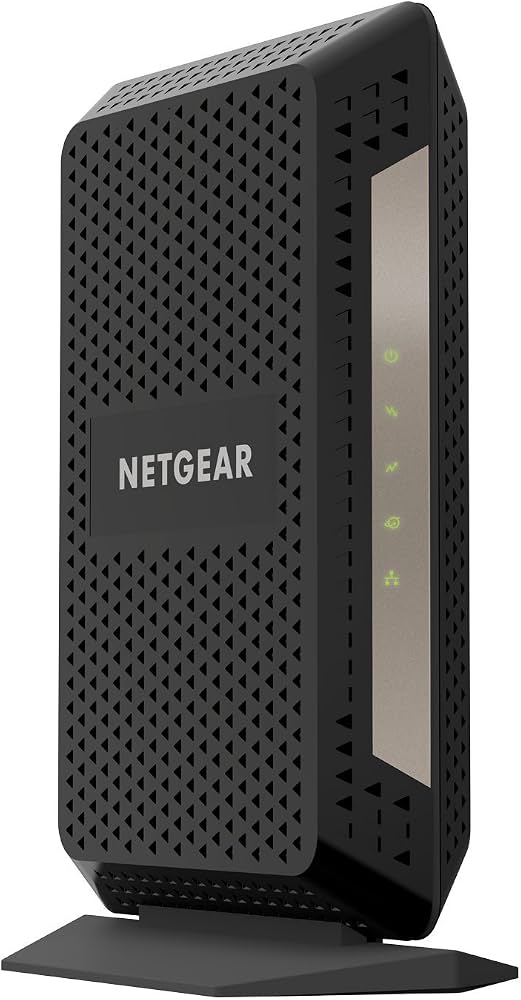
Introduction: What the Netgear Multi-Gig Speed Cable Modem CM1100 Offers
The Netgear Multi-Gig Speed Cable Modem CM1100 is a DOCSIS 3.1 cable modem built for households and small offices that want faster, more reliable wired internet without renting a modem from an ISP. It is designed to support multi-gig cable plans, with link aggregation capability that can help deliver up to 2 Gbps when paired with compatible service, a supported router, and the right network configuration. For users upgrading from older DOCSIS 3.0 hardware, the CM1100 offers better future-proofing, improved channel bonding, and strong compatibility with major cable providers.
This modem is best suited for gamers, remote workers, streamers, and power users who want a stable connection for 4K video, large downloads, cloud backups, and latency-sensitive tasks. Because it is a modem-only device, it must be connected to a separate router or mesh system for Wi-Fi. That makes it ideal for users who already own a high-performance router and want to keep their network modular. The CM1100 is also attractive to anyone looking to reduce monthly equipment rental costs while maintaining premium internet performance.
Typical pricing for the netgear Multi-Gig Speed Cable Modem CM1100 usually falls in the mid-range refurbished-to-premium tier, often around $90 to $180 depending on seller condition, retailer, and availability. Certified refurbished units may be cheaper, while new or open-box listings can cost more. Availability varies by retailer and ISP compatibility, so buyers should confirm their internet provider supports the modem before purchasing.
Specifications for Netgear CM1100 DOCSIS 3.1 Cable Modem
- Model: Netgear Nighthawk CM1100
- Modem standard: DOCSIS 3.1, backward compatible with DOCSIS 3.0
- Channel bonding: 32 downstream x 8 upstream for DOCSIS 3.0, with OFDM support for DOCSIS 3.1
- Ethernet ports: Two Gigabit Ethernet ports
- Multi-gig support: Link aggregation support for higher-speed wired connections
- Maximum service tier: Up to 2 Gbps with compatible plan and setup
- Connectivity: Coaxial cable input plus wired Ethernet output
- Power: 12 VDC, 2.5 A output adapter
- Dimensions: 8.8 x 3.4 x 5.9 in
- Weight: About 1.0 lb
- Operating temperature: 32° to 104°F
- Operating humidity: Up to 90% noncondensing
- Memory: 256 MB RAM and 128 MB flash
Compared with the CM1000, the CM1100 adds dual Gigabit Ethernet ports and link aggregation, making it better for multi-gig internet plans. Compared with modem-router combos, it offers more flexibility because you can pair it with a dedicated router of your choice for better performance and coverage.
Setup Guide: How to Install the Netgear Multi-Gig Speed Cable Modem CM1100
- Disconnect your old modem and power it off before starting.
- Connect the coaxial cable from the wall outlet to the modem’s cable input.
- Plug an Ethernet cable from the modem to your router’s WAN port, or use both Ethernet ports only if your router supports link aggregation.
- Connect the power adapter and wait for the status lights to stabilize.
- Activate the modem through your cable provider’s app, website, or support line if required.
- Restart your router after activation to ensure the connection is recognized.
For the best results, place the modem in a cool, well-ventilated area and avoid stacking it under other hot electronics. If the modem is not online after activation, reboot both the modem and router, then verify that your ISP has provisioned the device correctly. Safety precautions include using only the supplied power adapter, keeping the unit dry, and avoiding coax or power cable strain.
Troubleshooting Netgear CM1100 Common Problems and Fixes
- No internet light: Check coax connections, confirm service activation, and power-cycle the modem for 60 seconds.
- Slow speeds: Test with a wired device, confirm your router supports the subscribed speed tier, and verify that link aggregation is configured correctly if used.
- Activation failed: Contact your ISP and provide the modem’s MAC address and serial number.
- Intermittent drops: Replace damaged coax cables, tighten connectors, and test the modem directly at the wall outlet.
- Router not detecting modem: Reboot the router after the modem fully syncs.
If the modem shows repeated sync issues or unusual indicator behavior, inspect the cable line for signal problems and check for local service outages. Preventive maintenance includes keeping firmware-provisioned devices updated through your ISP, using quality cables, and placing the modem in a ventilated location. Support is typically handled through Netgear customer service and your ISP, and warranty assistance depends on whether the unit is new, refurbished, or reseller-provided. If you need help, contact your internet service provider first for activation and line checks, then Netgear support for hardware-related issues.
Pros & Cons of the Netgear Multi-Gig Speed Cable Modem CM1100
Pros
- DOCSIS 3.1 support helps future-proof your home network.
- Two Gigabit Ethernet ports and link aggregation support improve flexibility.
- Good fit for internet plans up to 2 Gbps.
- No modem rental fees, which can save money over time.
- Works well with high-performance routers for a custom networking setup.
Cons
- No built-in Wi-Fi, so a separate router is required.
- Best multi-gig benefits depend on ISP support and router compatibility.
- Can be more expensive than entry-level DOCSIS 3.0 modems.
- May be overkill for users with plans below 500 Mbps.
Overall, the netgear Multi-Gig Speed Cable Modem CM1100 delivers strong value for users who want a long-term modem investment and already own a capable router. Compared with modem-router combos, it offers better upgrade flexibility; compared with simpler cable modems, it provides stronger performance potential for faster internet tiers.
Customer Reviews: What Users Say About the CM1100 Cable Modem
Customer feedback for the CM1100 is generally positive, with many users praising easy setup, strong wired performance, and solid value for money. Typical ratings cluster around 4 out of 5 stars, especially from buyers who use the modem with Xfinity or other major cable providers. One common compliment is that the modem feels reliable once activated and performs well for gaming, streaming, and large downloads.
Frequent complaints include occasional activation hassles, the need for a compatible router to unlock full multi-gig potential, and the lack of integrated Wi-Fi. A common user recommendation is to buy the CM1100 if you already have a good router and want to stop paying monthly rental fees. It is less ideal for users who want a simple all-in-one wireless solution.
Frequently Asked Questions
- Is the CM1100 a router? No, it is a cable modem only.
- Does it support Wi-Fi? No, Wi-Fi requires a separate router or mesh system.
- Can it handle gigabit internet? Yes, and it is designed for multi-gig cable service when configured properly.
- Is it good for gaming? Yes, especially when paired with a low-latency router and a wired connection.
The netgear Multi-Gig Speed Cable Modem CM1100 is a strong choice for users seeking reliable DOCSIS 3.1 performance, dual Gigabit Ethernet ports, and support for faster cable plans. For buyers who want a modem-only device with upgrade flexibility, it remains a practical and high-value option.
Faqs
How do I set up the netgear Multi-Gig Speed Cable Modem CM1100 for the first time with my cable internet service?
What internet plans and cable providers are compatible with the netgear Multi-Gig Speed Cable Modem CM1100?
Why is my netgear Multi-Gig Speed Cable Modem CM1100 showing a connection but no internet access?
Can I use both Ethernet ports on the netgear Multi-Gig Speed Cable Modem CM1100 for faster speeds?
How do I know if the netgear Multi-Gig Speed Cable Modem CM1100 is actually delivering the speed I pay for?
What should I do if the netgear Multi-Gig Speed Cable Modem CM1100 keeps dropping the connection?
Do I need a separate router with the netgear Multi-Gig Speed Cable Modem CM1100, or can it provide Wi-Fi on its own?
How should I maintain and care for the netgear Multi-Gig Speed Cable Modem CM1100 to keep it working reliably?
More netgear manuals
- How to Use: Netgear High Speed Cable Modem CM1000 User Manual
- How to Use: Netgear Multi-Gig Speed Cable Modem CM1200 User Manual
- How to Use: Netgear ADSL Modem with Ethernet or USB Connection DM602 User Manual
- Setup & Features: Netgear Orbi Whole Home Tri-Band Mesh WiFi 6 System User Manual
- How to Use: Netgear NeoTV Max (NTV300SL) Streaming Player User Manual
- How to Setup: Netgear WiFi 7 Extender EXS18, EXS25, EXS27 User Manual
Leave a Comment