
How to Use: Netgear High Speed Cable Modem CM1000 User Manual
Content
Netgear High Speed Cable Modem CM1000 Review and Product Manual
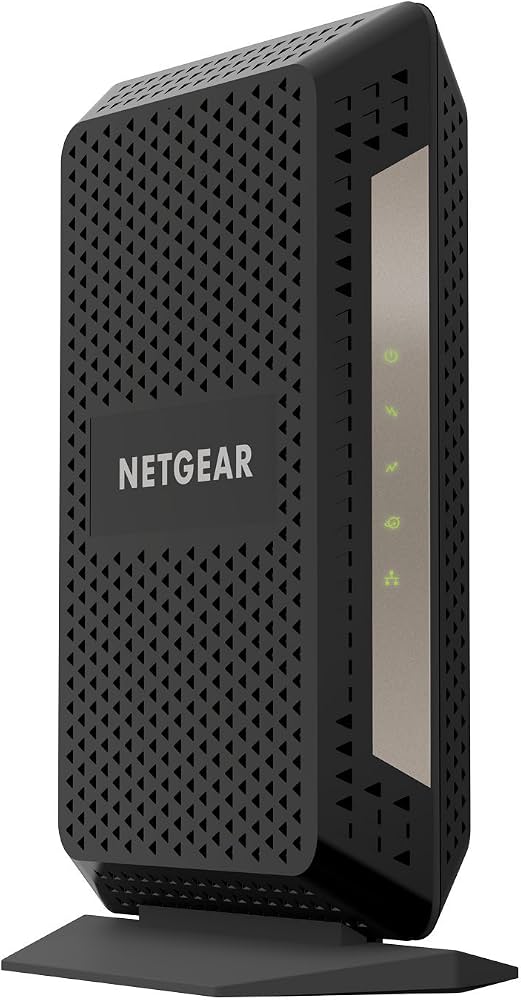
The netgear High Speed Cable Modem CM1000 is a DOCSIS 3.1 cable modem designed for users who want a fast, stable, and straightforward wired internet connection without renting equipment from a provider. It supports high-speed cable internet plans, including gigabit-tier service, and works as a modem-only device that pairs with your own Wi‑Fi router for complete home networking. This makes it a strong choice for gamers, streamers, remote workers, and households that want to reduce monthly rental fees while improving network control.
One of the biggest advantages of the netgear High Speed Cable Modem CM1000 is its DOCSIS 3.1 technology, which delivers improved performance over older DOCSIS 3.0 modems and helps future-proof your internet setup. It includes a Gigabit Ethernet port, backward compatibility with DOCSIS 3.0, and support for major cable internet providers such as Xfinity, Spectrum, and Cox, depending on regional compatibility. The modem is compact, easy to install, and built for users who want a reliable cable modem for up to 1 Gbps service plans.
In typical retail channels, the CM1000 has commonly been available in the approximate range of $80 to $150, with pricing varying by seller, promotions, and stock levels. Availability may fluctuate because this model is older than newer multi-gig cable modem options, but it is still widely found through electronics retailers, marketplace sellers, and provider compatibility lists. For buyers looking for a dependable DOCSIS 3.1 modem at a reasonable price, it remains a practical and value-focused option.
Specifications for Netgear CM1000 DOCSIS 3.1 Cable Modem
- Modem type: DOCSIS 3.1 cable modem, backward compatible with DOCSIS 3.0
- Channels: 32x8 DOCSIS 3.0 channel bonding with 2 OFDM downstream and 2 OFDMA upstream channels
- Ports: 1 coaxial WAN port and 1 Gigabit Ethernet LAN port
- Network speed support: Suitable for cable plans up to 1 Gbps, depending on ISP provisioning
- Memory: 128 MB flash and 256 MB RAM
- Power: 12 V DC power input with standard AC adapter
- Dimensions: Approximately 8.8 x 5.9 x 3.4 inches
- Weight: About 0.84 lb
- Environmental range: 32°F to 104°F operating temperature
- Compatibility: Commonly approved for major U.S. cable providers, but activation depends on your specific service area
Performance-wise, the CM1000 is positioned as an ultra-high-speed modem for single-device wired output to a router. Compared with older DOCSIS 3.0 modems, it offers better efficiency, lower congestion potential, and stronger readiness for higher-speed cable tiers. Compared with newer multi-gig models, however, it is limited by its single Gigabit Ethernet port, so it is best for users whose internet plan is 1 Gbps or lower.
Setup Guide: How to Install the Netgear High Speed Cable Modem CM1000
Setting up the netgear High Speed Cable Modem CM1000 is simple and usually takes only a few minutes. Before starting, make sure your ISP supports self-installation and that your account is ready for modem activation.
- Connect the coaxial cable from the wall outlet to the modem’s coax port.
- Plug the power adapter into the modem and then into a grounded wall outlet.
- Wait for the power, downstream, upstream, and internet LEDs to stabilize.
- Connect an Ethernet cable from the modem’s Gigabit port to your router’s WAN or Internet port.
- Open your internet provider’s activation page or call support to register the modem’s MAC address if required.
- Restart both the modem and router after activation to complete the pairing process.
If the internet light does not come on, check the coax connection, confirm that your provider has activated the modem, and verify that your router is connected to the correct port. For safety, place the modem in a dry, ventilated area, avoid stacking it under heat-producing devices, and do not use damaged coax or power cables.
Troubleshooting the Netgear CM1000 Cable Modem
Most issues with the CM1000 are related to signal, activation, or router pairing. If the modem cannot get online, the first step is to power-cycle the modem by unplugging it for 30 seconds and reconnecting it. Then reboot your router after the modem fully reconnects.
- No internet connection: Confirm coax connection, check provider outage status, and complete activation with your ISP.
- Blinking downstream or upstream light: This usually means the modem is searching for a stable cable signal or has not been provisioned correctly.
- No Ethernet link: Replace the Ethernet cable or test a different router port.
- Frequent dropouts: Inspect coax splitters, reduce excessive cable length, and ensure the modem is not overheating.
- Activation failure: Re-enter the modem’s MAC address with your provider and confirm account compatibility.
Common error states are typically caused by signal loss rather than hardware failure. Preventive measures include using high-quality coax lines, minimizing splitter use, keeping firmware updates handled by the ISP, and ensuring adequate ventilation. Netgear support and the modem’s warranty coverage are available through the manufacturer’s product support portal, while activation and line issues are usually resolved through your cable provider’s technical support team.
Pros and Cons of the Netgear High Speed Cable Modem CM1000
Pros
- DOCSIS 3.1 support improves performance and future readiness for modern cable plans.
- Reliable single-port modem design works well with third-party Wi‑Fi routers.
- Good value for users who want to stop paying monthly modem rental fees.
- Strong compatibility with many major cable providers makes setup easier.
- Compact hardware is easy to place on a shelf or desk.
Cons
- Only one Gigabit Ethernet port, so it is not ideal for multi-device wired aggregation.
- No built-in Wi‑Fi, so a separate router is required.
- Not the best match for internet plans above 1 Gbps.
- Older design compared with newer multi-gig cable modems.
Overall, the CM1000 offers strong value for households that want dependable cable internet without extra monthly charges. Compared with newer alternatives, it is less advanced in port flexibility, but for standard gigabit service it remains a sensible and cost-effective choice.
Customer Reviews of the Netgear CM1000 DOCSIS 3.1 Modem
Customer feedback for the netgear High Speed Cable Modem CM1000 is generally positive, with many users praising its easy installation and stable performance. Average user sentiment is often in the 4 to 4.5 star range, especially among households that use it with compatible cable plans and a high-quality router.
- Praise: “Setup was quick, and my internet speeds improved immediately after activation.”
- Praise: “A dependable modem that helped me stop paying rental fees every month.”
- Complaint: “It only has one Ethernet port, so it is not for advanced wired setups.”
- Complaint: “Activation took a little longer than expected with my provider.”
Most buyers recommend it for users who want a straightforward cable modem for home internet, streaming, and gaming. Frequent issues mentioned in reviews usually involve ISP activation delays rather than the device itself.
Faqs
How do I set up netgear High Speed Cable Modem CM1000 for the first time with my internet service provider?
What internet plans and cable providers are compatible with netgear High Speed Cable Modem CM1000?
Why is my netgear High Speed Cable Modem CM1000 showing no internet connection after installation?
How can I improve performance on netgear High Speed Cable Modem CM1000 for faster cable internet speeds?
What do the lights on netgear High Speed Cable Modem CM1000 mean during startup and troubleshooting?
Can I use netgear High Speed Cable Modem CM1000 with my own Wi‑Fi router and mesh system?
How do I safely restart or factory reset netgear High Speed Cable Modem CM1000 without losing service settings?
How should I maintain netgear High Speed Cable Modem CM1000 to keep it reliable over time?
More netgear manuals
- How to Use: Netgear ADSL Modem with Ethernet or USB Connection DM602 User Manual
- How to Use: Netgear Multi-Gig Speed Cable Modem CM1100 User Manual
- How to Use: Netgear NeoTV Max (NTV300SL) Streaming Player User Manual
- How to Use: Netgear Multi-Gig Speed Cable Modem CM1200 User Manual
- Setup: Netgear Nighthawk Pro Gaming Router XR1000 User Manual
- Setup & Features: Netgear Orbi Whole Home Tri-Band Mesh WiFi 6 System User Manual
Leave a Comment