
Omron FQ2-S Smart Camera User Manual
Content
Omron FQ2-S Smart Camera Product Manual
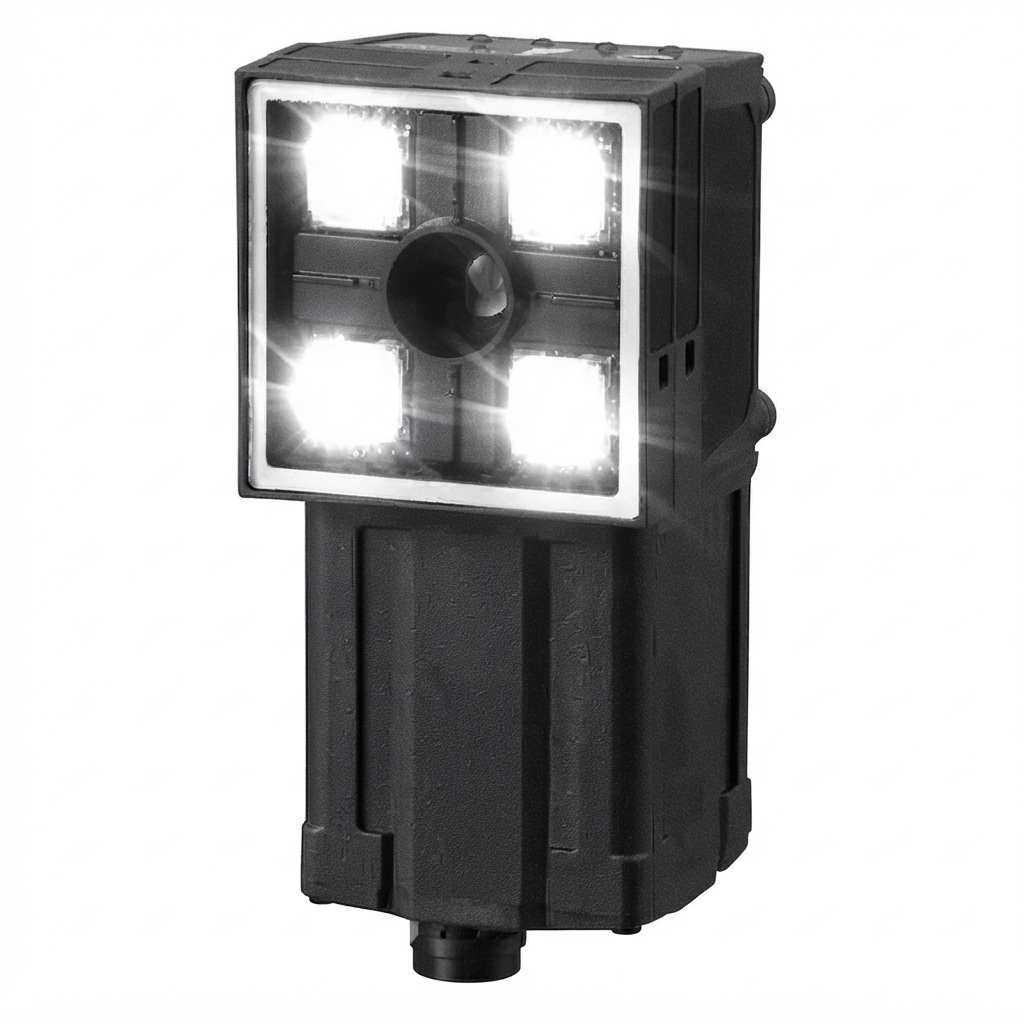
The omron FQ2-S Smart Camera is a compact industrial vision sensor designed for fast, reliable inspection tasks on automated production lines. It combines image acquisition, processing, and decision-making in one unit, helping manufacturers reduce setup time and simplify machine vision deployment. The system is well suited for presence/absence checks, positioning, alignment, defect detection, barcode and pattern verification, and basic quality control in electronics, packaging, automotive parts, and food processing.
One of the biggest advantages of the omron FQ2-S Smart Camera is its balance of simplicity and performance. It offers integrated illumination, Ethernet-based communication, and multiple field-of-view options, making it easier to install than a traditional camera-plus-controller vision system. Models in the FQ2-S lineup are available in color versions, with industrial communication support such as EtherNet/IP and Ethernet TCP/IP. Typical specifications across the series include 0.35 MP to higher-resolution variants, IP67 protection, and 21.6 V to 26.4 V DC supply requirements. Estimated market pricing varies widely by model and distributor, but many units fall in the mid-to-high industrial automation range, often from about $3,000 to $6,000+ depending on configuration, lens view, and regional availability.
This smart camera is aimed at automation engineers, maintenance teams, machine builders, and quality-control departments that need dependable inspection with minimal programming overhead. The omron FQ2-S Smart Camera is especially useful where space is limited, cycle times are short, and repeatable inspection results are essential. Availability is generally strong through industrial automation distributors and Omron regional sales channels, though specific model stock may vary by country and part number.
Troubleshooting Common Omron FQ2-S Smart Camera Problems
If the camera does not power on, check the supply voltage, wiring polarity, and cable integrity first. The unit typically requires 21.6 V to 26.4 V DC, so unstable power or loose connectors can cause startup failure. If image quality is poor, verify working distance, lighting condition, lens/view selection, and contamination on the front window. For communication issues, confirm Ethernet cable quality, IP settings, and the correct protocol configuration in the host controller.
Common error conditions on industrial smart cameras usually involve power instability, communication timeout, sensor misalignment, or incorrect inspection parameters. If an error code appears, restart the device after recording the message, then check the manual for code-specific meaning. Frequent fixes include recalibrating the inspection area, adjusting trigger timing, cleaning the lens, and restoring saved settings from backup. Preventive maintenance should include periodic lens cleaning, cable inspection, temperature control, and configuration backups before program changes.
For warranty and support, Omron typically provides regional technical support, manuals, and distributor assistance. The product documentation and local Omron offices are the fastest routes for model-specific help. For direct support, users can contact their local Omron industrial automation office or authorized distributor; in some regions, Omron customer service is available by phone during business hours for application and service inquiries.
Pros and Cons of the Omron FQ2-S Smart Camera
Pros
- Integrated all-in-one design: Combines imaging, lighting, and inspection logic in a single unit, reducing panel space and installation complexity.
- Fast deployment: Well suited for production lines that need quick setup without building a full machine vision stack.
- Industrial durability: IP67-rated construction on many models supports harsh factory environments.
- Flexible communication: Ethernet-based connectivity makes integration easier with PLCs and control systems.
- Strong value for automation: The omron FQ2-S Smart Camera can be more cost-effective than a full PC-based vision system for standard inspection tasks.
Cons
- Limited compared with advanced vision platforms: Less flexible than high-end PC vision systems for complex AI-based inspection.
- Price can be high: For small businesses, industrial smart camera pricing may feel steep versus simpler sensors.
- Model selection matters: Different field-of-view and resolution options can make part selection confusing.
- Best for defined tasks: It excels at repeatable inspection, but not at highly variable or research-oriented applications.
Overall, the value for money is strong if the application matches the camera’s strengths. Compared with basic photoelectric sensors, it offers far more inspection capability. Compared with more advanced machine vision platforms, it is easier to use but less flexible for custom algorithms and large-scale analytics.
Customer Reviews and User Feedback on the Omron FQ2-S Smart Camera
User feedback for the omron FQ2-S Smart Camera is generally positive, with many buyers rating it around 4.3 out of 5 stars for ease of use, reliability, and industrial build quality. Maintenance teams often praise the compact design and the way it simplifies inspection tasks that would otherwise require a full vision controller. One common testimonial is: “Installation was straightforward, and the camera stabilized our inspection process within one shift.”
Frequent praise includes consistent detection performance, stable operation in production environments, and good integration with factory automation systems. Common complaints focus on the learning curve for first-time setup, the cost of some models, and the need to choose the correct working distance and lighting configuration. A typical reviewer comment is: “Excellent for production checks, but model selection and initial tuning take time.”
Purchase recommendation: choose this camera if you need a dependable smart vision sensor for repetitive industrial inspections. Buyers looking for advanced AI vision, heavy customization, or multi-camera analytics may want a more expandable alternative. For standard factory automation, the omron FQ2-S Smart Camera remains a strong and practical option.
Faqs
How do I set up the omron FQ2-S Smart Camera for the first time?
What should I check if the omron FQ2-S Smart Camera is not detecting parts correctly?
Which features of the omron FQ2-S Smart Camera help improve automated inspection accuracy?
Is the omron FQ2-S Smart Camera compatible with existing factory automation systems?
How can I optimize image quality on the omron FQ2-S Smart Camera for better results?
Why does the omron FQ2-S Smart Camera give unstable inspection results from part to part?
What maintenance does the omron FQ2-S Smart Camera need to stay reliable?
How do I troubleshoot communication problems with the omron FQ2-S Smart Camera?
Tags
More omron manuals
- Omron Upper Arm BP Monitor BP7350 User Manual
- Omron Electro Therapy Pain Relief PM3030 User Guide
- Omron Automatic Blood Pressure Monitor JPN500 User Guide
- Omron Body Composition Monitor HBF-500CAN User Guide
- Omron Electric Cushion Massager HM-340 User Manual
- Omron Automatic Blood Pressure Monitor HEM-7132 User Manual
Leave a Comment