
Philips TAW6205 Wireless Home Speaker User Manual
Content
Philips TAW6205 Wireless Home Speaker: Complete Product Manual and Buyer Guide
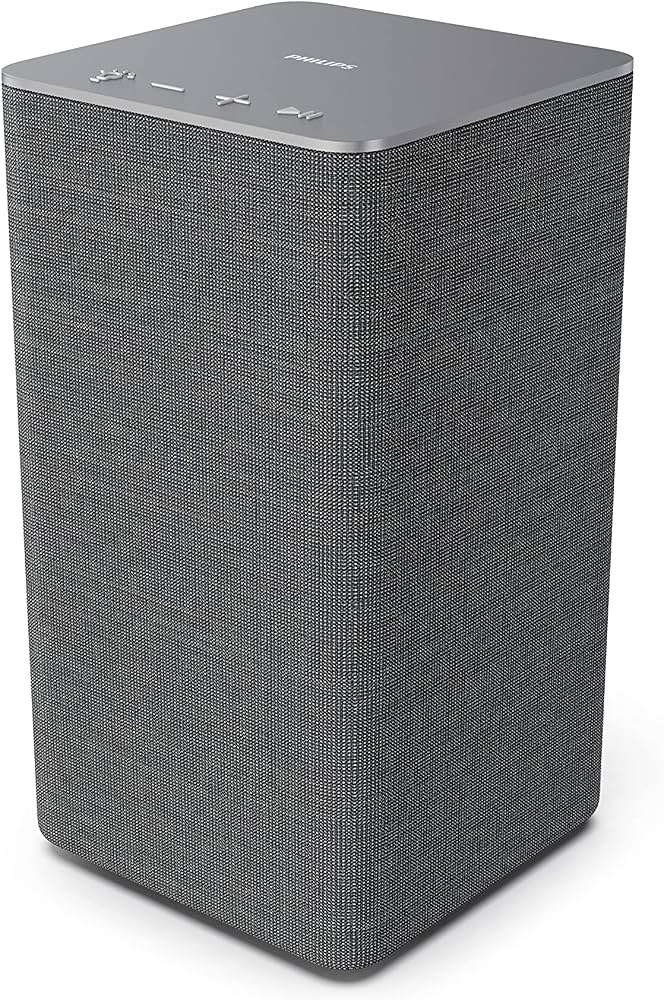
Introduction: What Is the Philips TAW6205 Wireless Home Speaker?
The Philips TAW6205 Wireless Home Speaker is a compact Wi-Fi and Bluetooth speaker designed for everyday home listening, multi-room audio, and wireless streaming from popular music services. Built around a 40W RMS output, a 3.5-inch woofer, a 1-inch tweeter, and dual passive radiators, it delivers a fuller sound than its small footprint suggests. With support for wireless playback through Wi-Fi, Bluetooth, AirPlay 2, and smart-home ecosystems, it fits easily into modern connected homes.
This speaker is a strong fit for users who want a simple wireless speaker for bedrooms, kitchens, home offices, or small living rooms. It works well for music streaming, podcasts, radio, and casual all-day listening. Its compact dimensions of 115 x 212 x 116 mm and weight of about 1.8 kg make it easy to place on a shelf, desk, or side table without taking up much space.
The Philips TAW6205 Wireless Home Speaker typically sits in the mid-range price category, with availability varying by region and retailer. In many markets, it is often found around the equivalent of budget-to-mid-tier Wi-Fi speaker pricing, making it appealing for buyers who want multi-room audio and smart connectivity without moving into premium speaker territory. If you are searching for a wireless home speaker with practical features, flexible connectivity, and compact design, this model is worth considering.
Key Features and Technical Overview
- 40W RMS output for everyday room-filling sound
- 1.0 channel speaker system with one woofer and one tweeter
- Two passive radiators for improved bass response
- Wi-Fi and Bluetooth wireless connectivity
- Support for AirPlay 2 and multi-room audio setups
- Compact size for shelf, desk, and tabletop placement
- AC-powered design for stable home use
Pros and Cons of the Philips TAW6205 Wireless Home Speaker
Pros
- Compact and versatile: The small footprint makes it easy to place in bedrooms, kitchens, and offices without clutter.
- Strong connectivity options: Wi-Fi, Bluetooth, and AirPlay 2 give users flexible streaming choices from phones, tablets, and smart devices.
- Good sound for the size: The 40W output, woofer, and dual passive radiators help produce more bass than many similarly sized speakers.
- Multi-room friendly: It is well suited for users building a connected audio system across multiple rooms.
- Good value for money: It offers useful smart features and wireless playback at a lower cost than many premium smart speakers.
Cons
- Single-channel design: As a 1.0 speaker, it does not deliver true stereo separation on its own.
- Best for small to medium spaces: It is not ideal for large rooms or high-volume party use.
- Limited bass compared with larger systems: The bass is solid for the size, but dedicated larger speakers will go deeper.
- Not the cheapest option: Compared with basic Bluetooth speakers, it costs more because of Wi-Fi and smart connectivity features.
Overall, the Philips TAW6205 Wireless Home Speaker offers a balanced mix of convenience, sound quality, and wireless streaming. Compared with basic Bluetooth-only alternatives, it is more capable for home use; compared with larger premium smart speakers, it is more affordable but less powerful.
Customer Reviews: What Buyers Say About the Philips TAW6205 Wireless Home Speaker
Customer feedback is generally positive, with many users rating the speaker around 4 out of 5 stars for its size, streaming flexibility, and easy placement. Buyers often praise the clean design, reliable Wi-Fi performance, and surprisingly strong sound for a compact unit. One common comment is that it works especially well in smaller rooms where a large speaker would be unnecessary.
Frequent complaints focus on the single-speaker sound stage and occasional setup or app-related frustration, especially for users expecting more advanced stereo performance. Some reviewers also mention a mild background noise at idle, depending on source and placement. A typical user comment is, “Great for kitchen listening and radio streaming, but I wanted a wider soundstage.” Another common opinion is, “Excellent value if you want a smart wireless speaker rather than a basic Bluetooth box.”
For buyers who want a compact wireless home speaker with practical features, the Philips TAW6205 Wireless Home Speaker is usually recommended. It is a better purchase than entry-level portable speakers if your priority is home streaming and multi-room use, but users seeking powerful bass or true stereo should consider a larger system or a paired speaker setup.
Frequently Asked Questions About the Philips TAW6205 Wireless Home Speaker
- What is the main use of the Philips TAW6205 Wireless Home Speaker? It is designed for wireless music streaming, home listening, and multi-room audio.
- Does it support Bluetooth? Yes, it includes Bluetooth along with Wi-Fi connectivity.
- Is it good for small rooms? Yes, its compact size and 40W output make it well suited for small and medium rooms.
- Can it be used with smart-home systems? Yes, it is compatible with modern smart streaming ecosystems and AirPlay 2 support.
- Is the Philips TAW6205 Wireless Home Speaker worth buying? Yes, if you want an affordable, flexible wireless speaker for home use and do not need stereo separation from a single unit.
Final Verdict
The Philips TAW6205 Wireless Home Speaker is a practical and well-rounded choice for users who want a compact Wi-Fi speaker with Bluetooth, AirPlay 2, and multi-room audio support. It combines useful smart features, easy placement, and a balanced sound profile that suits everyday listening.
If you are shopping for a wireless home speaker that prioritizes convenience, versatility, and value, this model deserves a place on your shortlist. It is especially appealing for bedrooms, kitchens, and home offices where space is limited but reliable audio matters.
Faqs
How do I set up the philips TAW6205 Wireless Home Speaker for the first time?
Why is my philips TAW6205 Wireless Home Speaker not connecting to Wi‑Fi?
Can the philips TAW6205 Wireless Home Speaker work with Bluetooth and Wi‑Fi at the same time?
What devices are compatible with the philips TAW6205 Wireless Home Speaker?
How can I improve sound quality on the philips TAW6205 Wireless Home Speaker?
What should I do if the philips TAW6205 Wireless Home Speaker has weak volume or distorted audio?
How do I reset the philips TAW6205 Wireless Home Speaker when pairing keeps failing?
How should I clean and maintain the philips TAW6205 Wireless Home Speaker?
More philips manuals
Leave a Comment