
Philips HTS3357 DVD Home Theater System User Manual
Content
Philips HTS3357 DVD Home Theater System Review and User Manual Guide
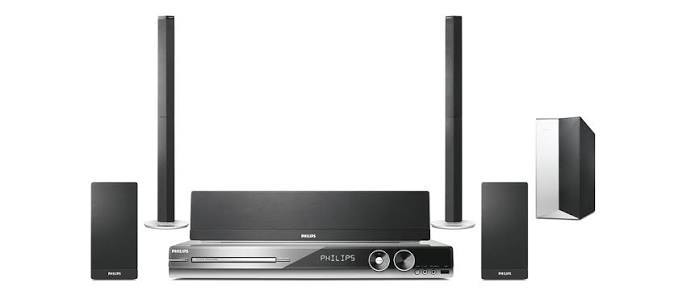
The Philips HTS3357 DVD Home Theater System is a compact 5.1-channel home cinema package designed to bring surround sound, DVD playback, and everyday media convenience into one affordable setup. Built for users who want better movie sound without the complexity of a full AV receiver system, it combines a slim main unit, matched speakers, and a powered-feel home-theater layout that fits well in living rooms, apartments, and secondary entertainment spaces.
One of the biggest advantages of the Philips HTS3357 DVD Home Theater System is its balance of simplicity and performance. It supports a wide range of disc formats, including DVD, CD, SVCD, VCD, and recordable DVD media, while also handling digital music and image playback. Many versions of this model include support for DivX playback, JPEG photos, and MP3/WMA files, making it a flexible all-in-one entertainment solution. The 600W RMS total output gives it enough power for clear dialogue, energetic surround effects, and room-filling playback for family movie nights or casual gaming.
This system is best suited for budget-conscious buyers, first-time home theater users, and anyone upgrading from TV speakers to a true surround setup. It is especially practical for users who want easy setup, multiple input options, and HDMI connectivity for simpler modern TV integration. At launch, the Philips HTS3357 DVD Home Theater System typically sat in the mid-range price category, and today it is usually found through used marketplaces, refurbished sellers, or leftover inventory at varying prices depending on condition and region.
Philips HTS3357 DVD Home Theater System Specifications and Key Features
- Total RMS output power: 600W for loud, room-filling home theater audio.
- Speaker layout: 5.1-channel surround sound with front, center, rear, and subwoofer speakers.
- Audio decoding: Dolby Digital, Dolby Pro Logic II, and DTS support for cinematic surround playback.
- Frequency response: approximately 150 Hz to 18 kHz for the main amplification range.
- Signal-to-noise ratio: greater than 60 dB to greater than 65 dB depending on the version listed.
- DAC performance: 24-bit/192 kHz audio conversion for improved detail over basic DVD systems.
- Video enhancement: progressive scan and high-definition output support in selected variants.
- Connectivity: HDMI output, component video, composite video, S-Video, coaxial digital input, AUX input, USB, and MP3 input.
- Media support: DVD-Video, CD-Audio, MP3, WMA, JPEG, VCD, SVCD, and DivX family formats in many regional versions.
- Typical comparisons: stronger and more feature-rich than basic all-in-one DVD players, but less flexible than a modern AV receiver and separate speaker package.
In practical use, the Philips HTS3357 DVD Home Theater System delivers a clear step up from standard TV audio, especially for movies and music playback. Its output power and codec support make it competitive with other compact Philips home theater bundles from the same era, while the HDMI output improves compatibility with modern displays.
Philips HTS3357 DVD Home Theater System Troubleshooting Guide
If the system does not power on, first check the wall outlet, power cable, and main unit fuse if applicable. If no sound is heard, verify speaker wiring, input selection, and volume settings, then confirm that the correct surround mode is active. If the display shows no picture, inspect the HDMI or composite cable, switch TV inputs, and test another video connection.
- Disc not playing: clean the disc, check for scratches, and make sure the disc format is supported by the player.
- Audio out of sync: reset the unit, power-cycle the TV, and reconnect the HDMI cable securely.
- USB not recognized: confirm file format compatibility and use a properly formatted USB device.
- Remote control unresponsive: replace batteries and ensure there is a clear line of sight to the main unit.
- Error messages or read failures: eject the disc, restart the system, and try a factory reset if the problem continues.
Preventive care helps reduce breakdowns: keep ventilation openings clear, avoid dusty locations, and store discs in protective cases. Warranty coverage depends on the region and seller, especially for older units, so buyers should check the purchase history and service status carefully. For help, contact Philips consumer support through the official support portal for your country, or use the printed service information included with the product manual.
Philips HTS3357 DVD Home Theater System Pros and Cons
Pros
- Powerful 600W RMS output for strong movie and music playback.
- True 5.1-channel surround sound with Dolby Digital and DTS support.
- Multiple connections, including HDMI, USB, and analog video outputs.
- Easy setup compared with separate receiver-and-speaker systems.
- Good value for buyers looking for an affordable DVD home theater package.
Cons
- Older DVD-centric design, so it lacks modern streaming and wireless features.
- Best performance depends on region-specific model support and cable quality.
- Not as flexible as a full AV receiver setup for future upgrades.
- Some users may find the compact speakers less dynamic than larger standalone home theater speakers.
For value for money, the Philips HTS3357 DVD Home Theater System remains appealing if the goal is reliable physical-disc playback and basic surround sound. Compared with newer soundbars, it offers fuller multi-speaker immersion, but compared with modern AV systems it is less expandable.
Philips HTS3357 DVD Home Theater System Customer Reviews and Ratings
Owner feedback for the Philips HTS3357 DVD Home Theater System is generally positive, especially from users who value simple setup and strong bass for the price. Many reviews highlight clear dialogue, lively surround effects, and the convenience of HDMI output for older flat-panel TVs. A common praise point is the system’s ability to make movie nights feel more cinematic without requiring advanced audio knowledge.
Frequent complaints usually focus on the age of the format support, limited smart features, and the fact that replacement parts can be harder to find today. Typical customer rating patterns place it around 4 out of 5 stars among satisfied legacy-product owners, with testimonials often describing it as “great for DVDs and family use” and “a solid budget theater system.” For buyers seeking a low-cost classic home cinema setup, it is a practical choice, but users who want streaming, Bluetooth, or modern app support should consider newer alternatives.
Faqs
How do I set up the philips HTS3357 DVD Home Theater System for the first time?
Why is my philips HTS3357 DVD Home Theater System not producing sound from all speakers?
Which TVs and devices are compatible with the philips HTS3357 DVD Home Theater System?
How do I get better picture quality from the philips HTS3357 DVD Home Theater System?
What discs and media formats can the philips HTS3357 DVD Home Theater System play?
How do I fix a philips HTS3357 DVD Home Theater System that keeps skipping or freezing on discs?
What should I do if the philips HTS3357 DVD Home Theater System remote control stops working?
How should I maintain and clean the philips HTS3357 DVD Home Theater System for long-term performance?
More philips manuals
Leave a Comment