
Setup: Rewire Security 103-RS / 103-RS+ GPS Tracker User Manual
Content
Rewire Security 103-RS / 103-RS+ GPS Tracker
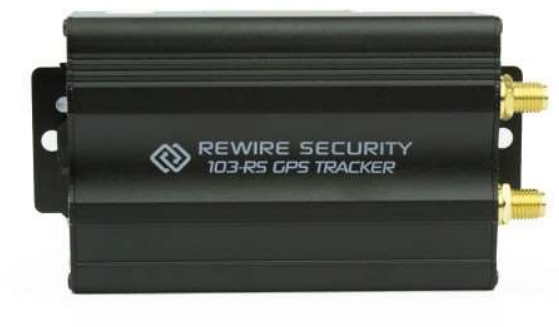
Introduction
The Rewire Security 103-RS and 103-RS+ GPS Tracker is a powerful, compact solution for real-time vehicle tracking and asset monitoring. Designed for both personal and commercial use, this device offers advanced GPS/GSM technology, ensuring reliable location updates and remote management. Whether you're a fleet manager, business owner, or concerned vehicle owner, the 103-RS series delivers peace of mind with its robust features and easy-to-use interface.
Key benefits include real-time tracking, geofencing, remote immobilisation (103-RS+), and instant alerts for unauthorised movement or tampering. The tracker is compatible with most vehicles and integrates seamlessly with mobile apps and web platforms for convenient monitoring. Its compact design and durable build make it ideal for discreet installation in cars, trucks, motorcycles, and valuable assets.
Target users include fleet operators, logistics companies, car rental services, and individuals seeking enhanced vehicle security. The Rewire Security 103-RS / 103-RS+ GPS Tracker is widely available through authorised dealers and online retailers, with an estimated price range of $120–$180, depending on the model and region.
Specifications of the Rewire Security 103-RS / 103-RS+ GPS Tracker
- Positioning Technology: GPS + GLONASS for high-accuracy tracking
- Network: GSM/GPRS (2G/3G), 4G LTE (103-RS+)
- Tracking Frequency: Up to every 10 seconds (configurable)
- Geofencing: Customizable virtual boundaries with instant alerts
- Remote Immobilisation: Engine cut-off feature (103-RS+ only)
- Power Supply: 12V–24V DC, low-power standby mode
- Operating Temperature: -20°C to +70°C
- Humidity: 5%–95% non-condensing
- Dimensions: Compact, discreet design (approx. 80mm x 50mm x 20mm)
- Weight: Lightweight (approx. 100g)
- Warranty: 1–2 years, depending on region
The 103-RS+ offers enhanced connectivity and remote control features compared to the standard 103-RS, making it a top choice for advanced fleet management and security needs.
Features
- 12v - 24v power support.
- Supports SMS/GPRS/Internet Network data transmission.
- External GSM and GPS antennas.
- Remote voice surveillance through the external microphone.
- SMS location reports via Google Maps support.
- 600 mAh backup battery.
- Remote immobilising via fuel or power cut-off.
Hardware Description
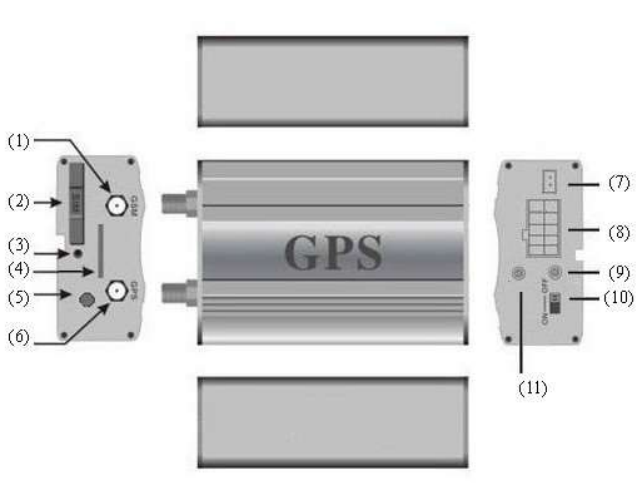
- GSM Antenna connector
- SIM card slot
- SIM card slot Pop-up switch
- MicroSD slot
- Microphone jack
- GPS Antenna connector
- Shock sensor port
- Harness Port
- GSM/GPS LED
- Backup battery switch
- Remote controller antenna
(Remote Controller: RS+ model only)
Accessories
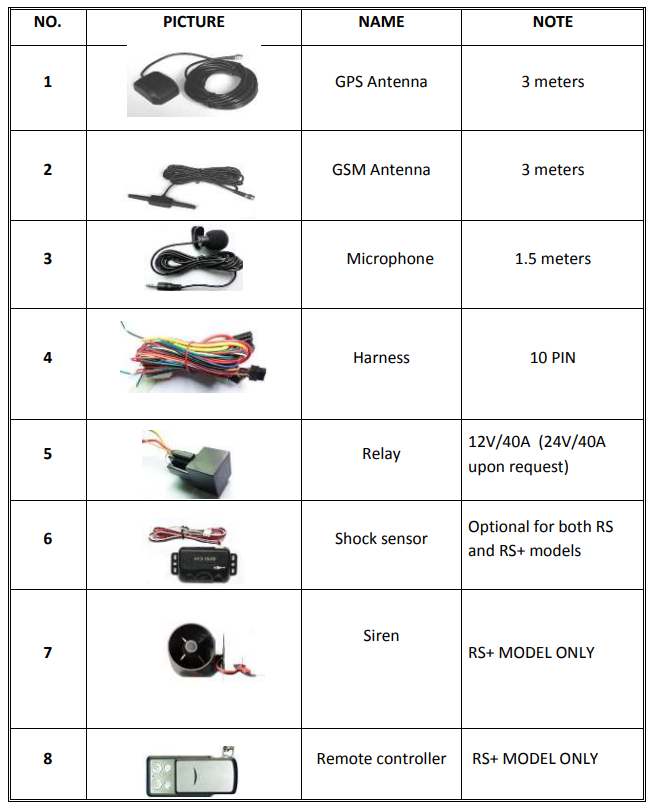
Installation
- Please ensure the installation is performed by a qualified and experienced technician. Rewire Security does not accept liability for any damages caused due to the incorrect installation of the tracker.
- On first installation, do not place your device in its final position. Start with just setting up your device by installing the sim card, connecting the GPS & GSM antennas and leaving it in a location with an uninterrupted view of the sky. Once your 103-RS is switched on and ready to use, test the functions you would like to use and finally install it in its final position.
- Do not install this device in places where it is likely to be exposed to excessive heat, water or dust.
- Find the 10 PIN harness and insert it into the corresponding holes. Connect the wires with the original car circuit as shown below:
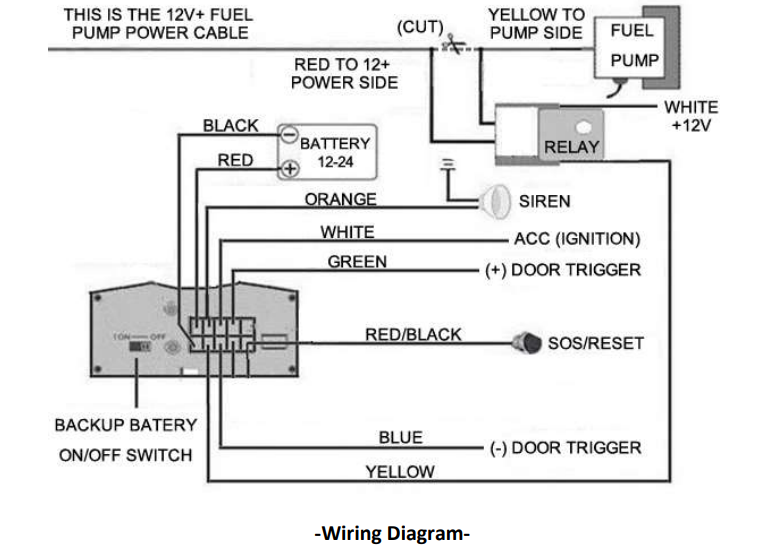
- The white cable with the black line is for the ultrasonic fuel sensor and can be discarded. User manual and installation guide for the ultrasonic fuel sensor are supplied separately upon purchase.
- Note: The orange wire should be connected to the siren (optional); however, it can also be connected to your vehicle's horn.
- Check if the type of your vehicle's door trigger is a positive or negative trigger. Please connect the green wire to the door control circuit if it is positive, and connect the blue wire if it is negative.
- If you wish to use the reset and SOS button, install it where the driver can easily reach.
- Insert the shock sensor plug (RS+ model, optional) into the sensor jack
- Insert the external Microphone into the microphone jack and place the microphone in your desired location.
- Connect the GPS and GSM antenna to the corresponding connector. Find an appropriate place and fix the antennas. Under the front dashboard is the most ideal location to fit the antennas. Thick metal surfaces (e.g. bonnet) will degrade the GPS signal and reduce accuracy. Therefore, antennas should be installed under or as close as possible to windows, windscreen or plastic surfaces.
- If you wish to use the remote immobilizing function, the circuit breaker relay unit must be installed on the cable that provides +12v power to your fuel pump. Please do this by cutting the 12+ fuel pump wire and installing the relay unit in between.
- The thick red wire should be connected to 12+ power side (usually coming from the fuse box) and the thick yellow wire should be connected to the fuel pump side. This way the power circuit to your fuel pump will be completed through the circuit breaker relay unit. The thin yellow wire that goes to the relay unit from your tracker is the relay control switch. The thin white cable on the relay unit must be connected to 12+ to power the relay unit.
Please note that you can also use the relay to cut off the starter motor instead of the fuel pump.
SIM CARD Installation
- Use tweezers or a screwdriver to push the SIM CARD ejector switch, the SIM CARD slot will pop up. Remove the sim card tray and install your sim card. Now you can install the sim card tray back to its position.
- Ensure that your SIM card has been activated and the PIN code request is disabled. If you are using a contract sim card and would like to use GPRS (live) tracking, make sure your SIM card's internet is enabled.
- Please make sure that caller id display is enabled on your phone as 103-RS will not be able to respond to messages or calls from private numbers.
Turn On the 103-RS
Connect the positive(red) and negative (black) wire to 12v or 24v power source, wait for 1 minute after connecting power to make sure 103-RS is operating normal, then turn on the backup battery switch.
GSM/GPS LED Indicator
- Red LED indicator on: No GSM network signal.
- Fast flashing Red LED : GSM Network signal is good and 103-RS is working in GSM mode
- Slow flashing Red LED : GSM Network signal is good and the 103-RS is working in GPRS mode.
- Green LED indicator on: GPS fix is established.
- Green LED indicator off: GPS module is searching for satellite signal.
Initialization
- Note: When reading this manual, you will notice that we have used "+" and "space" between some words; "+" between two words means they should be written together as one word and "space" between two words means you should leave one character space between two words. Commands are written in this format to avoid errors as some commands may consist of few words written as one word or separated by a space.
- e.g. sleep+123456+space+shock
- This command should be sent to 103-RS as following: sleep123456 shock
Changing your tracker's password
Send SMS "password+old password+space+new password" to 103-RS to change the password. e.g password123456 888888 . 103-RS will reply: “password OK”.
- If you forget your password, you can restore it to the default password using the command: adminpassword13142324
- Please note that you only need to change your password if you intend to share your 103-RS's phone number with third parties and do not wish to give them access to its settings.
- Example : password123456 99999
- Response: password OK
Authorization
You have to add your phone number as the authorized number if you wish to receive any alerts or scheduled reports. If you only wish to use this device for tracking via SMS or GPRS, you can skip the authorization process. Authorization can be done in two different ways:
- Dial 103-RS's phone number 10 times from your mobile phone and it will register your mobile phone number as the authorized number automatically.
Please note that each time you dial it, the 103-RS will hang your call after 2 seconds and reply with a location SMS message. - Send SMS “admin+password+space+phone number” to set up an authorized number. All the other authorized numbers must be set by the first authorized number. You will receive “admin OK” reply once the command has been executed.
Example: admin123456 07776665554
Response: admin OK
Depending on make/model of your phone, you may after switching the ignition off need to authorize your phone number with the country code. If you notice you do not get any alarms or text reports after calling your tracker, please authorize your phone number including the country code as shown below ;
Example: admin123456 +447776665544
Response: admin OK
Please note that when entering in international format, the first 0 of your phone number should be dropped. So 07776665544 should be entered as +447776665544 in international format.
Once a number is authorized, 103-RS will only respond to SMS single locating phone calls from the authorized number. However, it will still respond to commands sent from any phone number as long as the correct password is entered. If you notice that 103-RS is not responding back with an SMS after you call its phone number, this is very likely to be caused by an error in authorization. When that's the case, you can revert 103-RS to factory defaults by sending begin123456 command or check the command you have sent for authorization and retry it again with the correct format.
Delete authorization: Send SMS “noadmin+password+space+authorized number” to delete the authorized number.
Example: noadmin123456 +447776665544
Response: noadmin ok
Easy SMS Text Message Locating
If there aren't any authorized numbers set-up, 103-RS will reply to all calls with a location report. If there are authorized numbers set-up, only authorized numbers will be able to receive location reports from 103-RS.
The SMS text message will include coordinates, current speed, time and date. It will also contain a direct Google Map link for smartphone users.
Once you click on the link, it will instantly open up Google Map for you to see the location of your vehicle.
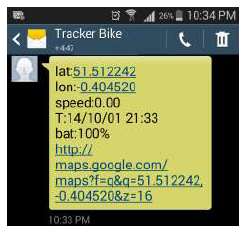
If you request your 103-RS's location when it does not have sufficient GPS signal, it will respond with a text message but will not contain any coordinates. Once it acquires enough GPS signal it will send another text message with its latest coordinates.
If the SMS position you have received from your 103-RS starts with "last", this means it does not have a current GPS fix and the position you have received is from the last location where it had a GPS fix.
Setup Guide for the Rewire Security 103-RS / 103-RS+ GPS Tracker
Setting up your Rewire Security 103-RS / 103-RS+ GPS Tracker is straightforward:
- Insert a compatible SIM card (2G/3G or 4G, depending on model) into the device.
- Connect the tracker to your vehicle’s power supply using the included harness.
- Power on the device and wait for the GPS and GSM indicators to stabilize.
- Download the official mobile app or access the web platform to register your device.
- Configure tracking intervals, geofencing, and alerts as needed.
- Test the connection and tracking functionality before final installation.
For optimal performance, ensure the device is installed in a location with clear GPS and GSM signal reception. Avoid dusty, humid, or high-temperature environments. If pairing issues occur, check SIM card compatibility and network coverage.
Troubleshooting Common Issues with the Rewire Security 103-RS / 103-RS+ GPS Tracker
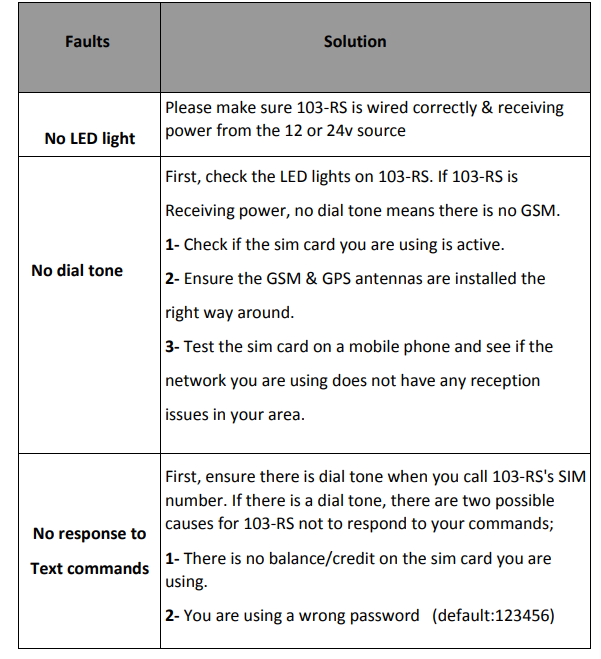
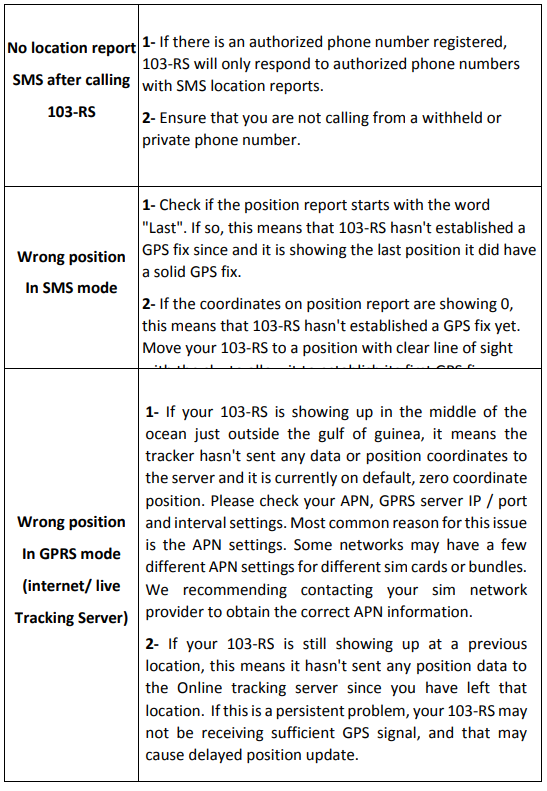
Preventive measures include regular firmware updates, proper installation, and periodic device checks. The manufacturer offers a 1–2 year warranty and technical support via email or phone for any unresolved issues.
Pros and Cons of the Rewire Security 103-RS / 103-RS+ GPS Tracker
Pros
- Reliable real-time tracking with high accuracy
- Remote immobilization feature (103-RS+)
- Easy installation and setup
- Robust build quality and weather resistance
- Competitive price for advanced features
Cons
- Requires an active SIM card and data plan
- Basic model (103-RS) lacks remote immobilization
- The app interface may require familiarization
The Rewire Security 103-RS / 103-RS+ GPS Tracker offers excellent value for money, especially for users needing advanced security and tracking features.
Customer Reviews for the Rewire Security 103-RS / 103-RS+ GPS Tracker
Users consistently rate the Rewire Security 103-RS / 103-RS+ GPS Tracker highly, with an average of 4.5 stars. Common praises include reliable tracking, easy installation, and responsive customer support. Some users mention occasional connectivity issues in remote areas, but overall satisfaction is high. Many recommend the 103-RS+ for its remote immobilization feature, making it a top choice for fleet and business applications.
Faqs
How do I set up the rewire security 103-RS / 103-RS+ GPS Tracker for the first time?
What should I do if the rewire security 103-RS / 103-RS+ GPS Tracker is not responding to SMS commands?
How can I program a remote keyfob to the rewire security 103-RS+ GPS Tracker?
What are the key features of the rewire security 103-RS / 103-RS+ GPS Tracker that enhance vehicle security?
Can the rewire security 103-RS / 103-RS+ GPS Tracker operate internationally, and what are the SIM card requirements?
How do I optimize the GPS and GSM signal reception for the rewire security 103-RS / 103-RS+ GPS Tracker?
How do I change or reset the password on my rewire security 103-RS / 103-RS+ GPS Tracker?
What maintenance steps should I follow to ensure the long-term performance of the rewire security 103-RS / 103-RS+ GPS Tracker?
More rewire security manuals
- Usage: Rewire Security E-Bike GPS Tracker User Manual
- Setup: Rewire Security 104 Pro GPS Tracker User Manual
- Setup: Rewire Security 102 Nano GPS Tracker User Manual
- Setup: Rewire Security GPS 303 Vehicle Tracking Device User Manual
- Setup: Rewire Security RX-1s Body Worn Camera User Manual
- Usage: Rewire Security SpyTrack Plus GPS Tracker User Manual
Leave a Comment