
Setup: Rewire Security 102 Nano GPS Tracker User Manual
Content
rewire security 102 Nano GPS Tracker
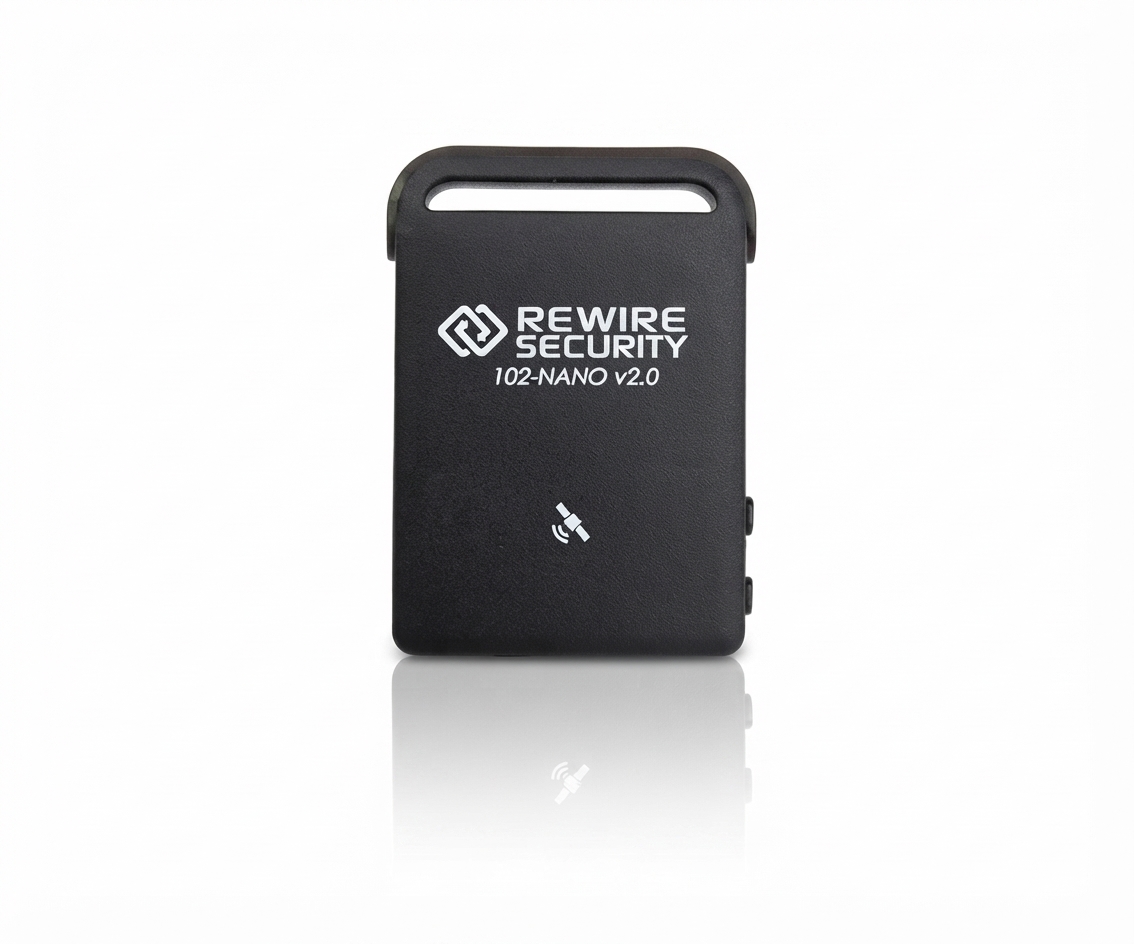
Introduction
The rewire security 102 Nano GPS Tracker is a compact, state-of-the-art tracking device designed to provide real-time location monitoring with pinpoint accuracy. Engineered for discreet and efficient asset tracking, it is ideal for personal safety, vehicle security, fleet management, and asset protection. Its ultra-small nano size allows it to be easily hidden in various environments, making it a versatile tool for both individuals and businesses seeking reliable security solutions.
Key benefits include live GPS tracking via a mobile app or web platform, long battery life, and multi-network GSM compatibility, ensuring consistent connectivity even in remote areas. The device supports geofencing alerts, historical route playback, and motion detection features. Its rugged design ensures durability, while simple setup and user-friendly controls make it accessible for all skill levels.
This tracker targets users such as parents monitoring children, vehicle owners preventing theft, logistics companies tracking shipments, and security professionals who need precise asset oversight. With an estimated price range of $70 to $120, the rewire security 102 Nano GPS Tracker offers competitive value and is widely available through online retailers and specialized security vendors.
Specifications of the rewire security 102 Nano GPS Tracker
- Dimensions: Approximately 4.5 x 3.0 x 1.0 cm (nano form factor)
- Weight: Around 30 grams for easy portability
- GPS Accuracy: Within 5 meters under open sky conditions
- Network: GSM/GPRS quad-band 850/900/1800/1900 MHz for global coverage
- Tracking Modes: Real-time tracking, interval tracking (configurable from 10 seconds to 10 minutes)
- Battery: Rechargeable lithium-ion battery, 800mAh capacity, providing up to 7 days standby time
- Features: Geo-fencing alerts, SOS emergency button, motion detection, historical route playback via app
- Connectivity: Supports SIM card installation with micro USB charging
- Compatibility: Accessible through Android/iOS apps and web-based platforms
- Durability: Water-resistant casing with temperature operating range -20°C to +65°C
Compared to similar nano GPS trackers like the Atlas GL300 or YB04 models, the rewire security 102 offers longer battery life and enhanced motion detection capabilities, making it suitable for extended monitoring without frequent recharging.
Hardware Description
Keep track of your family members, employees or anyone you need to monitor, with the 102-Nano GPS tracker from Rewire Security, one of the smallest GPS tracking devices available in the market to this date. Even with its small compact design, the 102-Nano does not lack on function or features, with the ability to track by turn or distance with updates from as little as every 10 seconds.
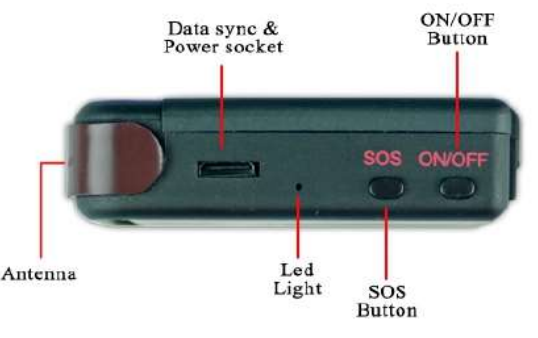
Side
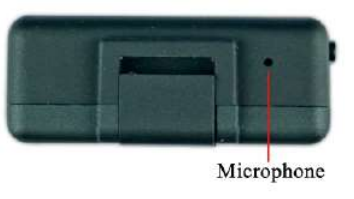
Bottom
Front
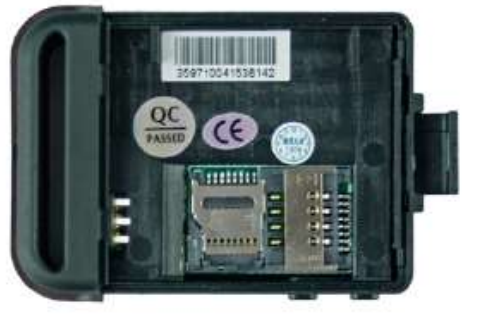
Interior
Usage
SIM Card Installation
- Please make sure that your SIM card is activated and PIN code request is disabled, the tracker won’t be able to enter a PIN code. If you are using a free contract SIM card and would like to use the 102-NANO via GPSLive GPS tracking platform, you may need to contact your SIM card network to check if your internet data access is active.
Steps for installation:
- Open the rear cover and remove the battery.
If you intend to use GPS Data logging to an SD CARD, please insert a Micro SD Card to the slot as seen in the guide picture below. If not, you can move on to the next step.
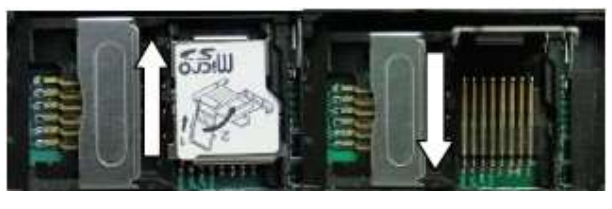
Insert the Standard SIM card into the SIM card holder tray. Please note that Micro and Nano SIM cards are not supported.

Battery and Charger
The battery should be charged between 8 - 12 hours before first use. Please use the battery charging cradle provided with the 102-Nano. The battery charging cradle is located under the soft pads holding the GPS unit in the package. This tracker uses built-in Li-ion battery technology, and a fully charged battery can power the 102-NANO from 16 hours up to 10 days depending on usage and standby mode. After the first use, the battery should be charged for 2-4 hours every time.
Warning: Do not puncture, heat or modify li-ion batteries. If at any time you notice a battery starting to get hot or swell up, stop the charging process immediately. Improper usage of Li-ion batteries and high temperature may cause the battery to explode.
Startup
- Please make sure to use your 102-NANO outdoors as GPS technology will not work accurately indoors. (GPS signals do not penetrate walls)
- Turn on the unit by pressing the “on/off” button until the indicator is on.
- In 10 to 40 seconds the device will begin to work and acquire GPS and GSM signals. The indicator will keep flashing frequently when it is searching for GSM signal.
- Once GSM and GPS connection is established, the LED light will start flashing less frequently.
- Please note – The default password for 102-NANO is ‘123456’
- Note: While reading the set-up commands, you will notice that some words are separated by + or space. “+” means two words should be written without a space, as one word. “Space” means there should be a space between two words. e.g. reset+123456 means the command you should send to the tracker is “reset123456”
- sleep+123456+space+shock means the command you should send to the tracker is sleep123456 shock (there is a space between 6 and shock)
Setup Guide for rewire security 102 Nano GPS Tracker
- Insert SIM Card: Open the device's SIM card slot using the included tool, and insert a GSM SIM card with an active data plan.
- Charge the Device: Fully charge the tracker using the provided USB cable before first use to ensure optimal battery performance.
- Power On: Press and hold the power button until the indicator LEDs light up, signaling the device is active.
- Configure Tracking Settings: Using the proprietary mobile app or web platform, enter the device IMEI and configure tracking intervals, geofence zones, and alert preferences.
- Pair Device: Sync the tracker with your smartphone via the app using the IMEI or QR code to enable real-time tracking and notifications.
- Installation: Place or secure the device discreetly on the asset or person to be tracked, ensuring GPS signal reception is unobstructed.
Troubleshooting Tips: If the device does not respond, verify SIM card activation and network signal strength, ensure the battery is charged, and double-check app configurations. Reset the tracker by holding the power button for 10 seconds if needed.
Safety Precautions: Do not expose the device to extreme moisture or temperatures outside the operational range. Avoid tampering with internal components to prevent damage or voiding warranty.
Troubleshooting the rewire security 102 Nano GPS Tracker
- Problem: No GPS signal or inaccurate location
Solution: Ensure the tracker is placed in an open area with a clear view of the sky. Restart the device and check GPS indicator LED. - Problem: Device not connecting to the network
Solution: Confirm SIM card is active with sufficient data balance and inserted correctly. Verify GSM indicator LED status. - Problem: App not showing real-time updates
Solution: Check internet connection on the smartphone, re-login to the app, and confirm device pairing with correct IMEI. - Error Codes: Common SMS error responses include 'Invalid password' or 'SIM not found'—reset password via SMS commands or reinsert SIM.
- Preventive Measures: Regularly update device firmware via the app, keep SIM card topped up, and avoid physical damage.
Warranty & Support: The product includes a standard 1-year warranty covering manufacturing defects. For assistance, contact customer support via email support@rewiresecurity.com or phone +1-800-555-1020.
Pros & Cons of the rewire security 102 Nano GPS Tracker
- Pros:
- Ultra-compact nano size enables discreet placement
- Excellent battery life up to 7 days standby
- Multi-network GSM compatibility ensures global use
- Feature-rich with SOS button, geofencing, and motion alerts
- Accessible via intuitive mobile app and web platform
- Cons:
- Requires separate GSM SIM card and data plan
- Setup may be challenging for users unfamiliar with GPS tracking technology
- No built-in SIM card included, adding to initial cost
- Limited water resistance—avoid submersion
In comparison to alternatives like the Atlas GL300, the rewire security 102 offers better battery endurance but lacks some advanced integration features like vehicle diagnostics. Still, it provides excellent value for money for personal and fleet tracking needs.
Customer Reviews of the rewire security 102 Nano GPS Tracker
Users consistently praise the rewire security 102 Nano GPS Tracker for its compact design and reliable real-time tracking. Many highlight the long battery life and ease of use through the mobile app as major advantages. One verified buyer noted, "The nano size allowed me to track my motorcycle discreetly without affecting aesthetics."
Common complaints include initial SIM card setup complexity and occasional GPS signal loss in dense urban areas. Ratings average around 4.4 out of 5 stars, with customers recommending it for asset protection, child safety, and small vehicle tracking. Overall, repeated recommendations stress its strong performance and competitive pricing as key purchase drivers.
Faqs
How do I set up the rewire security 102 Nano GPS Tracker for the first time?
What should I do if my rewire security 102 Nano GPS Tracker is not sending location updates?
How can I activate and customize the movement alert feature on the rewire security 102 Nano GPS Tracker?
Can the rewire security 102 Nano GPS Tracker be used with both vehicles and personal items?
What are the recommended maintenance practices for the rewire security 102 Nano GPS Tracker?
How does the over-speed alarm work on the rewire security 102 Nano GPS Tracker and how do I configure it?
Is the rewire security 102 Nano GPS Tracker compatible with smartphones and PC software?
What troubleshooting steps can I follow if the rewire security 102 Nano GPS Tracker is stuck in deep sleep mode?
More rewire security manuals
- Setup: Rewire Security RX-1s Body Worn Camera User Manual
- Usage: Rewire Security E-Bike GPS Tracker User Manual
- Setup: Rewire Security RX-5 V2 Body Worn Camera User Manual
- Setup: Rewire Security 103-RS / 103-RS+ GPS Tracker User Manual
- Usage: Rewire Security RX-3LITE v2 Body Worn Camera User Manual
- Setup: Rewire Security 104 Pro GPS Tracker User Manual
Leave a Comment