
Usage: Rewire Security RX-3LITE v2 Body Worn Camera User Manual
Content
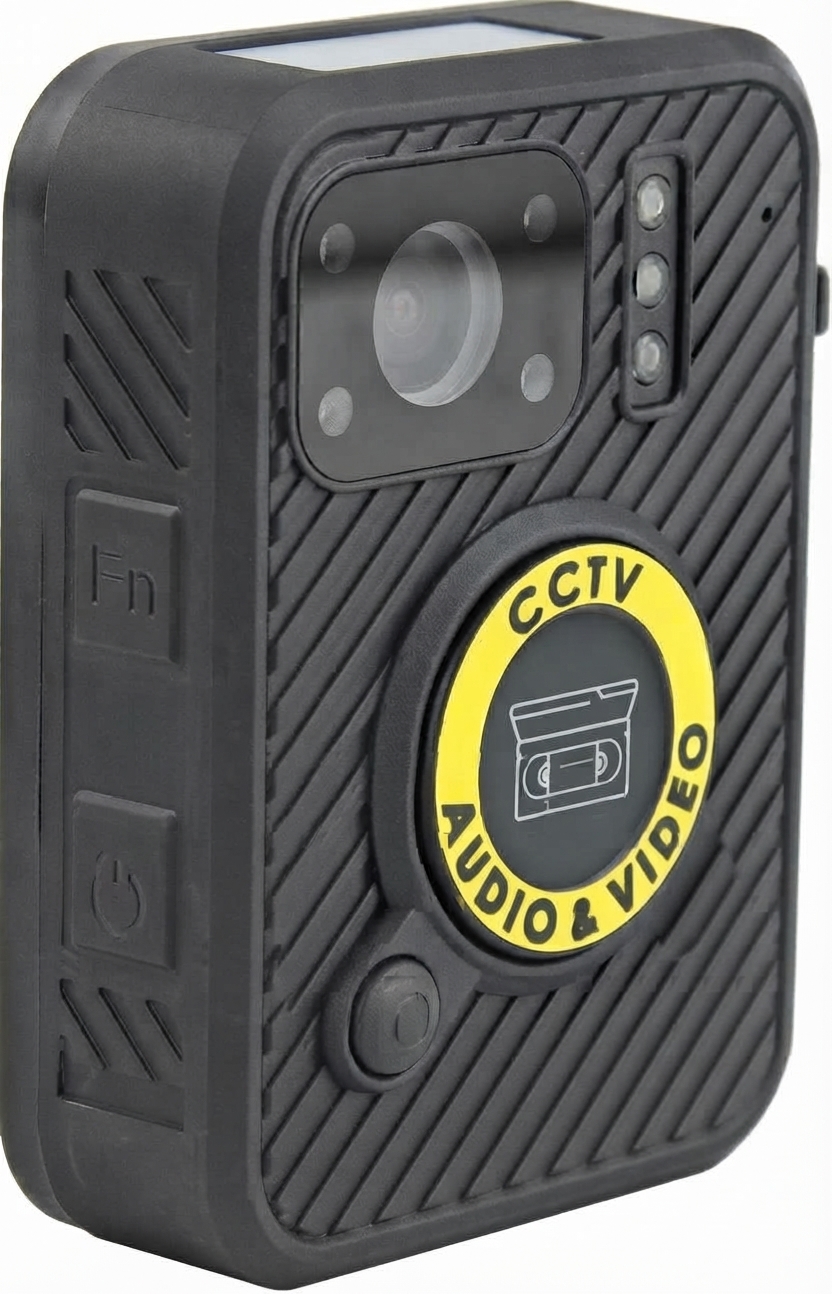
Rewire security RX-3LITE v2 Body Worn Camera
Introduction
The rewire security RX-3LITE v2 Body Worn Camera is a state-of-the-art wearable video recording device designed to enhance security, accountability, and evidence collection for professionals in law enforcement, security services, and private investigations. This compact, durable camera delivers high-definition recording with advanced features tailored for demanding environments, offering clear video and audio capture even in low-light conditions.
Key benefits include real-time video streaming, extended battery life, and rugged weather-resistant construction. The RX-3LITE v2 integrates intelligent features such as motion detection, encrypted data storage, and wireless connectivity for seamless evidence management and quick data transfer. Its ergonomic design ensures comfortable all-day wear, making it ideal for patrol officers, security personnel, and field agents.
Available through authorized security equipment distributors, the RX-3LITE v2 Body Worn Camera retails approximately in the $400-$600 price range, depending on configurations and purchase volume. With its robust capabilities and competitive pricing, it offers a practical solution for organizations seeking reliable, easy-to-use body cameras for daily operational use.
Specifications of the rewire security RX-3LITE v2 Body Worn Camera
- Recording Quality: 1440P, 1080P, 720P, 480P (H.265, MPEG4)
- Casing: Toughened ABS Plastic casing, Weatherproof IP65 Rated
- Memory: 32GB Built-in (Anti Tamper)
- File Split Time: Adjustable Between 3, 5, 10, 15, 30 minutes
- Recording time: 480P 13-14 hours
- 720P 8 - 9 hours
- 1080P 5 - 6 hours
- Charge time: 4 - 6 hours
- Connectivity: USB 2.0 (Data Download & Charging)
- Working temperature: -10°c - +60°c@ max 95% humidity (non condensing)
- Dimmensions: 75mm x 55mm x 22mm
- Weight: 125G
- Compliance: CE, RoHs
- Mount Options: Klickfast Dock Ready, Rotating Spring Loaded Clip. Klickfast Garment Mount (Included)
- Other Features: Time & Date Stamp, Device ID, GPS coordinates embeded into Video. Vibration Feedback, Audio Feedback, Record Indicator, One Touch Record From OFF, Custom Camera ID, User ID, GPS logging.
Charging
The camera should only be charged using the cable and charger supplied with your camera. We recommend charging the camera using the supplied charging dock. To charge the camera place the unit into the charging dock with the USB cable and plug connected. The charging status LED will come on the green while charging and charge to white once fully charged.
A full charge can take up to 5 hours depending on the camera's batteries current charge state.
Note - It is recommended to charge the camera before use and long periods of storage.
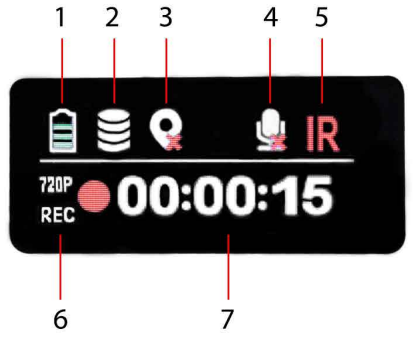
LCD Status Screen.
- Battery Status-
- Memory Status
- GPS Status
- Silent Mode enabled
- IR Night-vision enabled
- Recording Resolution
- Time & Date/Record Status
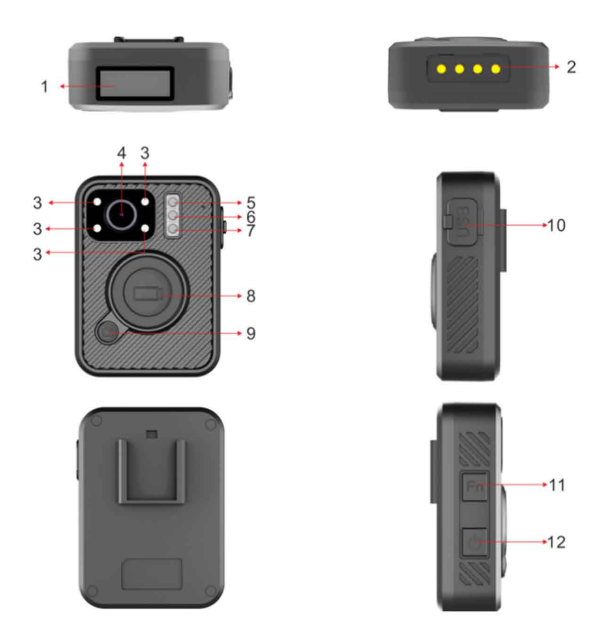
- Charging Data Sync Dock Connections.
- Night Vision LEDs. Infra-red night vision LEDs for operation of the camera in low light conditions.
- Camera Lens. Wide angle full HD camera lens
- Light Sensor. Used to automatically enable night-vision in low light levels.
- Charging Status LED. Blue: Charging, White: Fully Charged
- Operation Status LED.
Solid Green: Standby. (switched on and ready to record). Solid Red: Pre-record mode active
Flashing Red: Video recording in progress. - Record Button.
Start Recording: Press Once.
Stop Recording: Press and hold for 3 seconds.
Switch on and Record: Press and hold while switched off. - Snapshot Button.
Capture Still Image: Press Once.
Enable/Disable Covert Mode: Press and hold for 3 seconds. - USB Port & Reset Button.
USB socket for charging and downloading recorded data from the camera without the need of the dock.
Only use the official cable supplied with the Body Worn Camera. - FN Button
Press Once: To activate/deactivate Infra-red night vision when set to manual mode.
Press Twice: To activate/deactivate silent operation mode. - Power Button
To switch the camera on or off press and hold for 3 seconds.
Audible Voice Alerts
The camera is able to give audible alerts for the following scenarios
- Recording Started
- Recording Stopped
- Low Battery
- Full Memory
These can enabled/disabled by pressing the FN button twice.
Device Reset.
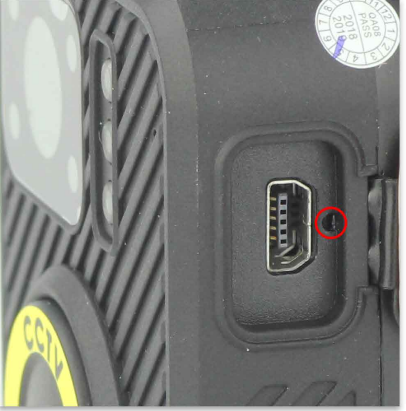
In the unlikely event your camera becomes unresponsive please perform a device reset by gently pressing the cameras reset button found under the trackers USB socket on the side of the camera. The reset button should be pressed with a thin blunt tool for 3-5 seconds and then released. The camera will switch off now press the power switch for 3 seconds to switch the camera back on again.
Software Installation
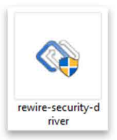
The latest version of the software for the RX3-Lite v2 is available . Navigate through the downloads menu and find 'Digital Evidence Management Software'. Once downloaded, extract the rewiresecurity.exe file on to your computer's desktop. Once done, follow the steps below to install the camera software.
Note: The RX3-Lite v2 is not Mac compatible

- Double click the newly downloaded rewiresecurity.exe installation file to start the camera software installation.
- The application installer will check if the necessary framework is installed on your computer. If you are prompted to install '.NET Framework' please install it before you proceed with the camera install installation. The installation can take a few minutes. Once complete, please rerun the rewiresecurity.exe to proceed.
- If prompted about an 'unknown application' click Yes/Ok to continue. The camera software will be automatically installed on your system.
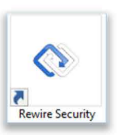
You can find a shortcut to the application on your desktop.
Downloading Data & Configuration
To download recorded data and configure the RX3-Lite body worn camera please follow the steps below.
- Connect the camera to your computer while switched OFF using the supplied dock and USB cable.
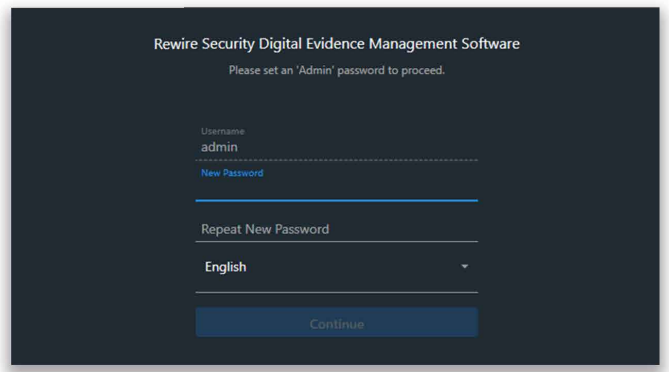
Once connected, the camera will switch on and play a start-up tone. Open the 'Rewire Security' software, the software will detect the camera and then you'll be asked to create a password for your Rewire Security software account.
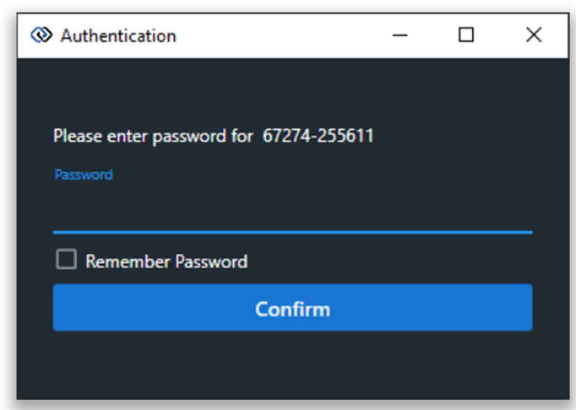
You will be prompted to enter the camera's password. The default password is 000000. Once entered, click 'login'
Once logged in, you will be able to access the dashboard which shows the camera connected, it's media storage and settings.
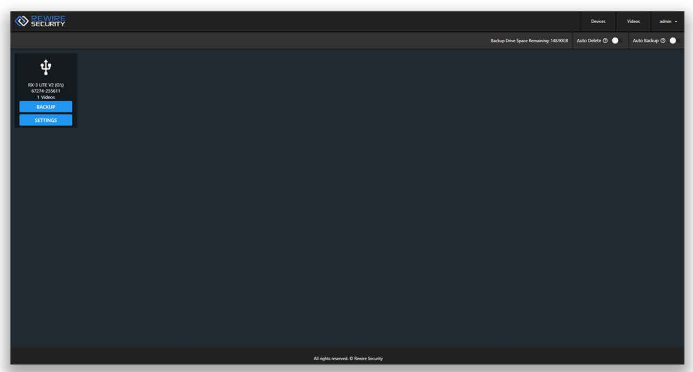
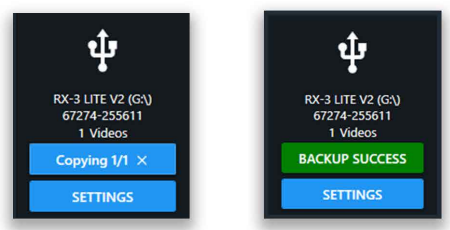
To view the camera media, you will need to first backup the media onto your Rewire Security software by pressing 'Backup'. Once this has completed, a message will display'Backup Success'.
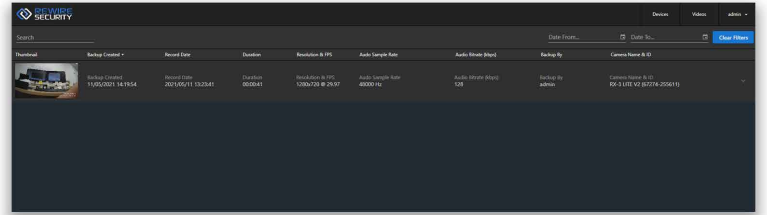
Next, to access the backed up media, click on the 'Videos'tab in the top right of the page. This will show you all media. From here you can edit, export and manage your footage.
You can access the device settings by click on 'Settings' of the connected device on the device page. You will be prompted to disconnect the device for 5 seconds and reconnect in order to access configuration mode.

Once you have done this, you will be greeted by the settings menu for the connected device. Here you can access the camera settings, time settings and change the password of the device.
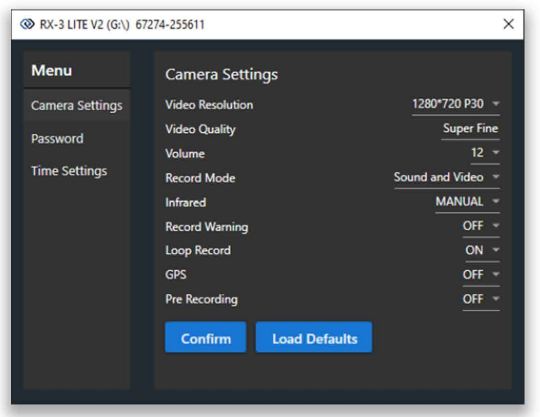
- Video Resolution: Set the video resolution the camera records in
- Video Quality: Set the sharpnes of the recorded video.
- Volume: Set the volume of the camera internal speaker.
- Record Mode: Select the type of recording, Sound+ Video or Video only
- Infrared: Toggle between automatic and manual infared
- Record Warning: Turn ON/OFF audible alerts for recording.
- Loop Record: Turn on loop record to allow the camera to overwrite recordings when full.
- GPS/Glonass: Turn ON/OFF GPS location logging.
- Video Split Time: Set the time for how often the camera splits video files during continous recording
- Time Zone: Set the GMT time zone the camera is being used in.
- Example: Time Zone 1 for British summer time.
- Pre Recording: Set camera to consantly record in segments, record button saves last segment
- Once finished, click'Save and Exit'to save changes or'Exit'to close without
Notes of use
- Always safely eject the camera before disconnecting from Computer.
- Always download and backup data between uses.
- Never place the camera on or near strong magnetic fields.
Troubleshooting Common Issues with the rewire security RX-3LITE v2 Body Worn Camera
- Camera Won't Power On: Check battery charge level; recharge fully. Perform a hard reset if needed.
- Recording Stops Unexpectedly: Confirm available storage space. Delete unnecessary files or expand storage.
- Wi-Fi Connection Fails: Reset network settings in the app. Ensure correct password and proximity to router.
- Error Codes: E101 indicates low battery; recharge immediately. E202 signals file system corruption; run device repair via desktop software.
- Preventive Measures: Regularly update firmware, avoid dropping the device, and store in a dry place.
- Warranty & Support: The RX-3LITE v2 includes a 12-month warranty covering manufacturing defects. Contact rewire security customer service or call 1-800-555-REWIRE for assistance.
Pros and Cons of the rewire security RX-3LITE v2 Body Worn Camera
Pros:
- High-Quality Video: Full HD recording ensures clear evidence capture.
- Long Battery Life: Up to 12 hours supports extended shifts without recharging.
- Robust Build: IP67 rating guarantees performance in harsh environments.
- Wireless Connectivity: Wi-Fi and Bluetooth ease data transfer and live monitoring.
- Ease of Use: Intuitive app and ergonomic design enable quick deployment.
Cons:
- Price Point: Slightly higher cost compared to entry-level models, which may be a barrier for budget-restricted buyers.
- Storage Limitations: Internal memory might require frequent offloading in high-usage scenarios unless expanded with microSD.
- Learning Curve: Some users report initial complexity navigating advanced settings in software.
Overall, the rewire security RX-3LITE v2 offers excellent value for money in the mid-range body camera market, balancing performance, durability, and advanced features.
Customer Reviews and Feedback on the rewire security RX-3LITE v2 Body Worn Camera
Users consistently praise the rewire security RX-3LITE v2 Body Worn Camera for its reliability and clear video quality, with an average rating of 4.5 out of 5 stars across security forums and retail platforms. Many highlight the long battery life as a game-changer for extended duty shifts, emphasizing that it outperforms many competitors in endurance.
Common compliments focus on the device’s durability and ease of mounting, making it comfortable and practical for daily wear. Some complaints mention occasional Wi-Fi connectivity hiccups and a learning curve with the mobile app interface, but these are often resolved through firmware updates and support.
Security professionals recommend the RX-3LITE v2 for patrol, event security, and investigative work, noting its efficient evidence management features. It is considered a trustworthy investment for organizations seeking robust body cameras with advanced connectivity and recording capabilities.
More rewire security manuals
- Setup: Rewire Security RX-3 Pro Body Worn Camera User Manual
- Setup: Rewire Security RX-5 V2 Body Worn Camera User Manual
- Setup: Rewire Security RX-2S V4 Body Worn Camera User Manual
- Setup: Rewire Security RX-1s Body Worn Camera User Manual
- Setup: Rewire Security RX-2S V2.0 Body Worn Camera User Manual
- Setup: Rewire Security 102 Nano GPS Tracker User Manual
Leave a Comment