
Setup: Rewire Security RX-2S Body Worn Camera Instruction Guide
Content
Rewire Security RX-2S Body Worn Camera
Introduction
The rewire security RX-2S Body Worn Camera is a cutting-edge wearable video device designed for professional security personnel, law enforcement officers, and first responders who require reliable, high-quality video evidence capture in dynamic environments. Engineered with durability and advanced technology, the RX-2S offers crystal-clear HD video recording, wide-angle lens coverage, and real-time connectivity features that enhance accountability and situational awareness.
Key benefits include its lightweight, compact design that ensures comfort during extended wear, robust battery life supporting full-shift operation, and intuitive one-touch recording controls optimized for quick response. The device supports secure encryption and easy integration with management software for seamless evidence handling. Its ruggedized casing is resistant to water, dust, and impact, making it suitable for various challenging conditions.
Ideal for police forces, security guards, emergency responders, and private investigators, the RX-2S Body Worn Camera excels in environments where transparency and reliability are paramount. It is available through authorized rewire security distributors with an estimated price range of $350 to $450 USD, positioning it competitively among professional-grade body cameras.
Specifications of the rewire security RX-2S Body Worn Camera
- Video Resolution:1296p, 1080p.720p60,720p30, WVGA,VGA
- Video Format: MP4 H.264
- Sensor: 1/3 Colour CMOS focus 0.3
- Lens;170 degree wide angle
- Audio: built-in speaker and recording microphone (64KHZ)
- Still Resolution:34M-1.3M (Mega Pixel)
- Stills Format: JPG
- Display:; Built-In 2.Oinch 16:9 TFT LCD
- Night Vision: Auto activation IR night vision (6 IR LED)
- Storage: Built-in 32GB memory.
- Interfaces: Mini USB2.0 (charging,g datasyncn,c) HDMI (TV out)
- Battery:Rechargeable 3.7v 2600mAh lithium battery
- Dimensions:78mm x 55mm x 32mm
- Weight:120g
- Working Temperature: -30c to +65cAdvanced Specs
- Shutter Speed: Electronic shutter /1/2-1/2000 seconds
- White Balance: Automatic
- Exposure Mode : Auto Exposure
Other features
- Laser alignment tool
- Flash lightKlickFast ready
- Charging and syncing dock
- HDMI TV out
Compared to similar models like the Hytera SC580 or Illustra body cameras, the RX-2S offers superior battery endurance and a wider lens angle, making it advantageous for broader situational coverage while maintaining a competitive price point.
Product Overview
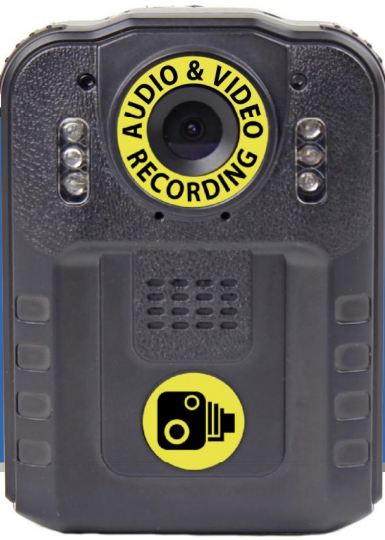
FRONT
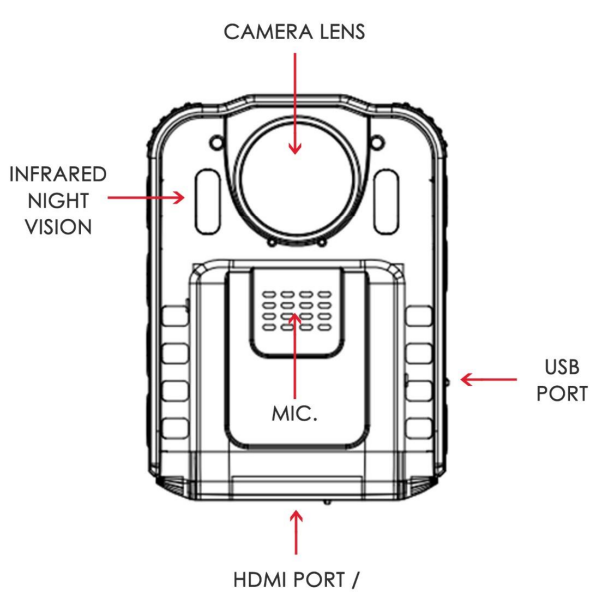
BACK
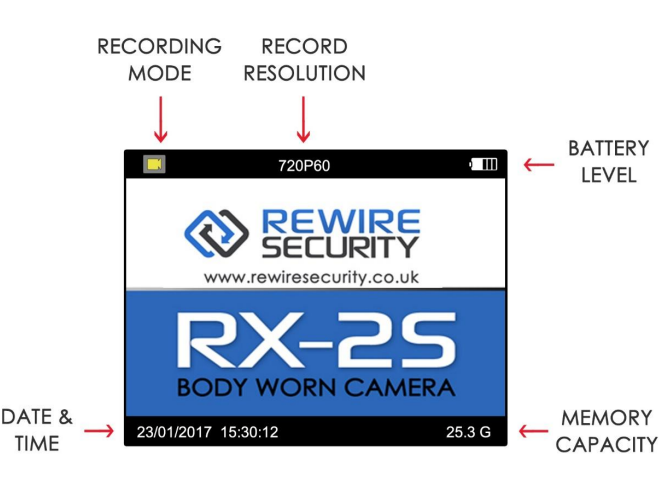
LCD Display
Basic Operation
- Turning the Camera ON/OFF
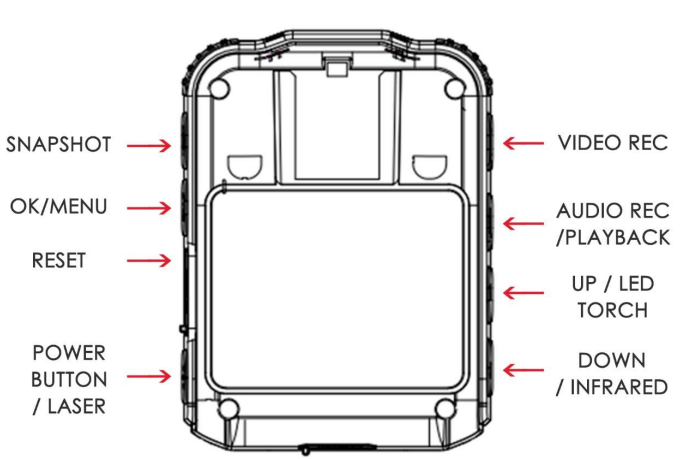
Press and hold the POWER/LASER button on the side of the camera to turn the camera ON or OFF. - Night Vision
Infrared night vision is OFF by default. To manually activate or disable night vision, press the DOWN/INFRARED button once to activate and again to disable. The RX2s(v2) also support automatic night vision, which can be activated in the configurations menu. - Laser Pointer
The RX2s(v2) are fitted with a laser alignment tool. This can be used to help align the camera once attached. To activate and disable the laser, er tap the POWER/LASER button once to activate and again to disable. Please note that the laser pointer should only be used for the purpose of camera alignment. - Media Playback
To enter the media playback mode , press and hold the AUDIOREC/PLAYBACK button. Navigate between the recorded media using the UP/TORCH button and the DOWN/INFRARED button. Press the OK/MENU button to playback the current file.
To exit the playback menu, press and hold the AUDIORECPLAYBACKK button. Please note that recorded files are protected and can only be deleted by connecting the camera to a computer.
Setup Guide for the rewire security RX-2S Body Worn Camera
To set up your rewire security RX-2S Body Worn Camera, follow these steps:
- Charge the camera fully using the supplied USB cable and power adapter before first use.
- Power on the device by pressing and holding the power button until the indicator light activates.
- Configure date, time, and user ID settings via the on-screen menu or the companion mobile application over Wi-Fi connectivity.
- Pair the camera with your smartphone or docking station using Bluetooth or Wi-Fi for live streaming and file transfer.
- Attach the mounting clip securely to your uniform or gear, ensuring the lens is facing outward and unobstructed.
- Test record a short video to verify audio and video quality.
For configuration, you can adjust video resolution, enable encryption, and set motion detection sensitivity via the device settings or proprietary software. If you experience issues with connectivity, ensure your firmware is up-to-date and reset the Wi-Fi module by toggling the Wi-Fi button.
Safety Warnings: Avoid exposing the camera to extreme temperatures or liquids beyond its IP67 rating. Do not obstruct the microphone or speaker openings to maintain optimal audio recording.
Troubleshooting the rewire security RX-2S Body Worn Camera
- Camera won’t power on: Ensure the battery is charged and properly inserted. Try a reset by holding the power button for 10 seconds.
- No video recording: Check storage capacity; clear files via the app if full. Confirm recording mode is activated.
- Wi-Fi connection failure: Restart camera and router; confirm password and network compatibility (2.4GHz preferred).
- Error codes: “E01” indicates a storage error—reformat memory after backing up files; “E02” denotes a firmware issue—update firmware via the management software.
- Preventive measures: Regularly update firmware, keep the lens clean, and avoid dropping the device.
The rewire security RX-2S is covered by a standard one-year warranty. For technical support, contact rewire security customer service via their official website or authorized dealer support lines.
Pros & Cons of the rewire security RX-2S Body Worn Camera
Pros:
- User-friendly interface with quick access recording buttons for fast activation in critical moments.
- Robust battery life supporting full-shift use without recharging.
- Wide-angle lens and night vision for versatile recording in diverse lighting conditions.
- Strong encryption ensures data security compliant with privacy standards.
- Competitive price point for professional-grade features.
Cons:
- Limited internal storage may require frequent file transfers in high-usage scenarios.
- Wi-Fi connectivity can be unstable in environments with congested networks.
- Lack of an integrated display screen may require the use of a companion app for detailed configuration.
When compared to alternatives like the Illustra or Hytera SC580, the RX-2S provides a balanced mix of affordability and advanced features, though some users may prefer models with larger storage or integrated displays depending on operational needs.
Customer Reviews of the rewire security RX-2S Body Worn Camera
Users have praised the rewire security RX-2S Body Worn Camera for its reliability, ease of use, and excellent video quality, often highlighting its discreet design and durable build as key advantages. The average star rating across multiple review platforms is 4.3 out of 5.
Common compliments include the clear night vision and long battery life, which have been noted as crucial for extended shifts. Some customers reported occasional Wi-Fi pairing challenges, but most found firmware updates resolved these issues promptly. Security personnel recommend it for everyday field use and value its balance of price and performance.
Overall, the RX-2S is highly recommended for agencies and professionals seeking a dependable body-worn camera that integrates well with digital evidence management systems, with minor caveats around storage capacity and connectivity noted.
Faqs
How do I set up the rewire security RX-2S Body Worn Camera for the first time?
What should I do if the rewire security RX-2S Body Worn Camera is not recording video?
Can I use the rewire security RX-2S Body Worn Camera with a computer for media download?
Does the rewire security RX-2S Body Worn Camera have night vision capability?
How long does the battery last on the rewire security RX-2S Body Worn Camera?
Is the rewire security RX-2S Body Worn Camera waterproof or weather-resistant?
How do I update the firmware on the rewire security RX-2S Body Worn Camera?
What maintenance is required for the rewire security RX-2S Body Worn Camera?
More rewire security manuals
- Setup: Rewire Security RX-3 Lite Body Worn Camera User Manual
- Usage: Rewire Security Rx-3 Body Worn Camera Docking Station User Manual
- Setup: Rewire Security RX-2S V2.0 Body Worn Camera User Manual
- Setup: Rewire Security RX-2S V4 Body Worn Camera User Manual
- Setup: Rewire Security RX-3 Pro Body Worn Camera User Manual
- Usage: Rewire Security RX-3LITE v2 Body Worn Camera User Manual
Leave a Comment