
Startup: Samsung 32 Inch Smart TV T5300 Instruction Manual
Content
Samsung 32 Inch Smart TV T5300
Introduction
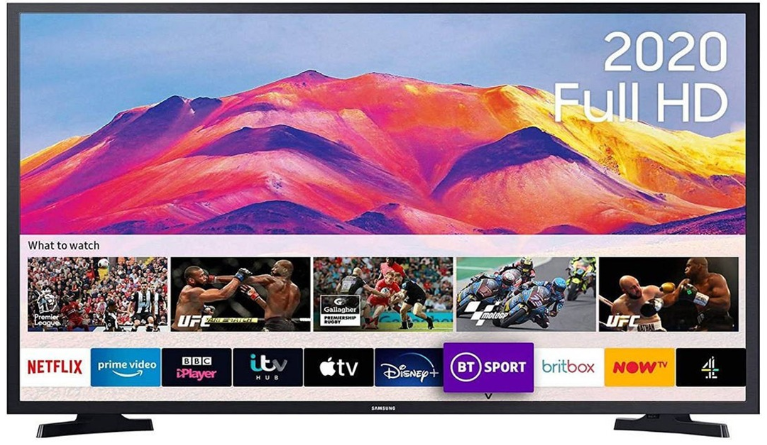
The Samsung 32 Inch Smart TV T5300 is a versatile and feature-rich television designed to enhance your viewing experience. Launched in recent years, this TV is part of Samsung's T5300 series, which focuses on delivering high-quality visuals and smart features at an affordable price. The estimated price for this model is around $250-$300, making it an attractive option for those looking to upgrade their home entertainment setup without breaking the bank.
This TV is ideal for small to medium-sized rooms and can be used for a variety of purposes, including watching movies, streaming content from services like Netflix and Hulu, playing games, and even using it as a computer monitor. With its sleek design and slim profile, it fits seamlessly into any living space.
The T5300 series is known for its user-friendly interface and extensive connectivity options, ensuring that you can easily connect your devices and access a wide range of apps and content.
What's in the box:
- TV
- Stand & Stand fixing Screws ((ST4 x 12) x 4)
- Power cable
- Remote control
- Batteries (2 x AAA)
- Quick start guide
- Warranty card
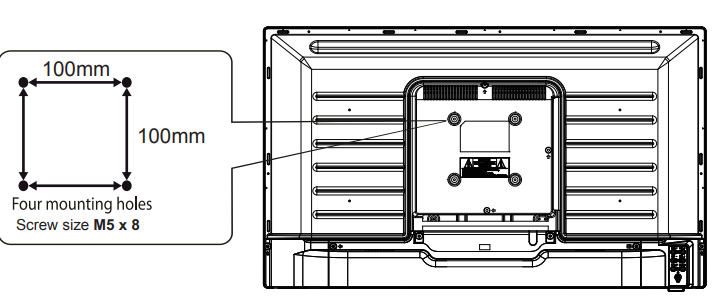
Wall mounting:
This TV is isVESA-compliantt and has been designed to be wall-mounted with a VESA-compliant wall mounting kit. (Wall mounting kit and screws not included)
Front IR sensor and TV buttons


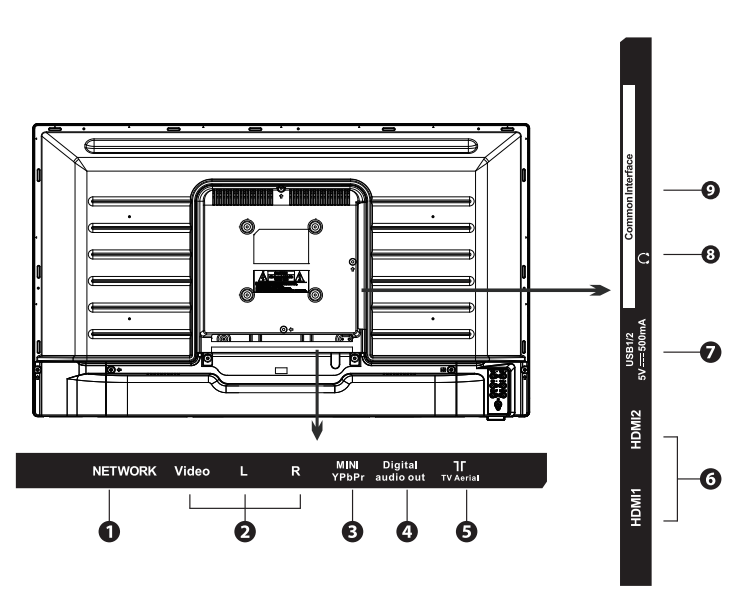
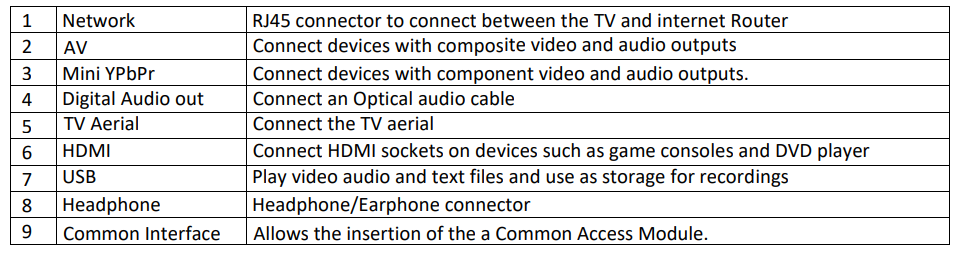
Rear View and Connections
Remote control
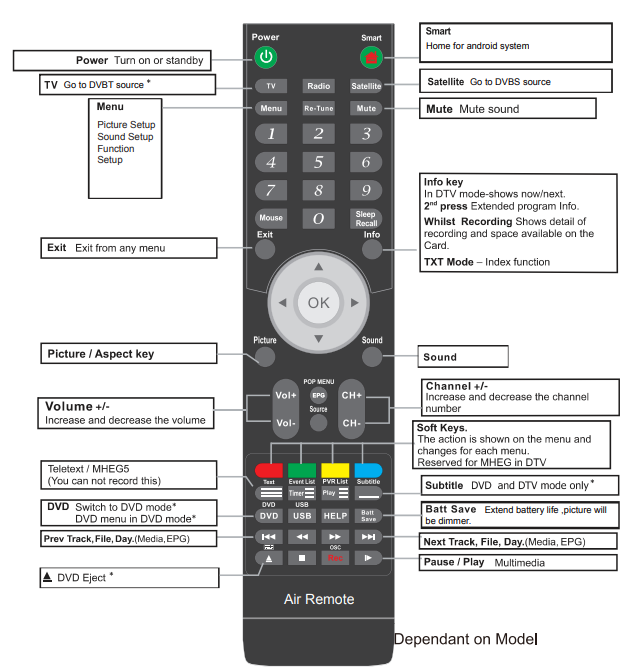
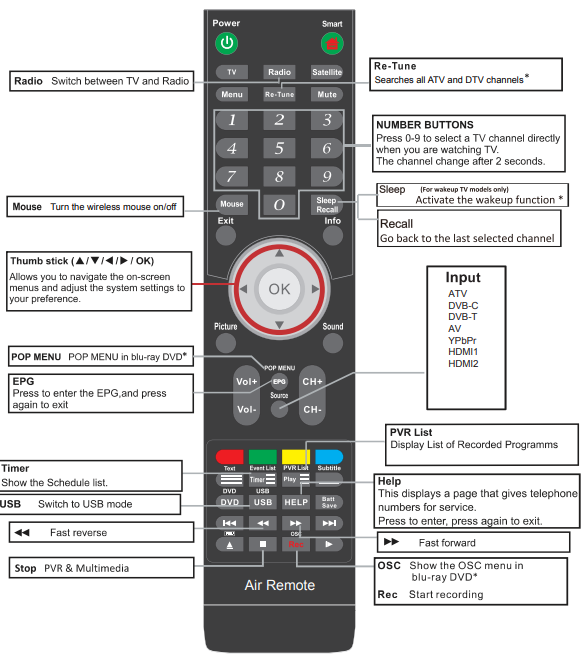
Setup
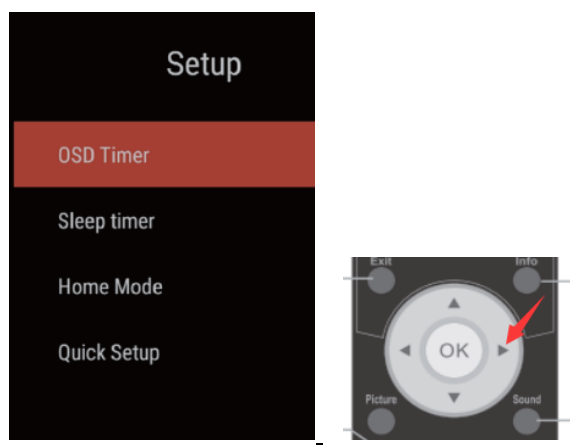
To navigate all menus, use the up/down/left right navigation keys on the remote control. Press the EXIT key on the remote control to return to the previous menu.
- OSD Timer: Select options of the duration the menus remain on screen from 10s/20s/30s/40s/50s/60s/Off
- Sleep Timer: The TV will automatically go to standby if the sleep timer is set. Select from options Off/15min/30min/60min/90min/120min/180min
- Home mode: Select from Home/Max Brightness
- Quick Setup: Reset the TV for TV tuning
Smart Features (Launcher screen)
Launcher screen
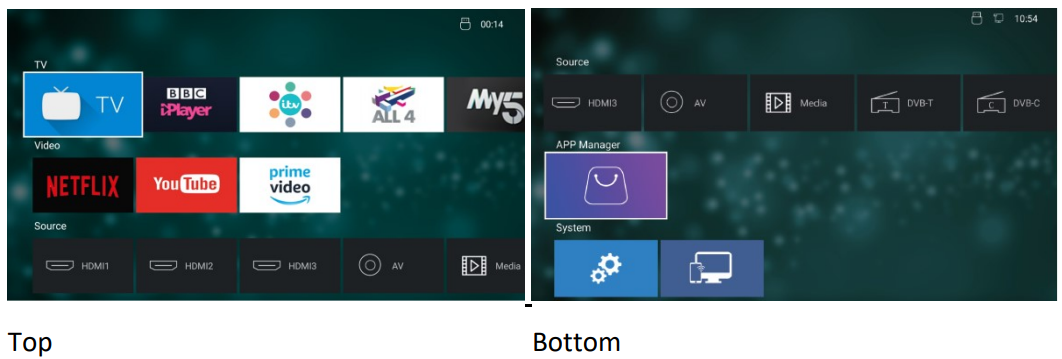
The TV on demand apps and streaming apps are listed in the top two rows.
TV apps: BBC iPlayer, ITV Hub/All4/MUKTV Play
Streaming apps: Netflix/YouTube/AmaPrimerime Video
The apps are not pre-installed , and you will need to install them by simply highlighting the app you want to install and pressing the OK key on the remote control. Press the OK key again to activate the download. The app will then download and install automatically.
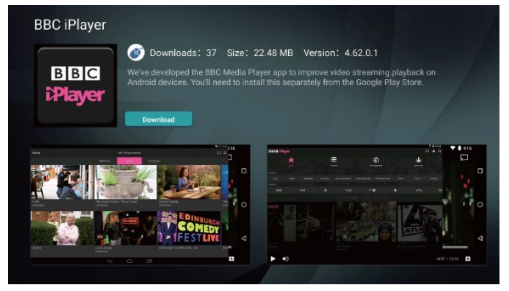
App manager
The app manager is on the 4th row down and shows you what apps are installed and if any app updates are available.
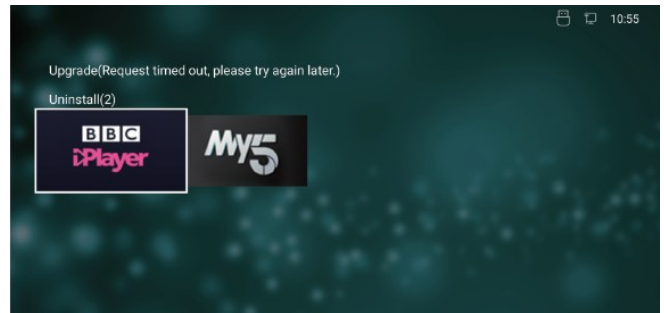
In this folder is also the option to uninstall any app. Uninstall by highlighting the app and pressing the OK key on the remote control. Select OK to uninstall.
If any updates are available, they will be in the app manager. If you find that an app is not opening on the home screen, please check the app manager for any updates.
To activate Netflix or Prime Video,o you will need to have a Netflix and or an Amazon account with login details (user name and password)

YouTube will function normally, but it is not possible to sign in to a Google account.
TV App
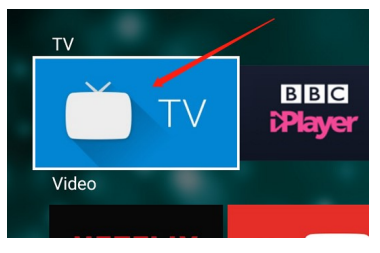
The TV is a direct link to your television channels.
Screen Mirroring
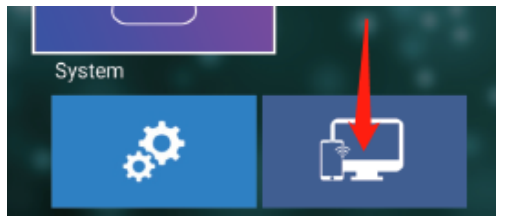
Highlight the Screen mirroring app, then press the OK key on the remote control to activate.e Now you can cast phones/laptops/Tablets to the big screen.
Note: The device and the TV must be connected to the same WIFI source
System settings
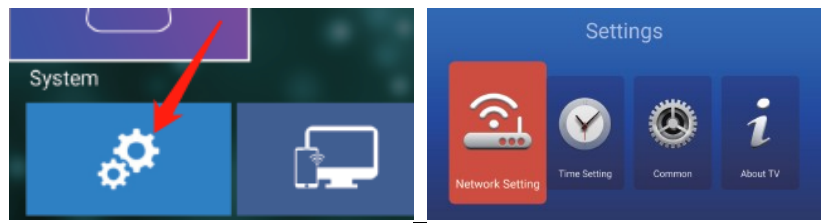
Highlight and press OK on the remote control to activate system settings
Network Settings
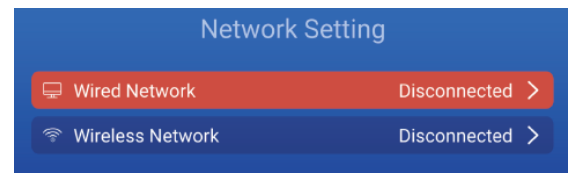
Highlight and select with the OK key on the remote control to open the wired and WIFI network settings.
Time Settings
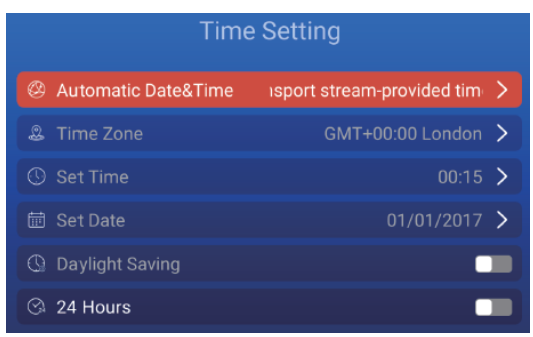
Highlight and select with the OK key on the remote control each option to set your preferences.
Common settings
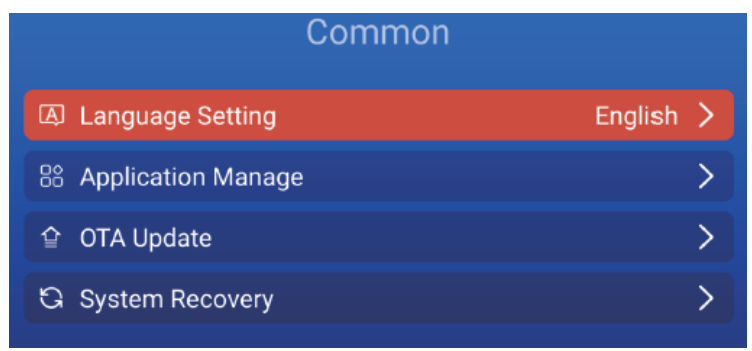
Highlight and select with the OK key on the remote control each option to set preferences.
OTA Update: If any updates are available for your TV, you will receive an upgrade prompt when you start up your TV. If you want to check manually,y then select OTA Update.
Note: The update will not delete any apps or personal settings.
System Recovery: To do a factory data reset, et select System Recovery. This will put the TV software back to factory default settings.
Note: Be aware that this process will delete all personal settings, and all apps will need to be reinstalled.
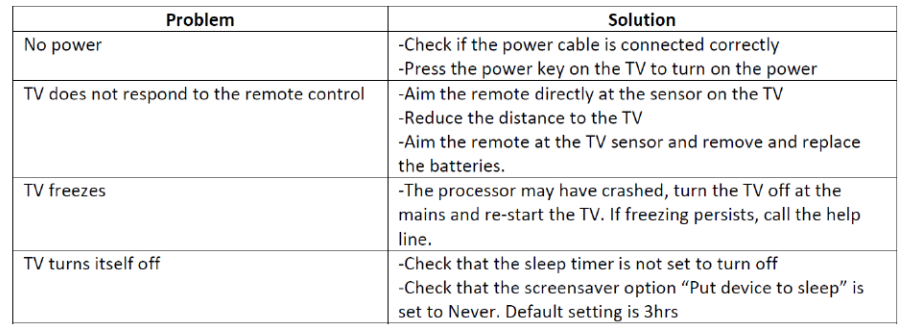
Trouble shooting
Warning
Under no circumstances should you try to repair the TV by yourself, as this will invalidate the warranty. Do not remove the rear cabinet of the T, V as there is a risk of electric shock. If a fault occurs, first check with the points listed below before calling the service help line ( 03334330312) for assistance.
Technical Specificatons
- Screen size and system 32” LED
- Max Screresolutionion 1366 (H) x 768(V )
- Screen Brightness 220 Nits
- Contrast Ratio 3000: 1
- Power Source AC 100-240V
- Processor A53 quad-core CPU @900MHz
- RAM 1GB DDR4
- GPU 5-core ARM Mali-470
- Built-in Flash memory 8GB
- Operating System Android 7.1
- Energy Efficiency Class A
- Average Annual Energy Consumption 50 kWh
- Speaker power 8W + 8W
- Vesa wall mounting size / Screw size 100 x 100mm / M5 x 8
- Dimension (W x D x H) without stand feet 730 x 94 x 431 mm
- Dimension (W x D x H) with stand feet 1460 x 250 x 916 mm
- Net Weight 4.3Kg
Pros & Cons
Pros
- Affordable price point without compromising on key features.
- High-definition display with clear visuals.
- User-friendly Tizen OS interface.
- Good connectivity options, including Wi-Fi and Bluetooth.
- Compact design suitable for small rooms.
Cons
- Limited number of HDMI ports compared to larger models.
- No 4K resolution; only HD.
- Sound quality could be better; I may require external speakers for enhanced audio.
- Limited local dimming capabilities, which can affect contrast ratio.
Customer Reviews
Customers generally praise the Samsung 32 Inch Smart TV T5300 for its value for money, ease of use, and good picture quality. However, some users have mentioned that the sound quality could be improved and that there are limited HDMI ports.
A common complaint is that the TV does not support 4K resolution, which might be a drawback for those looking for higher resolution options. Despite these minor issues, many users find it to be a solid choice for a small room or secondary TV.
Faqs
What is the resolution of the Samsung 32 Inch Smart TV T5300?
Does the Samsung 32 Inch Smart TV T5300 support 4K resolution?
How many HDMI ports does the Samsung 32 Inch Smart TV T5300 have?
Is the Samsung 32 Inch Smart TV T5300 compatible with voice control?
What operating system does the Samsung 32 Inch Smart TV T5300 use?
Can I connect external devices such as gaming consoles to the Samsung 32 Inch Smart TV T5300?
Does the Samsung 32 Inch Smart TV T5300 have built-in Wi-Fi?
How do I set up voice control on my Samsung 32 Inch Smart TV T5300?
What are some common complaints about the Samsung 32 Inch Smart TV T5300?
Is the Samsung 32 Inch Smart TV T5300 suitable for gaming?
More samsung manuals
- Setup: Samsung SmartCam HD Plus SNH-C6417BN Instruction Manual
- Samsung Galaxy S10+ Plus SM-G975F User Manual
- Setup: Samsung Solid State Drive TurboWrite Technology User Manual
- Samsung Refrigerator Fridge & Freezer RFG23D User Manual
- Setup: Samsung Galaxy Tab S3 T827V User Manual
- Samsung Double Door Refrigerator RFBB82 Instruction Manual
Leave a Comment