
Setup: Samsung Galaxy Tab S3 T827V User Manual
Content
Samsung Galaxy Tab S3 T827V
Introduction
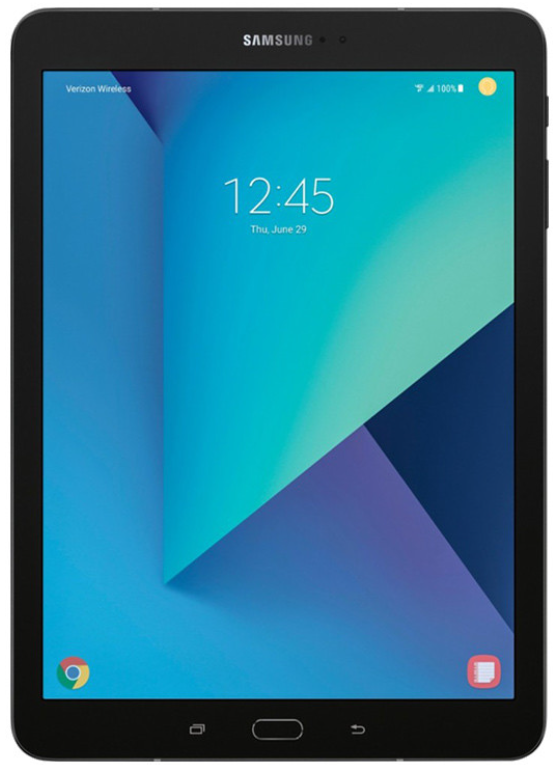
The Samsung Galaxy Tab S3 T827V is a versatile and powerful Android tablet designed for both personal and professional use. With its stunning 9.7-inch Super AMOLED display and HDR capability, it offers an immersive viewing experience. Equipped with a Qualcomm Snapdragon 820 processor and 4GB of RAM, it ensures smooth performance for multitasking and gaming. The tablet includes an S Pen for creative expression and supports a detachable keyboard for productivity. It is ideal for users seeking a portable device for work, entertainment, and creativity. Targeted at professionals and creatives, the Tab S3 T827V is available on Verizon and can be purchased for around $109.99 in refurbished condition. It runs on Android 7.0 and offers expandable storage up to 256GB via microSD. The robust battery life of up to 12 hours makes it suitable for long work sessions or extended entertainment on the go. Whether you're looking for a tablet for presentations, video streaming, or creative tasks, the Samsung Galaxy Tab S3 T827V is a reliable choice. Its portability and versatility make it a valuable asset for both personal and professional applications.
Specifications
The Samsung Galaxy Tab S3 T827V boasts impressive technical specifications:
- Display: 9.7-inch Super AMOLED with QXGA (2048x1536) resolution
- Processor: Qualcomm Snapdragon 820 Quad Core (2.15GHz + 1.6GHz)
- Memory: 4GB RAM + 32GB internal storage (expandable up to 256GB via microSD)
- Camera: 13MP rear camera, 5MP front camera
- Connectivity: LTE Cat.6 (300Mbps), Wi-Fi 802.11 a/b/g/n/ac, Bluetooth 4.2
- Battery: 6000mAh with fast charging support
- Additional Features: S Pen, Quad Speakers, USB Type-C 3.1, Fingerprint Sensor
Compared to similar tablets, the Tab S3 T827V offers a superior display and robust performance, making it a strong contender in the market.
Front View
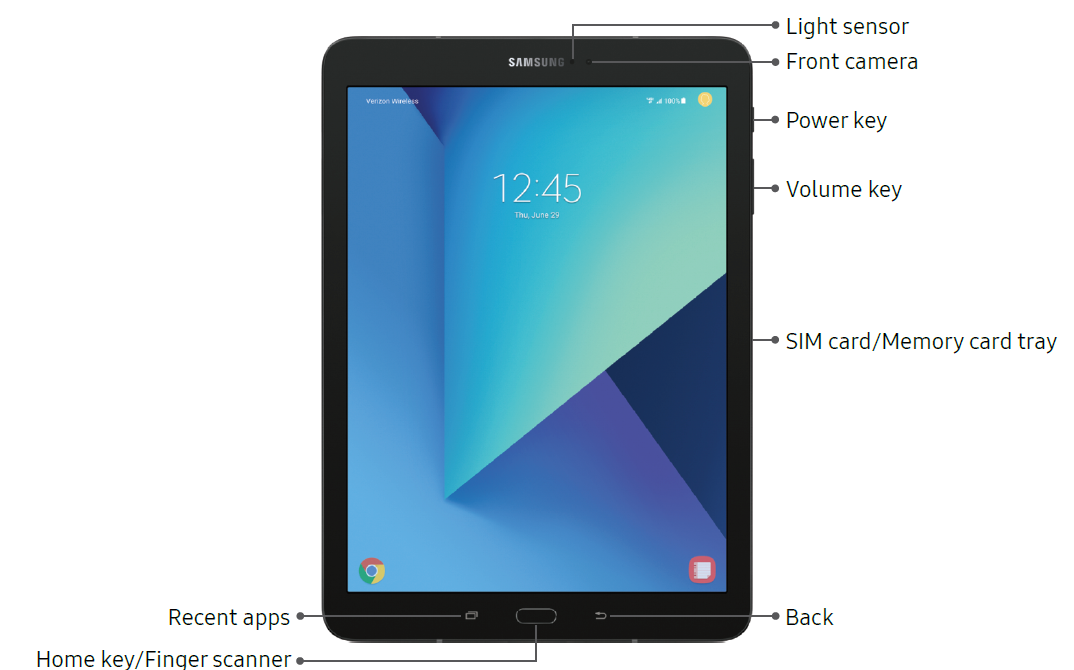
Power key
- Briefly press to turn on or off the screen.
- Press and hold to select a power control option.
Home key/Finger scanner
- Press and hold to launch Google.
- Gently put your finger on the key when you want to unlock the screen with your fingerprint.
Volume key
- Adjust the volume of your device’s sounds and audio playback.
- Gently press a volume key to take a photo.
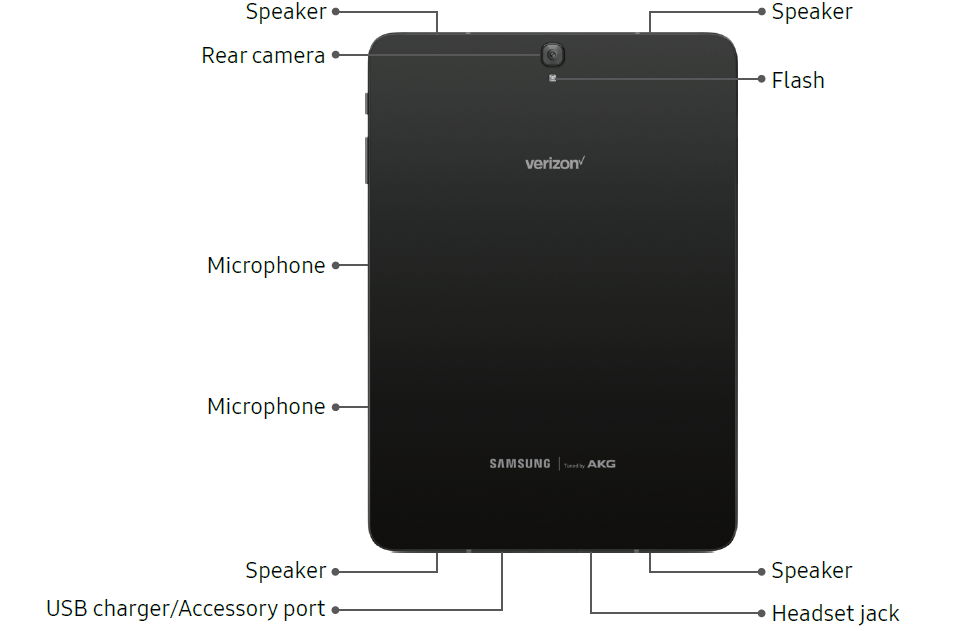
Back View
Home Screen
Status Bar
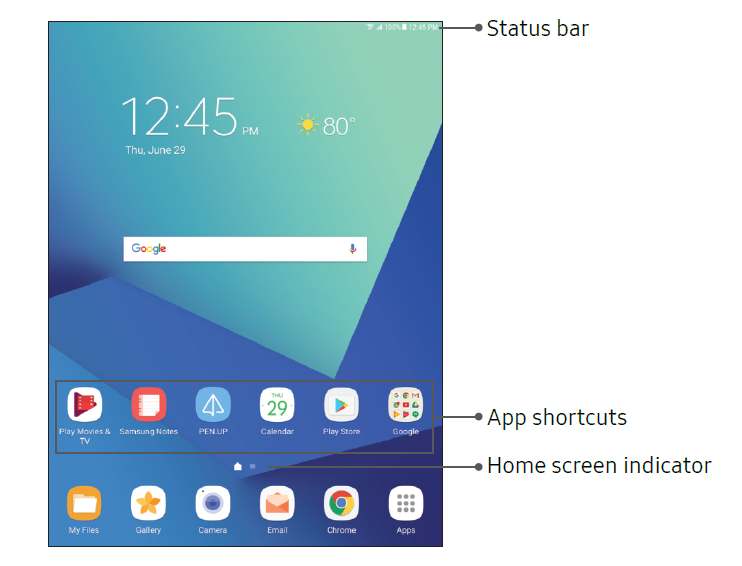
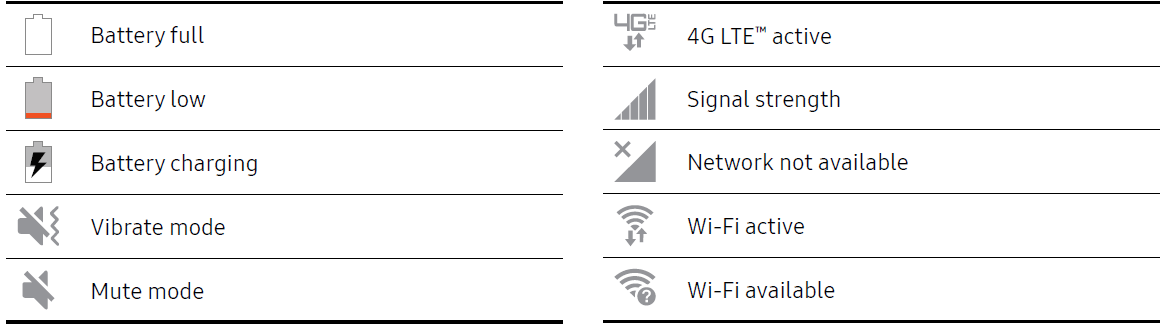
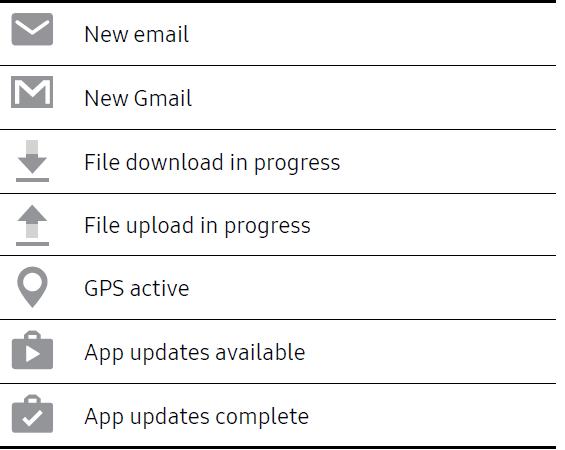
The Status bar at the top of the Home screen provides device information (such as network status, battery charge, and time) on the right side and notification alerts on the left.
Status Icons
Notification Icons
Notification Panel
Navigation
Learn the basics for how to navigate through your device.
Touchscreen Navigation
Please note that a touch screen responds best to a light touch from the pad of your finger or a capacitive stylus. Using excessive force or a metallic object on the touch screen may damage the tempered glass surface and void the warranty.
Tap
Lightly tap items to select or launch them.
- Tap the keyboard to enter characters or text.
- Tap an item to select it.
- Tap an app shortcut to launch the application.
Double-Tap
Lightly tap items twice to select or launch them.
- Double-tap an image to zoom in or out.
Touch and Hold
Touch and hold items on the screen to activate them.
- Touch and hold a widget on a Home screen to move it.
- Touch and hold a field to display a pop-up menu of options.
Swipe
Lightly drag your finger vertically or horizontally across the screen.
- Swipe the screen to unlock the device.
- Swipe the screen to scroll through the Home screens or menu options.
Drag
Touch and hold an item, and then move it to a new location.
- Drag an app shortcut to add it to a Home screen.
- Drag a widget to place it in a new location on a Home screen.
Pinch and Spread
Pinch the screen using your thumb and forefinger or spread it by moving your fingers apart.
- Pinch the screen to zoom out while viewing a picture or a web page.
- Spread your fingers on the screen to zoom in while viewing a picture or a web page.
Camera and Video
Intellectual Property
All Intellectual Property, as defined below, owned by or which is otherwise the property of Samsung or its respective suppliers relating to the SAMSUNG mobile device, including but not limited to, accessories, parts, or software relating thereto (the “mobile device”), is proprietary to Samsung and protected under federal laws, state laws, and international treaty provisions. Intellectual Property includes, but is not limited to, inventions (patentable or unpatentable), patents, trade secrets, copyrights, software, computer programs, and related documentation and other works of authorship.
You may not infringe or otherwise violate the rights secured by the Intellectual Property. Moreover, you agree that you will not (and will not attempt to) modify, prepare derivative works of, reverse engineer, decompile, disassemble, or otherwise attempt to create source code from the software. No title to or ownership in the Intellectual Property is transferred to you. All applicable rights of the Intellectual Property shall remain with SAMSUNG and its suppliers.
Open Source Software
Some software components of this product, including but not limited to ‘PowerTOP’ and ‘e2fsprogs’, incorporate source code covered under GNU General Public License (GPL), GNU Lesser General Public License (LGPL), OpenSSL License, BSD License, and other open source licenses. To obtain the source code covered under the open source licenses, please visit: opensource.samsung.com
Disclaimer of Warranties; Exclusion of Liability
The information below explains that a user accepts this Product as sold, including the hardware and software components as created and packaged for sale. If the user changes these parameters through a unique modification, Samsung will not be held responsible for damages or issues that result from these end-user changes.
Except as outlined in the Standard Limited Warranty that accompanies the Product, the purchaser takes the product “as is”, and Samsung makes no express or implied warranty of any kind whatsoever with respect to the product, including but not limited to the:
- merchantability of the product or its fitness for any particular purpose or use;
- design, condition,, or quality of the product;
- performance of the product;
- workmanship of the product or the components contained therein; or
- compliance of the product with the requirements of any law, rule, specification, or contract pertaining thereto.
Nothing contained in the User Manual shall be construed to create an express or implied warranty of any kind whatsoever with respect to the Product. In addition, Samsung shall not be liable for any damages of any kind resulting from the purchase or use of the product or arising from the breach of the express warranty, including incidental, special,,l or consequential damages, or loss of anticipated profits or benefits.
Modification of Software
Samsung is not liable for performance issues or incompatibilities caused by your editing of registry settings, or your modification of Operating System (OS) software.
Using custom OS software may cause your device and applications to work improperly. Your carrier may not permit users to download certain software, such as a custom OS.
If your carrier prohibits this, and if you attempt to download software onto the device without authorization, you will be notified on the screen that the device will no longer operate, and you will then be instructed to power down the device. You must then contact your carrier to restore the device to the carrier's authorized settings.
Samsung Knox
Samsung Knox is Samsung’s security platform and is a mark for a Samsung device tested for security with enterprise use in mind. An additional licensing fee may be required. For more information about Knox, please refer to: samsung.com/us/knox
Customer Reviews
Users praise the Samsung Galaxy Tab S3 T827V for its stunning display, robust performance, and versatility. It has a 3.7-star rating from sellers, with many users appreciating its value for money, especially in refurbished condition. Common praises include the tablet's battery life and the effectiveness of the S Pen for creative tasks. However, some users mention minor cosmetic wear on refurbished models and the need for additional accessories like the SIM card and original box. For those seeking a reliable and feature-rich tablet, the Samsung Galaxy Tab S3 T827V is a solid choice. It offers a balance of performance, portability, and affordability, making it suitable for both personal and professional use.
More samsung manuals
- Setup: Samsung Galaxy J3 V Smartphone User Manual
- Setup: Samsung Solid State Drive TurboWrite Technology User Manual
- Setup: Samsung Magician 8 User Manual
- Setup: Samsung SmartCam HD Plus SNH-C6417BN Instruction Manual
- Setup: Samsung Gear S2 R730V User Manual
- Startup: Samsung 32 Inch Smart TV T5300 Instruction Manual
Leave a Comment