
Setup & Pairing: Sennheiser Accentum Open True Wireless Earbuds User Manual
Content
Sennheiser Accentum Open True Wireless Earbuds

Introduction
The Sennheiser Accentum Open True Wireless Earbuds redefine open-ear listening with a blend of premium sound, comfort, and modern features. Designed for users who value situational awareness and natural audio, these earbuds offer a refreshing alternative to traditional in-ear models. Whether you're commuting, working from home, or enjoying outdoor activities, the Accentum Open lets you stay connected to your surroundings while delivering rich, detailed sound.
Key benefits include Sennheiser-tuned audio, a breathable open-fit design, and up to 28 hours of total battery life with the compact charging case. The earbuds feature responsive touch controls, multipoint Bluetooth 5.3 connectivity, and IPX4 splash resistance for durability in various conditions. With seamless device switching and intuitive operation, the Sennheiser Accentum Open True Wireless Earbuds are ideal for multitaskers, professionals, and active listeners who want clarity without isolation.
Available in black and cream, these earbuds are priced around $129.95 and widely available at major retailers and online stores. If you're seeking a comfortable, open-ear wireless solution with Sennheiser’s legendary sound quality, the Accentum Open is a top contender in the true wireless earbud market.
Package contents
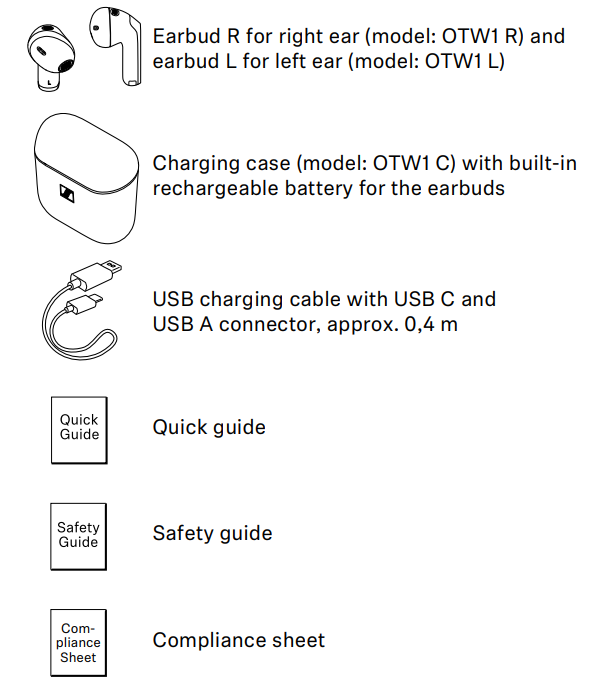
Specifications: Sennheiser Accentum Open True Wireless Earbuds
- Wearing style: True Wireless stereo earbuds
- Ear coupling: in-concha
- Frequency response: 25 Hz to 15 kHz
- Transducer principle: dynamic
- Transducer size: 11 mm
- Sound pressure level (SPL): 109 dB (1 kHz/1 mW)
- THD (1 kHz, 94 dB SPL): < 0.08% (1 kHz/94 dB)
- Noise cancellation: n/a
- Microphone principle: MEMS
- Microphone frequency response: 100 Hz to 10 kHz
- Microphone pick-up pattern (speech): 2 microphones per earbud beamforming array for noise reduction
- Relative humidity: operation: 10 to 80%, non-condensing storage: 10 to 90%
- Magnetic field strength: earbuds: 60 mT charging case: 47 mT Ingress protection earbuds: splash proof (IPx4)
- Weight: earbuds: approx. 4.35g each charging case: approx. 29.3g both earbuds and charging case: approx. 38g
- Dimensions: earbuds: approx. 18.27 x 33.34 x 19.38mm (W x H x D) charging case: approx. 51.77 x 50.18 x 25.36mm (W x H x D)
- Sensors: in-ear sensor, capacitive touch sensor
- Version: Bluetooth 5.3 certified, class 1
- Transmission frequency: 2,402 MHz to 2,480 MHz
- Modulation: GFSK, π/4 DQPSK, 8DPSK
- Profiles: AVRCP, A2DP, HFP
- Output power: 10 mW (max)
- Codec: AAC, SBC
- Device name: ACCENTUM Open
- Number of active connections: 2
- Required apps: no companion app
Compared to similar models like AirPods or Galaxy Buds, the Accentum Open stands out with its open-fit comfort, superior soundstage, and longer battery life, making it a top choice for open-ear wireless earbuds in 2025.
Product overview
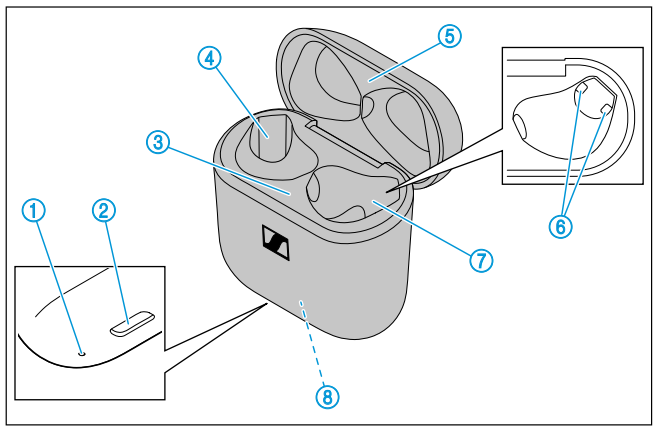
Charging case
Model: OTW1 C
- LED display indicates the charging process/charge status of the rechargeable battery of the charging case or of the earbuds (when inserted into the charging case)
- Input for USB-C connector for charging the rechargeable batteries
- Bottom cradle
- Charging compartment for the left earbud L
- Top cradle
- Charging contacts
- Charging compartment for the right earbud R
- Built-in rechargeable battery for charging the earbuds on the go
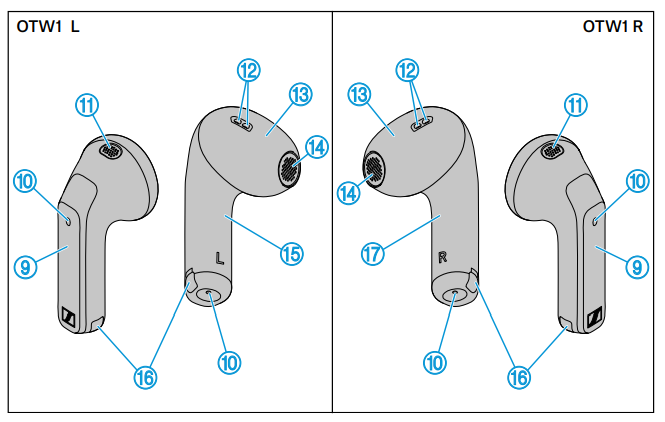
Earbuds
Model: OTW1 R and OTW1 L - Touch control panel
- Microphones for beamforming noise reduction
- Acoustic rear ventilation
- Acoustic front ventilation
- Built-in rechargeable battery
- Speaker
- Left earbud L
- Charging contacts
- Right earbud R
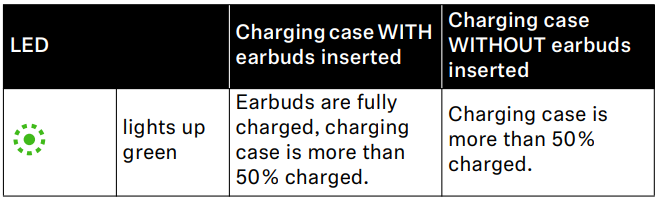
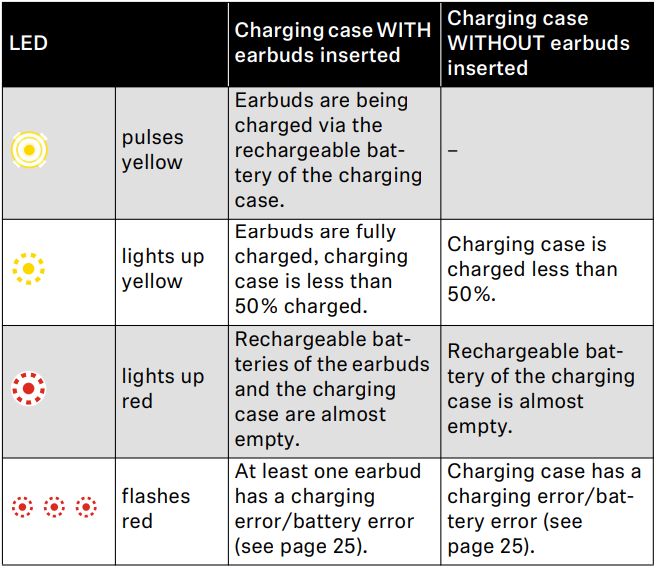
Overview of the LED display of the charging case

When a USB cable is connected to the USB socket of the charging case, the LED of the charging case permanently displays the charging process:
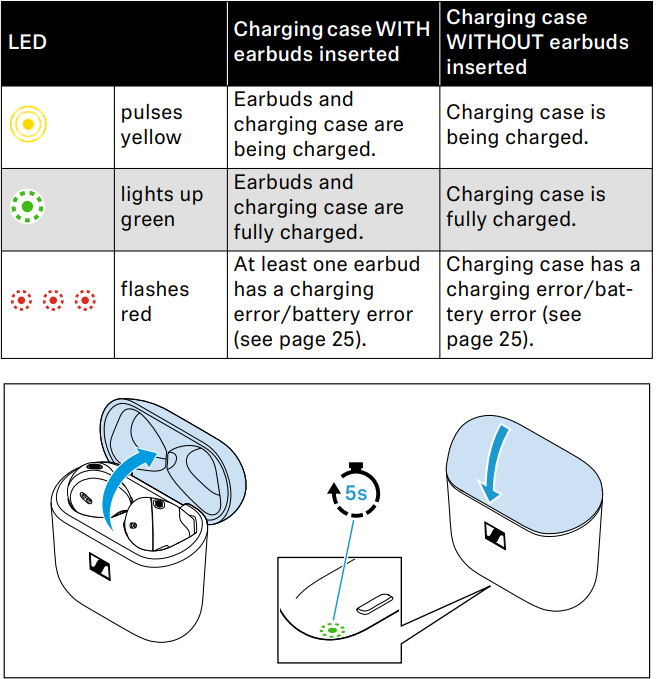
If you open the lid of the charging case and no USB cable is connected, the LED of the charging case displays the battery charge status or the charging process of the earbuds. If you close the lid of the charging case, the LED display switches off after 5 seconds.
Using the earbuds
Information on the rechargeable battery, the charging process, and the first use
- The earbuds and the charging case each have a built-in rechargeable battery.
- To charge the rechargeable batteries, you can use the supplied USB cable.
- The earbuds must be inserted into the charging case for charging. Thus, even on the go, the earbuds are always safely stored and charged.
- Upon delivery, the rechargeable batteries of the earbuds and the charging case are in sleep mode and have to be woken up by connecting them to a USB power source for at least 15 seconds. The lid of the charging case must be closed during this process.
- A complete charging cycle of the charging case and the earbuds takes about 1 hour. The quick charge function gives you approximately. 1.5 hours of playback time after 10 minutes of charging. The charging time can vary depending on the power source used and the ambient temperature.
- We recommend charging the earbuds and the charging case for a complete charging cycle without interruption before using them for the first time.
- When a USB cable connected to a power source is connected to the charging case, the rechargeable battery of the charging case is being charged. When the earbuds are inserted into the charging case, their rechargeable batteries are being charged at the same time. The LED display of the charging case indicates the charging process (see page 8).
- When the charge status of the earbuds’ rechargeable batteries drops to a critical level, you will hear a sequence of three tones.
- The charge status of the rechargeable battery of the charging case is indicated by the LED display on the charging case (see page 8).
- At the end of its operational lifetime, this product with its built-in rechargeable battery must be disposed of separately from normal household waste. You can find more information here: see page 31.
Connecting the earbuds to a Bluetooth device
To be able to use the Bluetooth wireless connection, you must register both devices (earbuds and Bluetooth device, e.g. s, smartphone) via the settings of your Bluetooth device. This process is called pairing.
If the operation differs from the steps mentioned, also refer to the instruction manual of the Bluetooth device you are using.
When you switch on the earbuds for the first time after initial charging, they automatically switch to Bluetooth pairing mode.
Information on the Bluetooth wireless connection
- The earbuds are Bluetooth 5.3 certified.
- If your audio source supports the high-resolution audio encoding method AAC, music is automatically played in high audio quality. Otherwise,, the earbuds will play back your music in normal audio quality (SBC).
- Paired devices establish the Bluetooth wireless connection immediately after switch-on and are ready for use.
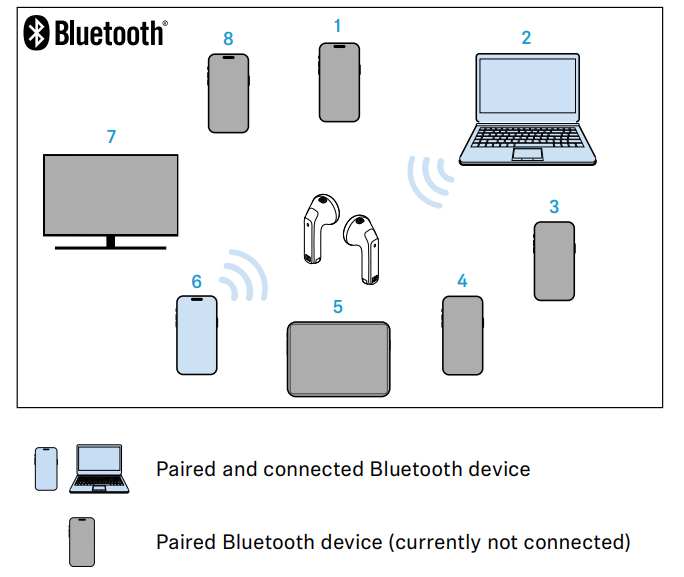
- When switched on, the earbuds will automatically try to connect to the last two Bluetooth devices used. The earbuds can save the connection profiles of up to eight Bluetooth devices with which they have been paired. Audio playback is only possible from one device at a time.
- If you pair the earbuds with the ninth Bluetooth device, the connection profile of the first connected Bluetooth device will be overwritten. If you want to connect to this Bluetooth device again later, you have to pair the earbuds again.
Resetting the earbuds
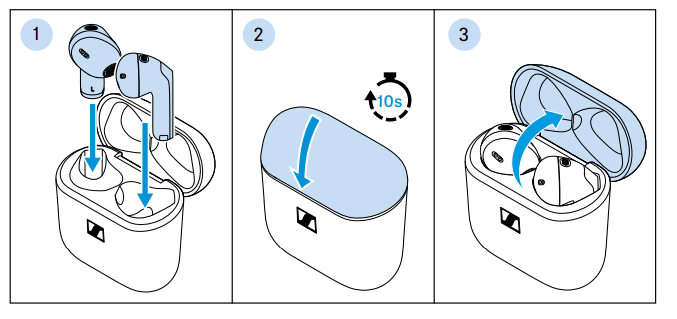
If the function of the earbuds is disturbed, perform a reset. Individual settings s,, such as the pairing settings,, are not deleted.
- Insert the earbuds into the charging case.
- Close the lid of the charging case and wait at least 10 seconds.
- Open the lid again.
The earbuds will restart (reset).
Resetting the earbuds to the factory default settings
If the function of the earbuds is disturbed and a reset (see page 27) does not improve, reset the earbuds to the factory default settings. This deletes, among other things, all pairing settings.
- Disconnect all existing connections between Bluetooth devices and your earbuds, e.g., by removing “ACCENTUM Open” from the list of Bluetooth devices found on your device.
- Take one earbud out of the charging case, insert it in your ear,,r and close the lid of the charging case. The second earbud remains in the charging case.
- Tap and hold the touch control panel of the earbud that is not in the charging case for 12 seconds.
You hear a sequence of three tones. - Take the second earbud out of the charging case and insert it in your ear.
- Tap and hold the touch control panel of the second earbud for 12 seconds.
You hear a sequence of three tones. - Remove the earbuds from the ears and place them as close together as possible.
The earbuds connect to each other within 15 seconds.
The earbuds are successfully reset to the factory settings and paired
Pair your earbuds with your Bluetooth device again (see page 16).

Care and maintenance of the earbuds/charging case
ATTENTION
Liquids can damage the electronics of the product!
Liquids entering the housing of the product can cause a short-circuit and damage the electronics.
- Keep all liquids far away from the product.
- Do not use any solvents or cleansing agents.
- Only clean the charging case with a soft, dry cloth.
- Clean the earbuds with a slightly damp cloth.
- Clean the charging contacts on the earbuds and in the charging case from time to time, e.g,. With a cotton swab.
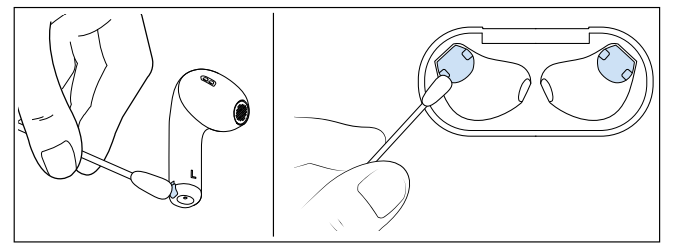
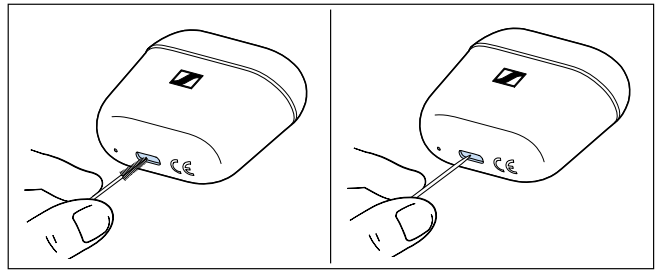
To remove any dirt,, such as dust accumulation or lint, from the USB-CBB socket of the charging case:
Carefully swipe a fine object (e.g,,. toothpick or interdental brush) through the opening of the socket.
If the earbuds have gotten wet:
- Dry the earbuds with a dry cloth. If necessary, let the earbuds dry at room temperature for approximately. 12 hours.
Information on the built-in rechargeable battery
Sonova Consumer Hearing ensures and guarantees that the rechargeable batteries perform at their optimum upon purchase of the product. If, upon purchase or within the warranty period, you suspect that a rechargeable battery is obviously defective or if a charging error/battery error is displayed (see page 8), stop using the product, disconnect it from the power supply system , and contact your Sonova Consumer Hearing partner. Your Sonova Consumer Hearing partner will coordinate the repair/replacement with you.
Do not return a product with a defective battery to your dealer or Sonova Consumer Hearing partner unless requested to do so. To find a partner in your country, search at www.sennheiser-hearing.com/service-support.
At the end of its operational lifetime, this product with its built-in rechargeable battery must be disposed of separately from normal household waste. You can find more information here: see page 31.
Troubleshooting Common Issues
- Earbuds not connecting: Ensure Bluetooth is enabled and reset by placing both earbuds in the case, closing the lid, and reopening after 10 seconds.
- Touch controls not responding: Clean the touch surface and avoid using it with wet hands. Reset the earbuds if issues persist.
- Low battery or charging issues: Use the included USB-C cable and ensure the charging contacts are clean. If the case doesn’t charge, try a different power source.
- Sound quality issues: Check for firmware updates via the Sennheiser Smart Control app (if supported) and ensure a secure fit.
- Error codes: No specific error codes; if problems continue, contact Sennheiser support.
Preventive measures include regular cleaning, avoiding extreme temperatures, and storing in a case when not in use. The Sennheiser Accentum Open True Wireless Earbuds come with a standard 2-year warranty. For support, visit Sennheiser’s official support page or contact customer service at 1-800-544-4124.
Pros and Cons of the Sennheiser Accentum Open True Wireless Earbuds
Pros
- Superior open-ear soundstage and natural audio clarity
- Lightweight, comfortable fit for extended wear
- Long battery life with compact charging case
- Responsive touch controls and multipoint Bluetooth connectivity
- IPX4 splash resistance for outdoor use
- Great value for money compared to premium alternatives
Cons
- Fit may feel insecure for some users
- Limited bass impact due to open design
- No active noise cancellation or passive isolation
- Minimal customization or EQ options
The Sennheiser Accentum Open True Wireless Earbuds offer excellent value for those prioritizing comfort, clarity, and situational awareness over deep bass or ANC features.
Customer Reviews: Sennheiser Accentum Open True Wireless Earbuds
Customers consistently praise the Sennheiser Accentum Open True Wireless Earbuds for their natural sound, comfortable fit, and long battery life. Many users rate them 4.5/5 stars, highlighting the open-ear design as ideal for outdoor activities and multitasking. Common praises include the responsive touch controls, clear mids and highs, and reliable Bluetooth connectivity.
Some users mention the fit can feel less secure during vigorous exercise, and a few note the bass is lighter than expected. However, most agree that the earbuds deliver excellent value for the price. Purchase recommendations often cite the Accentum Open as a top AirPods alternative for those seeking open-ear comfort and Sennheiser sound quality.
Faqs
How do I set up the sennheiser Accentum Open True Wireless Earbuds for the first time?
What should I do if the sennheiser Accentum Open True Wireless Earbuds are not connecting to my phone?
Can I use the sennheiser Accentum Open True Wireless Earbuds with multiple devices simultaneously?
How does the open design of the sennheiser Accentum Open True Wireless Earbuds benefit daily use?
What are the key features of the sennheiser Accentum Open True Wireless Earbuds that enhance audio performance?
How long does the battery last on the sennheiser Accentum Open True Wireless Earbuds, and how is it charged?
What troubleshooting steps can resolve touch control issues on the sennheiser Accentum Open True Wireless Earbuds?
How should I clean and maintain my sennheiser Accentum Open True Wireless Earbuds to ensure longevity?
More sennheiser manuals
- Pairing & Setup: Sennheiser Momentum True Wireless Earbuds User Manual
- Sennheiser True Wireless Earbuds CX 400BT User Manual
- Setup: Sennheiser HD 450BT Headphones SEBT4 User Manual
- Sennheiser Around-Ear Wireless Headphone HD-350BT User Guide
- How to Pair: Sennheiser Bluetooth Earphones Headphones CX 7.00BT User Guide
- Sennheiser M3AEBTXL Momentum 3 Earcbuds Guide | Charging & Setup
Leave a Comment