
Setup: Sennheiser HD 450BT Headphones SEBT4 User Manual
Content
Sennheiser HD 450BT Headphones SEBT4
Introduction
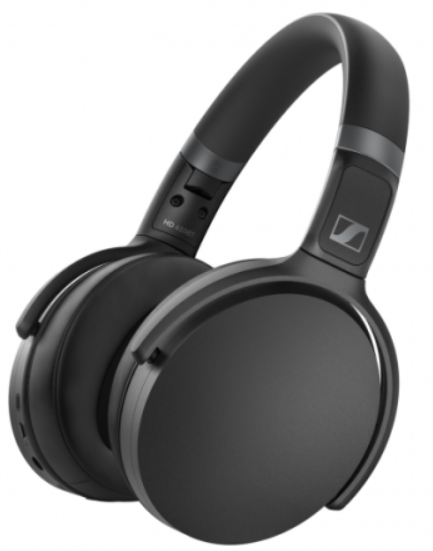
The Sennheiser HD 450BT Headphones SEBT4 are premium wireless over-ear headphones that combine superior sound quality with advanced active noise cancellation (ANC). Designed for audio enthusiasts and daily commuters alike, these headphones deliver immersive listening experiences whether at home, work, or on the move. With Bluetooth 5.0 connectivity and support for high-quality codecs such as aptX, aptX Low Latency, and AAC, users enjoy crisp, low-latency audio for music, calls, and media streaming.
Key benefits include a robust 30-hour battery life with ANC enabled, fast USB-C charging in approximately two hours, and a comfortable closed-back design that isolates external noise effectively. The headphones also support voice assistants like Google Assistant and Siri via the Sennheiser Smart Control app, enhancing ease of use. The HD 450BT’s lightweight build (around 238 g) and foldable design make it highly portable for everyday use.
Targeted at commuters, remote workers, and casual listeners seeking quality wireless noise-cancelling headphones without breaking the bank, the HD 450BT offers exceptional value around the $149 price range. These headphones are widely available through major online retailers and official Sennheiser outlets worldwide.
Using the headphones
Information on the rechargeable battery and the charging process
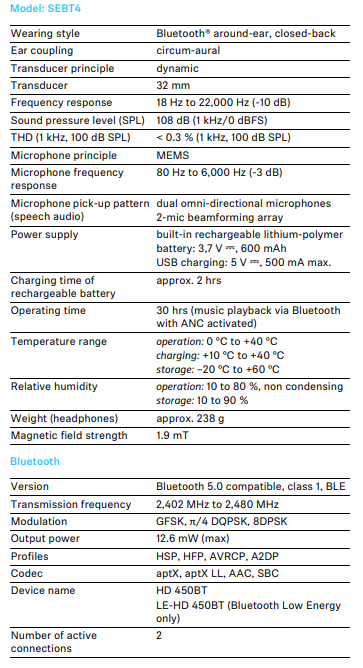
The headphones have a built-in rechargeable battery. A complete charging cycle takes approx. 2 hours. Before using the headphones for the first time, charge the rechargeable battery for a complete charging cycle without interruption.
When the headphones are being charged, the LED lights up (> 7). Once the headphones are fully charged, the LED flashes blue for 5 minutes and then goes off. When the battery charge drops to a critical level, a voice prompt asks you to recharge the headphones .
(“Recharge headset”).
Sennheiser recommends using the supplied USB cable and a compatible standard USB power supply for charging the headphones. While the headphones are being charged, you can still listen to music or make phone calls. In this case, however, the charging time may be longer. Charging the headphones' rechargeable battery
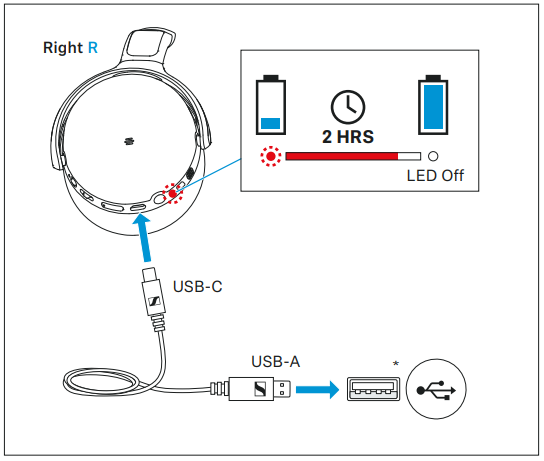
- Connect the USB-C connector of the charging cable to the USB socket of the headphones.
- Connect the USB-A connector to a corresponding socket of a USB power source (to be ordered separately). Make sure that the US B power source is connected to the power supply system.
The charging process of the headphones begins. The LED displays the charge status:
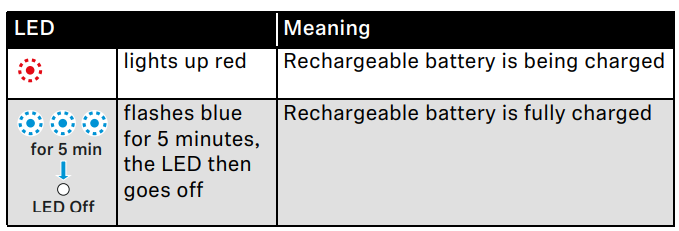
If the LED does not light up immediately during charging, clean the charging socket and charge the headphones until the LED lights up again (> 11).
You can speed up the charging process by charging the headphones when they are switched off.
Connecting the headphones to a Bluetooth device
- To be able to use the Bluetooth connection, you must register both devices (headphones and e.g. smartphone) once. This process is called pairing.
- If the operation differs from the steps mentioned, also refer to the instruction manual of the Bluetooth device you are using.
- When you switch on the headphones for the first time, they automatically switch to pairing mode.
Information on the Bluetooth wireless connection
- The headphones are compatible with Bluetooth 5.0.
- If your audio source supports one of the following high-resolution audio encoding methods, music is automatically played in high audio quality: aptX, aptX LL o, or AAC. Otherwise , the headphones will play your music in normal audio quality (SBC).
- Paired devices establish the Bluetooth wireless connection immediately after switch-on and are ready for use.
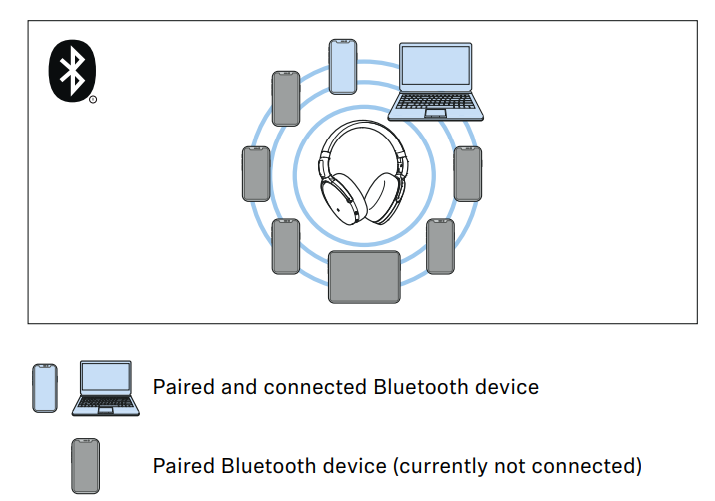
- On switch-on, the headphones automatically try to connect to the last two connected Bluetooth devices. The headphones can save the connection profiles of up to eight Bluetooth devices with which they have been paired. Audio playback is only possible from one device at a time.
- If you pair the headphones with the ninth Bluetooth device, the saved connection profile of the least used Bluetooth device will be overwritten. If you want to re-establish a connection with the overwritten Bluetooth device, you have to pair the headphones again.
Pairing the headphones with a Bluetooth device
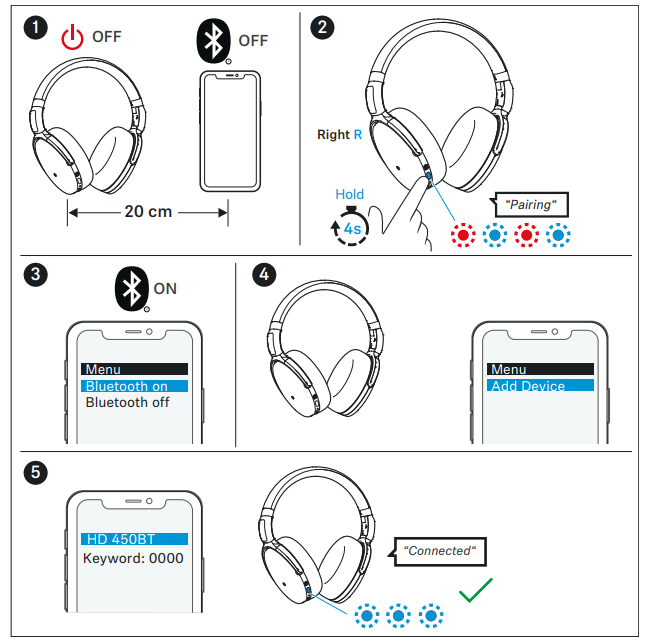
- Switch the headphones off and place them close to the Bluetooth device (max. 20 cm).
- Press and hold the on/off button for 4 seconds.
The LED flashes red and blue. The headphones are in pairing mode. - Activate Bluetooth on your Bluetooth device.
- Via the menu of your Bluetooth device, start the search for new Bluetooth devices.
All active Bluetooth devices in the proximity of your Bluetooth device are displayed. - From the list of found Bluetooth devices, select “HD 450BT”. If necessary, enter the default pin code “0000”.
- If pairing was successful, you hear the voice prompt “Connected” . The LED flashes blue 3x.
- If no connection is established within 5 minutes, pairing mode is terminated and the headphones switch to standby mode. If necessary, repeat the steps described above.
- If you switch on the headphones for the first time (the pairing list is empty), they automatically switch to pairing mode.
Disconnecting the headphones from a Bluetooth device
- Via the menu of your Bluetooth device, disconnect the connection to the headphones.
The headphones are disconnected from the Bluetooth device. You hear the voice prompt “Lost connection”. The headphones switch to standby mode. - To delete the Bluetooth pairing list of the headphones, > 31.
Installing the Smart Control app
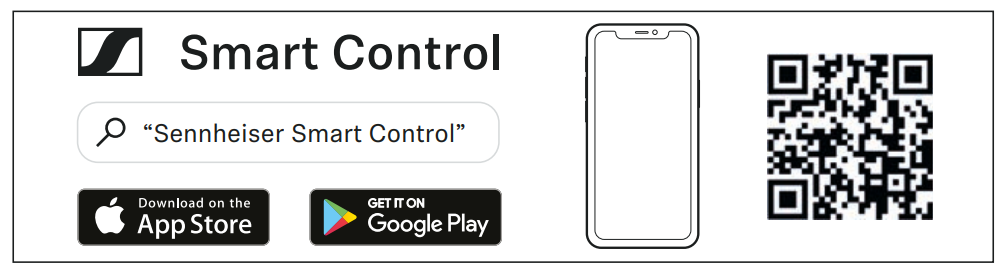
To make full use of all the settings and functions of the headphones, you need to have the free Sennheiser Smart Control app installed on your smartphone.
Download the app from the App Store or Google Play and install it on your smartphone. Alternatively, you can use your smartphone to scan the following QR code or to call up the following Internet site:
www.sennheiser.com/smartcontrol
- Connect your smartphone to the headphones via Bluetooth (> 12).
- Start the Smart Control app.
- Follow the instructions in the app.
The Smart Control app recognizes the headphones and activates all available settings and functions.
Switching the headphones on
- WARNING
Danger of hearing damage due to high volume levels! Listening at high volume levels can lead to permanent hearing damage. - Before putting the headphones on, adjust the volume to a low level (> 19).
Do not continuously expose yourself to high volume levels.
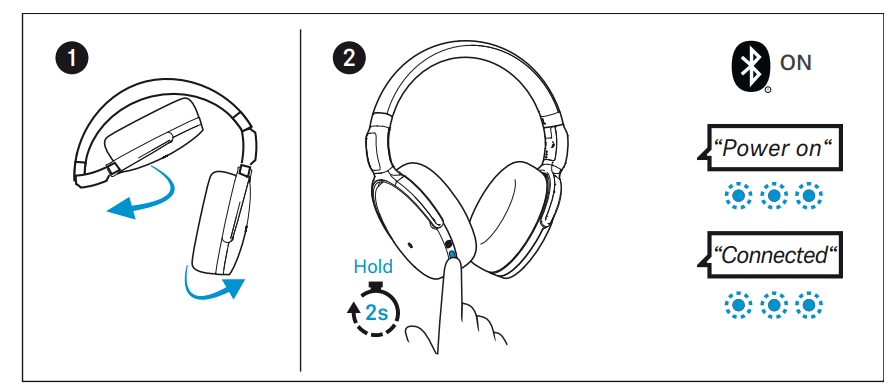
- Unfold both ear cups.
The joints click into place. - Press and hold the on/off button for 2 seconds.
The LED flashes blue 3x. You hear the voice prompt “Power on”. If Bluetooth is activated on the headphones and a paired device is available, the LED flashes blue 3x and you hear the voice prompt “Connected”.
If Bluetooth is deactivated on the headphones(> 25), you hear the voice prompt “Power on” and the active noise cancellation ANC may be activated (> 20).
- Make sure that Bluetooth is already activated on your Bluetooth device when switching on the headphones.
- If Bluetooth is activated and the headphones cannot find a paired Bluetooth device within a few minutes, you hear the voice prompt “Lost connection”. The LED flashes red 3x. The headphones switch to standby mode.
Switching the headphones off
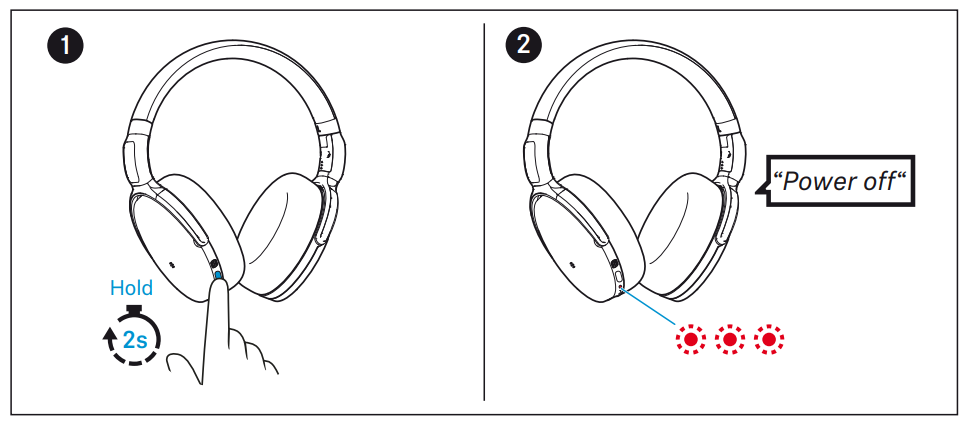
- Press and hold the on/off button for 2 seconds.
- You hear the voice prompt “Power off” and the LED flashes red 3x . The headphones switch off.
Putting the headphones on and adjusting the headband
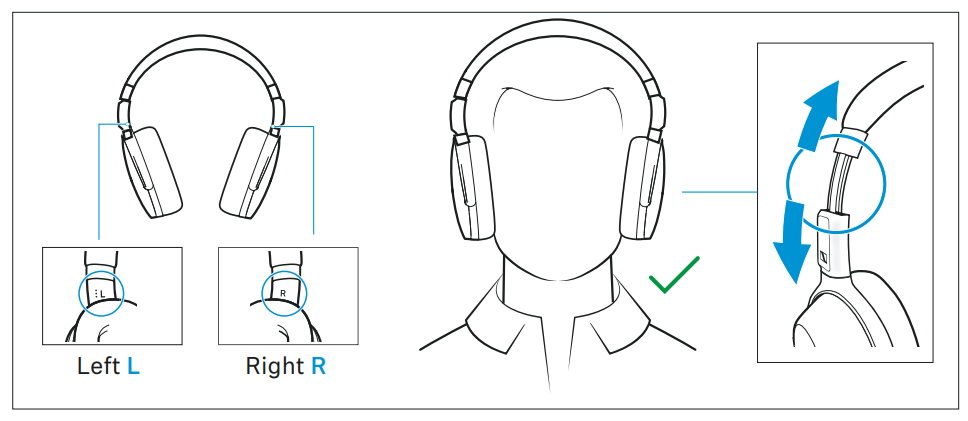
For good sound quality and the best possible wearing comfort, the headband can be adjusted to properly fit your head.
- Wear the headphones so that the headband runs over the top of your head. The markings R for the right side and L for the left side can be found on the inside of the headband.
- Move the ear cups up or down the headband slider until:
- Your ears are comfortably covered by the ear pads,
- You feel even, gentle pressure around your ears,
- A snug fit of the headband on the head is ensured.
For optimal sound quality, the ear pads must completely surround your ears.
Retrieving information on the battery charge status
When the headphones are connected to your Bluetooth device, the battery charge status can be displayed on the screen of your smartphone (depending on the device and operating system used).
The Smart Control app also displays the battery charge status.
You can retrieve information on the battery charge status on the headphones by pressing the center of the volume button 1x.
Adjusting the volume
- WARNING
Danger of hearing damage due to high volume levels!
Listening at high volume levels can lead to permanent hearing defects. Toggling between the audio sources may cause enormous volume jumps that can permanently damage your hearing. - Before putting the headphones on and before toggling between audio sources, adjust the volume to a low level.
- Do not continuously expose yourself to high volume levels.
You can adjust the playback volume for music and for phone calls.
- If you are playing music or are on a call: Press the rear part or the front part of the volume button to increase or reduce the volume for music and phone calls.
- When the maximum or minimum volume is reached, you hear a beep.
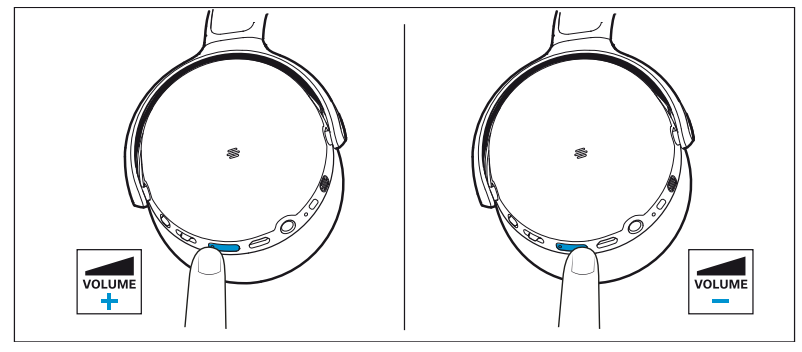
- You can also adjust the volume using the connected Bluetooth device.
Information on active noise cancellation ANC
Due to its closed design, the headphones offer effective passive isolation from ambient noise.
In addition, the headphones have an active noise cancellation (ANC ) function, which allows you to reduce ambient noise to a minimum.
Even when ANC is activated, your headphones' sound quality is always at its best.
You can activate or deactivate ANC when the headphones and your audio source are connected via Bluetooth or the audio cable (provided that the battery is sufficiently charged).
If you want to create a quiet space in a noisy environment, you can simply use the headphones – without cable and disconnected fr om any Bluetooth device – as noise protection by using ANC (> 20).
Notes on active noise cancellation
- Continuous and uniform noise, such as motor or fan noise, is particularly well suppressed.
- Speech or high-frequency noise is significantly reduced, but can remain perceptible.
- In very quiet environments, slight noise may occur. In this case, deactivate ANC.
- If an unusual (whistling or beeping) noise occurs, take the headphones off and put them on again. Make sure that the ear cups fit properly around your ears.
- To avoid loud, unusual (whistling or beeping) noise and to ensure proper noise cancellation, do not cover the microphone openings of the active noise cancellation circuitry located on the outside of the ear cups.
Activating/deactivating the active noise cancellation ANC
- Make sure that the headphones are switched on (> 16).
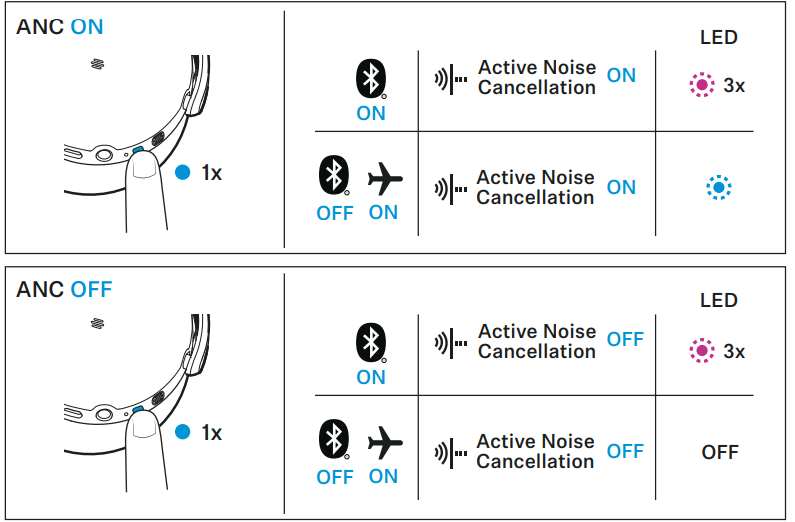
- To activate the active noise cancellation ANC:
- Press the on/off button 1x.
- If you are using Bluetooth:
- The LED flashes purple 3x.
- If Bluetooth is deactivated (analog audio cable is connected, > 25):
- The LED lights up blue.
- ANC is activated.
To deactivate the active noise cancellation ANC:
- Press the on/off button 1x. If you are using Bluetooth: The LED flashes purple 3x. If Bluetooth is deactivated: , the LED goes off.
- ANC is deactivated.
Listening to music using the headphones
You can listen to music when the headphones and your audio source are connected via Bluetooth (> 12) or the audio cable (> 26).
Controlling music playback
The following music playback functions are only available when the headphones and the device are connected via Bluetooth. Some smartphones or music players may not support all functions.
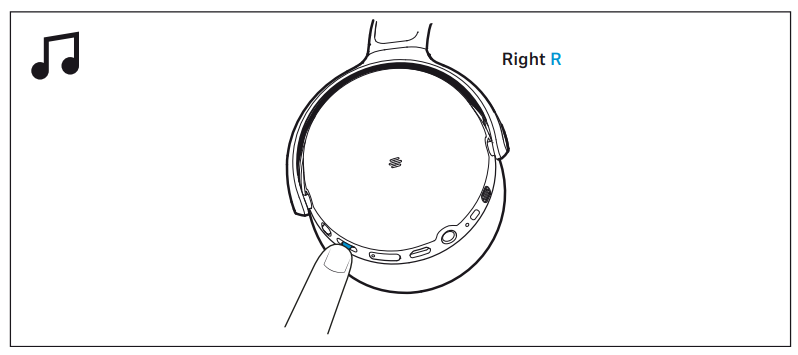
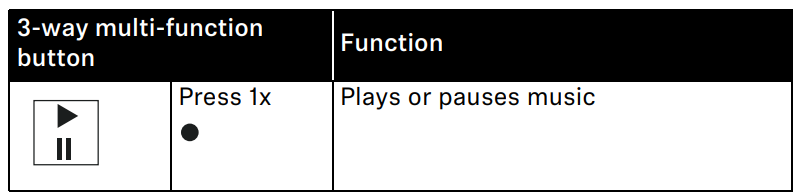
Playing/pausing music
- Press the center of the 3-way multi-function button 1x.
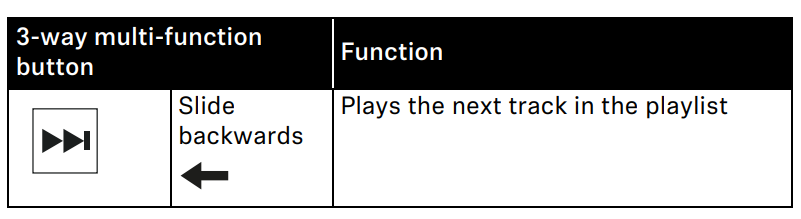
Playing the next track
- Slide the 3-way multi-function button backwards.
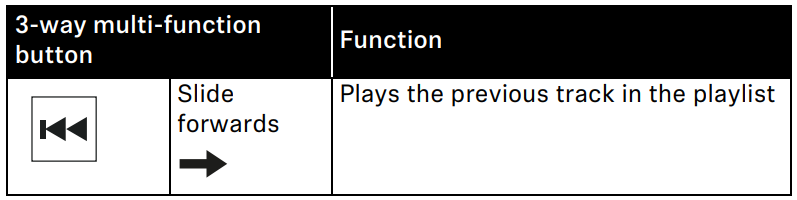
Playing the previous track
- Slide the 3-way multi-function button forward.
Making phone calls using the headphones
The following call functions are only available when the headphones and smartphone are connected via Bluetooth. Some smartphones or communication apps may not support all functions.
Making a call
- Dial the desired number on your smartphone.
If your smartphone does not automatically transfer the call to headphones, select “HD 450BT” as the output device on your smartphone (see the instruction manual of your smartphone if necessary).
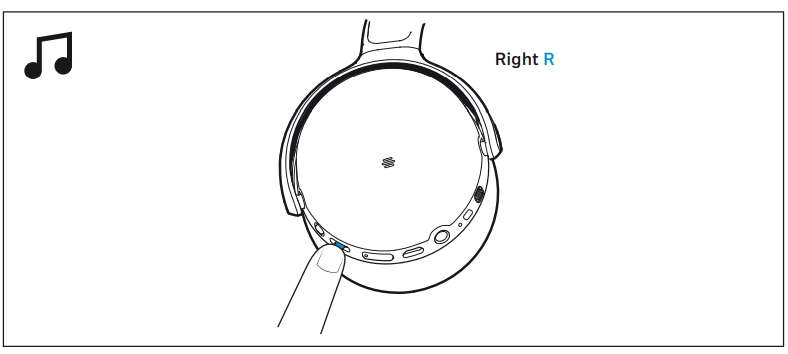
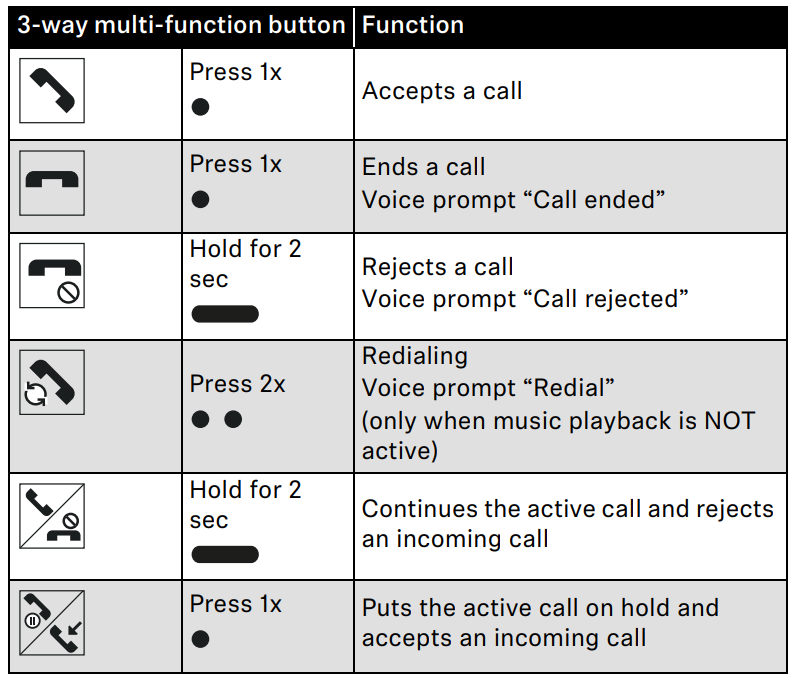
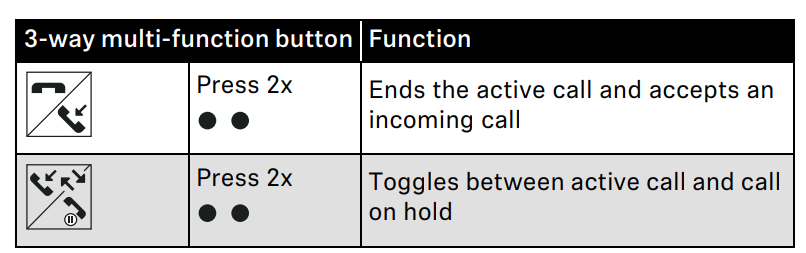
Accepting/rejecting/ending a call
- If your headphones are connected to a smartphone and you receive a call, you hear a ringtone in the headphones.
- If you are playing music when you receive a call, the music pauses until you end the call.
Using the voice assistant/voice dialing
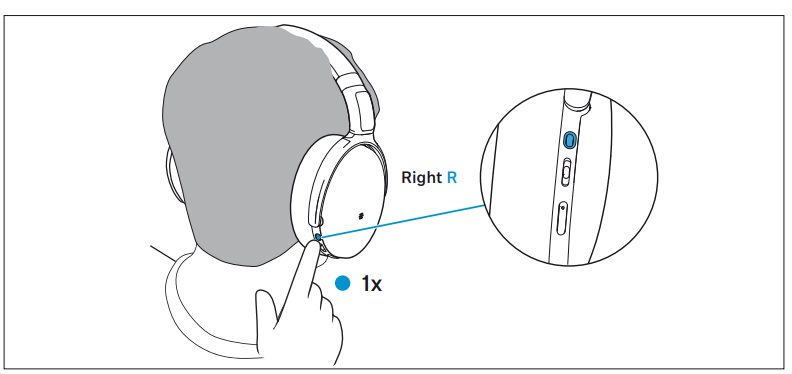
- Press the voice assistant button once.
The available voice assistant of your smartphone is activated, depending on the system or app on your smartphone: Siri, Google Assistant, or others. If no voice assistant is available, voice dialing may be activated). - Ask the voice assistant your question or make a request.
- To cancel the voice assistant/voice dialing:
- Press the voice assistant button 1x.
Adjusting sound effects/the equalizer
To be able to use the sound effects/equalizer, you require the Smart Control app (> 15).
- In the Smart Control app, select the desired sound effects.
The sound effects are stored in the headphones. These sound settings are active even without using the Smart Control app, i.e. , when you are using another Bluetooth device.
Using the audio cable/activating flight mode
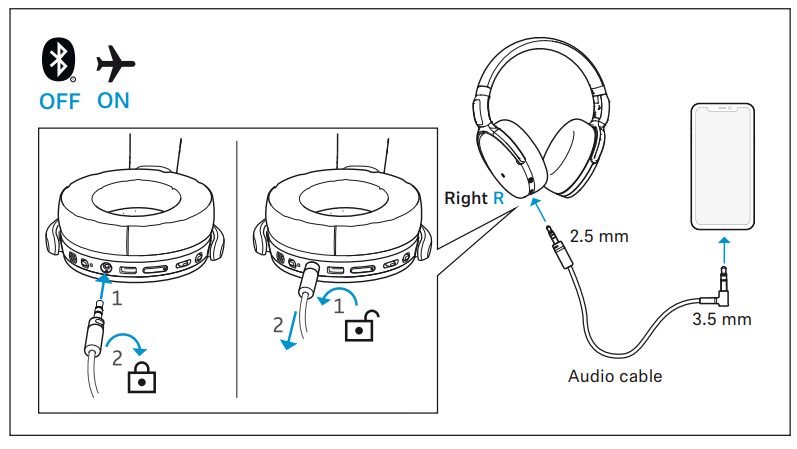
If you connect the audio cable, flight mode is activated and the Bluetooth wireless connection is deactivated.
Use the audio cable when:
- Wireless transmission is not allowed, e.g. , during aircraft take-off and landing,
- The headphone's rechargeable battery is empty,
- Your audio source doesn't offer a Bluetooth connection.
- The functions for controlling music and/or calls, or voice assistance, are not possible. The active noise cancellation ANC can be fully used provided that the rechargeable battery is charged (> 20).
Connecting the headphones using the audio cable
- Insert the 2.5 mm jack plug of the audio cable straight into the headphones' audio socket until you feel a resistance.
- Turn the 2.5 mm jack plug to the right until you feel a resistance. The jack plug is now locked in place, and the audio cable is correctly connected to the headphones.
- Insert the 3.5 mm jack plug of the audio cable into the audio output of your smartphone.
The Bluetooth connection is deactivated.
Disconnecting the audio cable from headphones
- Turn the 2.5 mm jack plug of the audio cable to the left until yo u feel a resistance.
- Pull the 2.5 mm jack plug straight out of the headphones' audio socket.
- Pull the 3.5 mm jack plug of the audio cable straight out of the audio output of your smartphone.
Storing and transporting the headphones
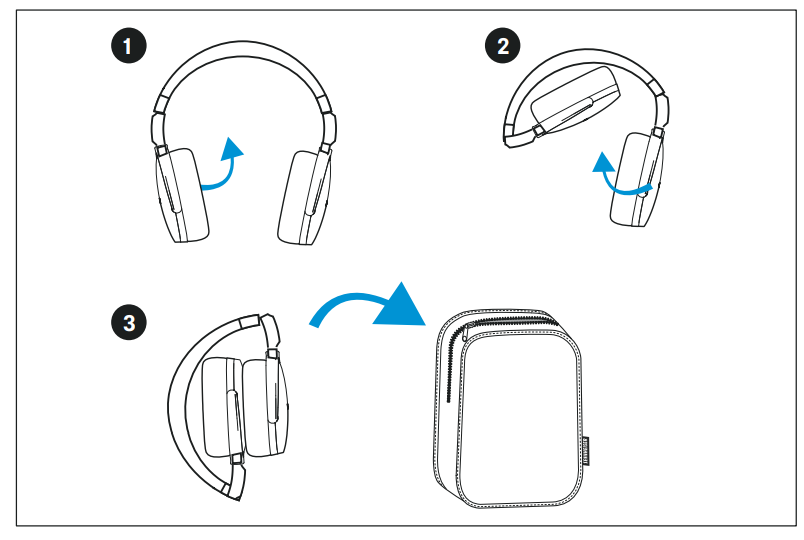
Store the headphones in the carry case to prevent damage to the headphones when you are not using or transporting them.
- Fold up the headphones and place them in the carry case as shown in the illustration.
Care and maintenance
CAUTION
Liquids can damage the electronics of the product!
Liquids entering the housing of the product can cause a short-circuit and damage the electronics.
- Keep all liquids far away from the product.
- Do not use any solvents or cleansing agents.
- Clean the parts of the product only with a soft, dry cloth.
Replacing the ear pads
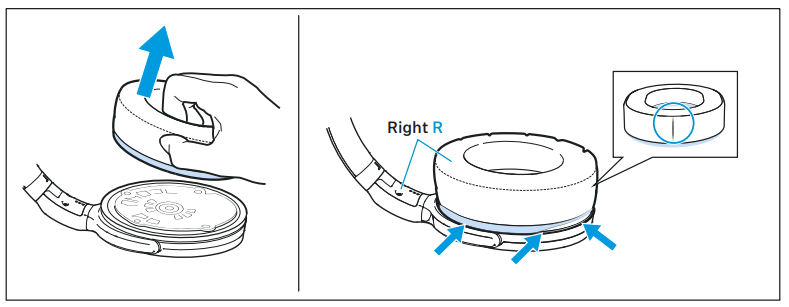
For reasons of hygiene, you should replace the ear pads from time to time. Spare ear pads are available from your Sennheiser partner.
- Peel the ear pad up and away from the ear cup.
- Assign the right ear pad to the right ear cup and the left ear pad to the left ear cup.
- Place the new ear pad onto the ear cup. Make sure that the seam of the ear pad points downwards.
- Place the ear pad around the ear cup so that the ear pad fills the notch of the ear cup.
Specifications
Troubleshooting Common Issues with Sennheiser HD 450BT Headphones SEBT4
Users may occasionally face issues such as Bluetooth connectivity drops, ANC malfunction, or charging problems. If pairing issues arise, ensure the headphones are in pairing mode and within range of the device. Resetting the headphones by holding the power button for 10 seconds can often resolve minor software glitches.
For battery-related problems, use the included USB-C cable to charge fully, avoiding third-party chargers with incompatible voltages. The headphones feature a dual beamforming microphone system; if voice quality is poor during calls, verify that the mic is unobstructed and the device firmware is up to date via the Sennheiser Smart Control app.
Preventive measures include keeping the headphones clean, avoiding exposure to moisture, and storing them in a protective case. The product comes with a standard warranty from Sennheiser, typically covering one to two years d, depending on purchase location. For further assistance, users can contact Sennheiser customer support via their official website or authorized service centers.
Pros & Cons of Sennheiser HD 450BT Headphones SEBT4
Pros
- Excellent sound quality: Rich, balanced audio with deep bass and clear mids and highs, enhanced by support for aptX and AAC codecs.
- Effective active noise cancellation: Significantly reduces ambient noise, ideal for commuting or noisy environments.
- Long battery life: Up to 30 hours of continuous playback with ANC activated, suitable for long flights or daily use.
- Comfortable and portable: Lightweight design with padded ear cups and foldable hinges for easy storage.
- Modern features: USB-C charging, Bluetooth 5.0, voice assistant integration, and a customizable EQ via the Sennheiser Smart Control app
Cons
- ANC not top-of-the-line: While effective, it is slightly less powerful compared to premium models like Sony WH-1000XM5.
- Microphone quality: Adequate for calls , but can struggle in very noisy environments.
- Price segment: Mid-range pricing may be a stretch for budget buyers, though justified by features.
- No wired option: Lacks a 3.5mm audio jack for wired listening, which some alternatives provide.
Customer Reviews of Sennheiser HD 450BT Headphones SEBT4
Users consistently praise the Sennheiser HD 450BT Headphones SEBT4 for their rich sound profile, comfortable fit, and extended battery life. Many highlight the strong ANC performance for the price point, noting noticeable noise reduction during commutes and remote work. Star ratings typically average around 4 to 4.5 out of 5.
Common complaints include occasional Bluetooth dropouts and microphone limitations in busy settings. However, the overall consensus recommends these headphones for anyone seeking quality wireless ANC headphones under $200. Frequent buyers emphasize the value for money and ease of use, making the HD 450BT a popular choice in the mid-tier wireless headphone market.
Faqs
How do I set up my sennheiser HD 450BT Headphones SEBT4 for the first time?
What should I do if my sennheiser HD 450BT Headphones SEBT4 have connectivity issues?
Can I use the sennheiser HD 450BT Headphones SEBT4 with non-Sennheiser devices and which audio codecs are supported?
How can I optimize sound performance on the sennheiser HD 450BT Headphones SEBT4?
What should I do if the active noise cancellation (ANC) on my sennheiser HD 450BT Headphones SEBT4 is not working properly?
How long does the battery of the sennheiser HD 450BT Headphones SEBT4 last and how do I charge it?
How do I care for and maintain my sennheiser HD 450BT Headphones SEBT4 to ensure longevity?
What are the main features that distinguish the sennheiser HD 450BT Headphones SEBT4 from other wireless headphones?
More sennheiser manuals
- Sennheiser True Wireless Earbuds CX 400BT User Manual
- Sennheiser Around-Ear Wireless Headphone HD-350BT User Guide
- Setup & Pairing: Sennheiser Accentum Open True Wireless Earbuds User Manual
- How to Pair: Sennheiser Bluetooth Earphones Headphones CX 7.00BT User Guide
- Pairing & Setup: Sennheiser Momentum True Wireless Earbuds User Manual
- Sennheiser M3AEBTXL Momentum 3 Earcbuds Guide | Charging & Setup
Leave a Comment