
Pairing & Setup: Sennheiser Momentum True Wireless Earbuds User Manual
Content
Sennheiser Momentum True Wireless Earbuds
Introduction
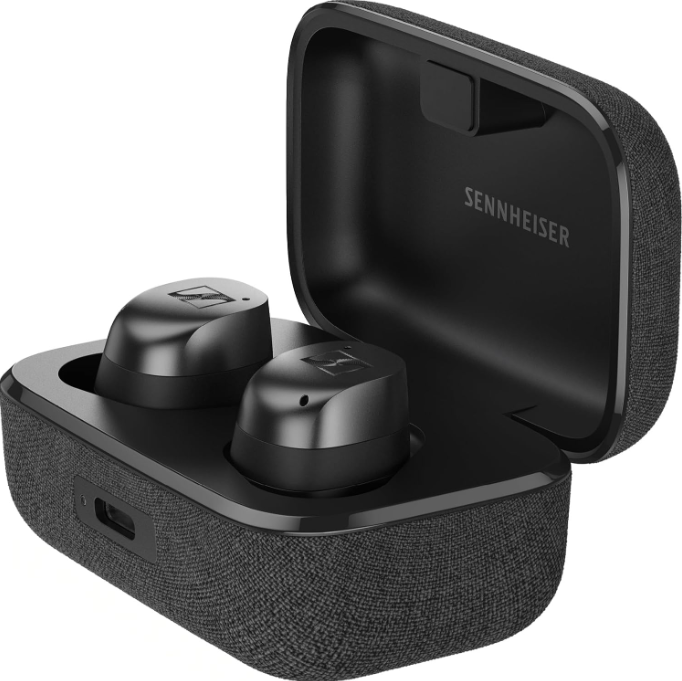
The Sennheiser Momentum True Wireless Earbuds represent a premium blend of exceptional sound quality, advanced technology, and sleek design, tailored for audiophiles and casual listeners alike. These earbuds deliver the renowned Sennheiser signature sound, characterized by rich, detailed audio with impactful bass and crystal-clear highs, making every musical note vivid and immersive. Featuring state-of-the-art adaptive noise cancellation technology, the Momentum True Wireless earbuds effectively reduce ambient noise for an uninterrupted listening,g experience, whether commuting, working out, or relaxing at home.
Designed for comfort with assorted soft silicone ear tips and fins, they provide a secure fit suitable for extended listening sessions. The earbuds also boast future-proof Bluetooth 5.4 connectivity with support for the latest codecs,s including aptX Adaptive and Lossless, ensuring compatibility with a wide range of devices and high-resolution audio streaming. Users can personalize sound profiles using the intuitive Sennheiser Smart Control app, enabling tailored EQ settings and adaptive transparency modes for situational awareness.
These earbuds are ideal for music lovers, podcast enthusiasts, and professionals seeking wireless freedom combined with premium audio fidelity. With a competitive price range roughly between $250 and $300 and wide availability at major electronics retailers and online platforms, Sennheiser Momentum True Wireless Earbuds stand out in the true wireless category for their balance of performance, comfort, and advanced features.
Specifications of Sennheiser Momentum True Wireless Earbuds
- Driver: 7mm dynamic TrueResponse transducer delivering detailed sound from 5 Hz to 21 kHz
- Frequency Response: 5 Hz – 21 kHz for wide audio range coverage
- Bluetooth: Version 5.4 with support for SBC, AAC, aptX™, aptX Adaptive, aptX Lossless, and LC3 codecs
- Noise Cancellation: Hybrid Adaptive ANC that automatically adjusts to ambient noise
- Microphones: Six MEMS microphones (three per earbud) with beamforming for superior voice clarity and noise reduction
- Battery Life: Up to 7 hours of playback on earbuds; total up to 30 hours with the charging case; supports fast Qi wireless charging (8 minutes charge = 1 hour of playback)
- Water Resistance: IP54 rated for dust and splash protection
- Comfort: Multiple sizes of silicone ear tips and fins for secure, ergonomic fit
- App Support: Sennheiser Smart Control app allows sound personalization with EQ, sound zones, sound check, and preset modes
- Connectivity Features: Multipoint support for connecting multiple devices simultaneously
Compared to competitors such as Bose QuietComfort Earbuds II, the Momentum True Wireless 4 offers similar noise cancellation performance with a stronger bass-forward sound signature and enhanced codec support, making it a strong contender for audiophiles seeking wireless earbuds with uncompromised sound precision.
MOMENTUM True Wireless
Workaround solving Android 10 Bluetooth connection problem (Cross key problem)
There is a known issue with Android 10 that the smartphone is not able to connect via Bluetooth with the Sennheiser MOMENTUM True Wireless after performing a firmware update.
Please try the following steps to solve this connection problem:
- Open the Bluetooth settings menu of your smartphone and remove the „MOMENTUM TW“ from the Bluetooth device list.
- Open the Sennheiser Smart Control app and remove the „MOMENTUM TW“ from the device list.
- Close the Smart Control app (not only hide).
- Reset the earphones to the factory default settings
- Make sure that the contacts on the earbuds and in the charging case are clean and make contact (the LED of the charging case lights up when you insert the earbuds into the charging case). If necessary, clean the contacts.
- Use the USB cable to connect the charging case to a power source.
Insert the earbuds into the charging case and, within 60 seconds, touch and hold the right and the left touch control panel for at least 30 seconds.
The earphones are reset to the factory default settings.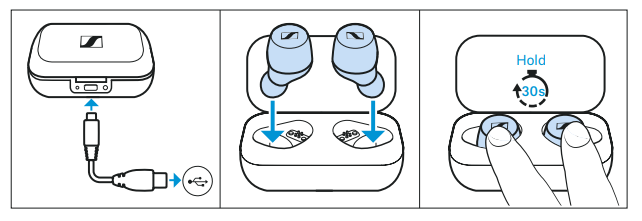
- Take the earbuds out of the charging case.
The earbuds are now in Bluetooth pairing mode. LEDs light up red-blue. - Start the Smart Control app and try to connect to the „MOMENTUM TW“.
The Bluetooth connection should now work.
If the Bluetooth connection still is not working: - Close the Smart Control App.
- Open the Bluetooth settings menu of your smartphone and turn Bluetooth „off“ and „on“ again.
- Click on „Pair new device“ and choose „MOMENTUM TW“.
- Open the Smart Control app again.
The Bluetooth connection should now work.
Troubleshooting Sennheiser Momentum True Wireless Earbuds
- Problem: Earbuds not connecting via Bluetooth
Solution: Ensure earbuds are charged; reset earbuds by holding touch controls for 10 seconds; remove and re-pair the device in Bluetooth settings. - Problem: One earbud is producing no sound
Solution: Check battery level of each earbud; clean charging contacts; reset earbuds; update firmware via the Sennheiser Smart Control app. - Problem: Poor call quality or microphone issues
Solution: Confirm microphone holes are clean; use earbuds in quiet environments; toggle noise cancellation off; update firmware. - Error Codes: No specific error codes, but the app will notify if the firmware update fails or battery issues are detected.
- Preventive Measures: Keep earbuds and the charging case dry and clean; avoid exposing them to extreme temperatures; regularly update firmware for best performance.
The product comes with a standard manufacturer’s warranty covering defects and workmanship. For assistance, users can contact Sennheiser customer support via their official website or through the Smart Control app’s support section.
Pros & Cons of Sennheiser Momentum True Wireless Earbuds
- Pros:
- Exceptional, bass-forward sound quality with detailed mids and highs
- Advanced adaptive noise cancellation comparable to higher-end models
- Comprehensive co, dec support including aptX Lossless and LC3 for high-fidelity streaming
- Long battery life with fast wireless charging capability
- Customizable sound profiles via intuitive app
- Comfortable, secure fit with multiple ear tip options
- IP54 rating ensures protection against dust and spThes
- Cons:
- The premium price point may be high compared to some of the charging
- Charging case lacks waterproofing, requiring caution
- Sound signature may be less bass-heavy than some users prefer
- Slight learning curve in optimizing fit and app settings
Overall, the Sennheiser Momentum True Wireless Earbuds offer excellent value for users seeking premium sound and features, standing strong against rivals such as Bose QuietComfort and Sony WF-1000XM5 earbuds.
Customer Reviews of Sennheiser Momentum True Wireless Earbuds
Users widely recommend Sennheiser Momentum True Wireless earbuds for their superb audio clarity, crisp highs, and balanced bass, noting the earbuds’ premium build and comfort during extended use. Many reviewers highlight the effective adaptive noise cancellation and the convenience of customizable EQ via the app as major strengths. Common complaints include the relatively high price and occasional connectivity glitches, which are often resolved by firmware updates. The earbuds receive an average rating of around 4.5 out of 5 stars, with multiple testimonials recommending them for audiophiles and daily commuters alike. Frequent positive remarks focus on the immersive sound experience and all-day comfort, while some users wish for a more robust charging case. Overall, buyers recommend the Momentum True Wireless earbuds as a top-tier choice in the premium true wireless segment.
Faqs
How do I set up my Sennheiser Momentum True Wireless Earbuds for the first time?
What should I do if my Sennheiser Momentum True Wireless Earbuds are not pairing with my phone?
Can I use the Sennheiser Momentum True Wireless Earbuds with any Bluetooth device?
How can I optimize sound quality on my Sennheiser Momentum True Wireless Earbuds?
What are the indicators for battery status on Sennheiser Momentum True Wireless Earbuds and case?
How do I reset my Sennheiser Momentum True Wireless Earbuds if they malfunction?
What maintenance tips can prolong the life of my Sennheiser Momentum True Wireless Earbuds?
Does the Sennheiser Momentum True Wireless Earbuds support wireless charging, and how do I use it?
More sennheiser manuals
- Setup & Pairing: Sennheiser Accentum Open True Wireless Earbuds User Manual
- Sennheiser True Wireless Earbuds CX 400BT User Manual
- Setup: Sennheiser HD 450BT Headphones SEBT4 User Manual
- Sennheiser Around-Ear Wireless Headphone HD-350BT User Guide
- How to Pair: Sennheiser Bluetooth Earphones Headphones CX 7.00BT User Guide
- Sennheiser M3AEBTXL Momentum 3 Earcbuds Guide | Charging & Setup
Leave a Comment