
Sennheiser True Wireless Earbuds CX 400BT User Manual
Content
Sennheiser True Wireless Earbuds CX 400BT
Introduction
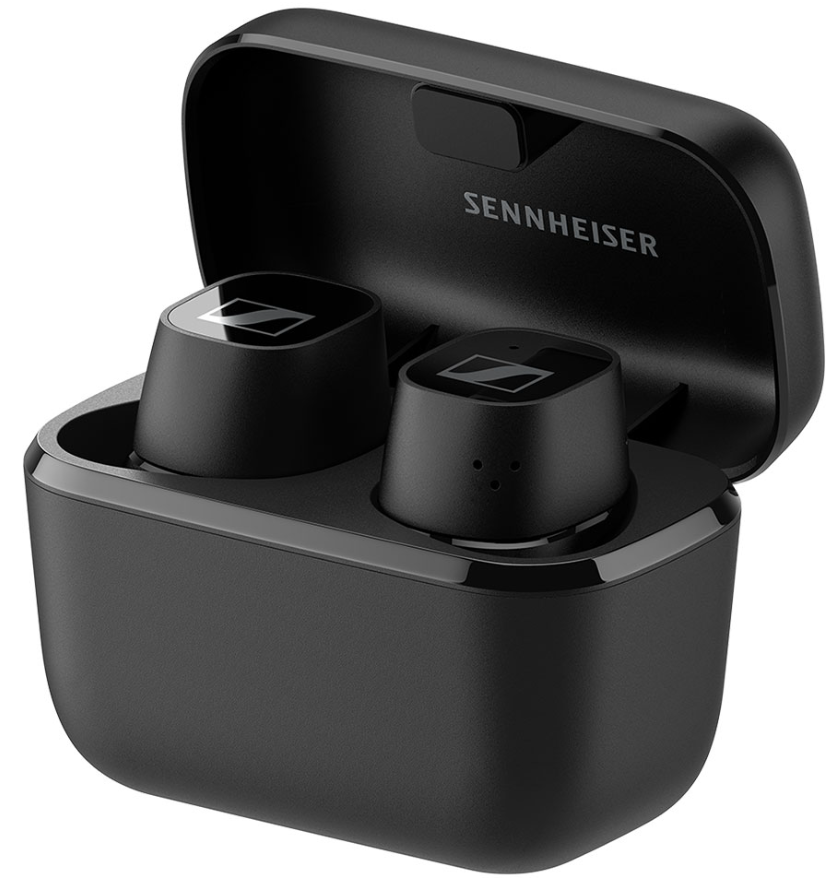
The Sennheiser True Wireless Earbuds CX 400BT deliver an outstanding audio experience for users seeking high-fidelity sound in a compact, wire-free design. Sporting dynamic 7mm drivers identical to those in Sennheiser's premium Momentum True Wireless 2 model, these earbuds offer superb sound clarity, deep bass, and natural mids without the premium price tag. Their ergonomic in-ear fit and customizable silicone tips ensure comfort for extended wear, making them ideal for daily commuters, music enthusiasts, and remote workers alike.
Unique selling points include advanced Bluetooth 5.1 connectivity for quick pairing and stable transmission, support for high-quality codecs such as SBC, AAC, and aptX, and an intuitive control system customizable through the Sennheiser Smart Control app. Though lacking active noise cancellation, they provide effective passive noise isolation and feature a transparent hearing mode to stay aware of ambient sounds outdoors.
With an estimated price range of around $150 to $180 (approx. RM999), these earbuds offer premium sound quality and convenient features at a competitive price. They are widely available through leading electronics retailers and official Sennheiser outlets worldwide.
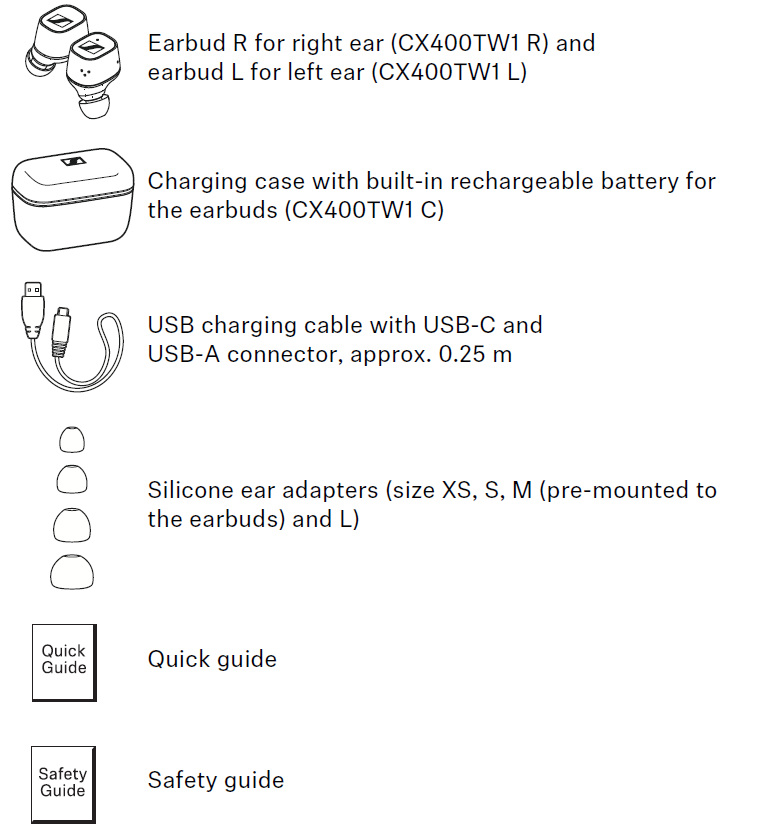
Package contents
Specifications of Sennheiser True Wireless Earbuds CX 400BT
- Drivers: 7mm dynamic drivers for rich, detailed sound
- Frequency Response: 5 Hz to 21,000 Hz,, ensuring a wide audio range
- Bluetooth Version: 5.1 for low latency and stable connection
- Supported Codecs: SBC, AAC, aptX compatible with various devices
- Battery Life: 7 hours of playback per charge, 13 additional hours via charging case; total up to 20 hours
- Charging: USB-C fast charging with 1.5 hours for a full charge; 10 minutes of quick charge provides 1 hour of playback
- Weight: Each earbud 6g; charging case 37g; total 59g
- Controls: Customizable touch controls via Sennheiser Smart Control App
- Noise Isolation: Passive noise cancellation with selectable transparent hearing mode
- Additional Features: Single-earbud operation, multiple silicone ear tip sizes (XS, S, M, L)
Compared to alternatives like the Momentum True Wireless 2, the CX 400BT sacrifices active noise cancellation but maintains comparable sound quality and superior value for money, positioning it well for users prioritizing audio fidelity and battery life over ANC features.
Product overview
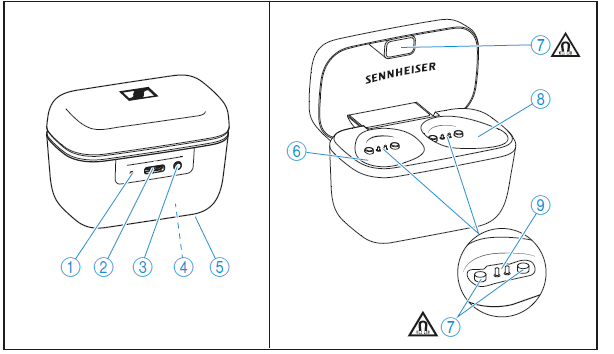
Charging case
CX400TW1 C
- LED displays the charging process/charge status of the rechargeable battery of the charging case or of the earbuds (when inserted into the charging case)
- Input for USB-C connector for charging the rechargeable batteries
- LED button activates the LED display for 5 seconds
- Built-in rechargeable battery for charging the earbuds on the go
- Type plate
- Charging compartment for the left earbud L
- Magnetic holders
- Charging compartment for the right earbud R
Charging contacts
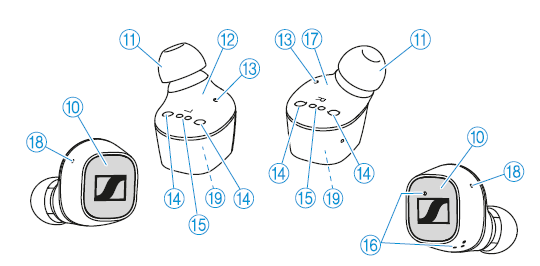
Earphones
CX400TW1 R and CX400TW1 L- Touch control panel
- Changeable silicone ear adapters
- Left earbud L (secondary earbud, receives signals from the right earbud)
- Status LED
- Magnetic holders
- Charging contacts
- Microphones for phone calls
- Right earbud R (primary earbud, controls the Bluetooth connection to the smartphone and to the left earbud)
- Openings for acoustic optimization
- Built-in rechargeable battery
Using the earphones
Information on the rechargeable battery, the charging process, and the first use
The earbuds and the charging case each have a built-in rechargeable battery. The charging case allows you to store the earbuds safely at all times while they are being charged.
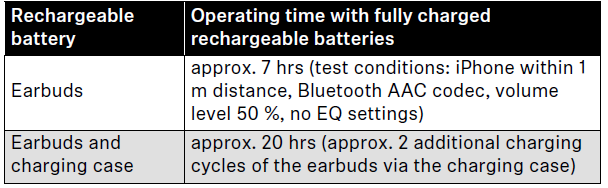
Upon delivery, the rechargeable batteries of the earbuds and the charging case are in sleep mode and have to be woken up by connecting them to a power source once. Sennheiser recommends charging the earbuds and the charging case for a complete charging cycle without interruption before using them for the first time.
A complete charging cycle of the charging case and the earbuds takes about 1.5 hours. The quick charge function gives you approximately. 1 hour of playback time after 15 minutes of charging.
Sennheiser recommends using the supplied USB cable and a compatible standard USB power supply for charging the headphones.
When a USB cable connected to a power source is also connected to the charging case, the rechargeable battery of the charging case is being charged. When the earbuds are inserted into the charging box, their rechargeable batteries are being charged at the same time. The LED of the charging case displays the charge status (> 7).
When the battery charge of the earbuds drops to a critical level, a voice prompt asks you to recharge the earbuds (“Recharge headset”).
The charge status of the rechargeable battery of the charging case is displayed by the LED on the charging case (> 7).
Important safety instructions
- Read this instruction manual carefully and completely before using the product.
- Always include this instruction manual when passing the product on to third parties.
- Do not use the product if it is obviously defective or makes a loud, unusual (whistling or beeping) noise.
- Only use the product in environments where Bluetooth® wireless transmission is permitted.
Preventing damage to health and accidents
- Protect your hearing from high volume levels. Permanent hearing damage may occur when headphones are used at high volume levels for long periods of time. Sennheiser headphones sound exceptionally good at low and medium volume levels.
- Do not insert the earphones too deeply into your ears,, and never insert them without ear adapters. Always remove the earphones slowly and carefully from your ears.
- The product generates stronger permanent magnetic fields that could cause interference with cardiac pacemakers, implanted defibrillators (ICDs), and other implants. Always maintain a distance of at least 3.94"/10 cm between the product component containing the magnet (earbuds and charging case) and the cardiac pacemaker, implanted defibrillator, or other implant.
- Keep the product, accessories,, and packaging parts out of reach of children and pets to prevent accidents. Swallowing and choking hazards
- Do not use the product in an environment that requires your special attention (e.g.,, in traffic).
Preventing damage to the product and malfunctions
- Always keep the product dry and do not expose it to extreme temperatures (hairdryer, heater, extended exposure to sunlight, etc.) to avoid corrosion or deformation. The normal operating temperature is from 0 °C to 40 °C/32 °F to 104 °F.
- Use only attachments/accessories/spare parts supplied or recommended by Sennheiser.
- Clean the product only with a soft, dry cloth.
Installing the Smart Control app
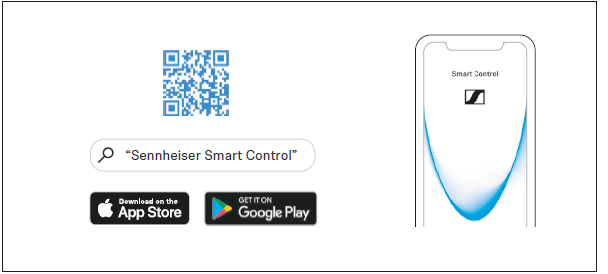
To make full use of all the settings and functions of the headphones, you need to have the free Sennheiser Smart Control app installed on your smartphone.
Download the app from the App Store or Google Play and install it on your smartphone. Alternatively, you can use your smartphone to scan the following QR code or to call up the following Internet site: www.sennheiser.com/smartcontrol
- Connect your smartphone to the earphones using Bluetooth (> 15).
- Start the Smart Control app.
- Follow the instructions in the app.
- Simultaneously touch and hold the right and the left touch control panel for 3 seconds to accept the Bluetooth Low Energy connection.
The Smart Control app recognizes the earphones and activates all available settings and functions.
If you connect the earphones via the Smart Control app, only a Bluetooth Low Energy connection may be established (Bluetoothname LE-CX400BT TW”). To use the earphones for music playback, etc., pair the earbuds via the Bluetooth menu of your smartphone (Bluetooth name “CX 400BT TW”) (> 16).
Using the Auto Call function
If you take the paired earbuds out of the charging case during an incoming call, the call is automatically accepted, and you can use the earbuds directly for making calls.
You can activate (default setting) or deactivate the function via the Smart Control app.
Adjusting sound effects/the equalizer
To be able to use the sound effects/equalizer, you require the Smart Control app (> 19).
In the Smart Control app, select the desired sound effects via the equalizer. You can use predefined presets or define your own settings.
The sound effects are stored in the earphones. These sound settings are active even without using the Smart Control app, i.e., when you are using a different Bluetooth device.
Setting the voice prompts/beep sounds.
To be able to set the voice prompts and beep sounds, you require the Smart Control app (> 19).
You can change the language of the voice prompts, choose between voice prompts and beep sounds, or deactivate the status messages with a few exceptions (e.g.,, rechargeable battery is empty).
Customizing the control functions
To be able to customize the control functions for music playback, you require the Smart Control app (> 19).
The app allows you to customize the control functions and other commands or to select preset control functions. Some basic functions can be changed (e.g., volume loud/quiet, call control).
Care and maintenance of the earbuds/charging case
CAUTION
Liquids can damage the electronics of the product!
Liquids entering the housing of the product can cause a short-circuit and damage the electronics.
- Keep all liquids far away from the product.
- Do not use any solvents or cleansing agents.
- Clean the product only with a soft, dry cloth.
- You can clean the silicone ear adapters under lukewarm running water. Allow the ear adapters to dry at room temperature for at least 12 hours before putting them back on the earbuds.
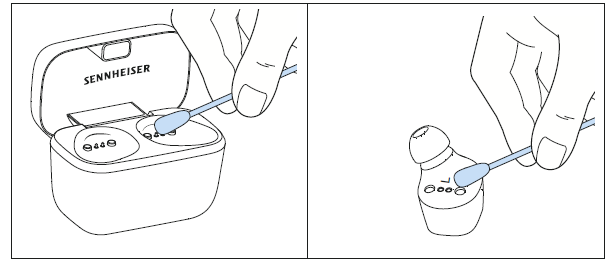
- Clean the charging contacts on the earbuds and in the charging case from time to time using,, e.g.,, a cotton swab.
Information on the built-in rechargeable battery
Sennheiser ensures and guarantees that the rechargeable battery performs at its optimum upon purchase of the product. If, upon purchase or within the warranty period, you suspect that the rechargeable battery is obviously defective or if a charging error/battery error is displayed (> 7), stop using the product, disconnect it from the power supply system an and contact your Sennheiser partner. Your Sennheiser partner will coordinate the repair/replacement with you.
Do not return a product with a defective battery to your dealer or Sennheiser partner unless requested to do so. To find a Sennheiser partner in your country, search at www.sennheiser.com/service-support.
Installing firmware updates
Firmware updates can be downloaded free of charge from the Internet using the Sennheiser Smart Control app.
- Connect your earphones to your smartphone and start the Smart Control app (> 19).
- The app provides information on available firmware updates and guides you through the installation process.
Troubleshooting Guide for Sennheiser True Wireless Earbuds CX 400BT
- ProblemEarbudsre are ds not pairing with the device.
Solution: Ensure Bluetooth 5.1 is enabled on your device, reset the earbuds by placing them in the case and holding the touch controls for 10 seconds, then try pairing again. - Problem: One earbud is not producing sound.
Solution: Check the battery level of both earbuds, clean the earbud contacts,, and reconnect via the app or Bluetooth settings. - Problem: Audio is cutting out intermittently.
Solution: Minimize distance between earbuds and source device; avoid interference from other wireless devices; update firmware through the Sennheiser Smart Control app. - Problem: Touch controls are unresponsive.
Solution: Clean the earbud surface, ensure firmware is updated, and customize controls via the official app.
Preventive measures include regularly cleaning the earbuds and charging contacts, keeping firmware updated via the Smart Control app, and storing headphones properly in the charging case when not in use. The CX 400BT comes with a standard manufacturer's warranty, and Sennheiser provides customer support through their website and authorized retailers for replacements or repairs.
For assistance, contact Sennheiser support at their official website or via the customer service hotline listed in the product manual.
Pros & Cons of Sennheiser True Wireless Earbuds CX 400BT
- Pros:
- Exceptional sound quality with balanced bass, mids, and clear treble thanks to 7mm dynamic drivers
- Long battery life offering up to 20 hours of playback,, including charging case
- Customizable touch controls and sound presets through the Sennheiser Smart Control app
- Comfortable ergonomic design with multiple ear tip sizes for a secure fit
- Stable Bluetooth 5.1 connection with support for aptX and AAC codecs
- Cons:
- No active noise cancellation, relying solely on passive isolation
- No multipoint Bluetooth support; can connect to only one device at a time
- Minimal bass emphasis under 100Hz may disappoint bass-heavy music lovers
- Limited water resistance, not ideal for intense workouts or rainy conditions
Overall, the CX 400BT offers excellent value for music lovers seeking superior sound clarity and battery life at a midrange price, standing out against competitors that either lack sound fidelity or have shorter battery spans.
Customer Reviews and Feedback on Sennheiser True Wireless Earbuds CX 400BT
Users consistently praise the Sennheiser True Wireless Earbuds CX 400BT for their rich, natural sound profile, comfortable fit, and impressive battery performance. Typical ratings average around 4.3 to 4.5 stars out of 5. Many highlight the app's equalizer functionality as a valuable feature for personalized sound tuning.
Common complaints include the absence of active noise cancellation and occasional minor connectivity issues, which are usually resolved through firmware updates or troubleshooting. Some users note the lack of multipoint Bluetooth as a drawback for switching between multiple devices.
Most reviewers recommend the CX 400BT for users prioritizing sound quality and long battery life over advanced noise cancellation features. The earbuds are considered a strong purchase for commuters, remote workers, and casual listeners looking for premium audio without premium pricing.
Faqs
How do I set up and pair my sennheiser True Wireless Earbuds CX 400BT with a new device?
What should I do if my sennheiser True Wireless Earbuds CX 400BT won’t connect or keep disconnecting?
How can I customize the sound settings on my sennheiser True Wireless Earbuds CX 400BT?
Are sennheiser True Wireless Earbuds CX 400BT compatible with all Bluetooth devices, including iPads and Windows PCs?
What are the touch control features on the sennheiser True Wireless Earbuds CX 400BT and how do I avoid accidental commands?
How long does the battery last on the sennheiser True Wireless Earbuds CX 400BT and how fast can I recharge them?
What is the recommended way to clean and maintain my sennheiser True Wireless Earbuds CX 400BT to ensure longevity?
How do I update the firmware on my sennheiser True Wireless Earbuds CX 400BT for optimal performance?
More sennheiser manuals
- Setup & Pairing: Sennheiser Accentum Open True Wireless Earbuds User Manual
- Setup: Sennheiser HD 450BT Headphones SEBT4 User Manual
- Pairing & Setup: Sennheiser Momentum True Wireless Earbuds User Manual
- Sennheiser Around-Ear Wireless Headphone HD-350BT User Guide
- How to Pair: Sennheiser Bluetooth Earphones Headphones CX 7.00BT User Guide
- Sennheiser M3AEBTXL Momentum 3 Earcbuds Guide | Charging & Setup
Leave a Comment