
Pairing: Sennheiser SEBT4 Wireless Headphone User Guide
Content
Sennheiser SEBT4 Wireless Headphones
Introduction
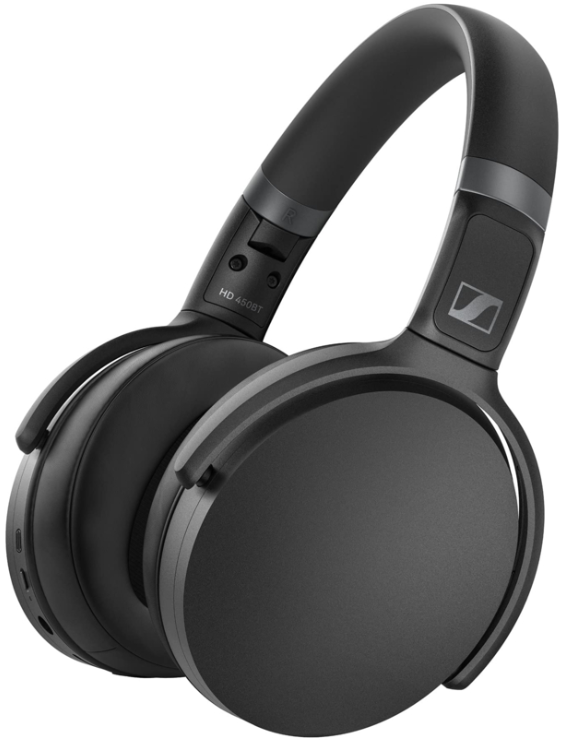
The Sennheiser SEBT4 Wireless Headphone offers an immersive audio experience with its advanced technology and sleek design. Whether you're listening to music or taking calls, these headphones provide exceptional sound quality and convenience.
Specifications
Instructions
- Charge the headphones fully before first use.
- Turn on the headphones by pressing and holding the power button.
- Enable Bluetooth on your device and pair it with the SEBT4 headphones.
- Adjust the headphones for a comfortable fit.
- Control the volume, playback, and calls using the buttons on the headphones.
- To activate the active noise cancellation, press the ANC button.
- For voice assistant support, press and hold the dedicated voice assistant button.
- To turn off the headphones, press and hold the power button.
- When not in use, store the headphones in the provided carrying case.
- Refer to the user manual for more detailed instructions.
Package contents
Product overview
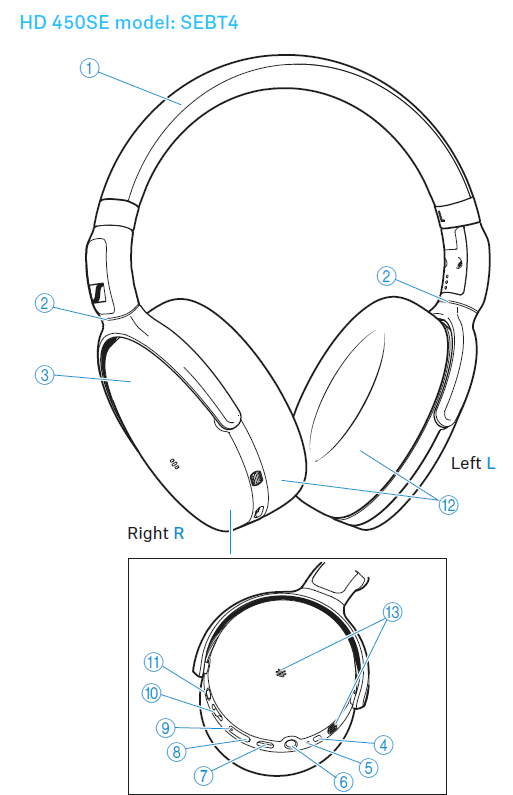
- Headband
- Ear cup joints
- Ear cups, steplessly adjustable
- On/off button for the headphones and the active noise cancellation ANC. Pressing for 4 seconds activates the Bluetooth pairing mode. Pressing 1x activates/deactivates AN.C.
- LED
- Input for analog audio cable; when a cable is connected, flight mode is activated, and Bluetooth is deactivated
- USB-C socket for charging
- Volume – button (volume down)
- Volume + button (volume up)
- 3-way multi-function button for music and call functions
- Voice assistant button
- Ear pads
- Speech microphones (2 pcs.) for phone calls
Using the headphones
Information on the rechargeable battery and the charging process
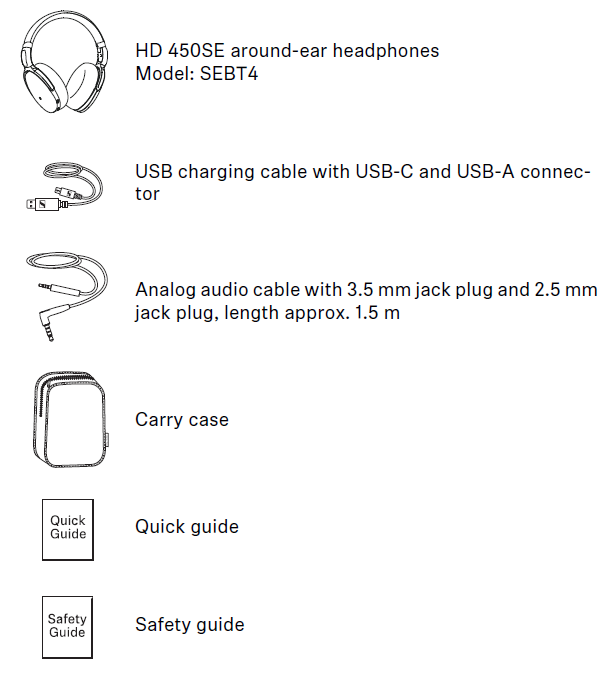
- The headphones have a built-in rechargeable battery. A complete charging cycle takes approx. 2 hours. Before using the headphones for the first time, charge the rechargeable battery for a complete charging cycle without interruption.
- When the headphones are being charged, the LED lights up (> 7). Once the headphones are fully charged, the LED flashes blue for 5 minutes and then goes off. When the battery charge drops to a critical level, a voice prompt asks you to recharge the headphones (“Recharge headset”).
- Sennheiser recommends using the supplied USB cable and a compatible standard USB power supply for charging the headphones.
- While the headphones are being charged, you can still listen to music or make phone calls. In this case, however, the charging time may be longer.
Charging the headphones' rechargeable battery
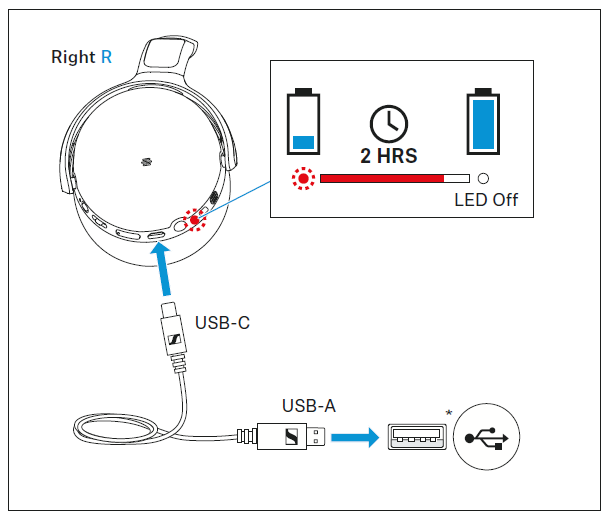
- Connect the USB-C connector of the charging cable to the USB socket of the headphones.
- Connect the USB-A connector to a corresponding socket of a USB power source (*to be ordered separately). Make sure that the US B power source is connected to the power supply system.
The charging process of the headphones begins. The LED displays the charge status:
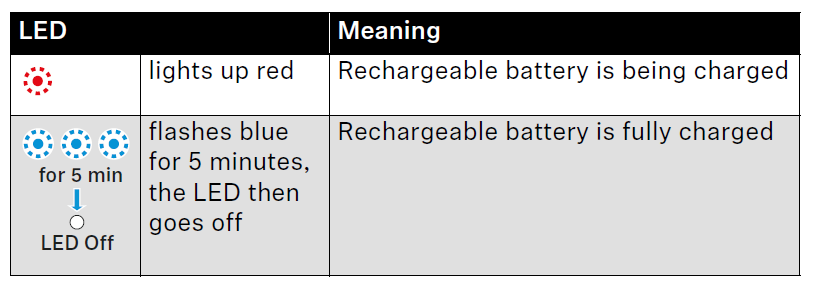
- If the LED does not light up immediately during charging, clean the charging socket and charge the headphones until the LED lights up again (> 11)
- You can speed up the charging process by charging the headphones when they are switched off.
Connecting the headphones to a Bluetooth device
- To be able to use the Bluetooth connection, you must register both devices (headphones and e.g. smartphone) once. This process is called pairing.
- If the operation differs from the steps mentioned, also refer to the instruction manual of the Bluetooth device you are using.
- When you switch on the headphones for the first time, they automatically switch to pairing mode.
Information on the Bluetooth wireless connection
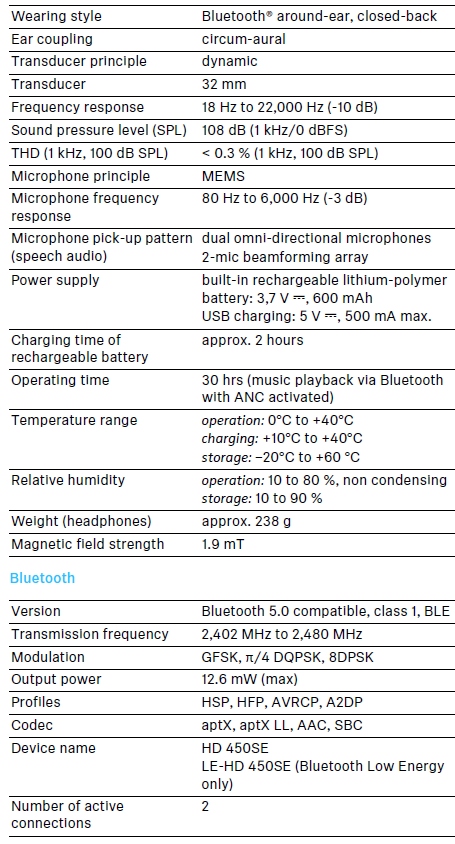
- The headphones are compatible with Bluetooth 5.0.
- If your audio source supports one of the following high-resolution audio encoding methods, music is automatically played in high audio quality: aptX, aptX LL, or AAC. Otherwise, the headphones will play your music in normal audio quality (SBC).
- Paired devices establish the Bluetooth wireless connection immediately after switch-on and are ready for use.
- On switch-on, the headphones automatically try to connect to the last two connected Bluetooth devices. The headphones can save the connection profiles of up to eight Bluetooth devices with which they have been paired. Audio playback is only possible from one device at a time.
- If you pair the headphones with the ninth Bluetooth device, the saved connection profile of the least used Bluetooth device will be overwritten. If you want to re-establish a connection with the overwritten Bluetooth device, you have to pair the headphones again.
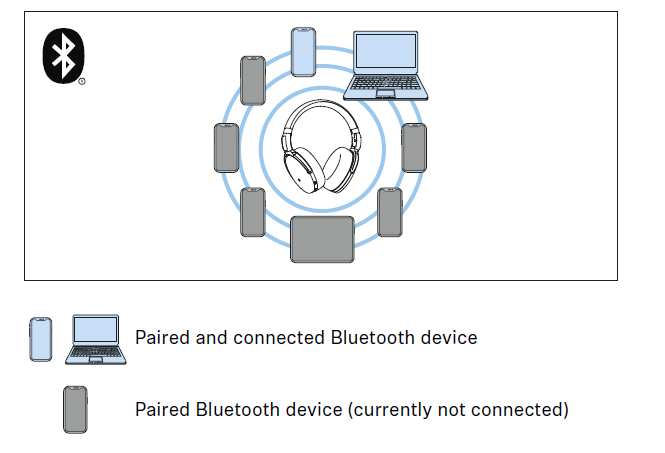
Pairing the headphones with a Bluetooth device
- Switch the headphones off and place them close to the Bluetooth device (max. 20 cm).
- Press and hold the on/off button for 4 seconds.
The LED flashes red and blue. The headphones are in pairing mode. - Activate Bluetooth on your Bluetooth device.
- Via the menu of your Bluetooth device, start the search for new Bluetooth devices.
All active Bluetooth devices in the proximity of your Bluetooth device are displayed. - From the list of found Bluetooth devices, select “HD 450SE”. If necessary, enter the default pin code “0000”.
- If pairing was successful, you hear the voice prompt “Connected” . The LED flashes blue 3x.
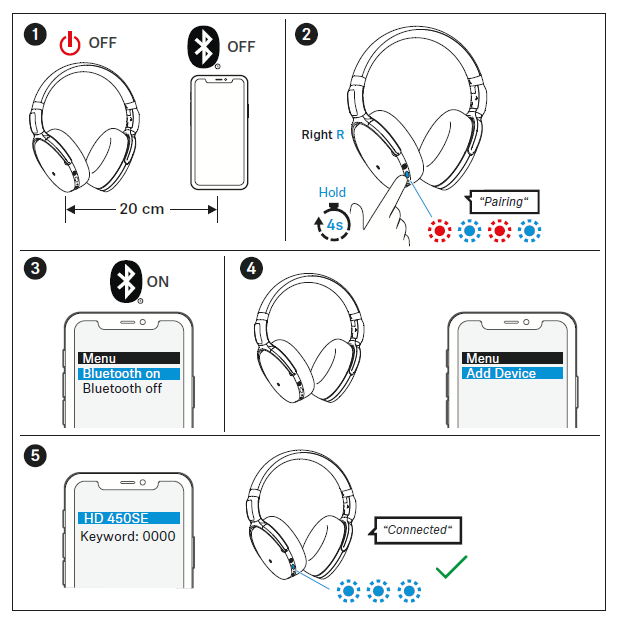
- If no connection is established within 5 minutes, pairing mode is terminated and the headphones switch to standby mode. If necessary, repeat the steps described above.
- If you switch on the headphones for the first time (the pairing list is empty), they automatically switch to pairing mode.
Disconnecting the headphones from a Bluetooth device
- Via the menu of your Bluetooth device, disconnect the connection to the headphones.
- The headphones are disconnected from the Bluetooth device. You hear the voice prompt “Lost connection”. The headphones switch to standby mode.
- To delete the Bluetooth pairing list of the headphones, > 31.
Installing the Smart Control app
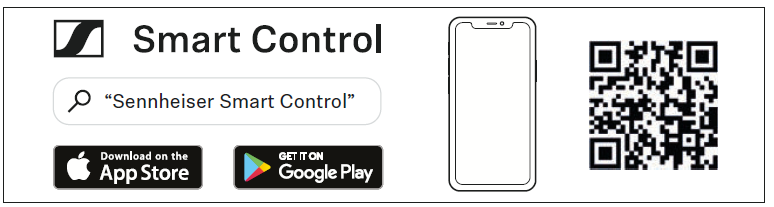
- To make full use of all the settings and functions of the headphones, you need to have the free Sennheiser Smart Control app installed on your smartphone.
- Download the app from the App Store or Google Play and install it on your smartphone. Alternatively, you can use your smartphone to scan the following QR code.
- Connect your smartphone to the headphones via Bluetooth (> 12).
- Start the Smart Control app.
- Follow the instructions in the app.
The Smart Control app recognizes the headphones and activates all available settings and functions. - For further functions of the headphones, you require the apps of the respective manufacturers:
- Amazon Alexa app (> 25)
Care and maintenance
CAUTION
- Liquids can damage the electronics of the product!
- Liquids entering the housing of the product can cause a short-circuit and damage the electronics.
- Keep all liquids far away from the product.
- Do not use any solvents or cleansing agents.
- Clean the parts of the product only with a soft, dry cloth.x
Faqs
How do I pair the SEBT4 headphones with my device?
Enable Bluetooth on your device and search for available devices. Select the SEBT4 headphones from the list and follow the on-screen prompts to complete the pairing process.
Can I use the SEBT4 headphones with my TV?
If your TV supports Bluetooth connectivity, you can pair it with the SEBT4 headphones. However, please check your TV's manual or specifications to ensure compatibility.
Is the active noise cancellation adjustable?
No, the active noise cancellation on the SEBT4 headphones is not adjustable. It automatically adapts to the surrounding environment to provide optimal noise reduction.
How long does it take to fully charge the headphones?
It takes approximately 2 hours to fully charge the SEBT4 headphones.
Can I use the headphones while they are charging?
Yes, you can use the SEBT4 headphones while they are charging. However, please note that the charging time may be slightly longer in this case.
Are the headphones sweat-proof or waterproof?
No, the SEBT4 headphones are not sweat-proof or waterproof. Avoid exposing them to excessive moisture or liquid to prevent damage.
Do the headphones support voice assistants?
Yes, the SEBT4 headphones support voice assistants. Simply press and hold the dedicated voice assistant button to activate your device's voice assistant.
Can I connect the headphones to multiple devices simultaneously?
No, the SEBT4 headphones can only be connected to one device at a time. To switch devices, disconnect the headphones from the current device and pair them with the new device.
What is the range of the wireless connectivity?
The SEBT4 headphones have a wireless range of approximately 10 meters (33 feet) in an open space. However, the range may vary depending on the environment and any obstructions.
Is there a warranty for the headphones?
Yes, the SEBT4 headphones come with a 1-year manufacturer's warranty. Please refer to the warranty card or contact Sennheiser customer support for more information.
More sennheiser manuals
- Sennheiser M3AEBTXL Momentum 3 Earcbuds Guide | Charging & Setup
- How to Pair: Sennheiser Bluetooth Earphones Headphones CX 7.00BT User Guide
- Sennheiser Around-Ear Wireless Headphone HD-350BT User Guide
- Setup: Sennheiser HD 450BT Headphones SEBT4 User Manual
- Sennheiser True Wireless Earbuds CX 400BT User Manual
- Setup & Pairing: Sennheiser Accentum Open True Wireless Earbuds User Manual
Leave a Comment