
Setup & Pairing: Shokz Opencomm 2 UC Headset User Manual
Content
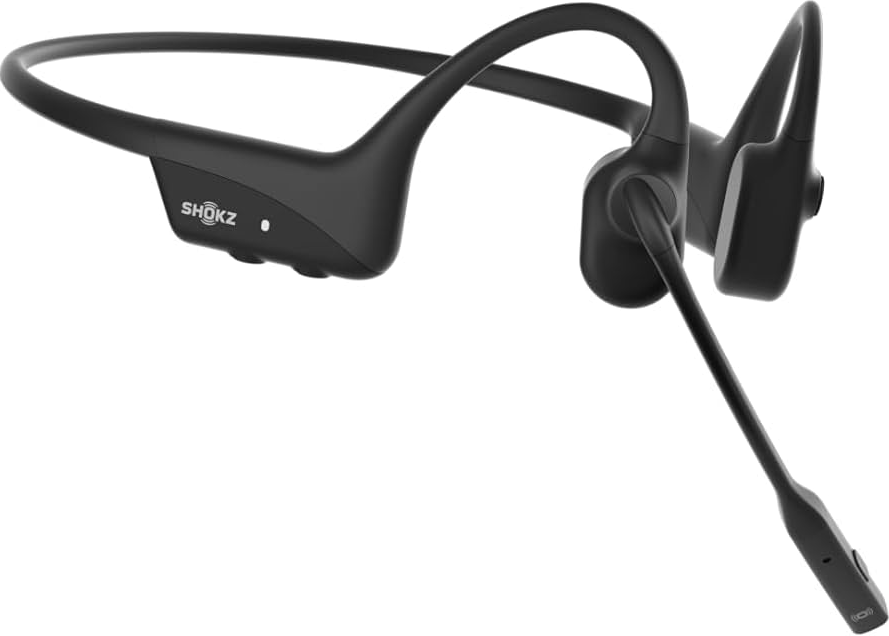
Shokz OpenComm 2 UC Headset
Introduction
The Shokz OpenComm 2 UC Headset is a cutting-edge, bone conduction Bluetooth device designed to offer unparalleled comfort and audio clarity. This headset features a unique open-ear design, ensuring users remain aware of their surroundings while enjoying high-quality stereo sound. Equipped with 7th-generation bone conduction technology and a dual noise-canceling microphone, it provides a crystal-clear calls and music experience. The OpenComm 2 UC is ideal for professionals who need to stay connected during long work hours, whether in the office or remotely.
Targeted at busy professionals and individuals who value situational awareness, this headset is perfect for those who require hands-free communication without compromising on comfort or audio quality. The estimated price range for the OpenComm 2 UC is around $195 to $200, making it a valuable investment for those seeking advanced wireless communication solutions. The headset is widely available at major retailers and online platforms.
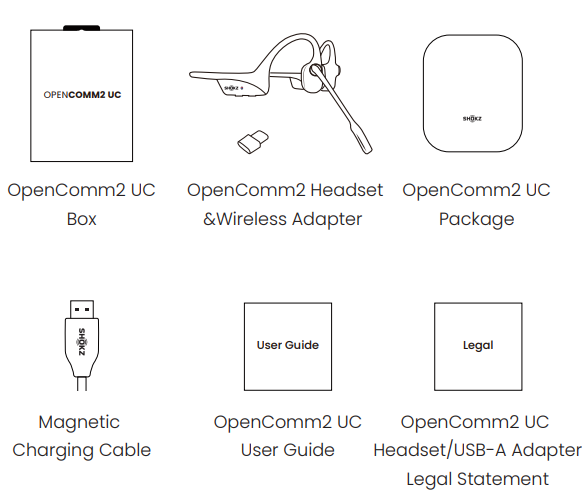
Specifications of the Shokz OpenComm 2 UC Headset
The Shokz OpenComm 2 UC boasts impressive technical specifications, including:
- Audio Technology: 7th-generation bone conduction technology for superior sound quality.
- Microphone: Dual noise-canceling microphone with Clear Voice Capture (cVc) and Digital Signal Processing (DSP) for high-fidelity voice transmission.
- Connectivity: Bluetooth 5.1 for stable connections up to 30 meters.
- Battery Life: Up to 8 hours of continuous playback or talk time (note: some sources mention up to 16 hours for talk time), with a quick charge option providing 2 hours of talk time from a 5-minute charge.
- Build: Lightweight titanium body with an IP55 sweat-proof rating, weighing only 35 grams.
- Compatibility: Works with most Bluetooth devices, including iPhones and Zoom for seamless video conferencing.
In comparison to similar products, the OpenComm 2 UC stands out for its innovative open-ear design and advanced noise-canceling capabilities, making it a top choice for those prioritizing both comfort and audio quality.
Headset Controls
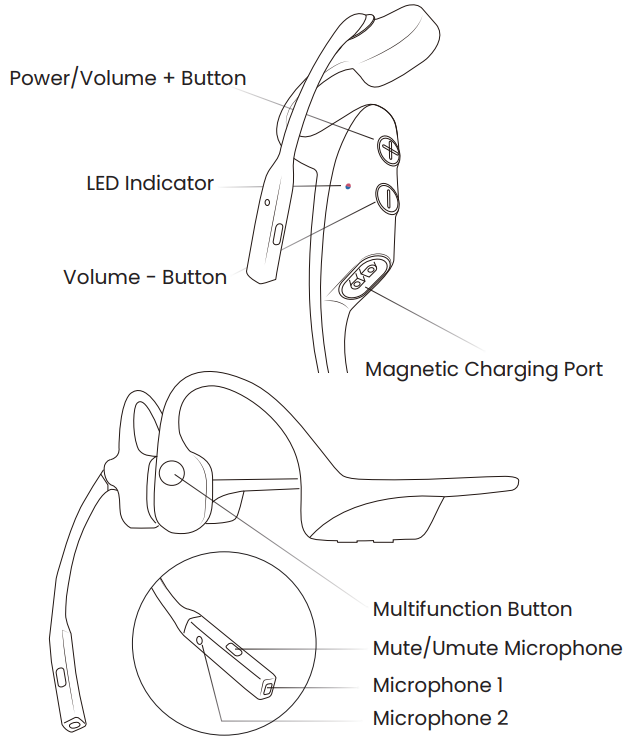
ON/OFF
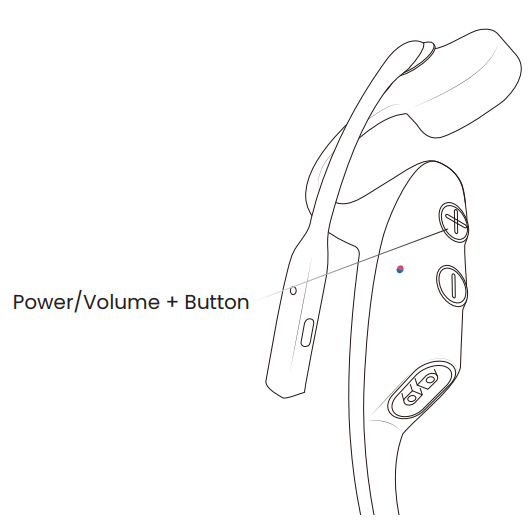
Turn on the headset :
- Press and hold the Power/Volume + Button until the LED Indicator flashes blue.
- Audrey will say, “Welcome to Shokz.”
Turn off the headset :
- Press and hold the Power/Volume + Button until the LED Indicator flashes red.
- Audrey will say, “power off.”
Pairing to Mobile Device
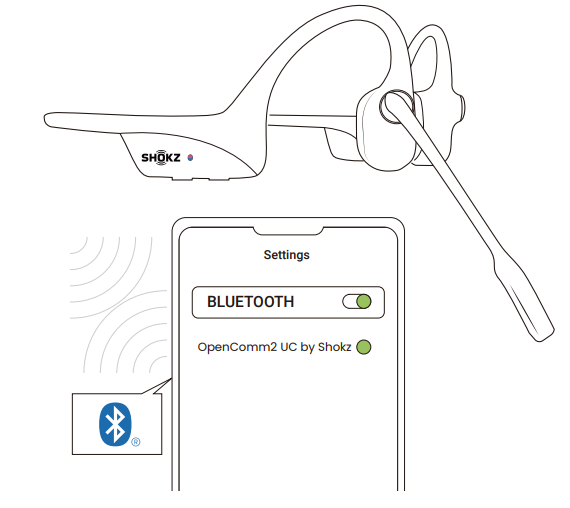
Operate controls with your headset powered off.
- Start with your headset turned off.
- Press and hold the Volume + Button until the LED Indicator flashes red and blue alternately.
- Select "OpenComm2 UC by Shokz" on your device's Bluetooth settings. Audrey will say, "Connected".
Pairing to PC
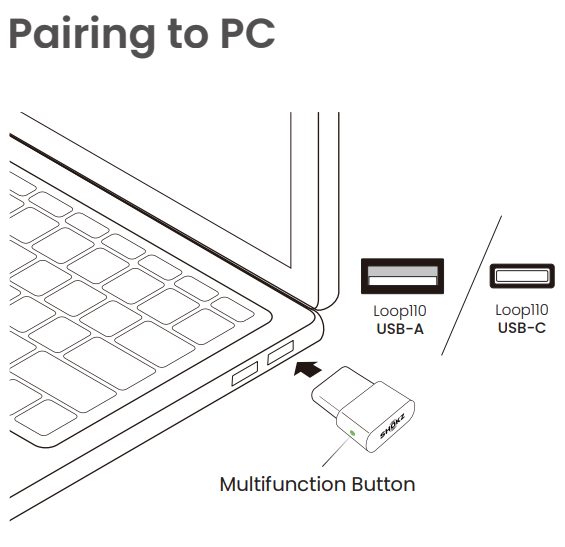
Operate controls with your headset powered off.
- Start with your headset turned on.
- Plug the included USB adapter into a USB port on your PC.
- Connection is established when Audrey says "Connected" or beeps, and the LED Indicator on the USB adapter is solid blue.
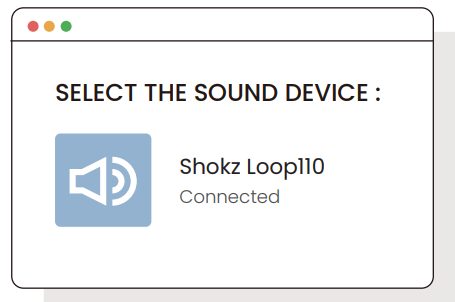
Configure
- To play music or take calls on the headset, please ensure the “Shokz Loop110” is both identified as the default input and output devices in your operating system’s audio settings.
How to Wear
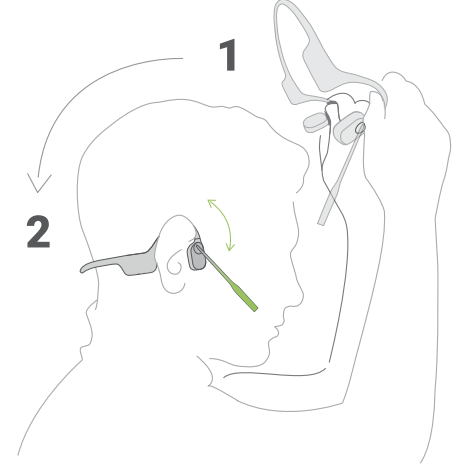
Slide the headset over your head, bring it to the back of your neck and position the ear-hooks on your ears.
- Position the noise-canceling microphone close to your mouth.
- Wearing your headset the wrong way could cause discomfort. Be sure you have the transducers resting in front of your ears.
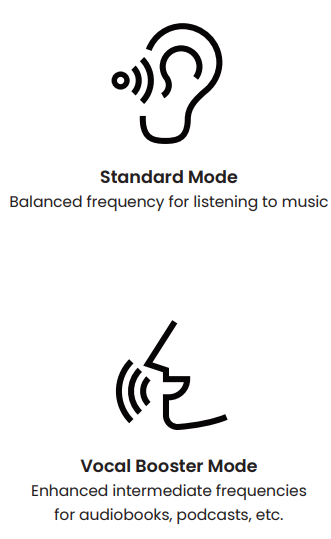
EQ Modes
Charging Tips
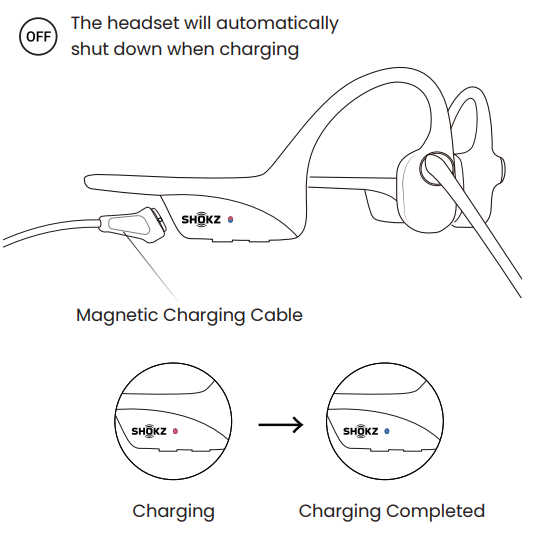
- When the headset is at low battery, there will be a “charge me” prompt and the red light will flash intermittently. Use the corresponding magnetic charging cable for charging.
- The LED indicator will turn red during the charging process and the headset will automatically turn off. The LED indicator will turn from red to blue when charging is complete.
Storage and Maintenance
OpenComm2 UC
- Store the headset in a cool, dry place. The working temperature should be 0~45°C(32~113°F). Working in a cold/hot environment, a highly humid area, or an extremely low air pressure may reduce the battery life.
- Keep the product away from heat sources, direct sunlight, combustible gas or other liquids.
- Keeping the charging port dry before connecting to the charger will reduce the risk of damage.
- This headset is water-resistant, but is not waterproof. Please do not submerse the headset in water.
- Clean the headset with a soft dry cloth.
- Do not charge right after exercising, in case there's sweat inside the charging port, which could lead to circuit burning while charging.
- After storage for a long period, please charge the headset before using again.
- Although rare, some users may experience skin allergies or skin sensitivity when coming into long-term contact with the product’s outer materials.
- To avoid the risk of an allergic reaction, please do not wear the product if you are experiencing skin injuries or irritations on or around the neck, ears, and/or head.
- If you experience any redness of the skin, swelling, or itchiness while wearing the product, discontinue use of the product immediately and consult a physician.
- Only charge with the magnetic charging cable approved by the manufacturer. Other charging cables may not meet applicable safety standards, and charging with such cables could pose a risk of injury to the users or damage to the device. Use this product only with an agency-approved power supply that meets local regulatory requirements (e.g., UL, CSA, VDE, CCC).
Shokz Loop110 USB-A/USB-C Wireless Adapter
- Store the product in a cool, dry place. The working and storage temperature should be 0°C-55°C (32°F-131°F).
- Never allow children and pets to play with the product.
- Small parts may be a choking hazard. If accidental ingestion happens, seek immediate medical attention.
- Keep the product away from heat sources, direct sunlight, combustible gas, or liquids.
- Do not disassemble the product.
- Unplug, discontinue use, and contact Shokz if the product overheats or has a damaged outer casing or plug.
Pros and Cons of the OpenComm 2 UC Headset
Pros
- Comfortable Design: The open-ear design ensures all-day comfort without isolating users from their surroundings.
- Crystal-Clear Audio: Provides high-quality sound through bone conduction technology and clear voice capture.
- Convenience: Easy to use with intuitive controls and quick charging capabilities.
- Durability: Built with a durable titanium frame and IP55 rating for moisture resistance.
Cons
- Sound Leakage: May not be ideal for environments where sound privacy is essential.
- Price: Higher cost compared to some traditional headsets.
- Charging Time: Requires about an hour for a full charge, which may be longer than some competitors.
Overall, the Shokz OpenComm 2 UC offers excellent value for money, particularly for users who prioritize comfort and audio quality in a professional setting.
Customer Reviews and Feedback
Users have praised the OpenComm 2 UC for its comfort, sound quality, and ease of use. Common praises include the headset's ability to keep users aware of their surroundings while delivering clear audio. Some users have noted that the price is slightly higher than expected, but the quality and features justify the cost. On average, customers rate this product highly, with many recommending it for its unique design and performance.
Star ratings often range from 4 to 5 stars, with testimonials highlighting the headset's durability and seamless connectivity. For those considering purchasing, the OpenComm 2 UC is recommended for its superior comfort and audio capabilities.
More shokz manuals
- Setup & Pairing: Shokz Opencomm UC C102-AA Headset User Manual
- Setup: Shokz Openswim S700 Headphone User Manual
- Setup: Shokz Openfit 2+ T921 Earbuds User Manual
- Setup: Shokz Openrun Pro 2 Headphones User Manual
- Setup & Pairing: Shokz Openmove S661 Earbuds User Manual
- Usage & Pairing: Shokz Openrun S803 Headponhe User Manual
Leave a Comment