
Usage & Pairing: Shokz Openrun S803 Headponhe User Manual
Content
Shokz Openrun S803 Headphones
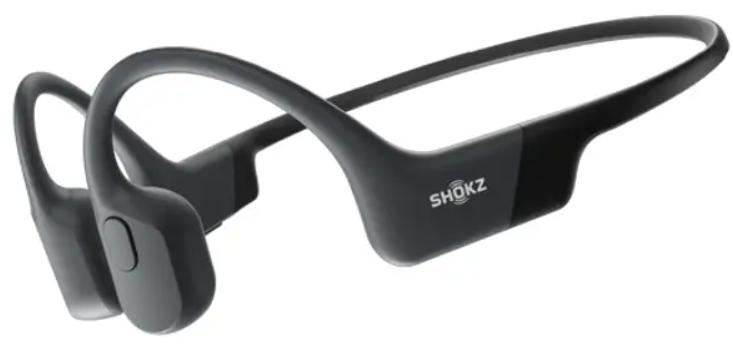
Introduction
The Shokz Openrun S803 Headphones are a breakthrough in wireless audio technology, specially designed for endurance athletes and active users seeking safety and superior sound quality. Utilizing advanced bone conduction technology, these headphones transmit sound through your cheekbones, leaving your ears open to ambient sounds such as traffic and conversations, enhancing situational awareness during workouts or outdoor activities. Lightweight and durable, the Openrun S803 offers a secure fit with a full wraparound titanium frame, suitable for running, cycling, and intense training sessions.
Key benefits include an IP67 waterproof rating, allowing resilience to sweat and rain, combined with an impressive 8-hour battery life and a rapid 10-minute quick charge for 1.5 hours of playback. Bluetooth 5.1 connectivity ensures a stable connection within a 33-foot range, while dual noise-canceling microphones provide crystal-clear call quality. The headphones also feature PremiumPitch 2.0 technology for crisp mids and highs and TurboPitch for rich bass, delivering a balanced, immersive sound experience.
The target audience encompasses fitness enthusiasts, outdoor adventurers, and professionals needing hands-free communication without losing awareness of their surroundings. Available in vibrant colors like red and black, these headphones retail for roughly between $120 to $150, purchasable through leading online retailers and authorized stores. Experience all-day comfort and safety with the shokz Openrun S803 Headphones, your ideal partner for active lifestyles.
What’s in the Box

Specifications of the Shokz Openrun S803 Headphones
- Model: S803
- Technology: 8th Generation Bone Conduction with TurboPitch and PremiumPitch 2.0
- Bluetooth: Version 5.1, supports multipoint pairing, range up to 33 feet (10 meters)
- Battery Life: Up to 8 hours of continuous audio playback
- Charging Time: Approx. 1.5 hours; 10-minute quick charge adds 1.5 hours of use
- Waterproof Rating: IP67, resistant to sweat and rain (not suitable for swimming)
- Weight: Approx. 26 grams for lightweight, comfortable wear
- Frame Material: Full wraparound titanium for durability and secure fit
- Audio Frequency Response: 20 Hz to 20 kHz
- Sensitivity: 105 ±3 dB
- Microphones: Dual noise-canceling for clear calls
- Controls: Multifunction button with volume and playback controls, voice assistant activation
- Accessories: Carrying case, magnetic USB-C charging cable, user guide
- Comparison: Versus the earlier Aeropex model, Openrun features Bluetooth 5.1 and improved quick charge
How It Works
Headphone Controls
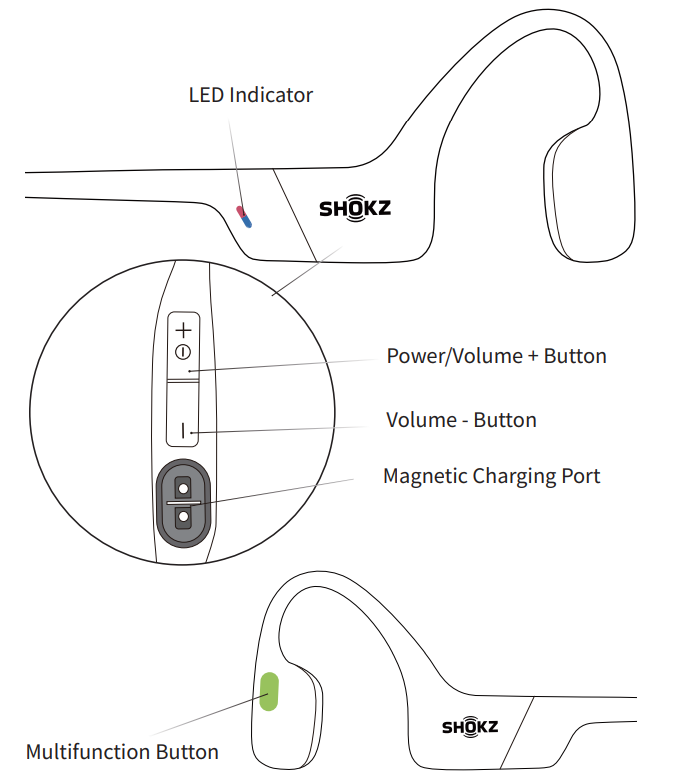
ON/OFF
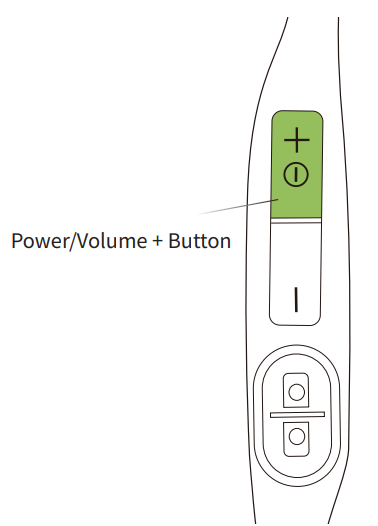
Turn on the headphones:
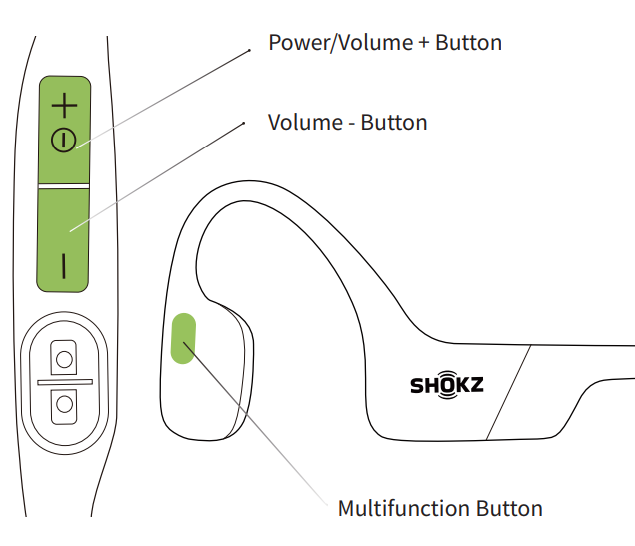
Press and hold the Power/Volume + Button until the LED Indicator flashes blue.
Audrey will say: “Welcome to Shokz”
Turn n off the headphones:
Press and hold the Power/Volume + Button until the LED Indicator flashes red.
Audrey will say “Power off”。
Pairing
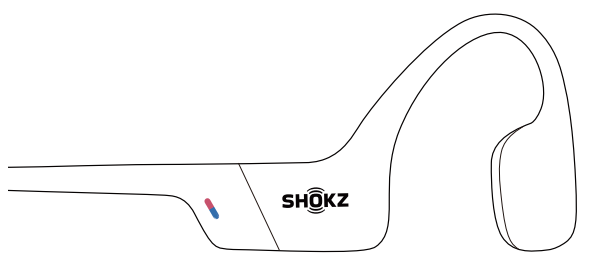
- Start with OpenRun turned off.
Press and hold the Volume + Button until the LED Indicator flashes red and blue alternately.
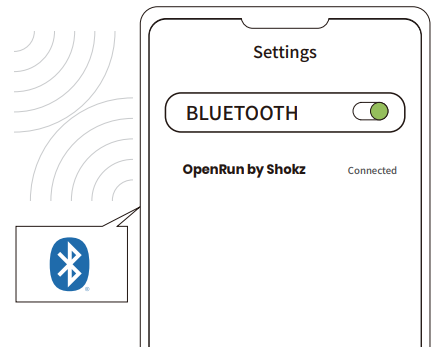
- Open your device's Bluetooth settings and select " OpenRun by Shokz." Audrey will say "connected."
How to Wear
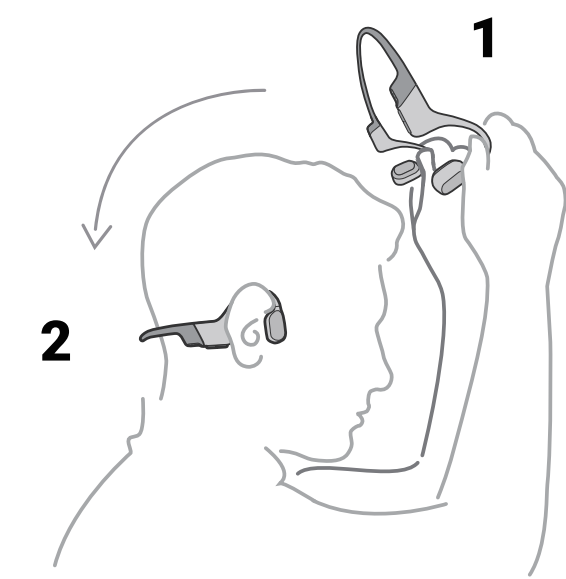
Pick up the headphones, bring them behind the back of the base of your neck, position the earhooks on your ears, then enjoy your music!
Wearing your headphones the wrong way could cause discomfort. The transducers should rest in front of your ears.
Multifunction Button
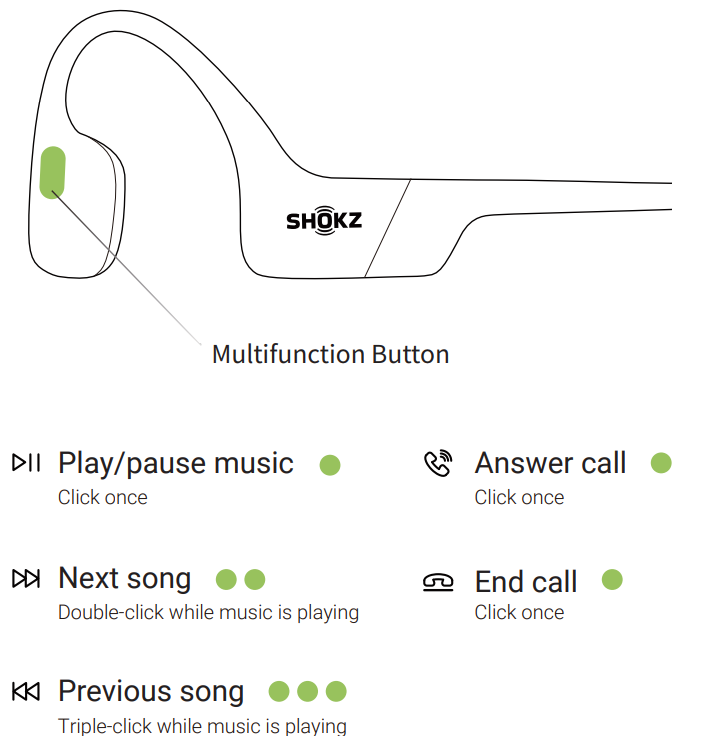
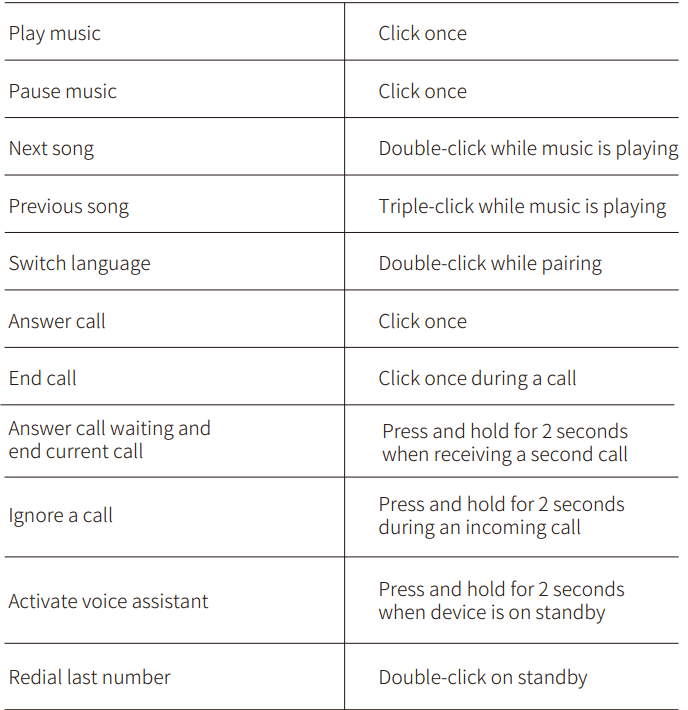
Extra Features
Pair Two Devices
Switch between two devices seamlessly with multipoint pairing
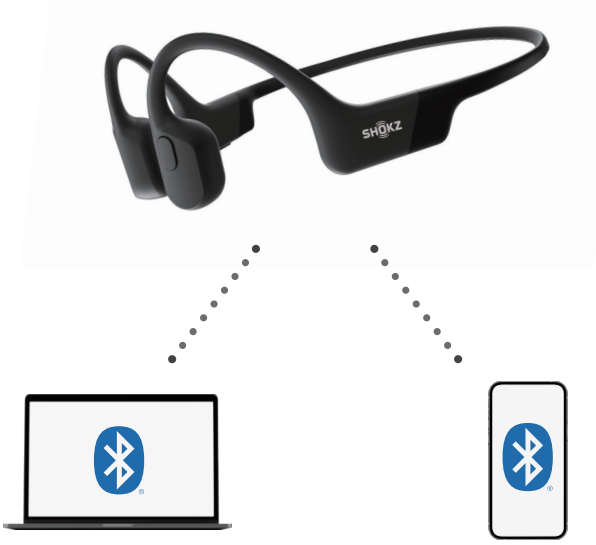
Multipoint Pairing
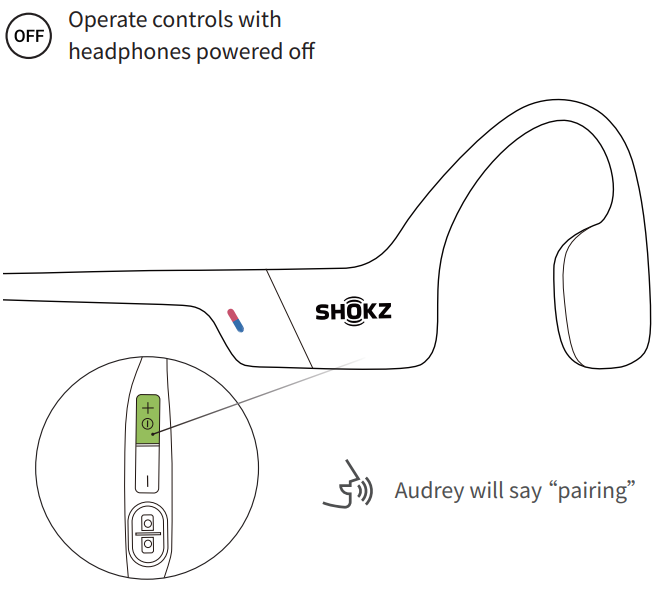
Start with your headphones powered off.
- Press and hold Volume + until Audsays say “pairing” and the LED indicator flashes red and blue alternately.
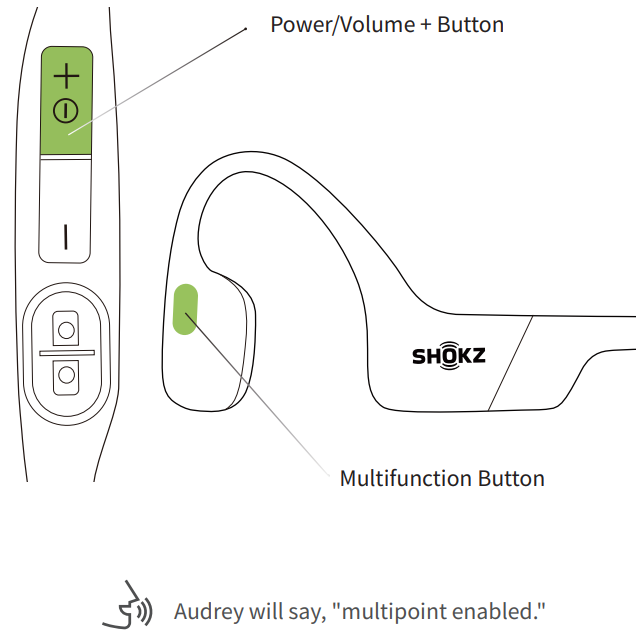
- Press and hold the multifunction button and Volume + button until Audrey says, "multipoint enabled."
- Open first device's Bluetooth® menu and select "OpenRun by Shokz."Audrey will say, "connected".
- Turn your headphones off.
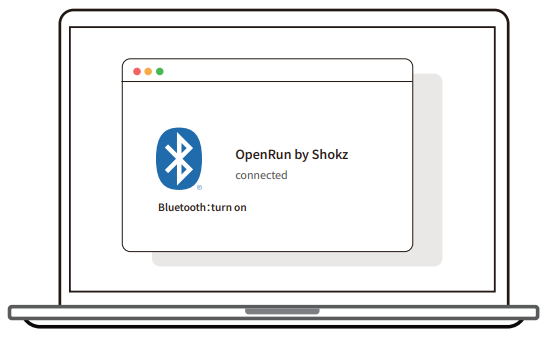
- Re-enter pairing mode by pressing and holding Volume + until Audrey says “pairing” and the LED indicator flashes red and blue alternately.
- Open the second device's Bluetooth® menu and select "OpenRun by Shokz."Audrey will say, “connected.”
- Turn your headphones off.
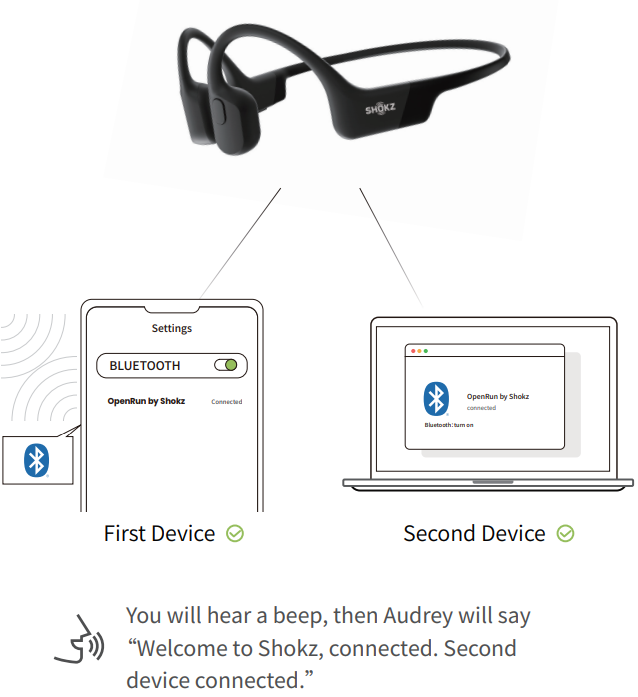
- Turn your headphones on. Your headphones are now connected to both devices.
Restore Factory Settings
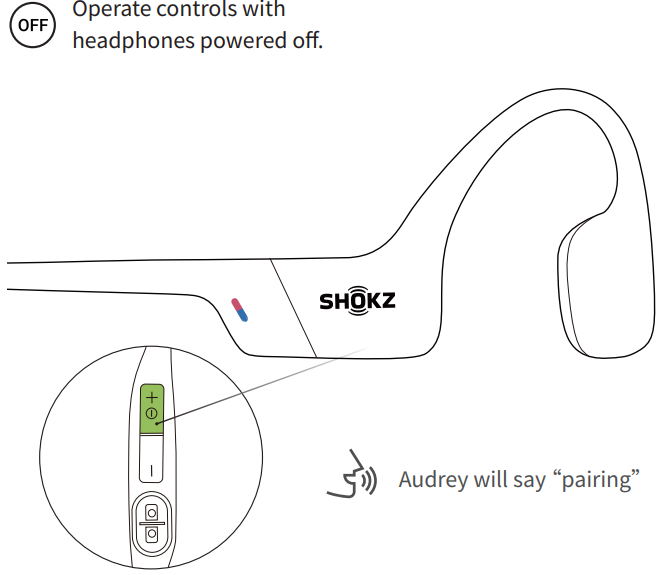
- Start with your headphones powered off.
- Press and hold Volume + until Audrey says “pairing”
- Press and hold the multifunction button, Volume ‒ button,, and Volume + button untiyou you hear two beeps and feel the vibration.
- Turn your headphones off. OpenRun is now reset and can be re-paired to your device.
Care and Maintenance
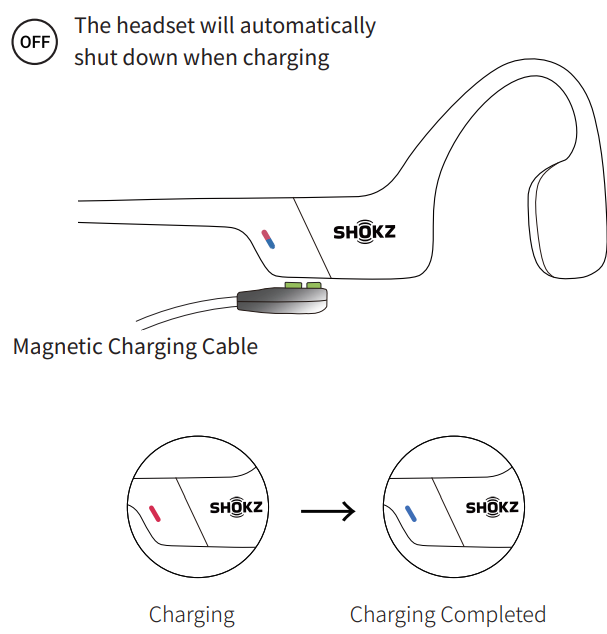
When the headphones are at a low battery, there will be a “charge me” prompt and the red light will flash intermittently. Use the corresponding magnetic charging cable for charging.
The LED indicator will turn red during the charging process, and the headphones will automatically turn off. The LED indicator will turn from red to blue when charging is complete.
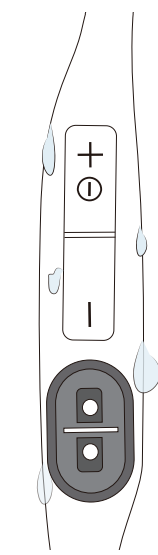
Moisture Detection Alert
How it Works:
These headphones can detect liquid such as water, sweat, or rain. If the headphones are plugged into the charger while wet, the LED indicator will flash red and blue. The headphones will then beep. If this happens, remove the charging cable, dry them completely, then proceed with charging.
Storage and Maintenance
- Store the headphones in a cool, dry place. The working temperature should be 0~45°C(32~113°F). Working in a cold/hot temperature, highly humid area, or low air pressure environment may reduce the battery life.
- Keep the product away from heat sources, direct sunlight, combustible gases, or other liquids.
- Keeping the charging port dry before connecting to the charger will reduce the risk of damage.
- The headphones can be used for daily cleaning, but they cannot be rinsed and soaked against the microphone hole, otherwise it may affect the performance of the microphone.
- Clean the headphones with a soft dry cloth.
- Do not charge right after exercising, in case there's sweat inside the charging port, which could lead to circuit burning while charging.
- After storage for a long period, please charge the headphones before using them again.
Note
Design and specification are subject to change without notice. For the most up-to-date product information, please visit https://shokz.com.
Warning
To avoid the risk of explosion, fire, or leakage from toxic chemicals, please do not disassemble the product or replace, deform, or mutilate the battery.
Troubleshooting Guide for Shokz Openrun S803 Headphones
- No Sound or Poor Audio: Verify correct placement on cheekbones; ensure headphones are charged and paired correctly via Bluetooth 5.1. Restart the device if needed.
- Bluetooth Connectivity Issues: Reset pairing by turning the headphones off, then pressing and holding Volume + until the LED flashes red and blue. Delete the previous pairing on your device and reconnect.
- Microphone Not Working: Check if the dual noise-canceling microphones are unobstructed and clean. Test calls on different devices to isolate the issue.
- Battery Does Not Charge or Drains Quickly: Ensure the magnetic charging cable is properly connected; clean the charging ports of debris. Avoid exposure to extreme temperatures.
- Moisture Detection Alert: This indicates wetness in the charging port; allow the headphones to dry completely before charging.
- Preventive Tips: Store headphones in the provided case, avoid submerging in water, and keep firmware updated.
- Warranty & Support: Shokz Openrun S803 comes with a 2-year warranty covering manufacturing defects. Contact Shokz customer support via the official website or authorized retailers for assistance.
Warranty
- Your headphones are covered by a warranty.
- Visit our website at https://shokz.com/pages/warranty-landing for details of the limited warranty..
Failure to register will not affect your limited warranty rights.
Pros & Cons of the Shokz Openrun S803 Headphones
Pros
- Open-Ear Safety: Bone conduction leaves ears open to environmental sounds, ideal for outdoor exercise.
- Lightweight Comfort: At only 26 grams, the titanium frame ensures secure, all-day wear without discomfort.
- Strong Audio Quality: PremiumPitch 2.0 and TurboPitch technologies deliver clear mids, highs, and rich bass uncommon in bone conduction devices.
- Excellent Battery Life: 8 hours continuous use with quick charge options for minimal downtime.
- Durability & Waterproof: IP67 rating protects against sweat and rain, supporting intense workout conditions.
- Bluetooth 5.1 & Multipoint: Stable wireless connection with the ability to connect two devices simultaneously.
Cons
- Sound Quality Limits: While excellent for bone conduction, audio fidelity is generally lower than traditional in-ear headphones.
- No Swimming Support: Despite water resistance, not designed for underwater use,, which limits versatility.
- Bluetooth Codec Support: Supports only the SBC codec, lacking high-resolution codecs like aptX or AAC.
- Price Point: Slightly higher cost compared to basic sport headphones, but justified by technology and features.
Customer Reviews and Feedback on Shokz Openrun S803 Headphones
Users consistently praise the Shokzz Openrun S803 Headphones for their comfortable fit and superior situational awareness during workouts, rating them an average of 4.6 out of 5 stars across major retailers. Many highlight the long battery life and quick charging as key advantages for daily use. The open-ear design receives favorable comments for safety, especially among runners and cyclists.
Common complaints include occasional Bluetooth connectivity dropouts and the absence of higher-quality Bluetooth codecs, which some audiophiles notice. A few users mention audio leakage in quiet environments, an expected tradeoff for open-ear technology. Despite these minor issues, the consensus recommends the Openrun S803 for active users prioritizing comfort, safety, and reliable performance.
Faqs
How do I set up my shokz Openrun S803 Headponhe for the first time?
What should I do if my shokz Openrun S803 Headponhe is not pairing with my device?
How can I switch EQ modes on my shokz Openrun S803 Headponhe for better sound performance?
Is the shokz Openrun S803 Headponhe compatible with both iOS and Android devices?
How do I enable multipoint pairing on my shokz Openrun S803 Headponhe to connect two devices?
What are common troubleshooting steps if my shokz Openrun S803 Headponhe has audio issues or low sound quality?
How should I clean and maintain my shokz Openrun S803 Headponhe to ensure longevity?
How can I check the battery level on my shokz Openrun S803 Headponhe without using a connected device?
More shokz manuals
- Setup: Shokz Openrun Pro 2 Headphones User Manual
- Setup: Shokz OpenRun Pro S810 Headphones User Manual
- Setup: Shokz Openswim S700 Headphone User Manual
- Setup: Shokz OpenMeet UC Headset User Manual
- Setup & Pairing: Shokz Opencomm 2 UC Headset User Manual
- Setup & Pairing: Shokz Openfit Earbuds T910 User Manual
Leave a Comment