
Setup: Shokz OpenMeet UC Headset User Manual
Content
Shokz OpenMeet UC Headset
Introduction
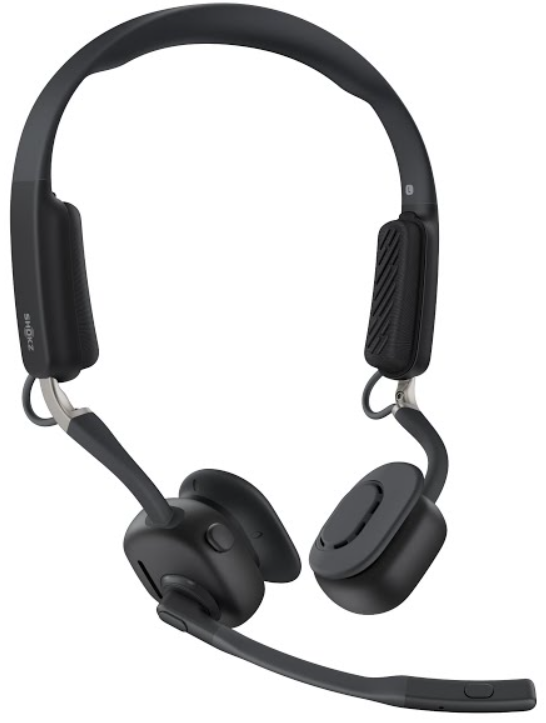
The Shokz OpenMeet UC Headset is a cutting-edge open-ear communication device designed to provide professional-grade audio and exceptional comfort for remote work, virtual meetings, and multitasking environments. Utilizing innovative bone conduction technology combined with air conduction, this headset delivers rich, immersive sound while keeping your ears open to ambient surroundings for enhanced situational awareness. Its lightweight and ergonomic titanium and silicone construction ensures all-day comfort, ideal for users who spend long hours in calls or video conferences.
Equipped with an advanced dual-microphone system powered by Qualcomm’s cVc noise canceling technology, the OpenMeet UC effectively minimizes background noise, ensuring crystal-clear voice transmission even in loud office settings. Supporting multipoint Bluetooth 5.4 connectivity, it enables seamless pairing with two devices simultaneously, enhancing productivity and convenience. With a long-lasting battery life of up to 15 hours of talk time and a rapid 1.5-hour recharge, this headset is well-suited for professionals on the go.
The shokz OpenMeet UC Headset targets business professionals, remote workers, call center agents, and anyone requiring reliable communication tools with superior comfort and sound clarity. It is compatible with popular platforms like Zoom, Microsoft Teams, and Google Meet. The headset typically retails around $250 and is widely available through online retailers and authorized distributors.
What’s in the Box

Technical Specifications and Features of the Shokz OpenMeet UC Headset
- Connectivity: Bluetooth 5.4 with multipoint pairing to connect two devices simultaneously; includes USB-C wireless adapter option.
- Battery: 215 mAh lithium-ion battery offering up to 15 hours of talk time, a rapid 5-minute charge for 2 hours of use, and standby time up to 14 days
- Audio Technology: DualPitch™ technology combining bone and air conduction, PremiumPitch™ 3.0, LeakSlayer™ 3.0 for low sound leakage
- Microphone: Boom-style dual-mic system with Qualcomm cVc noise reduction, microphone sensitivity -38dB ± 1dB
- Frequency Response: 20 Hz to 20,000 Hz for full-range audio clarity
- Range: Up to 98 feet (30 meters) Bluetooth wireless range
- Design & Materials: Open-ear, lightweight (78g), pressure relief lateral cushions, titanium and silicone build for comfort and durability
- Compatibility: Certified for Zoom, Microsoft Teams, Google Meet, and other UC platforms
- Other Features: EQ modes (Standard & Vocal Booster), busy light indicator, mute/unmute buttons, and voice assistant support
Compared with similar open-ear headsets, such as the OpenRun Pro, the OpenMeet UC excels in dedicated UC functionality, microphone noise cancellation, and multipoint device connectivity tailored for office environments.
Headset Controls
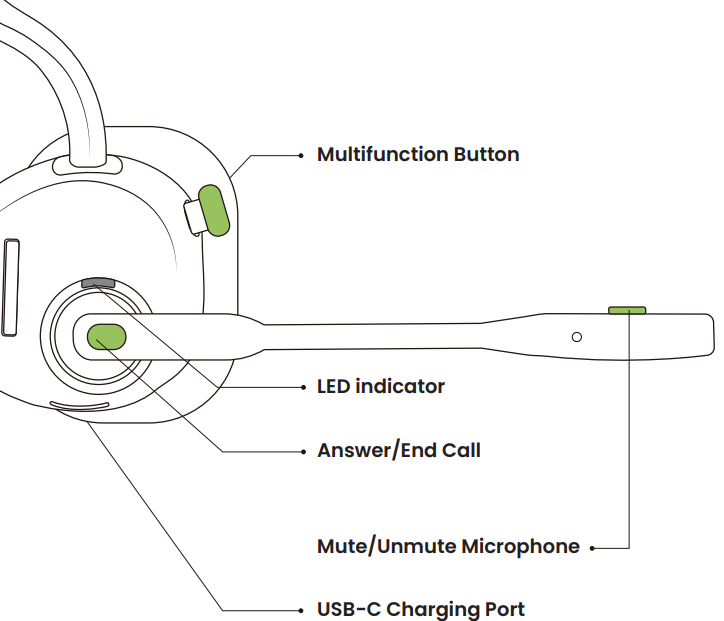
ON/OFF
Power On:
Press and hold the Multifunction Button for 2 seconds until the LED indicator flashes blue.
Power Off:
Press and hold the Multifunction Button for 3 seconds until the LED indicator flashes red.
Pairing to Mobile Device
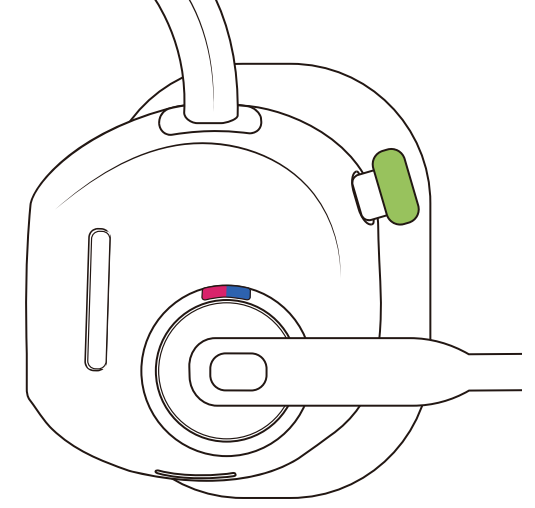
Operate controls with your headset powered off.
- Start with your headset turned off.
- Press and hold the Multifunction Button until the LED indicator flashes red and blue alternately.
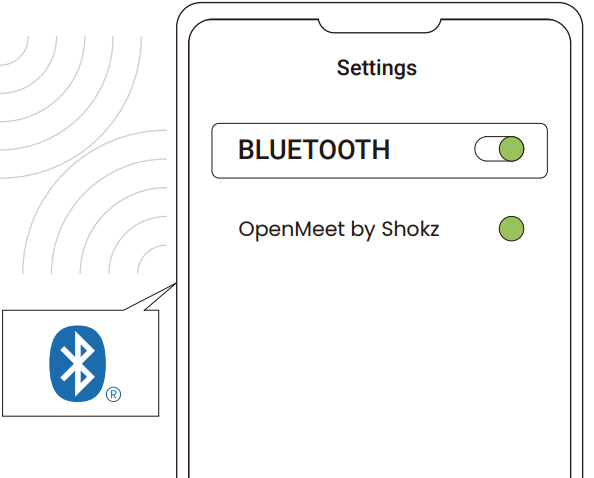
- Select "OpenMeet by Shokz" on your device's Bluetooth settings.
Pairing to PC
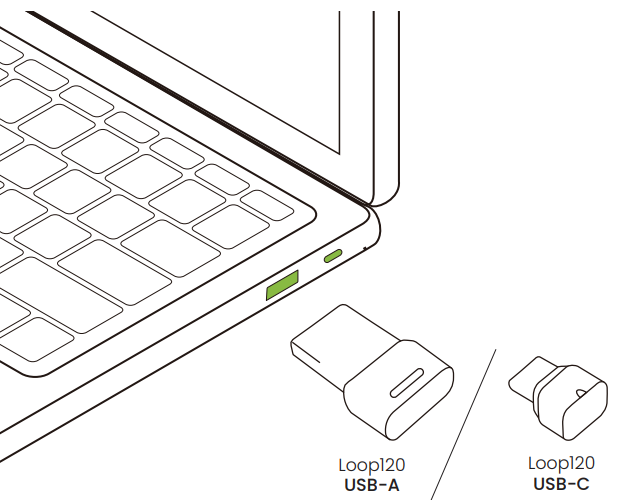
- Start with your headset turned on.
- Plug the included wireless adapter into a USB port on your PC.
- Connection is established when the LED indicator on the USB adapter is solid cyan.
Only the UC version is equipped with a wireless adapter. Fothe r non-UC version, visit www.shokz.com to purchase a wireless adapter if necessary.
SELECT AUDIO DEVICE :
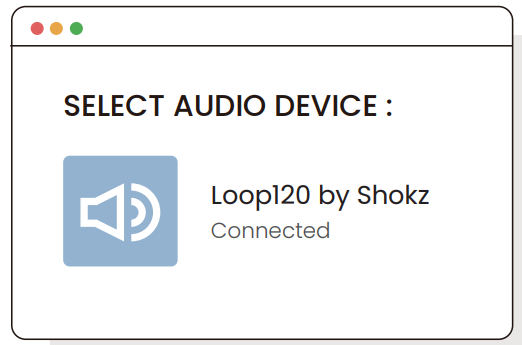
Configure
To play music or take calls on the headset, please ensure the “Loop120 by Shokz” is both identified as the default input and output devices in your operating system’s audio settings.
How to Wear
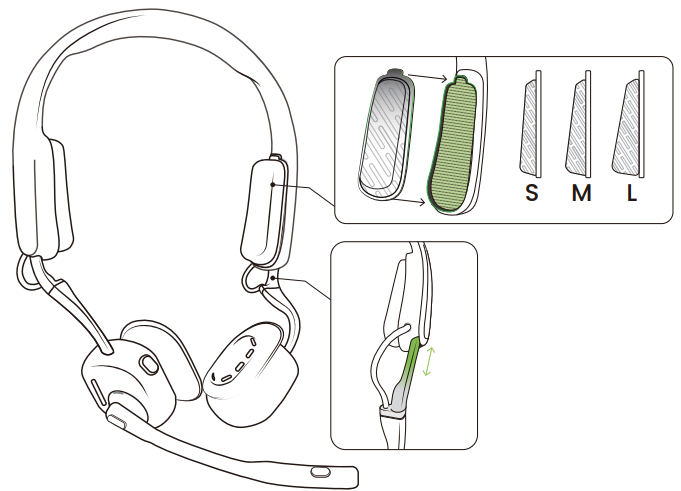
If necessary, replace the pressure relief cushions with a different size for optimal comfort and fit.
- Put the headset on your head with the earpieces placed in front of your ears.
- Adjust the size of the headpiece, so the headset fits comfortably.
- Adjust the microphone to a position close to your mouth.
- If necessary, replace the pressure relief cushions with a different size for optimal comfort and fit.
LED indicator
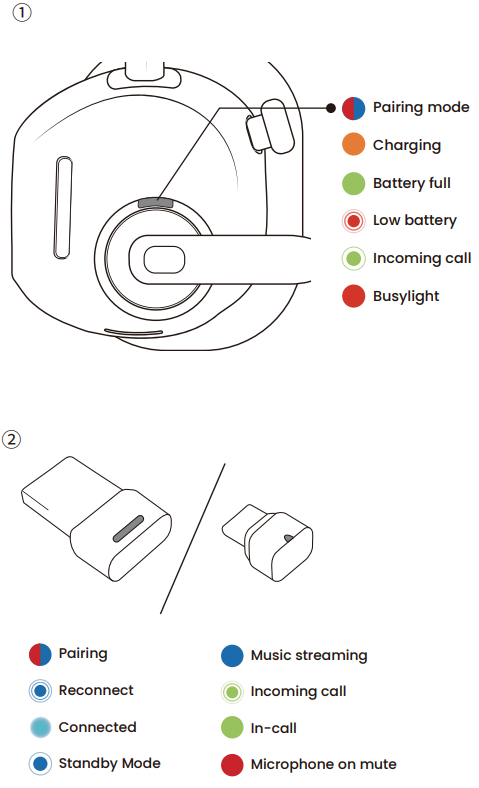
Check Battery Status
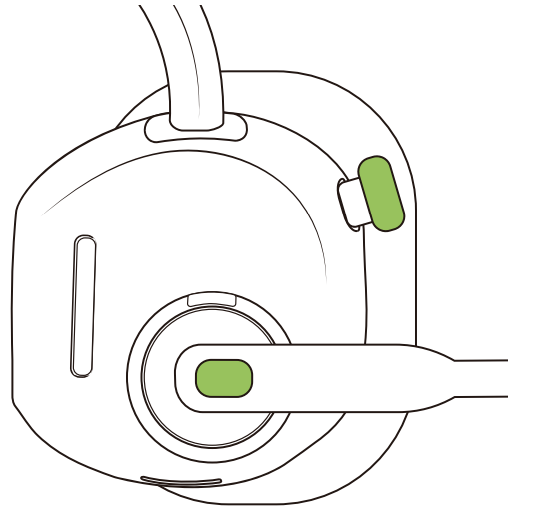
How to check battery status:
Click the multifunction button or answer/end call button while audio is not playing.
Extra Features
Restore Factory Settings
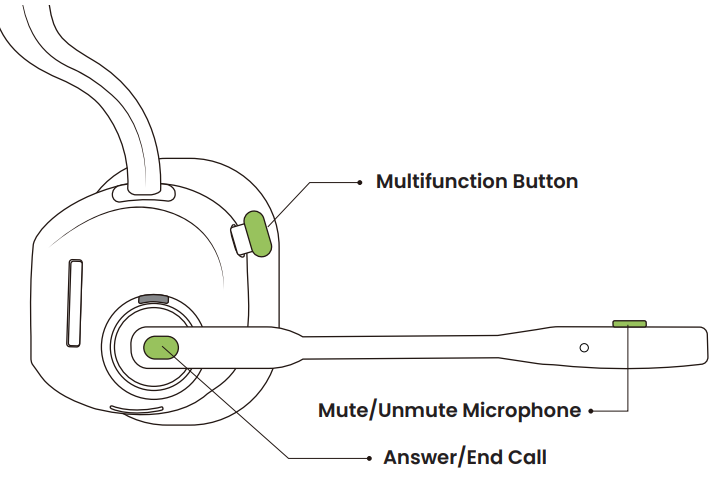
- Start with your headset turned off.
- Press and hold the Multifunction Button until the LED indicator flashes red and blue alternately.
- Press and hold the Answer/End Call Button and Mute/Unmute Button for 5 seconds until you hear a beep.
Care and Maintenance
Charging Tips
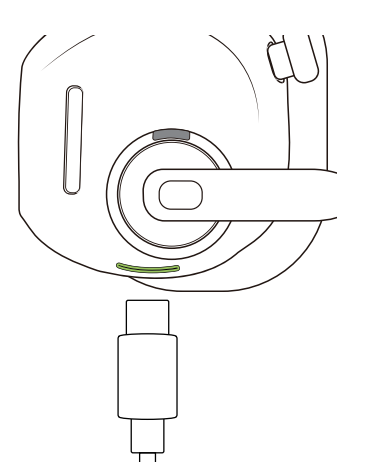
When the headset battery is low,w there will be a prompt and the red light will flash intermittently. Use the corresponding charging cable to charge.
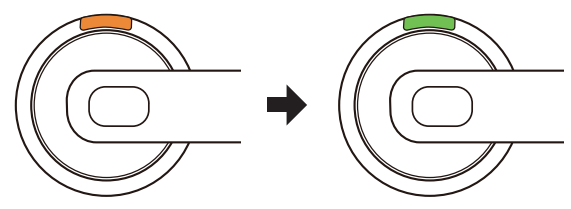
The LED indicator will turn orange while charging. Once fully charged, the LED indicator will turn from orange to green.
Troubleshooting Common Issues with the shokz OpenMeet UC Headset
- No sound or low volume: Ensure headset is powered on and connected via Bluetooth or USB-C adapter; check volume levels on both headset and connected device; try restarting both devices.
- Microphone not working or poor call quality: Confirm microphone boom is properly rotated into position; check mute status; update device firmware via Shokz Connect app; reduce background noise or move to a quieter environment.
- Bluetooth pairing issues: Put the headset into pairing mode by holding the multifunction button for 5 seconds; delete previous pairings on devices; ensure the device Bluetooth is enabled and within range.
- Battery won't charge or quickly drains: Use the provided USB-C cable and a compatible charger; clean charging contacts; avoid charging in extreme temperatures; perform a full charge cycle before use.
Preventive care includes storing the headset in its case when not in use, avoiding exposure to moisture despite its sweat resistance, and regular firmware updates for optimal function. The Shokz OpenMeet UC comes with a 2-year limited warranty. For further support, contact Shokz customer service via their official website or authorized dealers.
Warranty
Your headset is covered by a warranty. Visit our website at https://shokz.com/pages/warranty-landing for details of the limited warranty. Failure to register will not affect your limited warranty rights.
Pros and Cons of the Shokz OpenMeet UC Headset
Pros
- Comfortable open-ear design: Lightweight materials and pressure relief cushions enable all-day wear without ear fatigue.
- Excellent call clarity: Qualcomm cVc dual-microphone system effectively filters out background noise.
- Strong battery performance: Up to 15 hours of talk time with fast recharge capability supports long workdays.
- Multipoint connectivity: Seamlessly connects to two devices for multitasking across phone and computer.
- Broad platform compatibility: Certified for Zoom, Microsoft Teams, and Google Meet,, ensuring versatile use in professional settings.
Cons
- Higher price point: At around $250, it may be considered premium compared to traditional wired headsets.
- Open-ear design sound leakage: Although minimized by LeakSlayer™ 3.0, some sound leakage may occur in very quiet environments.
- Learning curve for controls: Multifunction buttons and boom mic controls may require adjustment for new users.
Overall, the Shokzkz OpenMeet UC headset offers excellent value for professionals seeking high-quality, comfortable communication tools, standing out among alternatives with its advanced bone conduction and noise-canceling technologies.
Customer Reviews and Feedback on the Shokz OpenMeet UC Headset
Users widely praise the Shokz OpenMeet UC Headset for its comfortable fit and clear voice quality, especially appreciating the open-ear design that allows awareness of the surroundings during calls. Many reviewers report significant improvements in call clarity using the noise-canceling boom mic, making it a preferred choice for remote work and busy office environments.
Some common complaints include occasional sound leakage during quiet moments and a short adjustment period to the unique control scheme. The battery life and quick charge feature receive positive notes, with users highlighting the convenience of multipoint pairing for switching between devices seamlessly.
Typical ratings average around 4.5 out of 5 stars, with testimonials recommending the headset for professionals who value comfort and uncompromised audio performance during extended meetings.
Faqs
How do I set up the shokz OpenMeet UC Headset for the first time?
What should I do if my shokz OpenMeet UC Headset is not working properly?
Can I use the shokz OpenMeet UC Headset with Microsoft Teams?
How often should I clean and maintain my shokz OpenMeet UC Headset?
What are the key features that make the shokz OpenMeet UC Headset different?
How do I adjust the volume and sound settings on the shokz OpenMeet UC Headset?
Can I use the shokz OpenMeet UC Headset for music?
Is the shokz OpenMeet UC Headset waterproof or sweat-resistant?
Tags
More shokz manuals
- Setup: Shokz OpenRun Pro S810 Headphones User Manual
- Setup & Pairing: Shokz Openfit Earbuds T910 User Manual
- Usage & Pairing: Shokz Openrun S803 Headponhe User Manual
- Setup & Pairing: Shokz Openfit Air Headphones T511 User Manual
- Setup: Shokz Openrun Pro 2 Headphones User Manual
- Setup: Shokz Openswim S700 Headphone User Manual
Leave a Comment