
Setup: Shokz Openrun Pro 2 Headphones User Manual
Content
Shokz Openrun Pro 2 Headphones
Introduction
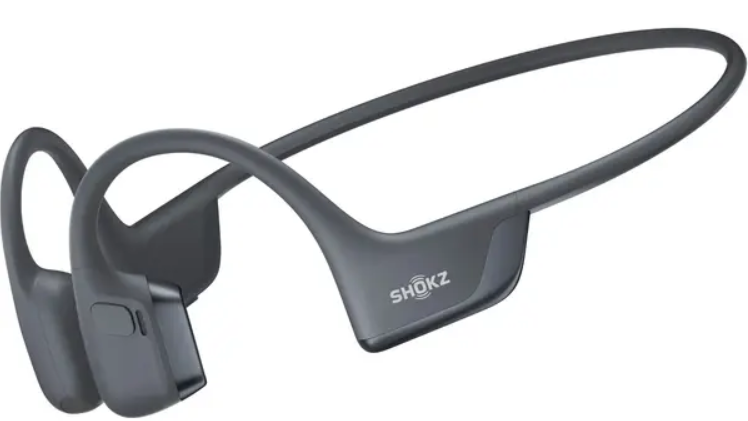
The Shokz Openrun Pro 2 Headphones represent the latest innovation in open-ear audio technology, delivering a unique listening experience through advanced bone conduction combined with air conduction drivers. Designed for active users and sports enthusiasts, these headphones provide exceptional sound clarity without blocking the ear canal, allowing users to stay aware of their surroundings while enjoying rich audio.
Key benefits of the Openrun Pro 2 include Shokz’s 10th Generation DualPitch™ Technology, which pairs bone conduction for precise mids and highs with a dedicated air conduction speaker for deep, powerful bass. This dual-driver system significantly improves sound quality over previous models, offering a balanced and dynamic musical experience. They also feature a lightweight, comfortable wraparound design with nickel-titanium alloy for durability and a secure fit, perfect for running, cycling, or gym workouts.
With an IP55 rating, these headphones are sweatproof and water-resistant, making them suitable for intense exercise and outdoor conditions. Battery life extends up to 12 hours on a single charge, with a fast charging feature providing 2.5 hours of playback from just 5 minutes of charging. Compatible with Bluetooth 5.3 and supporting multi-point pairing, the Openrun Pro 2 ensures seamless connectivity with smartphones and other devices.
Available globally through various retailers and directly from the Shokz website, the Openrun Pro 2 is priced in the mid-to-premium range, typically around $200 to $250, reflecting its flagship status and advanced features. These headphones are ideal for athletes, commuters, and anyone seeking a safe and immersive audio solution without isolating themselves from their environment.
Specifications of Shokz Openrun Pro 2 Headphones
- Technology: 10th Generation Bone Conduction with DualPitch™ (bone + air conduction drivers)
- Frequency Response: 20 Hz – 20 kHz
- Sensitivity: Bone conduction driver: 101.3 dB ± 3 dB; Air conduction driver: 96 dB ± 2.5 dB
- Bluetooth Version: 5.3 with multi-point pairing (connect two devices simultaneously)
- Battery Life: Up to 12 hours of continuous playback
- Charging Time: Approximately 1 hour; a 5-minute quick charge provides 2.5 hours of usage
- Water Resistance: IP55 rating for sweat, rain, and splash resistance
- Materials: Nickel-titanium alloy frame, silicone ear padding, lightweight plastic
- Weight: Lightweight for all-day comfort and secure fit
- Additional Features: Customizable EQ profiles via Shokz app, AI noise cancellation for calls, reduced vibration technology for comfort
Compared to the prior Openrun Pro model, the Openrun Pro 2 offers 20% more bass output, 16% less clamping force for added comfort, and an upgraded USB-C charging port replacing the older two-pin connector. These improvements enhance both audio fidelity and user experience.
How It Works
Headphone Controls
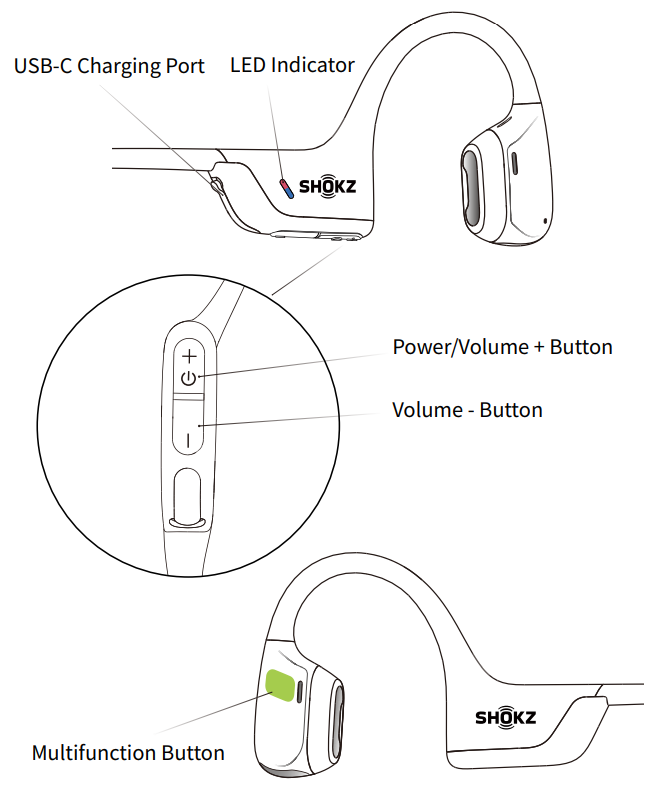
ON/OFF
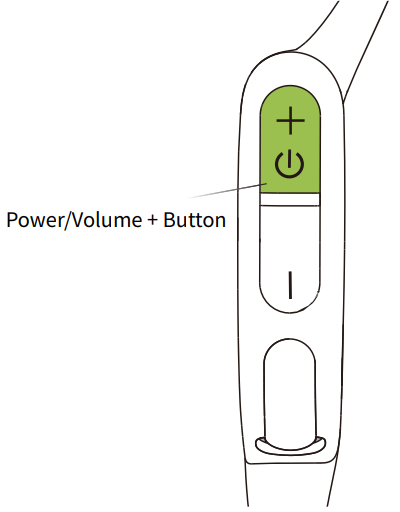
Turn on the headphones:
Press and hold the Power/Volume + Button until the LED Indicator flashes blue.
Turn off the headphones:
Press and hold the Power/Volume + Button until the LED Indicator flashes red.
Pairing
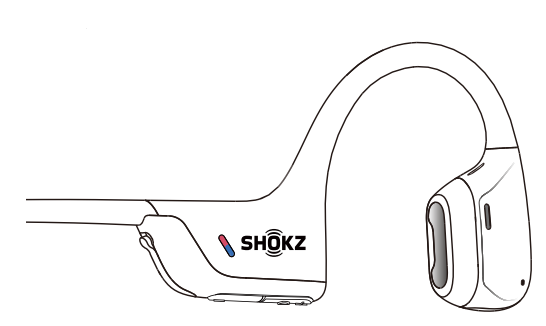
- Start with your headphones powered off.
Press and hold the Volume + Button until the LED Indicator flashes red and blue alternately.
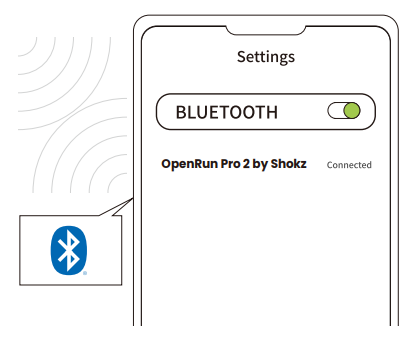
- Open your device's Bluetooth settings and select “ OpenRun Pro 2 by Shokz.”
How to Wear
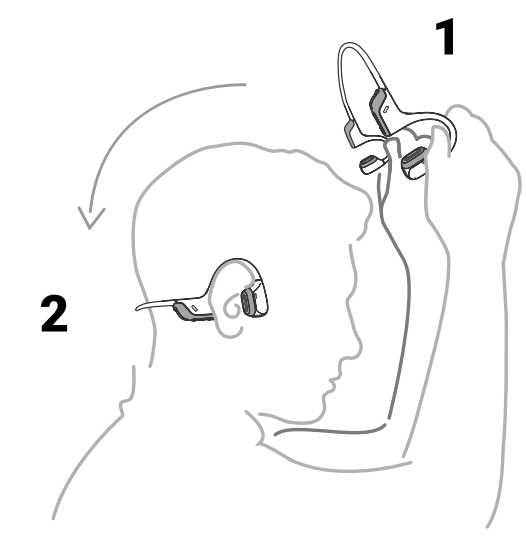
Pick up the headphones, bring them behind the back of the base of your neck, position the earhooks on your ears, then enjoy your music!
Wearing your headphones the wrong way could cause discomfort. The transducers should rest in front of your ears.
Volume
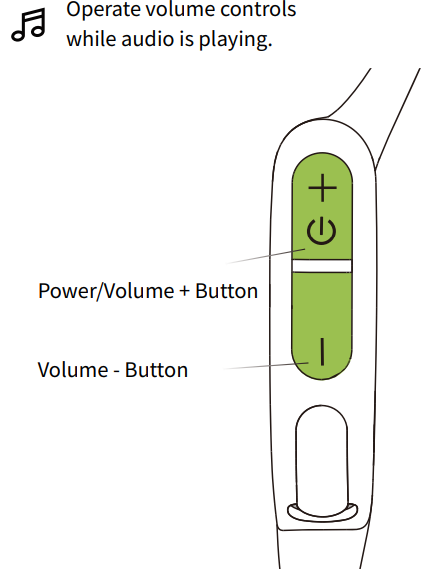
How to change volume:
While your audio is playing, adjust headphone volume by pushing either the Volume + or Volume ‒ buttons.
- A “beep” will sound when the volume is at its max.
- Listening with headphones at high volume may affect your hearing, and the audio will be distorted.
Improve Your Volume
If the volume still feels too low, try the following:
- Turn off volume protection on your phone:
- iPhone: Settings > Sounds & Haptics > Headphone Safety > Turn off “Reduce Loud Audio”
- Samsung: Settings > Sounds and Vibration > Volume > More > Turn off “Media Volume Limit”
- Other Android: Go to Bluetooth Settings > Enable “Absolute Volume”
- Use Volume Boost Mode in the Shokz App:
- Open the Shokz App
- Go to “EQ Modes”
- Select “Volume Boost” for louder sound in noisy environments
Note: Make sure your app is up to date to access this feature.
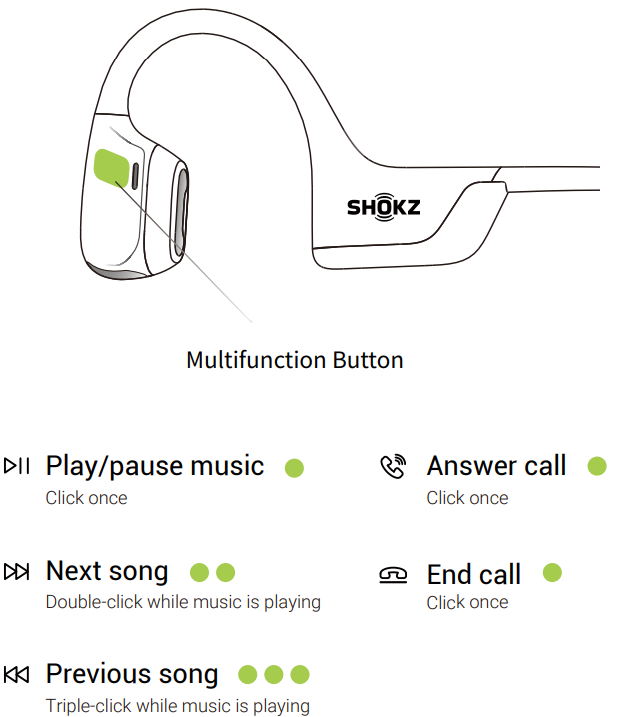
Multifunction Button
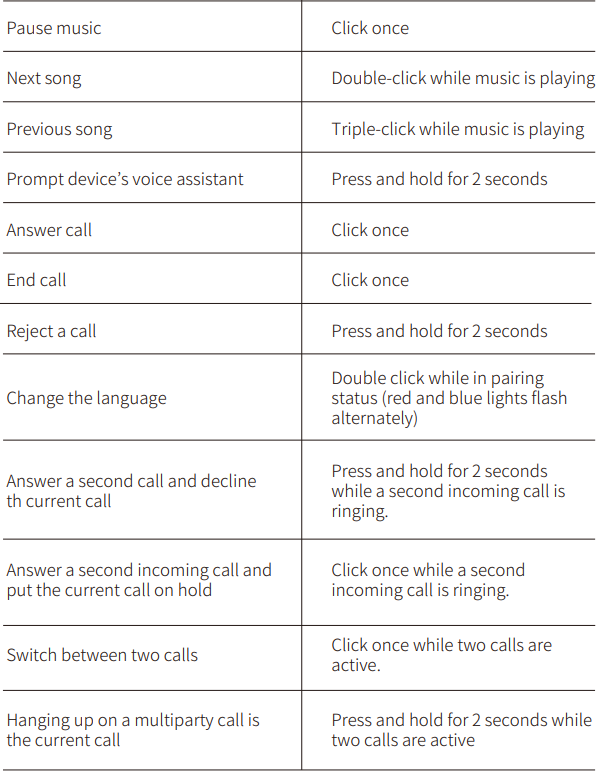
Check Battery Status
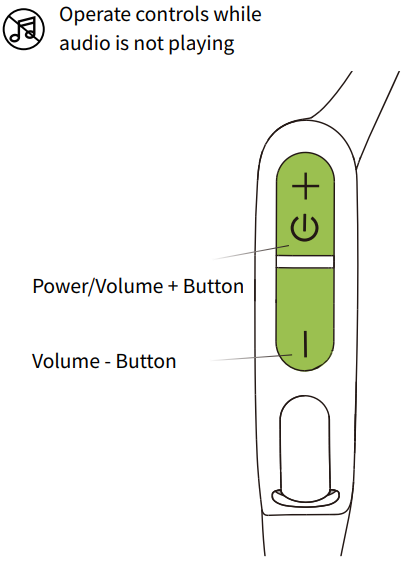
How to check battery status:
Click the Volume + or Volume - button while music is paused, Audrey will tell you the battery status: "Battery high/Battery medium/Battery low/Charge me"
Extra Features
Multipoint Pairing
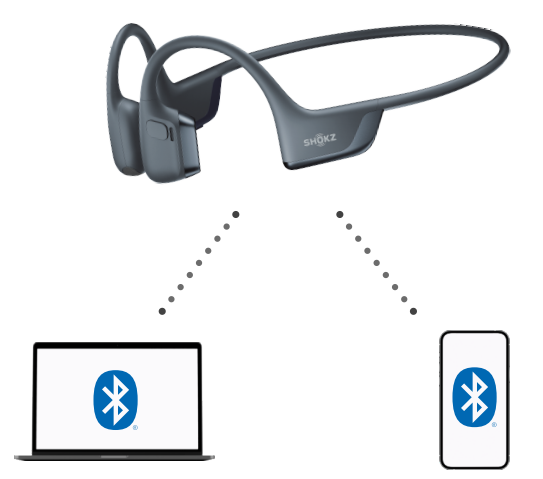
Pair Two Devices
Switch between two devices seamlessly with multipoint pairing
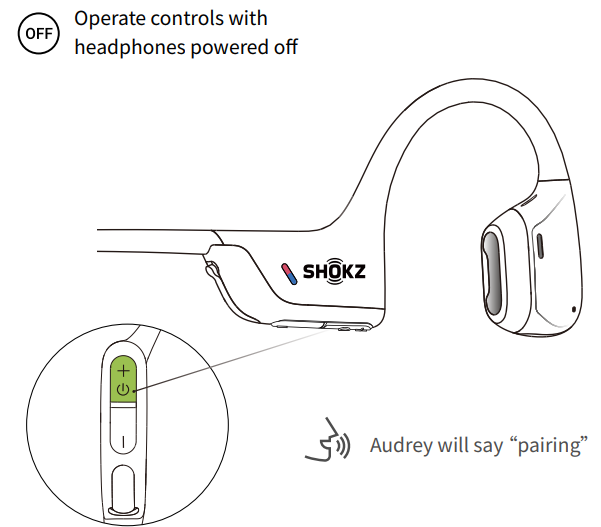
- Start with your headphones powered off.
- Press and hold Volume + until Audrey says “pairing” and the LED indicator flashes red and blue alternately.
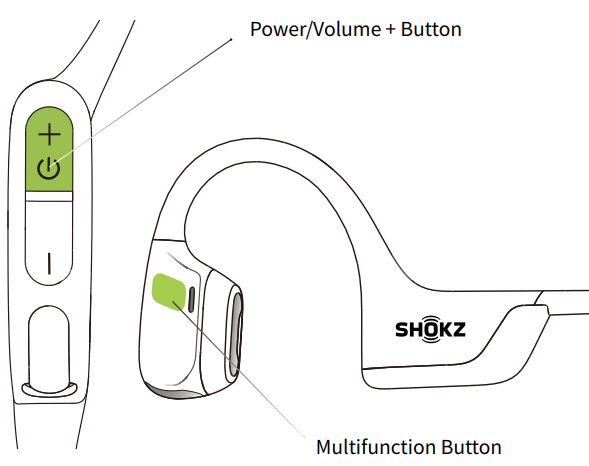
- Press and hold the multifunction button and Volume + button until the headphones emit a prompt sound.
Open first device's Bluetooth® menu and select "OpenRun Pro 2 by Shokz.
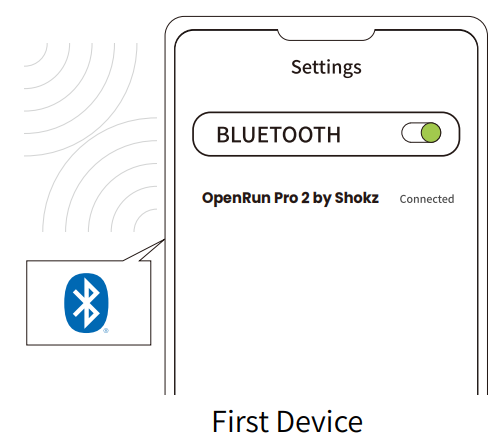
Turn your headphones off.
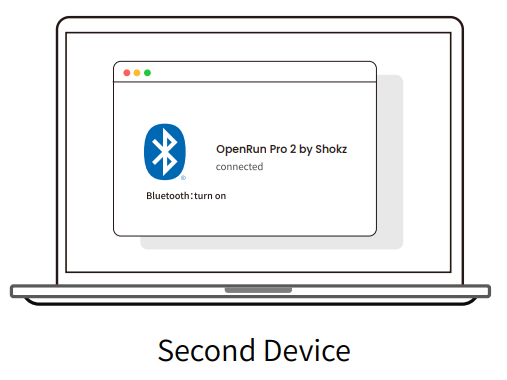
- Re-enter pairing mode by pressing and holding Volume + until Audrey says “pairing” and the LED indicator flashes red and blue alternately.
- Open the second device's Bluetooth® menu and select “OpenRun Pro 2 by Shokz.”
Turn your headphones off.
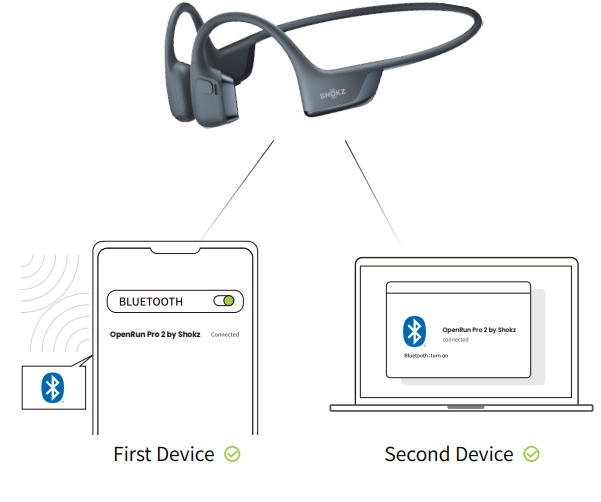
- Turn your headphones on. Your headphones are now connected to both devices.
You can also use the Shokz App for easy switching between devices
Restore the headphones to factory settings
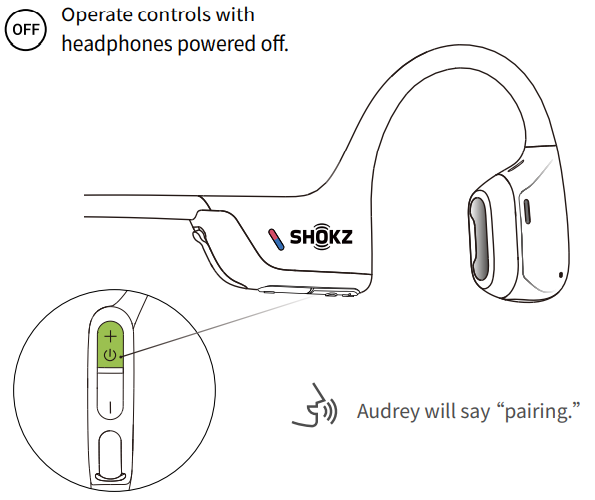
- Start with your headphones powered off.
Press and hold Volume + until Audrey says “pairing” and the LED indicator flashes red and blue alternately.
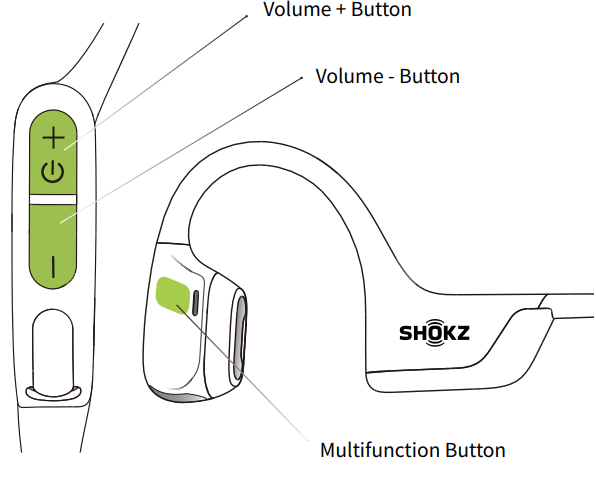
- Press and hold the multifunction button / Volume + button /Volume - button until the headphones emit a prompt sound
Care and Maintenance
Charging Tips
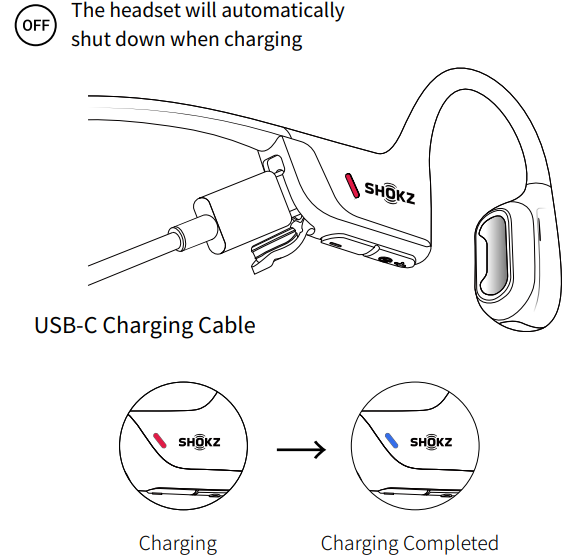
When the headphones are at a low battery, there will be a “charge me” prompt and the red light will flash intermittently. Use the corresponding USB-C charging cable for charging.
The LED indicator will turn red during the charging process,, and the headphones will automatically turn off. The LED indicator will turn from red to blue when charging is complete.
Storage and Maintenance
- Store the headphones in a cool, dry place. The working temperature should be 0~40°C (32-102℉).
- Keep the headphones away from heat sources, combustible gas or other clean/corrosive liquids, keep the headphones away from a long time of direct sunlight, using or placing them in hot places.
- Stop using the headphones immediately if any parts are damaged, smoking, hot, or have a burning smell.
- The headphones' liquid and dust resistance level is IP55. It can be used in non-water sports and exercises and is not fully waterproof. Do not place the headphones in water. IP55 is not a permanent protection rating and may be reduced by normal wear and tear.
- Clean the headphones with a soft dry cloth.
- After storage for a long period, please charge the headphones before using them again.
Hearing Loss
Listening with headphones at high volume may affect your hearing,, and the audio will be distorted.
Please do not listen with headphones at high volume for a long time.
Battery
CAUTION
- Replacement of a battery with an incorrect type that can defeat a safeguard.
- Disposal of a battery into fire or a hot oven, or mechanically crushing or cutting of a battery, that can result in an explosion.
- Leaving a battery in an extremely high temperature surrounding environment that can result in an explosion or the leakage of flammable liquid or gas.
- A battery subjected to extremely low air pressure that may result in an explosion or the leakage of flammable liquid or gas.
- Do not use the battery if it is noticeably expanded.
Charge
- Always confirm that the charging port is dry before connecting the device to the charging cable. Failure to do so could result in increased possibility of short circuit issues, fire,, or explosion danger.
- Do not charge right after exercising in case there's sweat inside the charging port, which could lead to circuit burning while charging.
- Keep the headphones away from heat sources when charging.
- Only power supplies that have been approved by relevant departments and meet local regulatory requirements (such as UL, CSA, V, DE,, and CCC) shall be used.
Dangers of Driving
Please note that in some countries or regions, it may be illegal to use the headphones while operating any type of vehicle. Please check and comply with the traffic rules or relevant laws and regulations in your area, or consult your local regulatory authority.
Skin irritation
- Although rare, some users may experience skin allergies or skin sensitivity when coming into long-term contact with the headphones' outer materials.
- To avoid the risk of an allergic reaction, please do not wear the headphones if you are experiencing skin injuries or irritations on or around the neck, ears, and/or head.
- If you experience any redness of the skin, swelling, or itchiness while wearing the headphones, discontinue use of the headphones immediately and consult a physician.
Notice
Design and specification are subject to change without notice. For the most up-to-date product information, please visit www.shokz.com.
Warranty
- Your headphones are covered by a warranty.
- Visit our website at https://shokz.com/pages/warranty-landing for details of the limited warranty.
- To register your product, download the Shokz App.
Failure to register will not affect your limited warranty rights.
Pros & Cons of Shokz Openrun Pro 2 Headphones
Pros
- Exceptional Safety & Awareness: Open-ear bone conduction design keeps ears free, ideal for outdoor sports and urban commuting.
- Advanced DualPitch Technology: Combines bone and air conduction for clear highs and robust bass, rare in bone conduction headphones.
- Long Battery Life & Fast Charging: 12 hours of playtime with quick charging ensures readiness for long sessions and quick top-ups.
- Comfortable & Durable: Nickel-titanium frame with 16% less clamping force than previous models for comfortable all-day wear.
- Water and Sweat Resistant: IP55 rating suits intense workouts and wet weather conditions.
Cons
- Audio Volume Limit: Maximum volume is moderate to limit sound leakage, which can be insufficient in very noisy environments.
- Sound Quality: While improved, bass may still feel less robust compared to traditional in-ear or over-ear headphones.
- Price Point: At around $200-$250, they are pricier than basic sports headphones but justified by unique technology and build quality.
- Fit Variability: Standard and mini sizes are available, but fit might not suit all head shapes perfectly.
Customer Reviews and Feedback on shokz Openrun Pro 2 Headphones
Users consistently praise the Shokz Openrun Pro 2 Headphones for their comfort and safety features, highlighting how the open-ear design allows them to stay alert during runs or bike rides. Many report clear and balanced sound, especially when customizing EQ settings for bass boost via the Shokz app.
Common compliments include the lightweight feel and secure fit, making them suitable for long workout sessions without discomfort. The improved battery life and USB-C charging are also applauded.
Some users mention that the maximum volume may not be high enough in loud environments, and a few note slight muffling of the microphone during calls under windy conditions. However, most appreciate the AI noise cancellation during phone conversations.
Overall, the headphones tend to receive ratings around 4.5 out of 5 stars, with recommendations especially strong among athletes and outdoor enthusiasts looking for safe, quality audio solutions.
Faqs
How do I set up my Shokz OpenRun Pro 2 Headphones for the first time?
What should I do if my Shokz OpenRun Pro 2 Headphones are not pairing with my device?
How do I use the MultiPoint Pairing feature on my Shokz OpenRun Pro 2 Headphones?
Can I use my Shokz OpenRun Pro 2 Headphones with both an iPhone and a Windows PC?
How often should I charge my Shokz OpenRun Pro 2 Headphones?
What are the key features that make Shokz OpenRun Pro 2 Headphones different?
How do I reset my Shokz OpenRun Pro 2 Headphones if they are not functioning properly?
What maintenance steps should I take to ensure my Shokz OpenRun Pro 2 Headphones last longer?
More shokz manuals
- Setup: Shokz Openswim S700 Headphone User Manual
- Usage & Pairing: Shokz Openrun S803 Headponhe User Manual
- Setup & Pairing: Shokz Opencomm 2 UC Headset User Manual
- Setup: Shokz OpenRun Pro S810 Headphones User Manual
- Setup & Pairing: Shokz Opencomm UC C102-AA Headset User Manual
- Setup: Shokz OpenMeet UC Headset User Manual
Leave a Comment