
Setup & Pairing: Shokz Opencomm UC C102-AA Headset User Manual
Content
Shokz OpenComm UC C102-AA Headset
Introduction
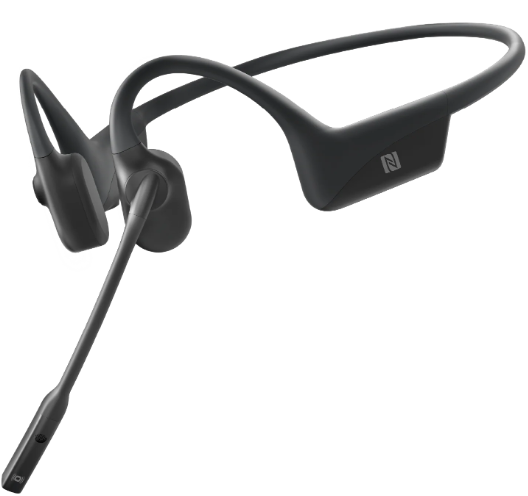
The Shokz OpenComm UC C102-AA Headset is a cutting-edge, bone conduction stereo Bluetooth headset designed specifically for the work-from-home experience. This headset offers all-day comfort and crystal-clear communication, making it ideal for professionals who need to stay connected while maintaining situational awareness. Key benefits include its unique open-ear design, noise-canceling boom microphone, and multipoint pairing capability, allowing users to connect to two Bluetooth devices simultaneously. The Shokz OpenComm UC is priced in the range of $100-$150 and is widely available online.
Targeted at remote workers and those in industrial settings, this headset ensures that users can hear their surroundings while on calls, making it perfect for environments where situational awareness is crucial. It also supports users with hearing aids, as it does not interfere with in-ear or behind-the-ear units.
Specifications
The Shokz OpenComm UC C102-AA Headset boasts an impressive array of features:
- Connection Type: Wireless Bluetooth 5.1
- Maximum Wireless Range: Up to 33 feet
- Water Resistance: IP55-rated for dust and water resistance
- Microphone: Noise-canceling boom mic with Qualcomm cVc noise reduction
- Comfort and Design: Open-ear, behind-the-neck design with full-wraparound titanium frame
- Battery Performance: 16-hour talk time, 14-day standby, and quick charge for 2 hours of talk time with a 5-minute charge
- Technical Audio Specifications: Frequency response of 20 Hz to 20 kHz
In comparison to similar bone conduction headsets, the Shokz OpenComm UC offers superior comfort and noise cancellation capabilities.
Headset Controls
Pairing to Mobile Device
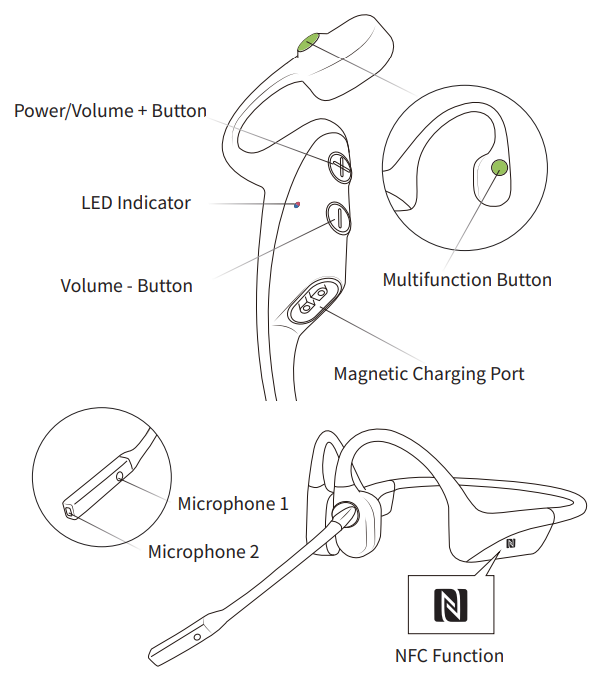
- Start with OpenComm turned off.
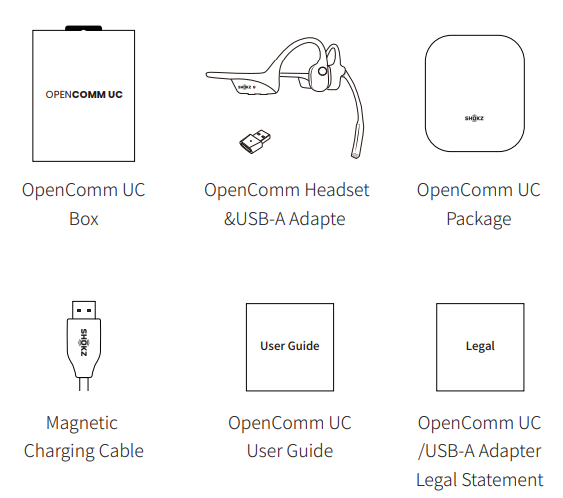
- Press and hold the Volume + Button until the LED Indicator flashes red and blue alternately.
- Open your device's Bluetooth settings and select "OpenComm by Shokz." Audrey will say "connected."
Pairing to PC
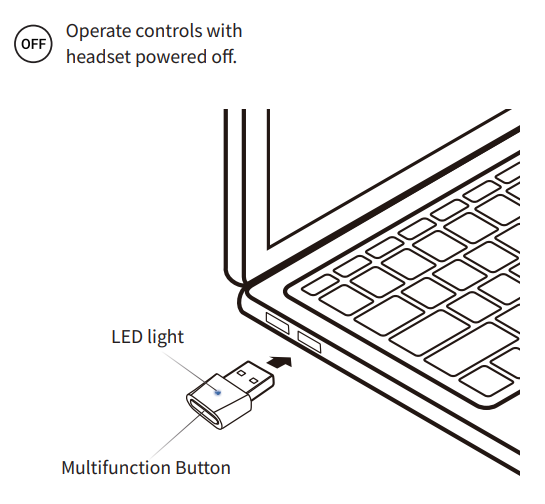
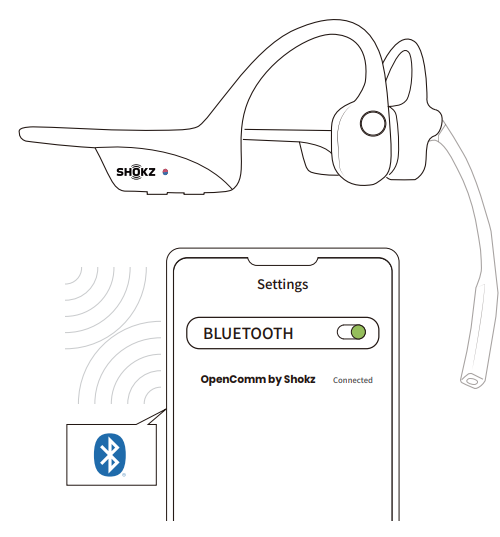
- Start with OpenComm turned on.
- Plug the included USB adapter into a USB port on your PC.
- Connection is established when Audrey says "Connected" or beeps, and the LED Indicator on the USB adapter is solid blue.
NFC Pairing
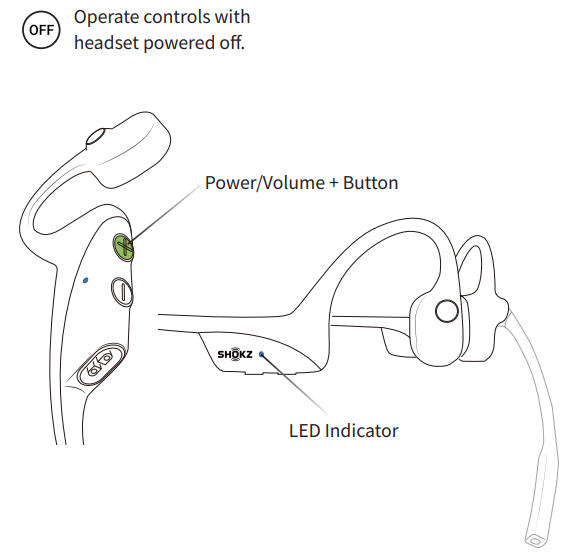
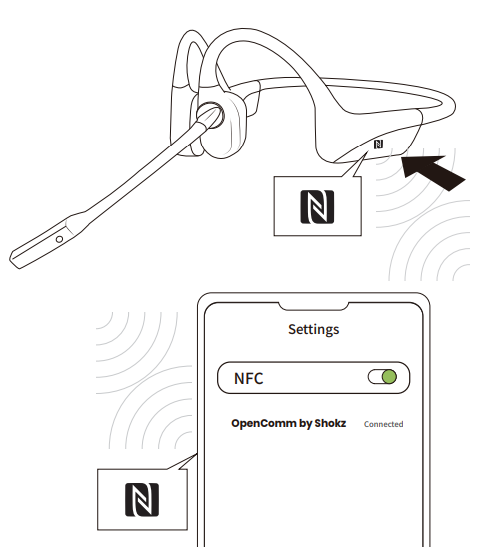
- Power on your headset (press and hold Power/Volume+ until the LED Indicator flashes blue)
- Unlock your phone and turn on NFC pairing (Refer to your phone's user guide if needed).
- Position the headset's NFC logo near the NFC detection area of your phone until the device shows pairing is completed. The headset's LED Indicator will flash blue once when pairing is successful.
How to Wear
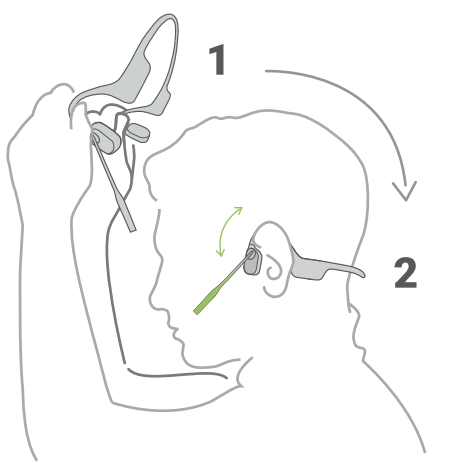
Pick up the headset, bring it behind the back of the base of your neck, and position the earhooks on your ears.
- Position the noise-canceling microphone close to your mouth.
- Wearing your headset the wrong way could cause discomfort. The transducers should rest in front of your ears.
Charging Tips
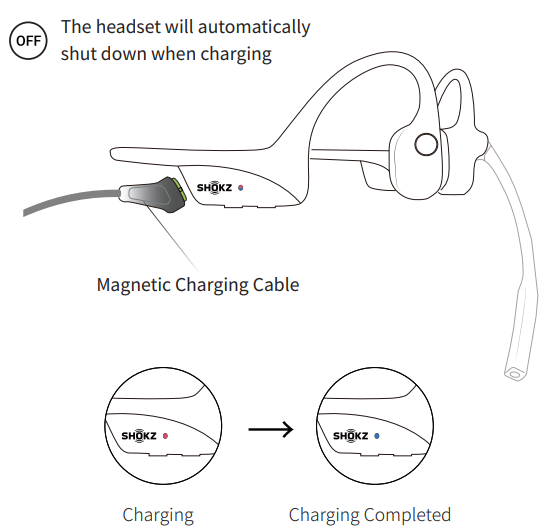
- When the headset is at low battery, there will be a “charge me” prompt and the red light will flash intermittently. Use the corresponding magnetic charging cable for charging.
- The LED indicator will turn red during the charging process, and the headset will automatically turn off. The LED indicator will turn from red to blue when charging is complete.
Storage and Maintenance
OpenComm
- Store the headset in a cool, dry place. The working temperature should be 0~45°C(32~113°F). Working in a cold/hot environment, a highly humid area, or an extremely low air pressure may reduce the battery life.
- Keep the product away from heat sources, direct sunlight, combustible gas, or other liquids.
- Keeping the charging port dry before connecting to the charger will reduce the risk of damage.
- This headset is water-resistant, but it is not waterproof. Please do not submerge the headset in water.
- Clean the headset with a soft, dry cloth.
- Do not charge right after exercising, in case there's sweat inside the charging port, which could lead to circuit burning while charging.
- After storage for a long period, please charge the headset before using it again.
Shokz Loop100 USB-A Bluetooth® Adapter
- Store the product in a cool, dry place. The working and storage temperature should be 0°C-55°C (32°F-131°F).
- Never allow children and pets to play with the product
- s. Small parts may be a choking hazard. If accidental ingestion happens, seek immediate medical attention.
- Keep the produce away from heat sources, direct sunlight, combustible gas, or other liquids.
- Do not disassemble the product.
- Unplug, discontinue use, and contact Shokz if the product overheats or has a damaged outer casing or plug.
Warranty
- Your headset is covered by a warranty.
- Visit our website at https://shokz.com/pages/warranty-landing for details of the limited warranty.
- Failure to register will not affect your limited warranty rights.
Troubleshooting
- If you have any trouble or problems, please visit https://shokz.com/pages/faq for more support!
Pros & Cons
Pros:
- All-Day Comfort: Designed for extended use without fatigue.
- Crystal-Clear Calls: Noise-canceling microphone ensures high-quality audio.
- Situational Awareness: Open-ear design allows users to hear their surroundings.
- Quick Charging: Rapid charging for quick call sessions.
Cons:
- No Call Control Integration: Limited functionality with platforms like Microsoft Teams.
- No Environmental Noise Isolation: May not be ideal for noisy environments.
The Shokz OpenComm UC C102-AA Headset offers excellent value for money, especially considering its advanced features and long battery life.
Customer Reviews
Users praise the Shokz OpenComm UC for its sound quality, battery life, and connectivity. It has a rating of 4.5 out of 5 stars, with users appreciating its ability to maintain situational awareness while on calls.
Common praises include the headset's comfort and noise-canceling capabilities, while some users mention the lack of call control integration as a drawback. Overall, the headset is highly recommended for those needing reliable, open-ear communication solutions.
Faqs
How do I set up the shokz Opencomm UC C102-AA Headset for the first time with my computer?
What should I do if my shokz Opencomm UC C102-AA Headset microphone is not picking up sound clearly?
Can I use the shokz Opencomm UC C102-AA Headset with multiple devices simultaneously?
How long does the battery last on the shokz Opencomm UC C102-AA Headset, and what is the charging time?
Is the shokz Opencomm UC C102-AA Headset waterproof or water-resistant?
How do I maintain and clean my shokz Opencomm UC C102-AA Headset to ensure longevity?
What are the key features of the shokz Opencomm UC C102-AA Headset that enhance work-from-home communication?
How can I optimize audio performance and reduce connectivity issues with my shokz Opencomm UC C102-AA Headset?
More shokz manuals
- Setup: Shokz Openfit 2+ T921 Earbuds User Manual
- Setup & Pairing: Shokz Opencomm 2 UC Headset User Manual
- Setup & Pairing: Shokz Openmove S661 Earbuds User Manual
- Setup: Shokz Openswim S700 Headphone User Manual
- Setup & Pairing: Shokz Opendots One E310 Earbuds User Manual
- Setup: Shokz Openrun Pro 2 Headphones User Manual
Leave a Comment