
Setup & Pairing: Shokz Opendots One E310 Earbuds User Manual
Content
Shokz Opendots One E310 Earbuds
Introduction
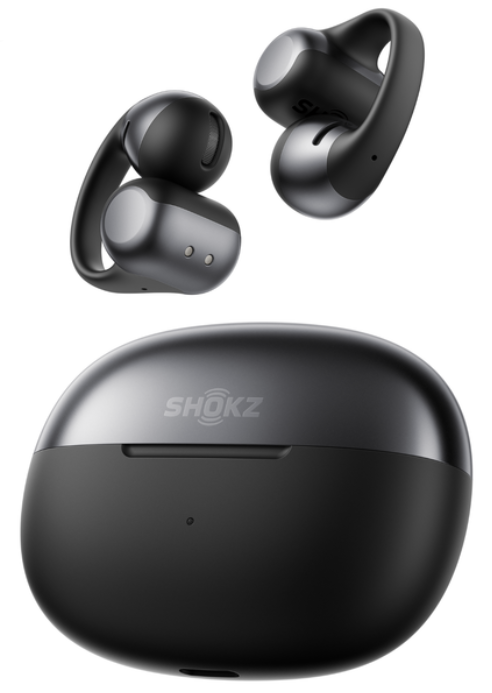
The shokz Opendots One E310 Earbuds are innovative, ultra-lightweight open-ear true wireless earbuds designed for users who value comfort, situational awareness, and quality sound on the go. Featuring a sleek clip-on design, these earbuds deliver premium audio performance with Dolby Audio and Bassphere™ technology, offering rich bass and clear sound while minimizing sound leakage. Their open-ear format allows you to stay connected to your surroundings, making them ideal for commuters, fitness enthusiasts, and professionals who need to remain alert while enjoying music or calls.
Weighing just 6.5 grams per earbud, the Opendots One E310 is virtually unnoticeable during extended wear, complementing eyewear, hats, and other accessories seamlessly. With up to 40 hours of total listening time powered by a wireless charging case, these earbuds offer all-day usability with quick 10-minute charging sessions providing an additional 2 hours of playback. Equipped with Bluetooth 5.4 and advanced AI Call Noise Cancellation, they ensure stable wireless connectivity and crystal-clear call quality.
Priced around $280 to $290, the Shokz Opendots One E310 Earbuds are widely available through major retailers and online platforms, targeting consumers who seek a balance between audio performance, comfort, and open-ear convenience without compromising safety or style.
Specifications
- Design: Open-ear clip-on earbuds with flexible nickel-titanium JointArc for secure, comfortable fit
- Weight: 6.5 grams per earbud; charging case approx. 39 grams; total 52 grams
- Audio Technology: Dolby Audio, Bassphere™ technology for punchy bass and minimized sound leakage, DirectPitch™ technology for clear personal audio
- Battery Life: Up to 10 hours of playback per charge; 40 hours total with charging case; 10-minute quick charge adds 2 hours
- Connectivity: Bluetooth 5.4 with SBC and AAC codec support; multipoint pairing to connect two devices simultaneously; operating range up to 10 meters (33 feet)
- Microphone & Call Quality: Dual AI noise-cancelling microphones with adaptive beamforming for clear voice calls
- Water Resistance: IP54 rating for sweat and light rain resistance
- Controls: Touch controls for playback, calls, and voice assistant activation
- Compatibility: Compatible with Android and iOS devices; customizable sound profiles through the Shokz App
- Dimensions: Earbuds — approx. 2.48 x 1.93 x 1.06 inches
Compared to similar open-ear earbuds, the Opendots One E310 stands out by combining advanced audio tech like Dolby Audio and Bassphere with a lightweight, clip-on design and an extended 40-hour battery life, offering excellent value for users seeking comfort and situational awareness without sacrificing sound quality.
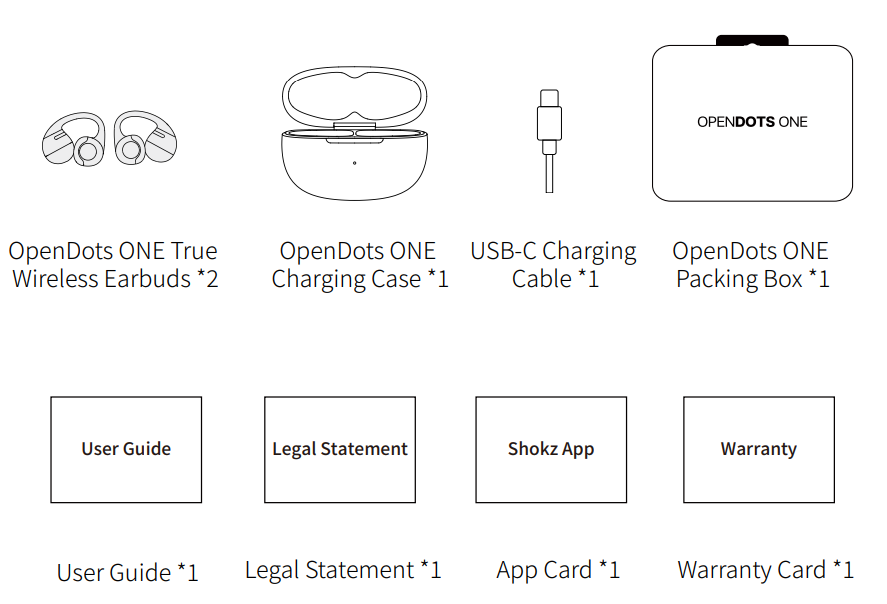
What's in the Box
Wear and Use
Earbud Diagram
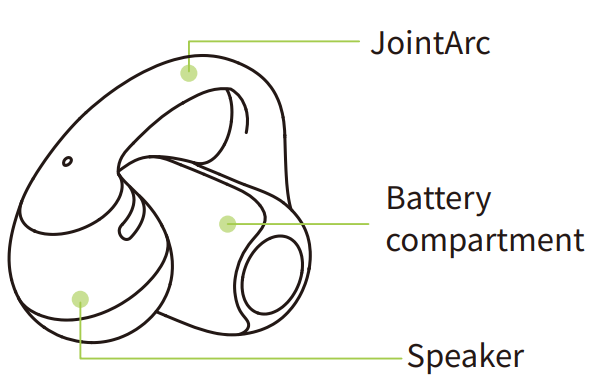
These earbuds feature an open-ear design and do not need to be inserted into the ear canal. They are not left/right specific and can automatically adjust based on how they are worn.
Charging Case
Bluetooth Pairing Instructions
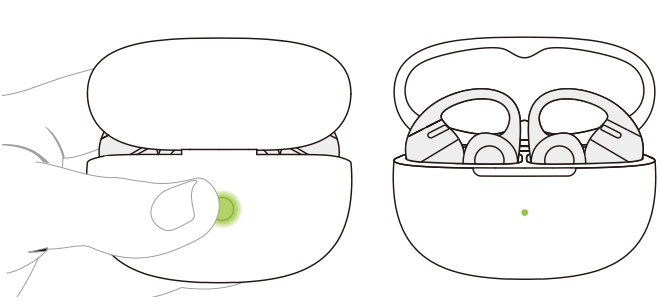
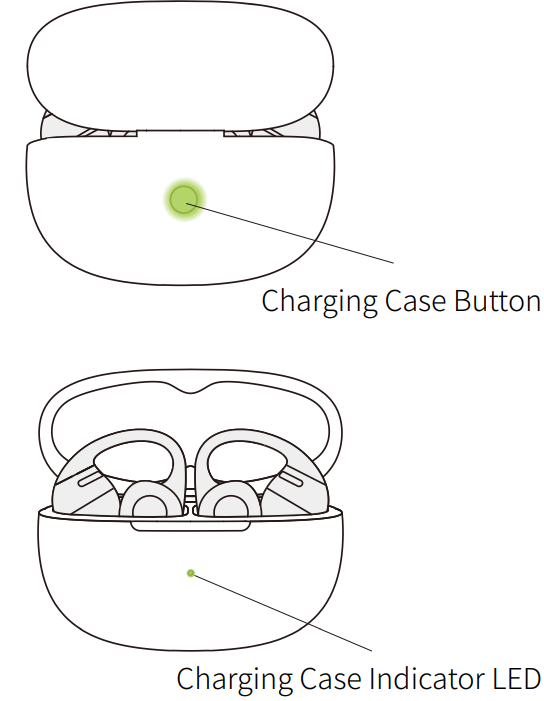
For first-time use, open the charging case to automatically enter Bluetooth pairing mode. The indicator light inside the case will flash orange and green. To re-pair the earbuds, follow these steps:
- Place both earbuds back into the charging case.
- With the case lid open, press and hold the function button for more than 3 seconds until the indicator light flashes orange and green. The earbuds will enter pairing mode.
- Turn on the Bluetooth function on your device and select "OpenDots ONE by Shokz". Once your device displays a successful pairing message, the connection is complete.
- After the earbuds are connected to your device, they will automatically power on and reconnect whenever you open the charging case. Closing the case will automatically power off the earbuds and disconnect them from the device.
- Note: If your earbuds disconnect due to distance from your device, return within 10 m (33 ft) within 3 minutes, and they’ll reconnect automatically with a confirmation tone. After 3 minutes, perform any touch control to trigger reconnection.
Wearing Instructions
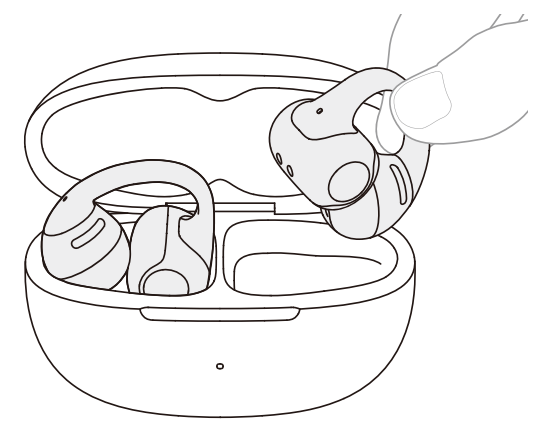
- Pinch the JointArc with your thumb and forefinger and raise it toward your ear.
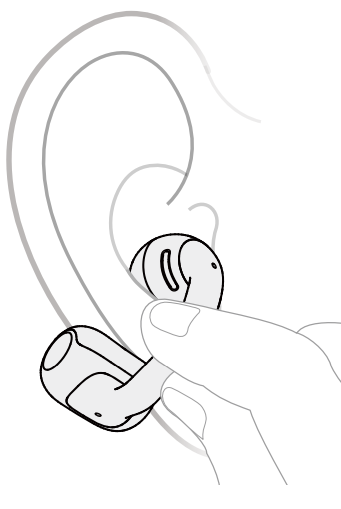
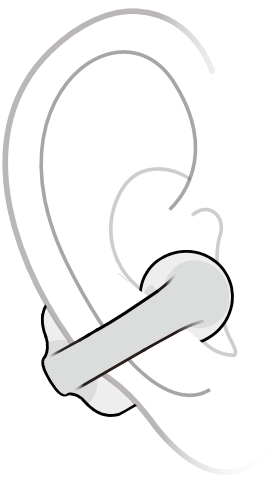
- Place the round speaker against the inner ridge of your ear and the cylindrical battery compartment behind your ear.
- Adjust the earbuds for a secure and comfortable fit.
Note:
For optimal comfort, it is recommended to wear the JointArc at an angle of 0° to 30° relative to the ground. You can adjust this angle based on your personal preference.
When putting on the earbuds, open them gently and avoid pulling them apart too much. Use one hand to follow the steps above. Also, refrain from bending the JointArc excessively when the earbuds are not in use.
Charging the Earbuds
Place the earbuds into the charging case until they are magnetically secured in place. The charging case indicator light will turn on, and you can then close the case.
Note:
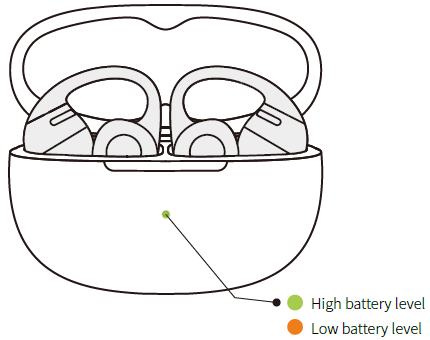
- The indicator light on the charging case shows the battery status of the earbuds inside. A green light indicates a battery level higher than 80%, while an orange light indicates a level lower than 60%. If both earbuds are in the case, the light will display the battery level of the earbud with the lower charge.
- The earbuds will be fully charged after approximately 60 minutes in the case. Ensure the charging case has enough battery to charge the earbuds.
MultiPoint Pairing
Before starting, please ensure that the Shokz App is updated to the latest version in the app store, and that your earbud firm-ware is upgraded to the latest version. Make sure Bluetooth is enabled on your devices.
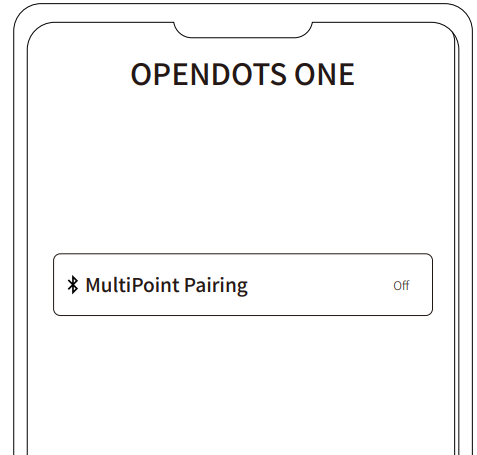
- First, connect your earbuds to your phone, then select “MultiPoint Pairing” in the Shokz App.
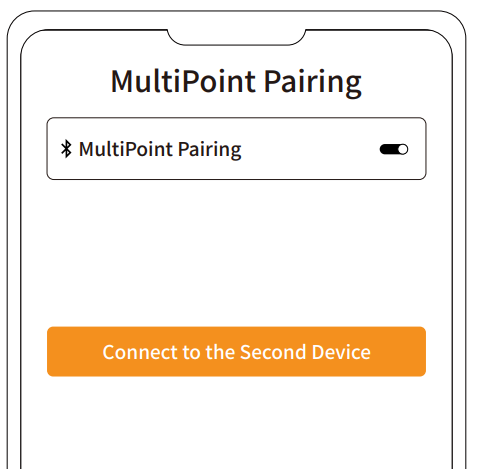
- On the pop-up page, confirm that the MultiPoint Pairing feature is enabled.
- Select “Connect to the Second Device” and follow the instructions to connect to the second device.
- Your earbuds are now connected to two devices, and you can easily manage their Bluetooth connections through the Shokz App.
Auto Reconnect
- After powering on, the earbuds will automatically attempt to connect to the most recently connected device. A prompt sound will indicate a successful connection.
- If the earbuds are disconnected from the device due to distance and return within connection range (10m) within 3 minutes,, they will automatically reconnect to the last paired device. A prompt sound will indicate a successful connection.
- These devices must be within range (10mm) and powered on. Please ensure your mobile device has Bluetooth enabled.
Cleaning
Cleaning the Earbuds
It is recommended to use a soft, clean, dry cloth to wipe the earbuds. When cleaning the earbud mesh, use a clean, dry cotton swab to gently remove any dirt and earwax from the mesh, then wipe it clean with a soft cloth.
Note:
- Stop using the earbuds and disconnect them from all devices before cleaning and maintenance.
- This product is not waterproof; do not rinse the earbuds directly with water or use ultrasonic cleaning.
- Avoid allowing liquids to enter any openings of the earbuds.
- To avoid damaging, warping, or discoloring the earbuds, do not use abrasive cleaners, sprays, high-concentration cleaners, chemical cleaning liquids, alcohol, or acetone-based solvents. Do not use any sharp or abrasive objects to clean the earbuds.
Cleaning the Charging Case
It is recommended to use a soft, clean, dry cloth to wipe the charging case. Use a clean, dry soft-bristled brush to remove any debris from the charging port. Use a clean, dry cotton swab to gently clean the charging contacts inside the case.
- Note:
- Disconnect the charging case from the charging cable before cleaning and maintenance.
- Do not use abrasive objects to clean the charging case.
Storage and Maintenance
- Store the product in a cool, dry place. Operating temperature: 0°C to 40°C.
- Keep the product away from heat sources, flammable gases, and corrosive liquids. Avoid prolonged exposure to direct sunlight or high-temperature environments.
- Stop using the product immediately if any part is damaged, emits smoke, becomes excessively hot, or produces a burning smell.
- The earbuds are rated IP54 for dust and splash resistance, suitable for non-water sports and workouts. They are not fully waterproof not submerge the earbuds in water. The IP54 protection level may degrade over time with normal wear and tear.
- The charging case is not waterproof. Avoid exposing it to any liquid.
- Use a soft, dry cloth to clean the earbuds.
- If the product is stored for an extended period, charge it fully before using it again.
Warranty
Your earphones are covered by a warranty. Visit our website at https://shokz.com/pages/warranty-return for details of the limited warranty.
Troubleshooting Guide for shokz Opendots One E310 Earbuds
- Issue: Earbuds not pairing or connecting
Solution: Ensure Bluetooth is enabled on your device, reset the earbuds by pressing and holding the touch controls for 10 seconds until the LED flashes, and try reconnecting. Make sure the earbuds are within 10 meters of the device. - Issue: Low or distorted sound quality
Solution: Clean the earbuds gently to remove debris, check volume levels, disable any EQ profiles,, and reset to default, update firmware via the Shokz App. - Issue: Call quality is poor, or the microphone is not working
Solution: Activate AI Noise Cancellation in the app, ensure earbuds are properly positioned, and reduce environmental noise. Test the microphone in a quiet environment. - Error Codes: No specific error codes reported; LED indicators show battery and connection status.
- Preventive Measures: Keep earbuds dry, store them in a charging case when not in use, avoid extreme temperatures, and regularly update firmware for optimal performance.
- Warranty & Support: Shokz offers a manufacturer’s warranty for the Opendots One E310. For assistance, contact Shokz customer support via their official website or the included user guide contact details.
Pros and Cons of shokz Opendots One E310 Earbuds
Pros
- Ultra-lightweight and Comfortable: At just 6.5 grams per earbud with flalflexiblep-on design, ideal for extended wear and active lifestyles.
- Excellent Battery Life: Up to 40 hours total with wireless charging case and fast 10-minute quick charge feature.
- High-Quality Sound: Dolby Audio and Bassphere™ tech deliver clear and punchy audio with minimal leakage, great for the open-ear format.
- Situational Awareness: Open-ear design lets users stay aware of their surroundings, enhancing safety during outdoor activities.
- Reliable Connectivity: Bluetooth 5.4 with multipoint pairing ensures stable connections across two devices.
Cons
- Limited Noise Isolation: Open-ear design sacrifices passive noise cancellation, so not ideal in very noisy environments.
- Control Sensitivity: Touch controls can be less intuitive and sometimes overly sensitive for some users.
- Price Point: Slightly higher price compared to basic true wireless earbuds without open-ear benefits.
- No Low-Latency Mode: May experience audio delay unsuitable for fast-paced gaming or certain video applications.
Customer Reviews and Feedback on shokz Opendots One E310 Earbuds
The Shokz Opendots One E310 Earbuds enjoy generally positive feedback with an average rating of around 4.3 stars. Users praise their exceptional comfort and secure fit, often noting the earbuds feel almost weightless during long use. The rich audio quality, especially the punchy bass from Bassphere technology, combined with Dolby Audio, receives frequent compliments.
Common praises include the impressive battery life and convenience of wireless charging. Many reviewers highlight the earbuds’ ability to maintain situational awareness as a key benefit for outdoor use and commuting. However, some users mention challenges with the touch controls being overly sensitive and occasional issues with volume settings. A few reviews also point out that these earbuds are not ideal for noisy environments due to their open-ear design.
Overall, the ShokzpendotsOne E310 are recommended for anyone seeking a lightweight, comfortable open-ear listening experience with strong battery performance and clear calls, making them a solid choice in the premium clip-on earbud category.
Faqs
How do I set up the shokz Opendots One E310 Earbuds for the first time?
What should I do if my shokz Opendots One E310 Earbuds are not connecting to Bluetooth?
Can I use shokz Opendots One E310 Earbuds with multiple devices at the same time?
How do the open-ear design and DirectPitch™ technology improve my listening experience with shokz Opendots One E310 Earbuds?
What is the battery life and charging time of the shokz Opendots One E310 Earbuds?
How can I maintain and clean my shokz Opendots One E310 Earbuds to ensure longevity?
Are shokz Opendots One E310 Earbuds compatible with hearing aids or eyewear?
Why am I experiencing audio latency with shokz Opendots One E310 Earbuds during video playback or gaming?
More shokz manuals
- Setup & Pairing: Shokz Openfit 2 T920 Earbuds User Manual
- Setup & Pairing: Shokz Openmove S661 Earbuds User Manual
- Setup : Shokz Openswim Pro S710 Headphones User Manual
- Setup: Shokz Openfit 2+ T921 Earbuds User Manual
- Setup & Pairing: Shokz Opencomm UC C102-AA Headset User Manual
- Setup & Pairing: Shokz Opencomm 2 UC Headset User Manual
Leave a Comment