
Setup : Shokz Openswim Pro S710 Headphones User Manual
Content
Shokz Openswim Pro S710 Headphones
Introduction
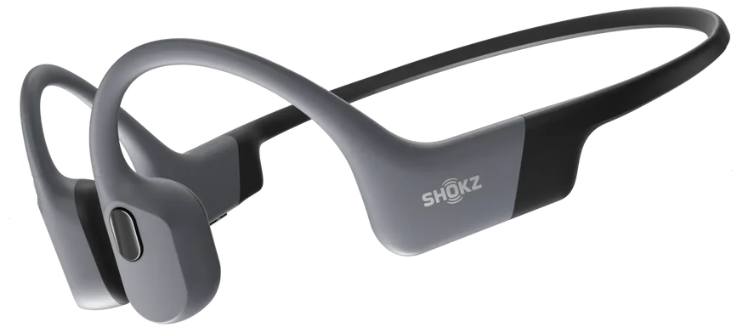
The Shokz Openswim Pro S710 Headphones are cutting-edge bone conduction headphones designed for water sports enthusiasts and active users who demand high-quality sound on land and underwater. With an IP68 waterproof rating, these headphones allow submersion up to 2 meters for up to two hours, making them perfect for swimming, triathlons, and other aquatic activities. Their open-ear design ensures safety by keeping your ears free to hear ambient sounds, while delivering clear, rich audio via advanced bone conduction technology.
Key benefits include dual-mode functionality with Bluetooth V5.4 for wireless streaming and built-in 32GB MP3 storage for phone-free music playback. The headphones feature a secure, ergonomic fit with a nickel-titanium alloy headband and sports-optimized physical buttons for easy control, even in motion or underwater. The battery supports up to 9 hours of playback with a rapid 10-minute quick charge option delivering 3 hours of use.
Ideal for swimmers, runners, cyclists, and outdoor adventurers seeking seamless transition from water to land activities, the shokz Openswim Pro S710 offers versatility without compromising comfort or sound quality. The estimated price range is around $170 to $180, widely available through official Shokz retailers and online platforms. These headphones redefine waterproof audio by combining durability, safety, and superior performance for an immersive listening experience.
Specifications of Shokz Openswim Pro S710 Headphones
- Bone Conduction Technology: 8th Generation PremiumPitch™ 2.0+ for improved sound clarity and reduced vibration leakage
- Waterproof Rating: IP68 (submersible up to 2 meters/6.6 feet for 2 hours)
- Connectivity: Bluetooth V5.4 for wireless streaming; MP3 mode with 32GB internal storage
- Battery Life: Up to 9 hours with Bluetooth; 6 hours in MP3 mode
- Charge Time: 1.5 hours full charge; Quick charge 10 minutes for 3 hours usage
- Weight: Approximately 27.3 grams (0.96 oz)
- Materials: Silicone, plastic, and nickel-titanium alloy for durability and comfort
- Control Features: Sports-optimized physical buttons for playback, calls, EQ mode switching, and Bluetooth/MP3 toggle
- EQ Modes: Multiple equalizer settings, including swimming mode and vocal booster
Compared to similar bone conduction models, the Openswim Pro S710 stands out with its dual-mode playback, larger MP3 storage, and superior IP68 water resistance, offering enhanced versatility for both swimming and land-based activities.
What’s in the Box

Precautions
Preparations Before Wearing Underwater
- Transfer audio files from your computer to your headphones.
- Switch the headphones from Bluetooth mode to MP3 mode before entering the water.
- You may switch to swimming mode and use it with earplugs.
Please refer to the online manual for detailed instructions.
Precautions for Wearing Underwater
- You won't be able to listen to audio from your smart device or answer incoming calls via Bluetooth® connection while underwater,, as Bluetooth® radio waves do not propagate in water.
- The MP3 mode is available when you are in the pool or at sea. Please ensure to rinse your headphones with clear water after use to prevent saltwater corrosion. Please do keep the magnetic charging port dry during charging or data transfer to ensure proper functioning and safety of the device.
How It Works
Headphones Control
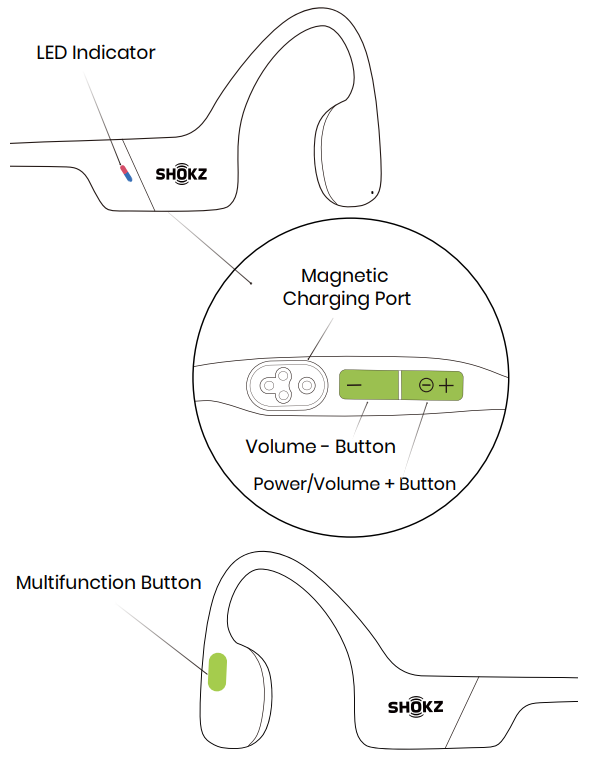
ON/OFF
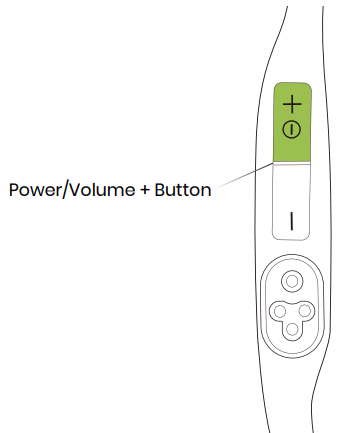
Turn on the headphones:
Press and hold the Power/Volume + button until the LED Indicator flashes blue.
A power-on tone will be heard at this time.
Turn off the headphones:
Press and hold the Power/Volume + button until the LED Indicator flashes red.
A shutdown tone will be heard at this time.
Pairing
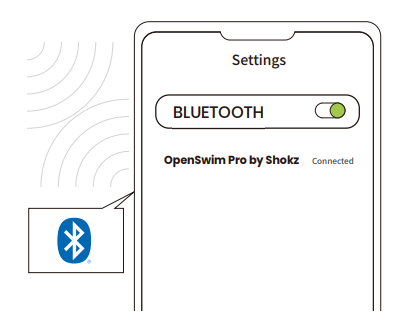
- Start with OpenSwim Pro turned off.
- Press and hold the Volume+ Button for 5 seconds until the LED
Indicator flashes red and blue. Open your device's Bluetooth settings and select "OpenSwim Pro by Shokz". Once your device confirms successful pairing, you're all set.
How to Wear
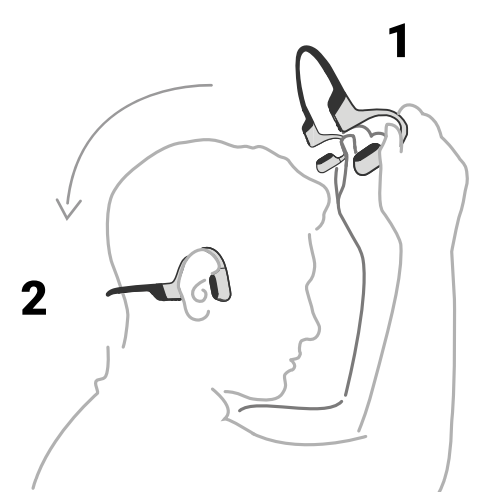
Pick up the headphones, bring them behind the back of the base of your neck, position the earhooks on your ears, then enjoy your music! Wearing your headphones the wrong way could cause discomfort. The transducers should rest in front of your ears.
More Functions
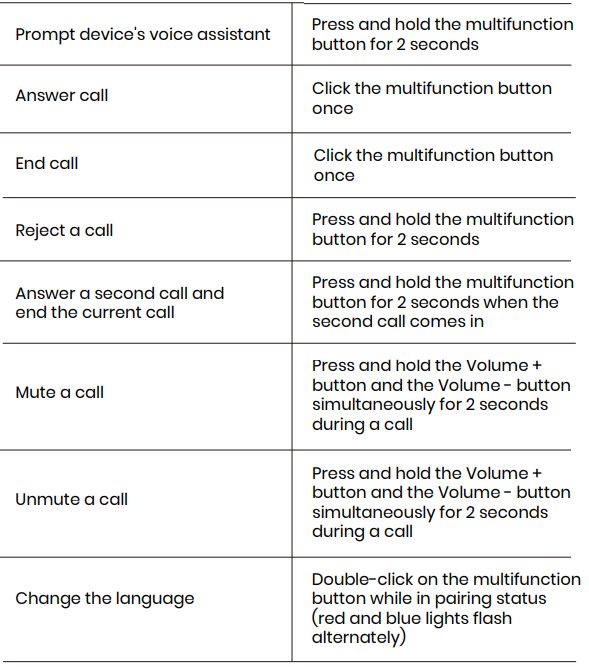
Restore Factory Settings
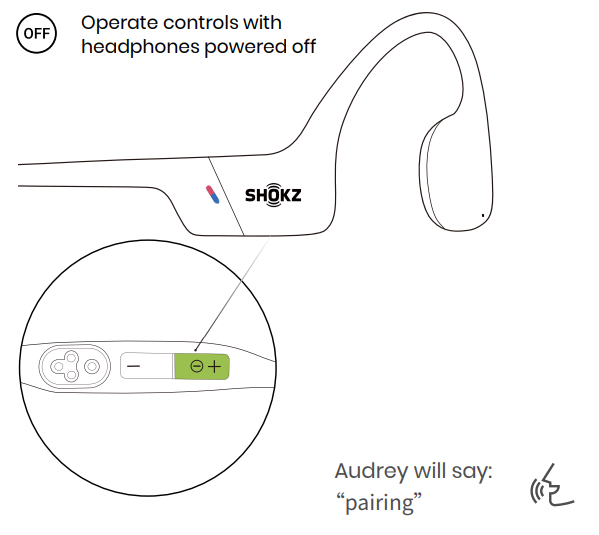
- Start with your headphones powered off.
- Press and hold Volume + until Audrey says “pairing” and the LED indicator flashes red and blue alternately.
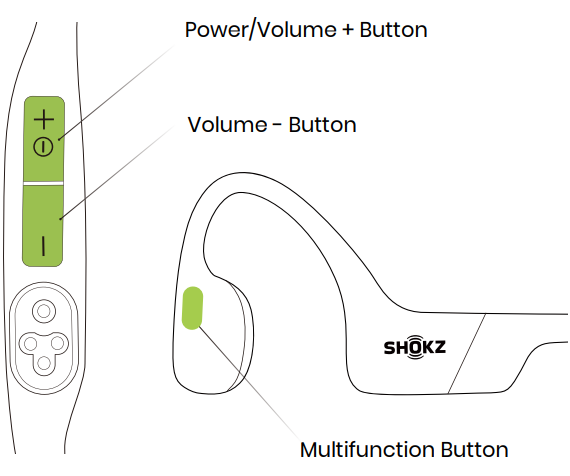
- Press and hold the multifunction button, the Volume -button, and the Volume + button together until you hear a beep.
Turn your headphones off. OpenSwim Pro has been reset and needs to be paired again.
Care and Maintenance
Charging Tips
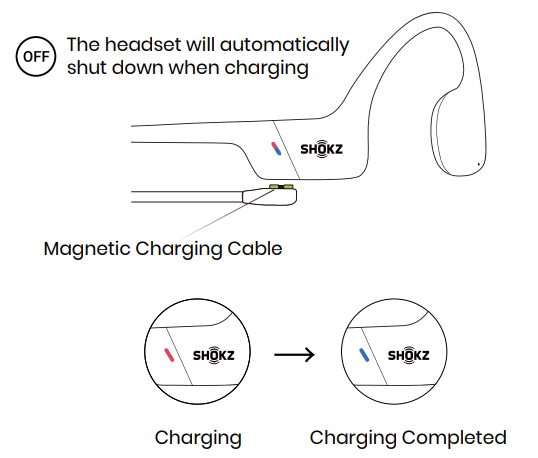
When the headphones are at a low battery, there will be a “charge me” pr,,ompt and the red light will flash intermittently. Use the corresponding magnetic charging cable for charging. The LED indicator will turn red during the charging process, and the headphones will automatically turn off. The LED indicator will turn green to blue when charging is complete.
Note:
The headphones will automatically turn off after standing for 2 hours in MP3 mode.
The headphones will automatically turn off after standing for 6 hours in Bluetooth mode.
Troubleshooting for Shokzz Openswim Pro S710 Headphones
- Issue: Headphones not powering on.
Solution: Charge fully using the magnetic charging cable; ensure charging contacts are clean and aligned. - Issue: Bluetooth is not pairing.
Solution: Turn off and on Bluetooth on your device, reset the headphones by holding the volume + and – buttons simultaneously for 10 seconds, then try pairing again. - Issue: Sound distortion or low volume underwater.
Solution: Use supplied swimming earplugs to improve sound quality; select swimming EQ mode via button or Shokz app. - Issue: MP3 mode not playing files.
Solution: Confirm MP3 files are transferred correctly in compatible formats; switch to MP3 mode by pressing and holding volume buttons for 2 seconds. - Preventive Measures: Rinse headphones with fresh water after use in chlorine or saltwater; dry thoroughly before charging.
Warranty covers manufacturing defects for one year. For support, contact Shokz customer service via their official website or authorized retailers.
If you have any trouble or problems, please visit: https://help.shokz.com/s/ for more support!
Warranty
Your headphones are covered by a warranty.
Visit our website at https://shokz.com/pages/warranty-return for details of the limited warranty.
To register your product, download the Shokz App.
Failure to register will not affect your limited warranty rights.
Pros & Cons of Shokz Openswim Pro S710 Headphones
- Pros:
- Exceptional IP68 waterproofing ensures durability for swimming and water sports
- Dual Bluetooth and MP3 playback modes offer versatile listening on and off the water
- Lightweight and secure fit with nickel-titanium alloy headband for all-day comfort
- Long battery life with a quick charge feature minimizes downtime
- Open-ear design maintains situational awareness and ear hygiene
- Cons:
- Bone conduction audio may lack deep bass compared to traditional earbuds
- MP3 file transfer requires manual syncing, which could be inconvenient for some users
- Physical buttons might be challenging to operate with wet hands or gloves
- Price is higher compared to basic waterproof headphones, reflecting advanced technology and features
Overall, the Shokz Openswim Pro S710 headphones provide excellent value for users seeking durable, high-performance, waterproof bone conduction headphones with advanced features not commonly found in alternatives.
Customer Reviews of shokz Openswim Pro S710 Headphones
Users commonly praise the comfort and secure fit of the Shokzzz Openswim Pro S710, especially during swimming and running. The clarity of sound with PremiumPitch™ 2.0+ technology and the convenience of dual MP3 and Bluetooth modes receive high marks. Many appreciate not needing to carry a phone while swimming.
Common complaints involve the learning curve with physical button controls underwater and occasional Bluetooth connectivity interruptions. Some users mention a desire for a stronger bass response, typical for bone conduction devices.
Average user ratings hover around 4 out of 5 stars, with recommendations highlighting these headphones as an ideal choice for swimmers and triathletes needing reliable, waterproof, and safe audio solutions.
Faqs
How do I set up my shokz Openswim Pro S710 Headphones for the first time?
What should I do if my shokz Openswim Pro S710 Headphones won’t pair with my device?
Can I use shokz Openswim Pro S710 Headphones in both Bluetooth and MP3 modes?
Are shokz Openswim Pro S710 Headphones compatible with all smartphones and smartwatches?
How can I optimize battery life and charging for my shokz Openswim Pro S710 Headphones?
How do I maintain and clean my shokz Openswim Pro S710 Headphones to ensure durability?
Why is the audio sound quality sometimes unclear on my shokz Openswim Pro S710 Headphones and how can I improve it?
How do I connect shokz Openswim Pro S710 Headphones to two devices simultaneously?
More shokz manuals
- Setup & Pairing: Shokz Openfit 2 T920 Earbuds User Manual
- Setup & Pairing: Shokz Opendots One E310 Earbuds User Manual
- Setup & Pairing: Shokz Openmove S661 Earbuds User Manual
- Setup: Shokz Openfit 2+ T921 Earbuds User Manual
- Setup & Pairing: Shokz Opencomm UC C102-AA Headset User Manual
- Setup & Pairing: Shokz Opencomm 2 UC Headset User Manual
Leave a Comment