
Setup & Pairing: Shokz Openfit 2 T920 Earbuds User Manual
Content
Shokz Openfit 2 T920 Earbuds
Introduction
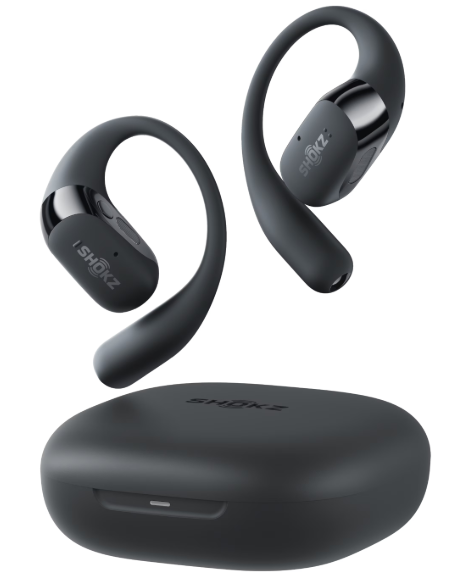
The shokz Openfit 2 T920 Earbuds represent the latest innovation in open-ear wireless audio technology, designed especially for active users who value safety, comfort, and premium sound quality. These earbuds feature an open-ear design that allows you to stay aware of your surroundings while enjoying vibrant, dynamic audio—making them ideal for workouts, outdoor activities, and hands-free calls. Enhanced by DualBoost™ Technology and Shokz OpenBass™ 2.0, they deliver powerful bass and crystal-clear mids and highs for an immersive listening experience without blocking ambient noise.
With a secure, ergonomic fit crafted from Ultra-Soft Silicone™ 2.0, the Openfit 2 T920 earbuds ensure all-day comfort even during intense exercise. Physical multifunction buttons offer precise control over music playback and calls, while AI-powered noise-canceling microphones provide clear voice communication in noisy environments. The earbuds boast up to 11 hours of playback on a single charge, extendable to 48 hours with the charging case, supporting your daily routines and long outings without interruption.
Targeted at fitness enthusiasts, outdoor adventurers, and commuters looking for safe, high-quality wireless earbuds, the Openfit 2 T920 combines durability with advanced features like IP55 water resistance. They are available globally through official retailers and online platforms, with an estimated price range of $140 to $160, positioning them competitively in the premium open-ear earbuds market.
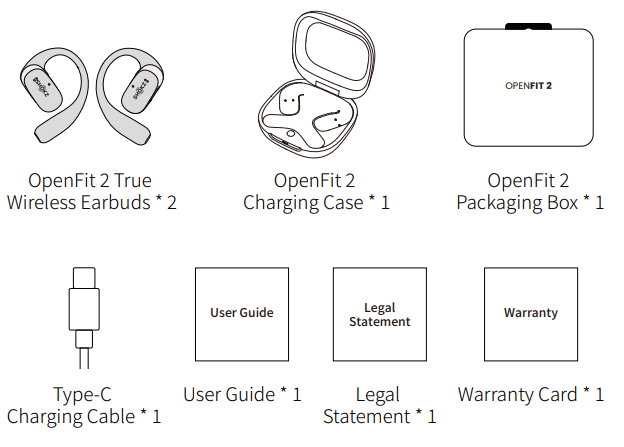
In the Box
Technical Specifications and Features of Shokz Openfit 2 T920 Earbuds
- Audio Technology: DualBoost™ Technology with independent high- and low-frequency drivers for enhanced bass and clear sound detail
- Sound Enhancement: Shokz OpenBass™ 2.0 algorithm delivering powerful, directed bass
- Design: Open-ear, secure fit with Ultra-Soft Silicone™ 2.0 and flexible ear hooks inspired by the golden spiral
- Battery Life: Up to 11 hours of playback per single charge; 48 hours total with charging case
- Charging: USB-C fast charging; 10 minutes quick charge for 2 hours of listening; 60 minutes for a full earbud charge, 100 minutes for the case
- Controls: Physical multifunction buttons for volume, track control, and calls
- Water Resistance: IP55-rated earbuds (charging case not waterproof)
- Microphones: AI-powered dual noise-canceling microphones for clear calls in noisy settings
- Connectivity: Bluetooth with multi-device support and “Find My Earbuds” feature within 10m range
- Weight: 9.4 grams per earbud for lightweight comfort
Compared to similar open-ear wireless earbuds, such as the previous OpenFit model and OpenFit Air, the OpenFit 2 T920 offers superior sound quality, improved battery life, advanced noise cancellation, and enhanced comfort due to its upgraded materials and design.
Wear and Use
Earbud diagram
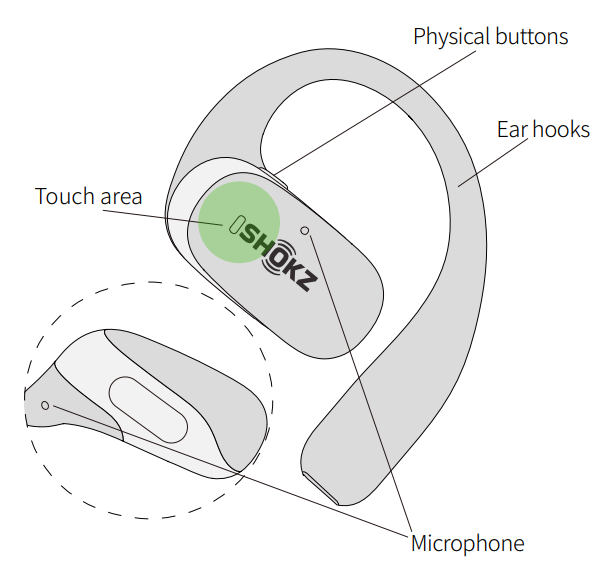
- The touch area for both earbuds is located on the raised areas of the Shokz logo.
- The microphones are exclusively for voice calls.
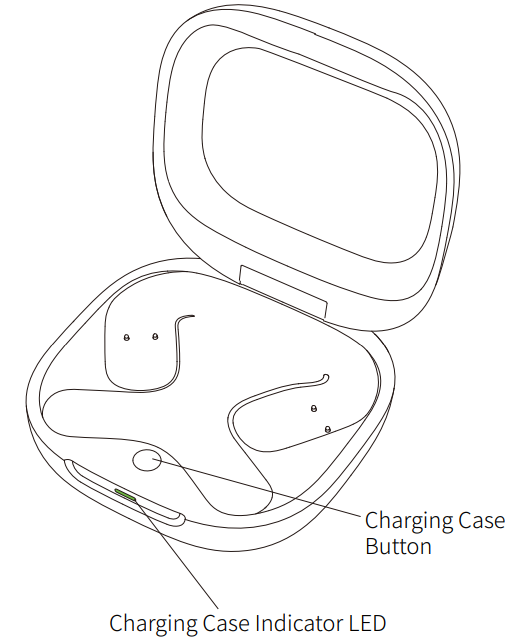
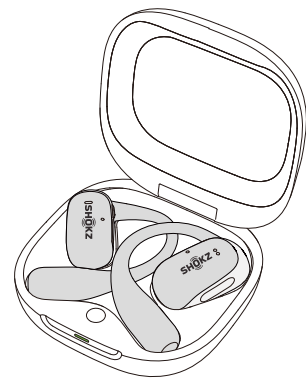
Charging Case
Pairing
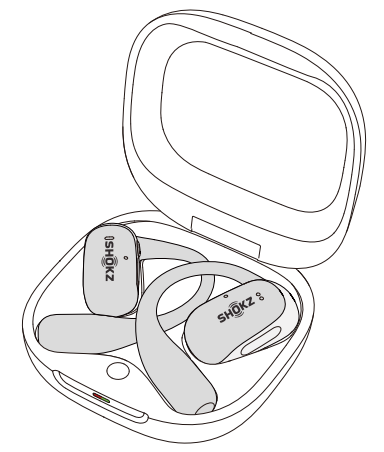
When using for the first time:
Open the charging case to immediately enter Bluetooth pairing mode, with the indicator light flashing orange and green.
For subsequent pairings:
- Place both earbuds into the charging case.
Press and hold the button inside the charging case for seconds until the indicator lights flash orange and green, indicating that the earbuds have entered pairing mode.
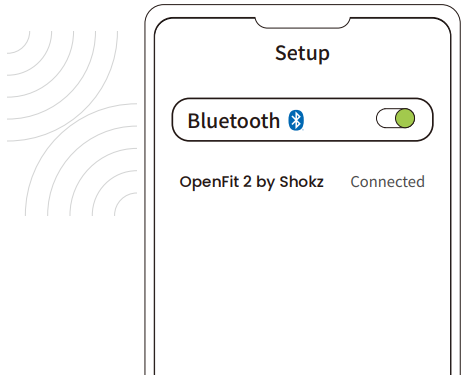
- Enable the Bluetooth function and select "OpenFit by Shokz." The device will display the successful pairing when complete.
Operation and Control
Music Control
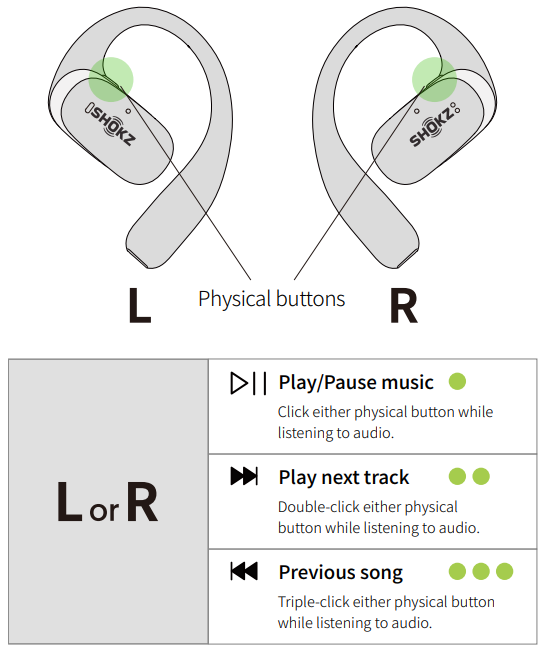
Call Control
Volume Control
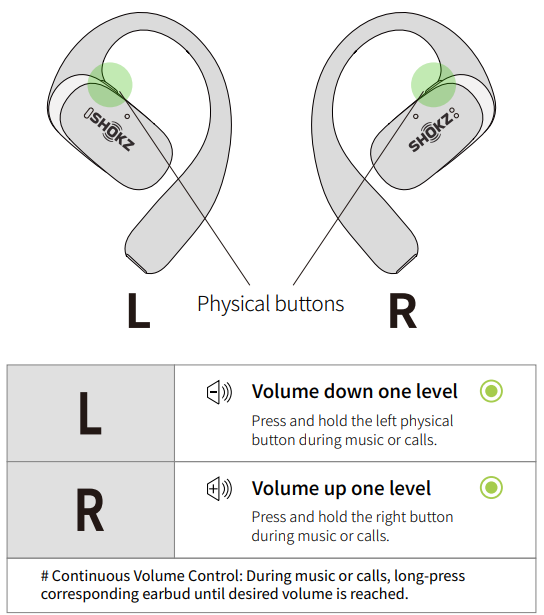
Single Earbud Control
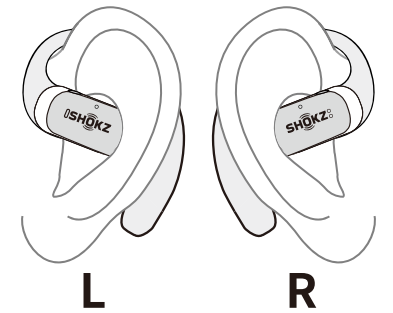
Additional Features
MultiPoint Pairing
Please update the Shokz App to the latest version in the App Store. Follow the instructions to update the earphone firmware to the latest version. Ensure that Bluetooth is enabled on your pairing device.
First, connect the earbuds to your phone, and start by selecting “MultiPoint Pairing” in the Shokz App.
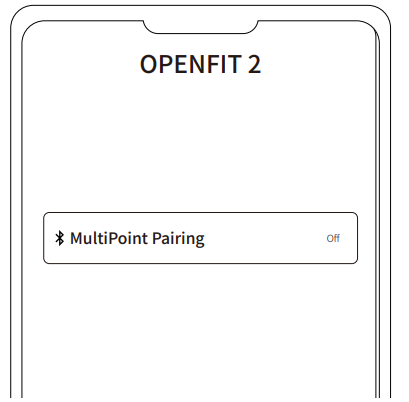
- On the pop-up page, confirm to open the MultiPoint Pairing function.
Select "Connect to the Second Device" and follow the instructions to establish a connection with the second device.
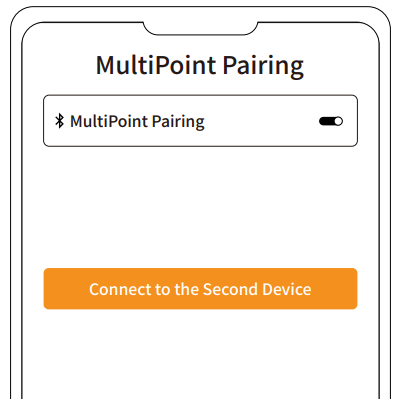
- Your earbuds are now connected to two devices. You can manage their Bluetooth connections conveniently through the Shokz App.
Auto Connect
- Once the earbuds are powered on, they'll automatically attempt to connect to the last paired device and emit a beep to indicate a successful connection.
- While in use, the earbuds may disconnect from the paired device due to connection range limitations. If they come back within range within 3 minutes, they'll re-establish connection with the paired device automatically, emitting a beep indicating successful reconnection.
- Should the earbuds re-enter the connectable range after minutes, press either physical button to trigger
automatic reconnection. - With MultiPoint Pairing enabled, simply press either physical button to reconnect to both devices.
Please ensure that the paired devices are within the connection range (m) and powered on. Also, make sure that your desired device has Bluetooth enabled.
Find my Shokz
- Make sure your earbuds are connected to your phone. Then, open the Shokz App and choose "Find my Shokz.
- Select the earbuds you want to locate from the list that appears.
- Select “Ringer”. Your earbuds will start making a loud noise to help you find them.
Resetting
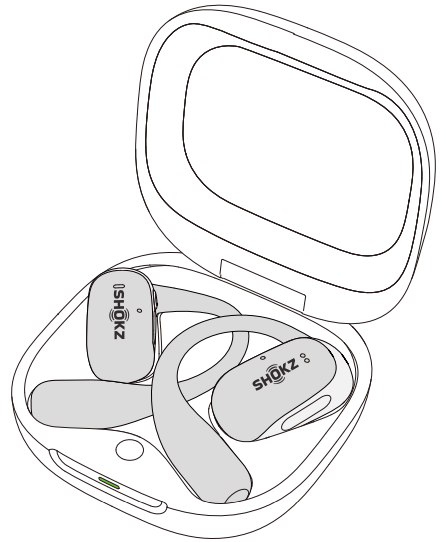
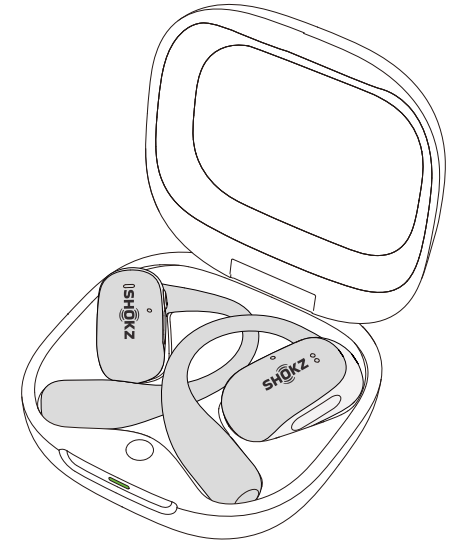
Resetting the earbuds will clear the list of paired devices and reset all settings.
- Place both earbuds in the charging case.
- Press and hold the button on the charging case for 15 seconds. The indicator will flash orange for five seconds before turning off, indicating that the reset is complete. Next, the indicator will flash orange and green, indicating that the earbuds have entered pairing mode.
Maintenance
Cleaning
Earbuds
- Use a soft, clean, dry cloth to wipe the earbuds.
- When cleaning the earbud mesh, gently brush away dirt and earwax with a dry cotton swab, then wipe with a soft cloth.
Note:
- Ensure the earbuds are powered off and disconnected from all devices before cleaning.
- Do not wash the earbuds with water or use ultrasonic cleaning.
- Prevent liquid from entering any openings of the earbuds.
- Do not use abrasive cleaners, high-concentration chemicals, alcohol, or acetone solvents, as they may cause damage, deformation, or discoloration.
- Avoid using sharp or abrasive objects.
Charging Case
- Use a soft, clean, and dry cloth to wipe the exterior of the charging case.
- Use a clean, dry, soft brush to remove debris from the charging interface.
- Gently wipe the charging contact surface inside the charging case using a clean and dry cotton swab.
Note:
- Ensure the charging case is powered off and disconnected from all devices before cleaning.
- Avoid using abrasive materials to clean the charging case.
Troubleshooting Common Issues with shokz Openfit 2 T920 Earbuds
- Issue: Earbuds not connecting to the device
Solution: Ensure Bluetooth is enabled on your device; reset earbuds by holding the multifunction buttons for 10 seconds; reconnect via Bluetooth settings or Shokz App. - Issue: Low or distorted sound quality
Solution: Check battery levels; clean earbuds gently to remove debris; update firmware via Shokz App; adjust EQ settings for personalized sound. - Issue: Calls have background noise or an unclear voice
Solution: Use AI-powered noise cancelation by enabling call noise reduction in settings; ensure microphones are unobstructed; update device drivers or firmware. - Error Codes: If LED flashes red rapidly, battery is critically low—charge immediately; if no LED response, try resetting.
- Preventive Measures: Avoid exposing charging case to water; clean with dry cloth; store earbuds in the case to prevent loss or damage.
Warranty
shokz provides a limited warranty covering manufacturing defects; for additional support, customers can contact the shokz Customer Happiness Team via their official website or included warranty card.
Your earphones are covered by a warranty. Visit our website at https://shokz.com/pages/warranty-return for details of the limited warranty.
Pros and Cons of Shokz Openfit 2 T920 Earbuds
- Pros:
- Open-ear design ensures situational awareness and safety during outdoor use
- Exceptional sound quality with DualBoost™ and OpenBass™ 2.0 delivering rich bass and clear highs
- Long battery life with quick charging and portable charging case
- AI-powered noise-canceling microphones provide clear calls even in noisy environments
- Comfortable, secure fit with Ultra-Soft Silicone™ 2.0 for extended wear
- Physical buttons allow precise, tactile control without touchscreen mistakes
- Cons:
- Charging case is not water-resistant, requiring careful handling
- Open-ear design may leak sound in very quiet environments
- May not suit users seeking full noise isolation offered by in-ear earbuds
- Higher price point compared to some open-ear competitors
Overall, the shokz Openfit 2 T920 earbuds deliver excellent value for fitness and outdoor users who prioritize safety, sound quality, and comfort over complete noise isolation.
Customer Reviews and User Feedback on shokz Openfit 2 T920 Earbuds
Users consistently praise the shokz Openfit 2 T920 earbuds for their remarkable open-ear audio clarity, secure fit during vigorous activity, and superior call quality supported by AI noise cancellation. Many highlight the impressive bass response and long battery life, with average star ratings around 4.5 out of 5.
Common praises include the convenience of physical buttons and comfort for all-day wear. Some users note minimal sound leakage and appreciate the ability to stay aware of their surroundings while running or cycling. However, a few customers mention sound leakage in very quiet settings and occasional challenges with the charging case's lack of water resistance.
Most recommend these earbuds for athletes, outdoor enthusiasts, and professionals who need reliable, safe wireless audio with excellent call capabilities. Frequent suggestions involve using the Shokz App to tailor EQ settings to personal preferences, enhancing the listening experience further.
Faqs
How do I set up Shokz OpenFit 2 T920 Earbuds for the first time?
What should I do if my Shokz OpenFit 2 T920 Earbuds are not connecting properly?
Can I use Shokz OpenFit 2 T920 Earbuds with my iPhone and Android simultaneously?
How do I optimize the sound quality of my Shokz OpenFit 2 T920 Earbuds?
What are the key features that make Shokz OpenFit 2 T920 Earbuds different?
How often should I maintain my Shokz OpenFit 2 T920 Earbuds?
Can I use Shokz OpenFit 2 T920 Earbuds in loud environments like construction sites?
How do I troubleshoot sound leakage from my Shokz OpenFit 2 T920 Earbuds?
More shokz manuals
- Setup : Shokz Openswim Pro S710 Headphones User Manual
- Setup & Pairing: Shokz Opendots One E310 Earbuds User Manual
- Setup & Pairing: Shokz Openmove S661 Earbuds User Manual
- Setup: Shokz Openfit 2+ T921 Earbuds User Manual
- Setup & Pairing: Shokz Opencomm UC C102-AA Headset User Manual
- Setup & Pairing: Shokz Opencomm 2 UC Headset User Manual
Leave a Comment