
Setup & Pairing: Tozo O2 Open Ear Headphones User Manual
Content
Tozo O2 Open Ear Headphones
Introduction
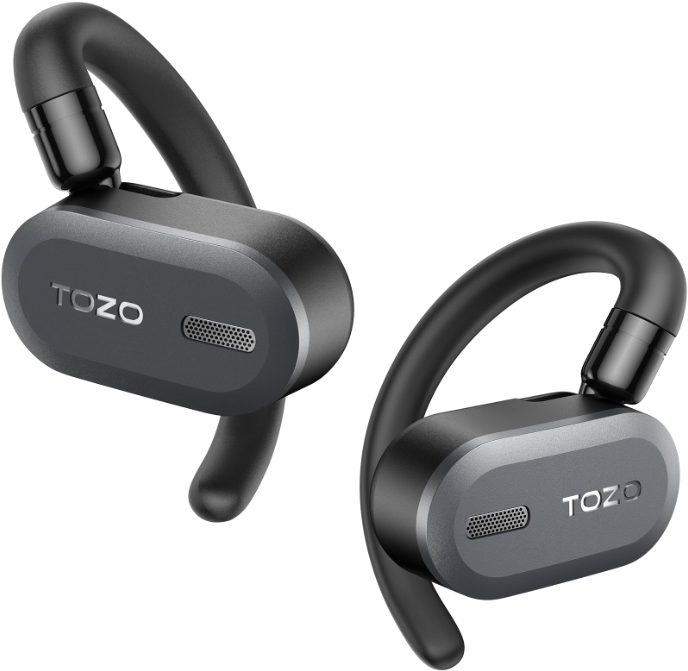
The tozo O2 Open Ear Headphones offer an innovative listening experience that combines safety, comfort, and high-quality sound. Designed with an open-ear style, these headphones allow users to stay aware of their surroundings while enjoying music, podcasts, or calls. This unique design makes them ideal for outdoor activities such as running, cycling, and commuting, where situational awareness is crucial.
Equipped with advanced 14.2mm dynamic drivers and the latest Bluetooth 5.3 technology, the tozo O2 delivers crisp audio with a stable wireless connection up to 10 meters. Users benefit from up to 42 hours of combined playback time using the fast-charging USB-C case, making them perfect for extended use throughout the day. Additional features include DSP noise reduction for clear voice calls, IPX5 sweat resistance, and ergonomic dual-axis fitting for all-day comfort.
Targeted at active individuals, fitness enthusiasts, and anyone seeking a balance between sound quality and safety, the tozo O2 Open Ear Headphones are versatile for daily routines and sports. The headphones retail in the approximate price range of $70 to $90, readily available through online platforms and authorized retailers. Their combination of open-ear technology and advanced features ensures a compelling option for users prioritizing comfort and awareness without sacrificing audio performance.
Specifications
- Speaker Size: CD 14.2mm
- Charging Time: s2H
- FR Range: 20Hz-20KHz
- Impedance: 160±15%
- Transmission Range: :!,1QM
- Earphone Battery Capacity: 70mAh
- Charging Case Battery Capacity: 650mAh
- Charging Parameters: 5V = 1A
- Product Size And Weight: 93 5828mm; 78g
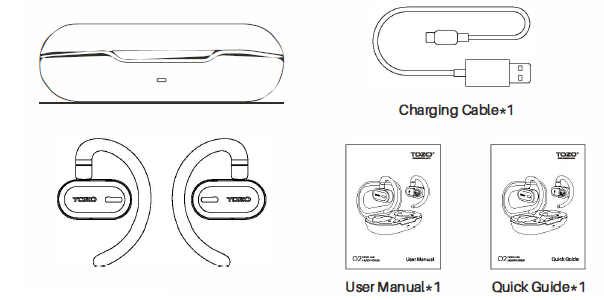
Product list
Power on/off
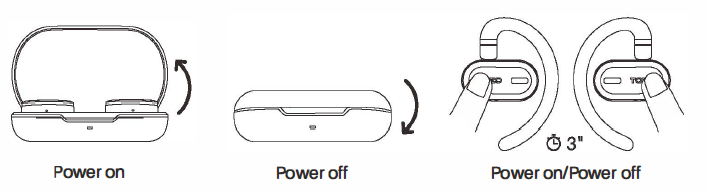
Power on:
- Auto power on: Open the charging case, and the earbuds will power on automatically.
- Hold Lor button for 3 seconds will turn on the earbuds when they are out of the charging case.
Power off:
- Auto power off: Put the earbuds back into the charging box, close the cover, and the earbuds will power off The volume foseconds will turn off when not playing media.
Wearing
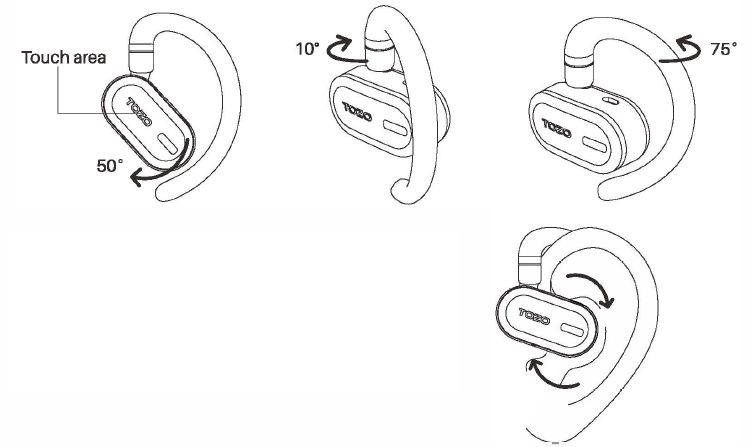
- The earphone ear hook can rotate forward and backward, as well as left and right. The touch area is shown in the picture.
- Adjust the curved part of the rotating earphone to adjust forward, backward, left, and right. Then wear it on the left and right ears respectively, and adjust the earphone's sound outlet to align with the ear canal as shown in the picture.
Bluetooth connection
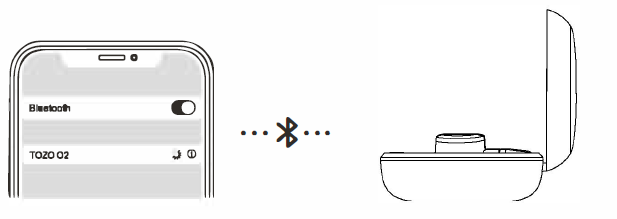
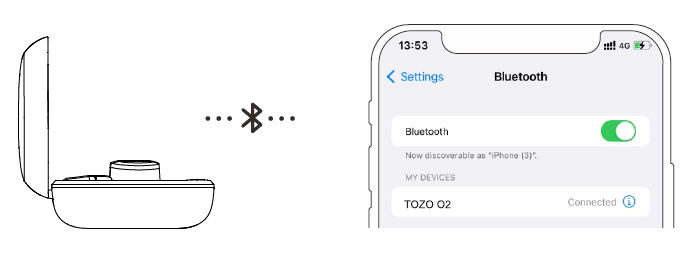
- Connection inside the charging case: Open the charging case, and the blue and white signal lights will flash alternately. Search for the signal [TOZO 02] and connect to it.
- Connection outside the charging case: Touch the left and right earphones for 3 seconds to turn them on. And then search for the signal [TOZO 02] to connect to it. You can also choose to connect only one earphone for use.
- After a successful connection, the signal light on the earphones will go off.
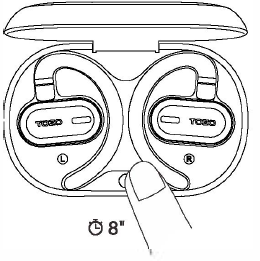
Reset
When the earphones are placed in the charging case, press and hold the charging case button for 8 seconds to clear the Bluetooth pairing records and restore the factory settings.
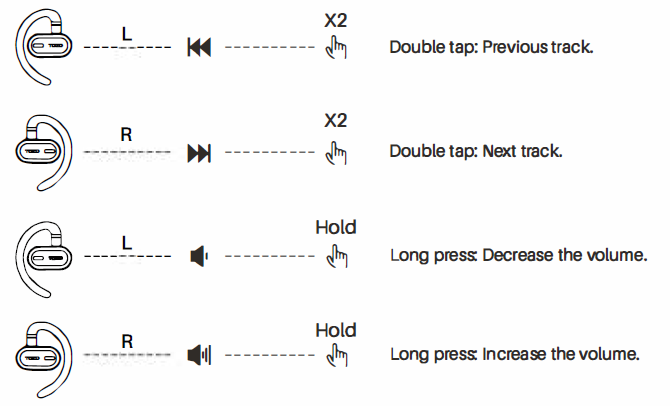
Music control

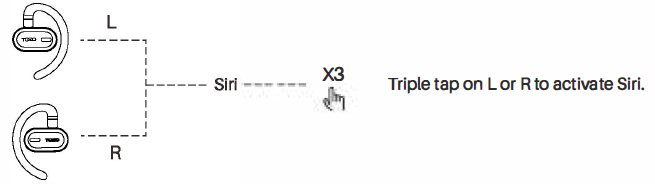
Voice assistant
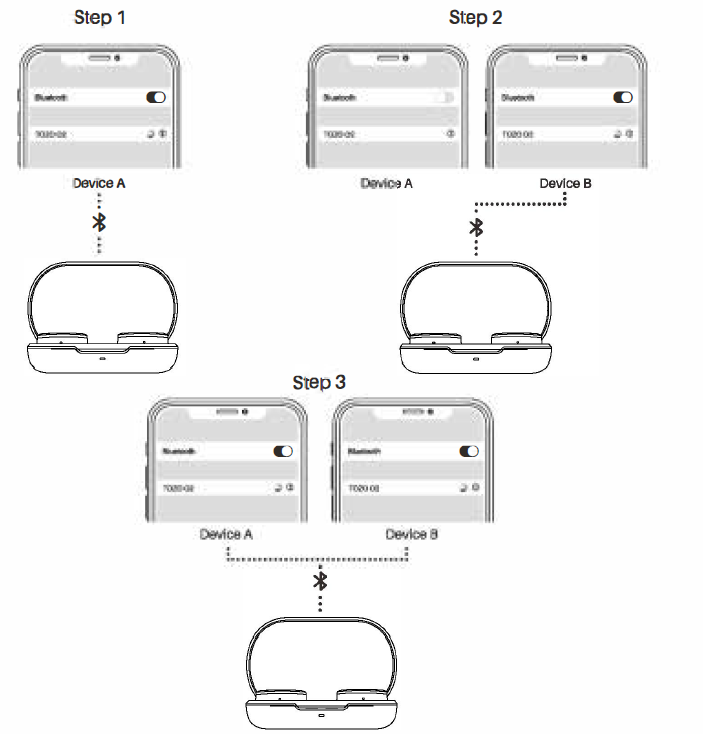
Bluetooth multipoint feature
- With the earphones turned Or\ put them in pairing mode and connect them to the first phone via Bluetooth.
- Turn off Bluetooth on the first phone and put the earphones back in pairing mode. Connect the earphones to the second phone via Bluetooth.
- Turn on Bluetooth on the first phone and search for the earphones in the 11th of paired devicesdevices..s. Click:k on the earphones to connect to both phones simultaneously.
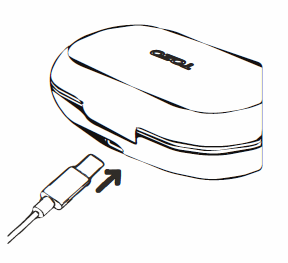
Charging methods
- Earphone charging: Simply place the earphones into the charging case to charge them.
- Charging case charging: It is recommended to use a 5V output charger to charge the charging case. Insert the Type-C charging cable into the charging "°" of the charging case to charge.
TOZOAPP
Download the TOZO App for Ul customization, EQ settings,,,, and more.
- Ul customization: Most of the controls can be customized in the App.
- EQ settings: There are lots of EQ settings you can choose in the app to optimize your experience while enjoying different music genres.
- Earbuds firmware update: The earbuds' firmware can be updated in the App. You will be informed once the new version of firmware is is detected when you connect the earbuds with the App.
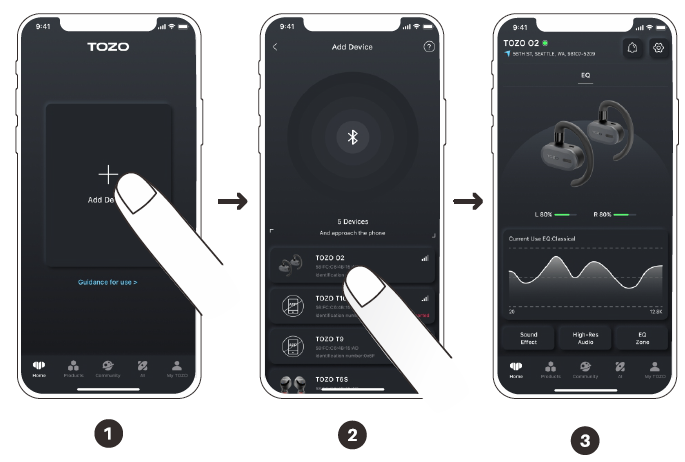
TOZO APP pairing
Step 1:
Download the TOZO App on your phone.
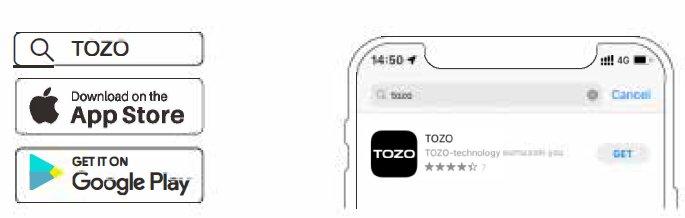
Step 2:
Bluetooth pairing with your earphones.
Step 3:
TOZO App pairing with your earphones.
Troubleshooting and reminders
- Cannot turn on: Trylng to charge the earphones and charging case, check whether the charging case's red light is on before attempting to turn them on.
- Water damage: Do not charge the product and immediately turn it off, wipe off any surface water to let 11 dry, and then try to use it again.
- Playback or connection Issues: Put the earphones in the charging case, press and hold the charging case button for 10seconds to restore factory settings, and then try to use them again.
- Unable to connect to phone: Make sure Bluetooth is turned on, delete the pairing, turn on the earphones, and search for the earphones' Bluetooth signal to connect. If it still does not work, try restoring factory settings.
- No sound: Ensure that Bluetooth is connected and try increasing the earphone volume.
- Unable to charge: Try using a different 5V power adapter to charge or replace the charging cable to see If It solves the problem.
- If the problem persists, please contact TOZO customer service.
Pros & Cons of tozo O2 Open Ear Headphones
- Pros:
- Open-Ear Design: Allows ambient sound awareness,, which is essential for outdoor safety during activities like cycling or running.
- Long Battery Life: Up to 42 hours with charging case support, suitable for long workouts or daily commutes without frequent recharging.
- Stable Bluetooth 5.3 Connection: Ensures fast pairing and reliable wireless performance within a 10-meter range.
- Comfortable Fit: Dual-axis and multi-angle adjustment reduce ear pressure, making them comfortable for extended wear.
- IPX5 Sweatproof: Suitable for intense workouts and outdoor conditions without worry of water damage.
- Clear Calls: DSP noise cancellation improves call clarity even in noisy environments.
- Cons:
- Limited Bass Response: Due to the open-ear design, bass is less pronounced compared to in-ear or over-ear headphones, which may disappoint bass lovers.
- Touch Control Limitations: Some users find volume control customization limited and voice assistant activation inconsistent.
- Sound Leakage: Open design means audio can leak, potentially disturbing nearby people in quiet environments.
- Price Point: Slightly higher than some closed-back alternatives, but justified by unique form factor and features.
Customer Reviews and Feedback on tozo O2 Open Ear Headphones
The tozo O2 Open Ear Headphones have garnered positive feedback with an average rating of 4.5 out of 5 stars from nearly 200 users. Many customers praise their lightweight design and secure fit, making them ideal for sports and daily wear. Users highlight the benefit of situational awareness provided by the open-ear style, which adds a safety layer when outdoors.
Common praises include long battery life and the clarity of voice calls, aided by DSP noise cancellation. Several reviews mention the convenience of the USB-C charging case and the stable Bluetooth 5.3 connection.
On the downside, some users report that the bass is not as rich as closed earbud models, and there are occasional issues with voice assistant functionality. A few customers note minor sound leakage, which is inherent to open-ear headphones.
Overall, purchase recommendations are strong among fitness enthusiasts and users prioritizing safety and comfort over deep bass, making the Tozo O2 a compelling choice for active lifestyles.
Faqs
How do I set up the tozo O2 Open Ear Headphones for the first time?
What should I do if my tozo O2 Open Ear Headphones won’t connect or pair correctly?
Can I use the tozo O2 Open Ear Headphones with multiple devices at the same time?
How do the open-ear design features of the tozo O2 Headphones affect sound and safety?
What are the main touch controls on the tozo O2 Open Ear Headphones and how do I use them?
How long does the battery last on the tozo O2 Open Ear Headphones and how do I charge them?
What maintenance tips should I follow to keep my tozo O2 Open Ear Headphones in good condition?
Are tozo O2 Open Ear Headphones compatible with both iOS and Android devices?
More tozo manuals
- How to Pair: Tozo T10 True Wireless Stereo Earbuds Instruction Guide
- How to Pair: Tozo T6 True Wireless Stereo Earbuds Instruction Manual
- How to Pair: Tozo T9 True Wireless Stereo Earbuds User Manual
- How To Pair: Tozo PE-1 Portable Wireless Sports Speaker Instruction Guide
- Pairing: Tozo T12 Stereo Earbuds Instruction Guide
- Setup: Tozo W6 Wireless Charger User Guide
Leave a Comment