
How to Pair: Tozo T6 True Wireless Stereo Earbuds Instruction Manual
Content
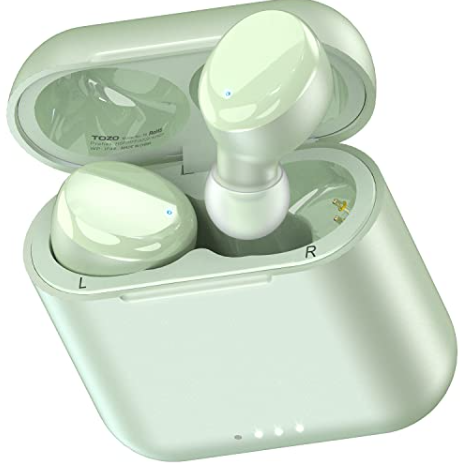
TOZO T6 True Wireless Stereo Earbud
Introduction
The TOZO T6 True Wireless Stereo Earbuds are a standout choice for anyone seeking high-quality, affordable wireless earbuds packed with modern features. Designed for everyday convenience, these in-ear headphones deliver impressive sound, long battery life, and robust water resistance—all at a budget-friendly price point. With Bluetooth 5.3 for fast, stable connections and support for AAC/SBC audio codecs, the TOZO T6 earbuds offer low-latency streaming and crisp, dynamic audio that rivals more expensive competitors
Key benefits include an IPX8 waterproof rating, making these earbuds ideal for workouts, running, and outdoor activities. The ergonomic, lightweight design ensures a secure, comfortable fit even during vigorous exercise, while the 12-hour playtime per charge (and up to 50 hours with the wireless charging case) means you can enjoy music all day without interruption. The included charging case supports both USB-C and Qi wireless charging, adding to the convenience.
The TOZO T6 True Wireless Stereo Earbuds are perfect for commuters, fitness enthusiasts, and anyone who values reliable audio without breaking the bank. They’re available in multiple colors, including Classic and Ergonomic with App Edition variants, and are widely available online, with prices typically ranging from $40 to $60 depending on promotions and retailer. These earbuds are a smart choice for users who want premium features—like touch controls, voice assistant support, and customizable EQ via the TOZO app—without the premium price tag.
Whether you’re looking for your first pair of true wireless earbuds or a dependable backup, the TOZO T6 True Wireless Stereo Earbuds deliver outstanding value, comfort, and performance for everyday listening and active lifestyles.
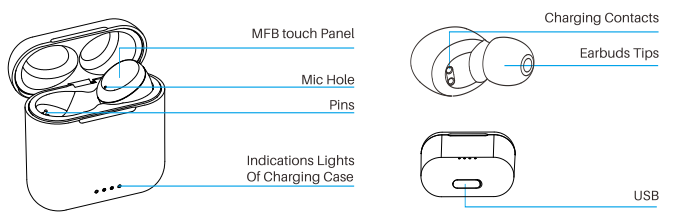
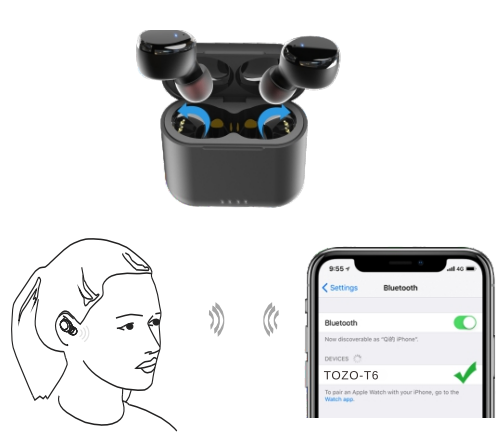
Product diagrammatic sketch
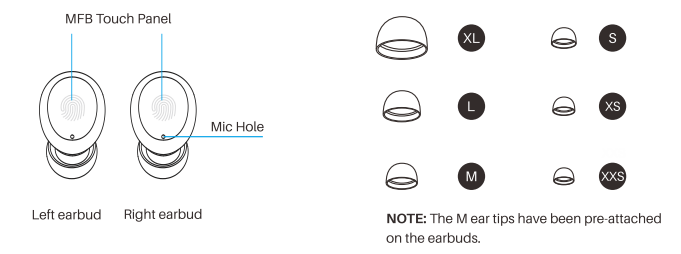
Wearing a diagrammatic sketch
Wearing steps
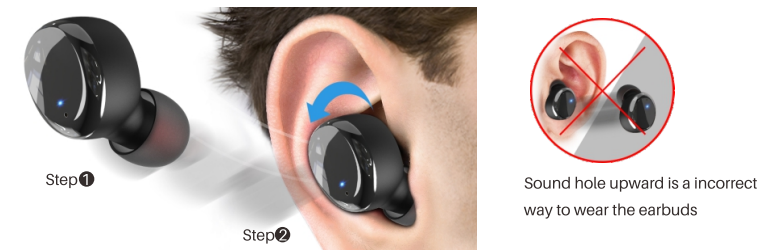
- Step 1: Ensure the earbud tip is facing downwards, then place the earbuds into your ear.
- Step 2: Rotate the earbuds back to the auricle side to fit snugly.
Operation of earbuds
How to play
- First-time use, remove the protective film from the earbuds, place them in the charging case for 2-3S, then take them out, they will turn on automatically and will connect to each other within 10 seconds.
- The two earbuds flash alternately in red and blue (pairing mode
- Search for the pairing name (TOZO-T6) and select it on your mobile.
Another method of turning on & turning off
Turn on:
- Tap and hold the touch panel on both earbuds for over 3 seconds.
Turn off:
- Touching the touch panel for 5 seconds will turn off when the earbuds are in playless status.
- The earbuds will turn off automatically after it is disconnected for more than 5 minutes.
Reset
If you accidentally get only one earbud working, or fail to pair each other, please reset them:
- Delete all (TOZO-T6) Bluetooth records on the phone, then turn off the Bluetooth.
- Pick up two earbuds from the charging case, then hold both earbuds''s panels for 5 seconds until the lights turn off to turn off the earbuds.
- Pressing the both earbuds for another 5 seconds till the red and blue lights blink alternately, and then clicking the both earbuds twice quickly.
- The reset will be done when the blue light flashes rapidly, and then the red and blue lights blink alternately.
NOTE: In case there is [Connection Unsuccessful)]in your devices, please delete all historical records of (TOZO-T6) and try the pairing process again.
Specification
- Support Bluetooth profile
- A2DP, AVRCP, HFP, HSP
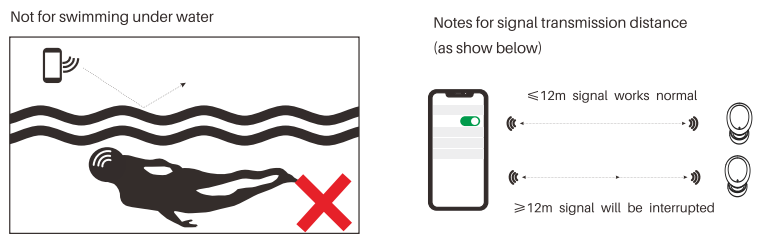
- Transmission Distance
- > 12m|
- Bluetooth working frequency
- 2.402GHz-2.480GHz
- Speaker type
- Impedance 160÷15%
- Charging time of earbuds
- 1.7 hours
- Charging time of the charging case
- 1.8 hours
Waterproof
- Waterproof for daily use (sweating, rain, washing face, showering, having a bath, etc, but not for swimming underwater»)
- "Please note that the phone's Bluetooth signal can not be transmitted underwater.
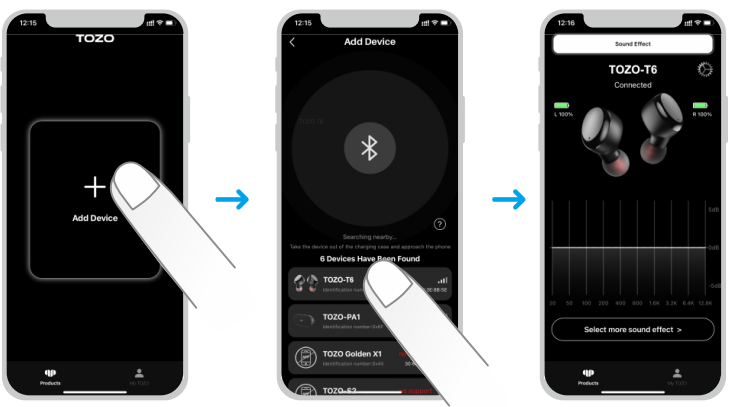
TOZO APP pairing
Step 1:
Download the TOZO App on your phone.
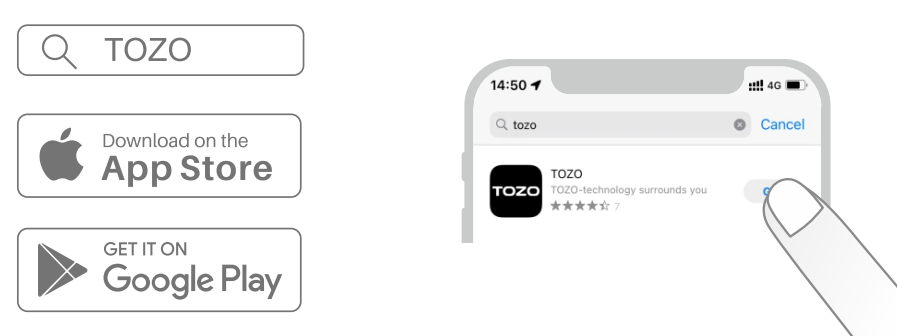
Step 2:
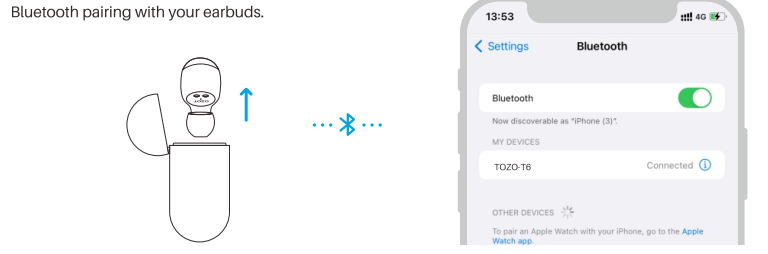
Step 3:
TOZO App pairing with your earbuds.
Troubleshooting Common Issues
Common Problems and Solutions
- Pairing Issues: If your TOZO T6 earbuds won’t connect, ensure Bluetooth is enabled on your device, then reset the earbuds by placing them back in the case, closing the lid, and waiting 10 seconds before trying again.
- Audio Dropouts: Move closer to your paired device, as the effective range is about 10 meters. Avoid interference from other wireless devices.
- Charging Problems: Make sure the charging contacts on both the earbuds and case are clean. Use a different cable or wireless charger if issues persist.
- Touch Controls Not Responding: Clean the touch area gently. If problems continue, reset the earbuds or update the firmware via the TOZO app.
- Low Battery Life: If playtime is shorter than advertised, try reducing the volume or disabling unnecessary features. Charge the case fully before use.
Error Codes and Fixes
No specific error codes are documented for the TOZO T6, but most issues can be resolved by resetting the earbuds or re-pairing them with your device.
Preventive Measures
- Keep the earbuds and case clean and dry.
- Avoid exposing the earbuds to extreme temperatures or direct sunlight for long periods.
- Regularly check for firmware updates via the TOZO app.
Warranty and Support
The TOZO T6 comes with a standard manufacturer’s warranty. For support, visit the official TOZO website or contact customer service through the retailer where you purchased the earbuds. Always keep your receipt for warranty claims.
Contact Information
For further assistance, refer to the user manual included in the box, visit the TOZO support website, or contact your retailer directly.
Pros & Cons
Advantages
- Excellent Value: Delivers premium features like wireless charging, IPX8 waterproofing, and long battery life at an affordable price.
- Comfortable, Secure Fit: Lightweight, ergonomic design stays in place during workouts and daily use.
- Strong Bass Performance: Impressive low-end response that appeals to fans of EDM, hip-hop, and pop
- Easy Controls: Intuitive touch controls for playback, calls, and voice assistants.
- Durability: IPX8 rating makes them resistant to sweat and rain, ideal for sports and outdoor activities.
Limitations
- No Active Noise Cancellation: Lacks ANC, so they don’t block out low-frequency noise like plane engines.
- Basic Sound Customization: Limited to SBC/AAC codecs; no aptX or LDAC support.
- Closed Soundstage: Audio can feel a bit confined, lacking the spaciousness of higher-end models.
- No Multipoint Bluetooth: Can’t connect to two devices simultaneously.
- Touch Controls Can Be Basic: No advanced customization without the app, and app support may be limited on some devices.
Value for Money
The TOZO T6 True Wireless Stereo Earbuds are a smart buy for budget-conscious users who want reliable performance and modern features without overspending. They compare favorably to other budget wireless earbuds, offering better water resistance and battery life than many rivals in the same price range. For users seeking higher audio fidelity or advanced features, consider TOZO’s Golden X1 or models from premium brands, but for everyday use and fitness, the T6 stands out as a top value pick.
Customer Reviews and Testimonials
Users consistently praise the TOZO T6 True Wireless Stereo Earbuds for their affordability, comfort, and battery life. Many highlight the secure fit during workouts and the convenience of wireless charging. The IPX8 waterproof rating is frequently mentioned as a major advantage for runners and gym-goers. Sound quality receives positive feedback, especially the powerful bass, though some note that he soundstage could be wider, and the lack of active noise cancellation is a downside for noisy environments.
Common complaints include occasional connectivity issues and the absence of multipoint Bluetooth. A few users mention that touch controls can be too sensitive or lack customization without the app. Star ratings from major retailers and review sites generally fall between 4 and 4.5 out of 5, reflecting strong satisfaction for the Testimonials often recommend the TOZO T6 as a reliable, everyday pair of wireless earbuds, especially for those who prioritize durability and battery life over premium sound features.
For best results, purchase from authorized sellers to ensure warranty coverage and access to customer support. The TOZO T6 True Wireless Stereo Earbuds are especially recommended for students, commuters, athletes, and anyone seeking an affordable, feature-rich audio solution.
Faqs
How do I set up the tozo T6 True Wireless Stereo Earbuds for the first time?
What should I do if one earbud of my tozo T6 True Wireless Stereo Earbuds is not connecting?
How do I use the touch controls on tozo T6 True Wireless Stereo Earbuds?
Are tozo T6 True Wireless Stereo Earbuds compatible with all Bluetooth devices?
How long does the battery last on the tozo T6 True Wireless Stereo Earbuds and how do I charge them?
What are the water resistance capabilities of the tozo T6 True Wireless Stereo Earbuds?
How can I optimize sound performance on my tozo T6 True Wireless Stereo Earbuds?
How should I clean and maintain my tozo T6 True Wireless Stereo Earbuds for long-term use?
More tozo manuals
- Setup & Pairing: Tozo O2 Open Ear Headphones User Manual
- How To Pair: Tozo PE-1 Portable Wireless Sports Speaker Instruction Guide
- How to Pair: Tozo T10 True Wireless Stereo Earbuds Instruction Guide
- Setup: Tozo W6 Wireless Charger User Guide
- How to Pair: Tozo T9 True Wireless Stereo Earbuds User Manual
- How to Use: Tozo W10 Wireless Charger User Manual
Leave a Comment