
Pairing: Tozo T12 Stereo Earbuds Instruction Guide
Content
Tozo T12 Stereo Earbuds
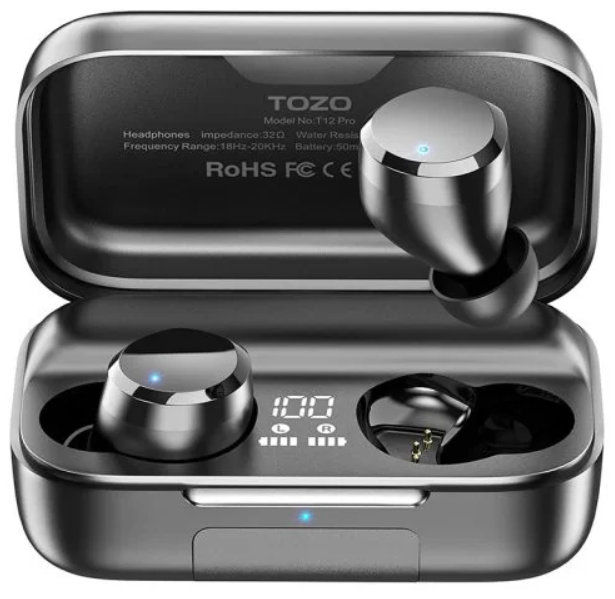
Introduction
The tozo T12 Stereo Earbuds are a standout choice for anyone seeking affordable, high-quality true wireless earbuds. Designed with advanced Bluetooth 5.3 technology, these earbuds offer fast and stable connectivity, making them perfect for daily use, workouts, travel, and hands-free calls. Featuring cutting-edge ORIGX Acoustic and 10mm dynamic drivers, they deliver crystal-clear, hi-fi stereo sound with powerful bass that audiophiles and casual listeners alike will appreciate.
These earbuds boast an ergonomic curved in-ear design with silicone ear hooks, ensuring a secure and comfortable fit even during vigorous activity. Their IPX8 waterproof rating means they are protected against sweat, rain, and accidental splashes, ideal for sports and outdoor enthusiasts. The built-in LED digital display on the charging case lets users easily monitor battery life, while wireless charging and a fast USB-C port provide versatile, cable-free recharging options.
With up to 11 hours of playback on a single charge and a total of 48 to 55 hours using the charging case, the tozo T12 offers exceptional battery endurance. Enhanced with an ENC noise-canceling microphone, it ensures clear, distortion-free calls in noisy environments. Available in multiple colors and priced competitively around $40-$60, these earbuds deliver premium features at a budget-friendly price point, making them a perfect fit for fitness lovers, commuters, and tech-savvy users seeking reliable, stylish wireless audio solutions.
Specification
- Support Bluetooth profile: A2DP, AVRCP , AVDTP, AVCTP, HFP, SPP, HSP, TDS, MAP, PBAP, GAVDP, OPPV, RFCMM
- Transmission Distance: 12m
- Bluetooth working frequency: 2.402GHz~2.480GHz
- Speaker type: <1>10mm 2
- Impedance: 320 2
Charging time of earbuds: 1.5 hours - Charging time of the charging case:
- Type-C charging: 1.5 hours
- Wireless charging: 2 hours
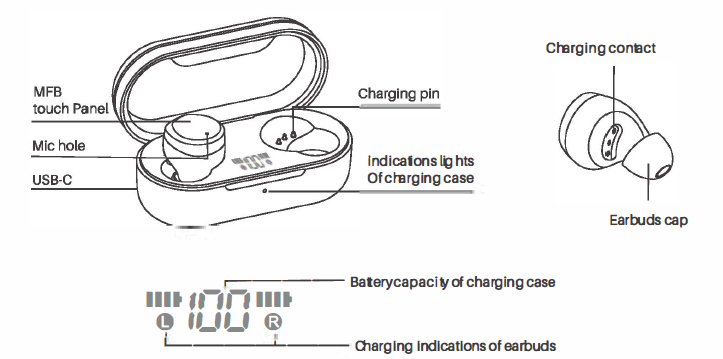
Product diagrammatic sketch
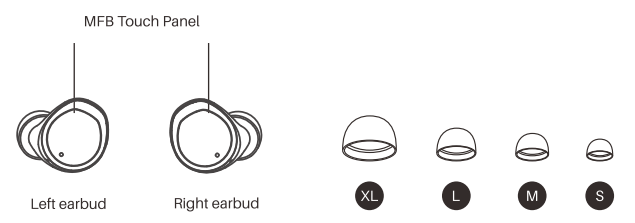
Wearing a diagrammatic sketch
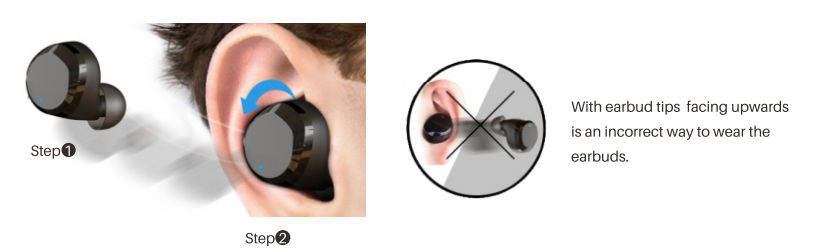
Wearing Steps
Step 1:
Ensure the earbud tip facing downwards, then place the earbuds into your ear.
Step 2:
Rotate the earbuds back to the auricle side to fit snugly.
Operation of earbuds
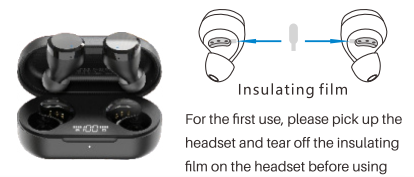
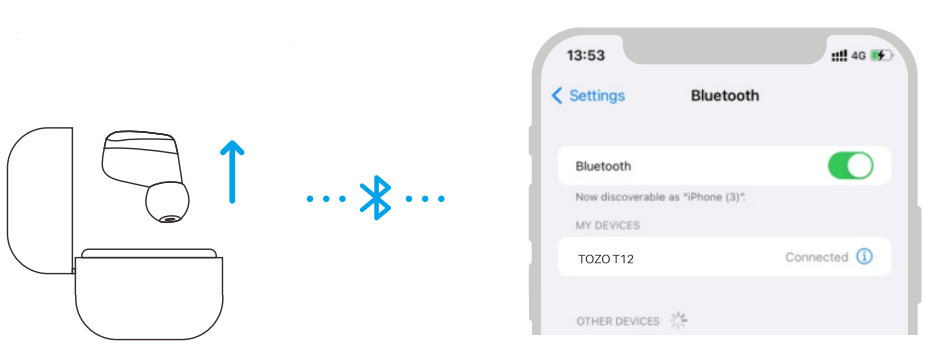
How to pair
- Take out the two e-liquid pods from the charging case. They will turn on automatically and turn off to each other within 10 seconds.
- The two earbuds flash alternately in red and blue (pairing mode).
- Search for pairing name [TOZOT12l and select it in your mobile.
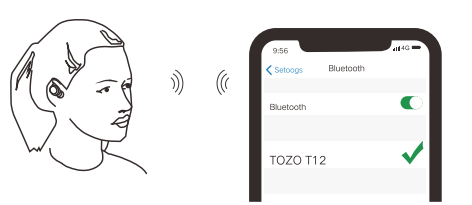
Another method of turning on & turning off
- Turn on:
Press and hold the touch button for about 3 seconds to turn on (the headset is turned off without the charging case) - Turn off:
When the headset is not playing music, press and hold the touch button for about 5 seconds to turn it off.
Clear pairing list
In the pairing mode of the left and right earbuds, double-click both MFB buttons quickly.
Reset
If only one earbud connects to the phone/the two earbuds can not pair together. Please try the following new reset steps:
- Delete all [TOZO T12] Bluetooth records on your phone, then turn off the Bluetooth.
- Pick up two earbuds from the charging case, then press and hold both earbuds until the red lights turn off to turn off the earbuds, and then release your fingers(that means press and hold for about 5s).
- Press and hold the both earbuds again, release fingers after the blue light fast blink 3 seconds (that means press and hold for about 10s).
Reset is complete when one of the earbuds flashes red and blue alternately. Turn on the Bluetooth to connect again.
Charging
Charging the Earbuds
- Put the earbuds into the charging case, and they will power off & be charged automatically. When the red LED lights up, it means that the earbuds are being charged from the charging case.
- When the Bluetooth headset is fully charged, the charging case will automatically enter the sleep low-power consumption state.
Charging the Charging Case
Please use the 5V/1A adapter to charge the charging case, which can be charged with a computer USB or other USB interface charger.
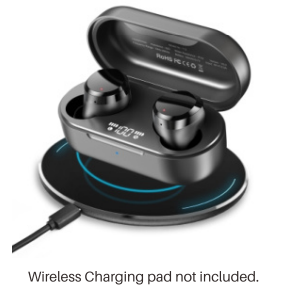
Box wireless charging
Specially designed for modern life, without charging cables, enjoy the convenience of unplugged charging and instant charging.
Charging warning
- Don't tap the earbuds touch button while in charge, otherwise it will be fail to pair.
- Then you should follow the reset to factory settings.
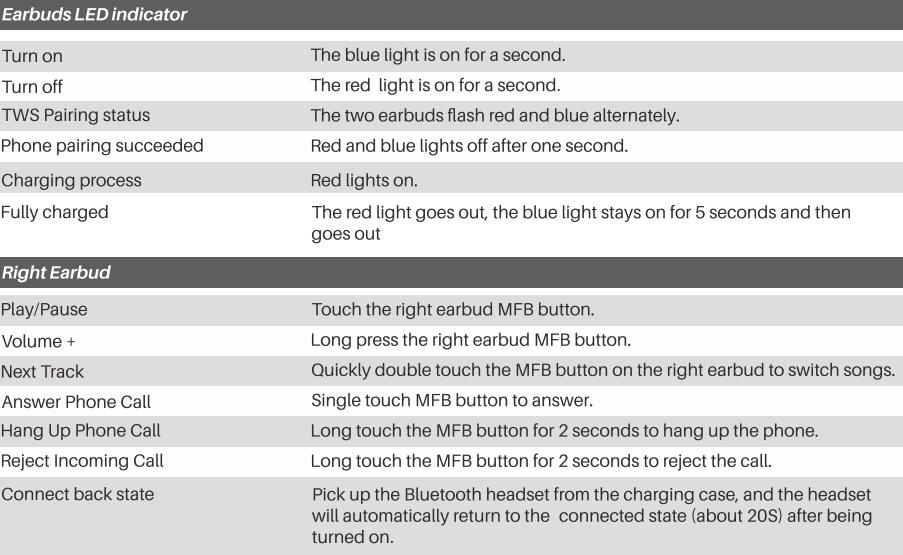
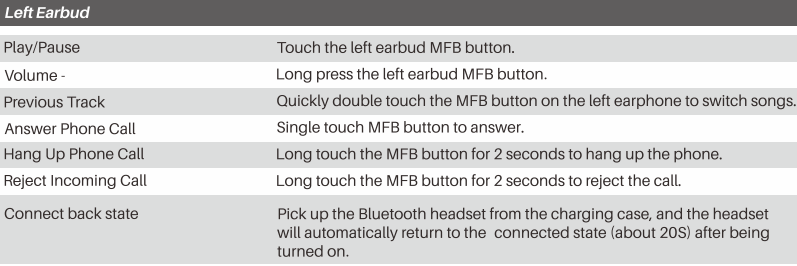
Button operation
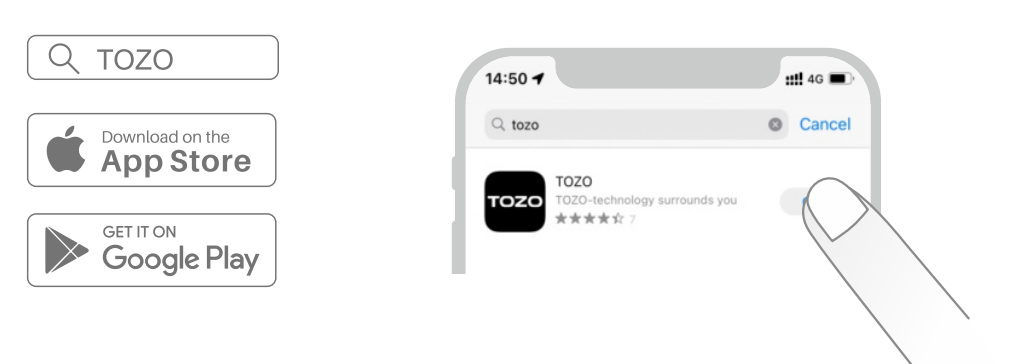
TOZO App
Download the TOZO App for UI customization, EO settings, and more.
- UI customization: Mosloftheoon1rotscan be customized in the App.
- EO settings; there are lots of EO settings you can choose in 1he App to optimize your experience while enjoying different music genres.
- Earbuds firmware update: The earbuds firmware can be updated in the App. You will be informed once the new version of firmware is detected when you connect the earbud to the App.
Step1:
Download the TOZO App on your phone.
Step2:
Bluetooth pairing with your earbuds.
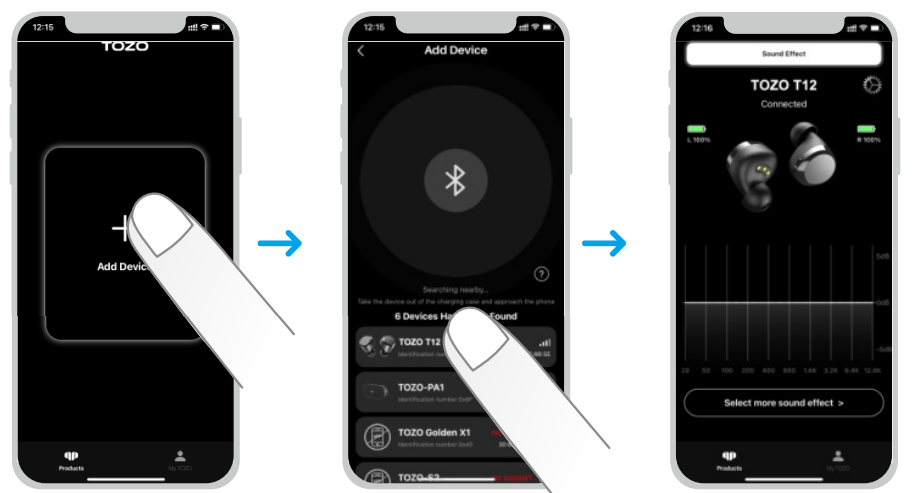
Step3:
TOZO App pairing with your earbuds.
Troubleshooting Your tozo T12 Stereo Earbuds: Quick Fixes and Support
Common issues with the tozo T12 Stereo Earbuds include pairing difficulties, audio dropouts, and microphone problems. To resolve pairing issues, ensure Bluetooth is enabled on your device, then take both earbuds out of the charging case to trigger automatic pairing. If the connection fails, reset the earbuds by holding the touch sensors for 10 seconds until the LED flashes red and white.
Audio dropouts may result from interference or low battery levels—keep the earbuds and device within a 10-meter range and fully charged. For muffled or unclear calls, clean the microphone openings gently and ensure the ENC noise cancellation is activated.
No specific error codes are displayed on the LED screen, but the digital display helps monitor battery levels to prevent unexpected shutdowns. To prevent issues, regularly charge the earbuds and case using the USB-C cable or wireless pad, avoid exposing them to extreme temperatures, and clean them with a dry cloth after use.
The tozo T12 comes with a standard 12-month warranty covering manufacturing defects. For technical support, contact TOZO customer service through their official website or authorized retailers. Many users find quick solutions through the included user manual and online FAQs.
Pros & Cons of tozo T12 Stereo Earbuds: What You Need to Know
- Pros:
- Excellent sound quality with strong bass thanks to 10mm dynamic drivers and ORIGX Acoustic technology
- Long battery life—up to 11 hours per charge and 48-55 hours with charging case
- IPX8 waterproof rating suitable for workouts and outdoor activities
- Bluetooth 5.3 ensures stable, fast pairing and broad device compatibility
- Convenient wireless charging combined with a smart LED battery display on the case
- Ergonomic and secure fit with silicone ear hooks, ideal for active users
- Customizable EQ settings via the TOZO app with 32 EQ presets
- Cons:
- The microphone quality is decent,, but not ideal for professional conference calls due to muffled sound under noisy conditions.ns
- Sound signature has a boosted bass and treble “V” shape, which may not satisfy audiophile purists seeking neutral so. und
- Touch controls can be overly sensitive or inconsistent for some users
- Some users report occasional connectivity dropouts in environments crowded with Bluetooth devices
Compared to alternatives like Apple AirPods or Sony WF series, the tozo T12 Stereo Earbuds offer excellent value for money by combining premium features at a budget price. While they may lack some advanced call features or ultra-precise tuning, their performance suits everyday listeners and active lifestyles very well.
Customer Reviews on tozo T12 Stereo Earbuds: Real User Experiences
With over 1,000 verified reviews averaging around 4.5 stars, users praise the tozo T12 Stereo Earbuds for their clear sound quality, comfortable fit, and impressive battery life. Many highlight the IPX8 waterproof rating as a major plus for gym use and outdoor activities. One user commented, “The bass is punchy and the earbuds stay in place even during intense workouts.” Another lauded the wireless charging feature and the convenient LED battery indicator.
Common complaints include microphone performance, which some found muffled or weak during calls, and occasional Bluetooth connectivity hiccups. A few users noted sensitivity with touch controls but appreciated the overall ease of use. Most recommend the earbuds for casual listening, fitness, and travel, emphasizing their outstanding value at the given price point.
Overall, customers agree that the tozo T12 Stereo Earbuds provide a reliable and enjoyable wireless audio experience suited for a wide range of daily scenarios.
Faqs
How do I set up tozo T12 Stereo Earbuds for the first time?
What should I do if tozo T12 Stereo Earbuds is not working properly after charging?
Can I use tozo T12 Stereo Earbuds with my iPhone?
How often should I maintain tozo T12 Stereo Earbuds?
What are the key features that make tozo T12 Stereo Earbuds different from other earbuds?
How do I customize the EQ settings on tozo T12 Stereo Earbuds?
Can I use tozo T12 Stereo Earbuds for workouts and sports activities?
How do I troubleshoot poor sound quality on tozo T12 Stereo Earbuds?
More tozo manuals
- How to Pair: Tozo T12 Pro Earbuds User Manual
- How to Pair: Tozo T9 True Wireless Stereo Earbuds User Manual
- How to Pair: Tozo Open Ear Earbuds User Manual
- How to Pair: Tozo T10 True Wireless Stereo Earbuds Instruction Guide
- How to Pair: Tozo T6 Stereo Earbuds Instruction Guide
- Setup & Pairing: Tozo O2 Open Ear Headphones User Manual
Leave a Comment