
How to Pair: Tozo Open Ear Earbuds User Manual
Content
Tozo Open Ear Earbuds
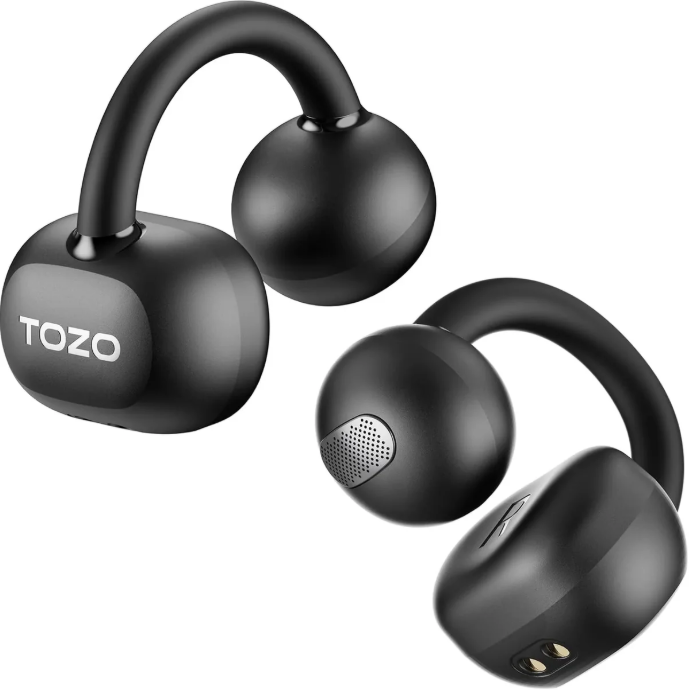
Introduction
The tozo Open Ear Earbuds deliver a revolutionary listening experience by combining open-ear design with advanced wireless technology. These earbuds provide users with the freedom to stay aware of their surroundings while enjoying crisp, clear audio—ideal for commuters, outdoor enthusiasts, and professionals who demand comfort without isolation. Featuring a lightweight, ergonomic build and dual-axis adjustment, they fit securely and comfortably for extended wear.
Key benefits include 12 hours of continuous music playback on a single charge, extending to 42 hours with the charging case, which ensures all-day use without frequent recharging. The earbuds support Bluetooth 5.3 connectivity for swift pairing and stable connections, along with DSP call noise cancellation for crystal-clear conversations. With an IPX6 waterproof rating, they are resistant to sweat and splashes, making them suitable for workouts and outdoor activities.
Priced around $70 to $100, the tozo Open Ear Earbuds offer excellent value in the mid-range wireless earbuds market. They are widely available online through official stores and major retail platforms. Whether you need earbuds for casual listening, hands-free calls, or active lifestyles, these earbuds are tailored for users who want situational awareness without sacrificing sound quality.
Specifications of the Tozo Open Ear Earbuds
- Driver Size: 14.2 mm dynamic drivers
- Frequency Response: 20 Hz – 20,000 Hz for balanced audio
- Bluetooth Version: 5.3 with up to 10 meters effective range
- Battery Capacity: 70 mAh (earbuds), 600 mAh (charging case)
- Playtime: 12 hours per single charge, total 42 hours with charging case
- Charging: USB Type-C port, 1.5 hours charging time for earbuds and case
- Waterproof Rating: IPX6 – sweat and splash resistant
- Noise Cancellation: DSP call noise reduction (no active ANC)
- Controls: Touch-sensitive for playback, volume, calls, and voice assistant
- Additional Features: Multipoint Bluetooth connectivity, TOZO app support for EQ customization
Compared to similar open-ear models like the TOZO OpenOrb (which features a 10mm driver and 24-hour battery), the Open Buds excel in longer battery life and advanced Bluetooth with multipoint support, making them more versatile for multitasking users.
Product Overview and Features
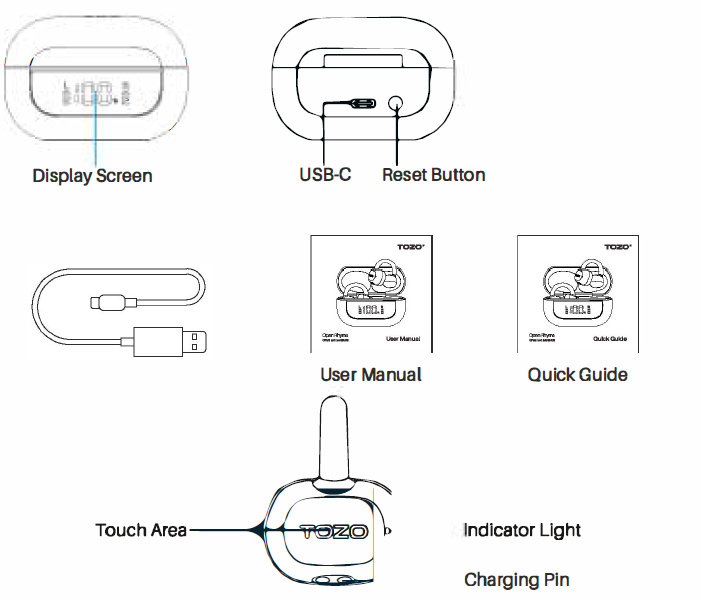
The packaging contains TOZO Open EarRng earbuds preinstalled with M-size earbud tips, a charging case, a USB-C cable, extra eartlps, and instructions.
Wearing Steps
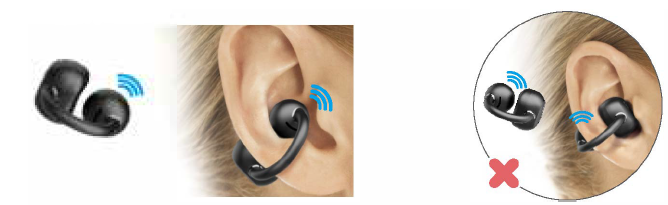
Ensure the speaker hole is facing into the ear.
The speaker hole facing outward is not the correct way to wear the earbuds.
Pairing and Connectivity
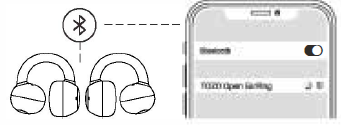
- Take out the two earbuds from the charging case; they will turn on automatically and connect within 10 seconds.
- The white lights on both earbuds flash in a cycle. (500mson, 500ms off)
- Search for the pairing name [TOZO Open EarRing and select 11 on your phone.
Power On/Off
Earbuds Auto Power On
Take out the earbuds from the charging case, and the earbuds will automatically power on.
Earbuds Auto Power Off
Placing the earbuds back in the charging case will automatically power off.
Another Method of Earbuds Power On/Off
- Tap and hold the 'L' or 'R' for 3 seconds; It will turn on when the earbuds power off.
- Tap and hold the 'L' or 'R' for 5 seconds; It will turn off when not playing audio.
- The earbuds will automatically turn off if they remain disconnected for more than 5 minutes.
Operations and Controls
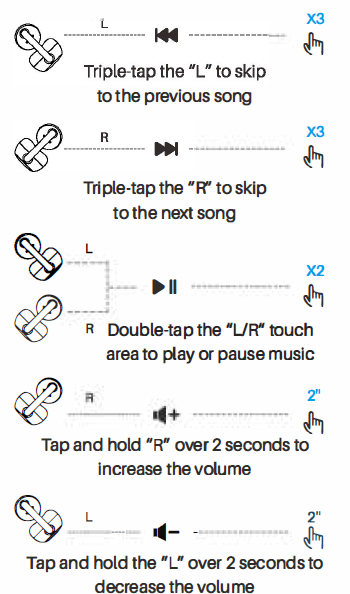
Music Operation
(Operation in wearing of double earbuds)
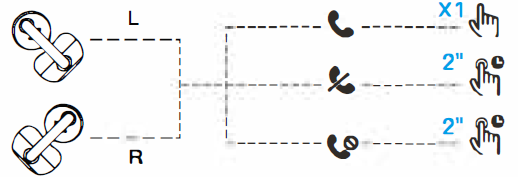
Calling controls
- Tap the "UR" touch area to answer the call
- Tap and hold the "UR" for 2 seconds to hang up the call
- Tap and hold the "UR" for 2 seconds to reject the call
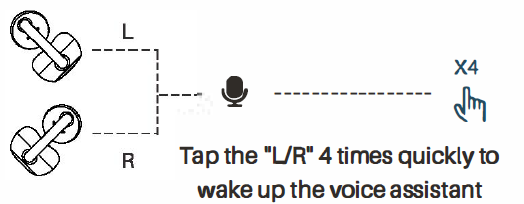
Voice Assistant
NOTE: If you accidentally get only one earbud paired with a phone, please make sure both earbuds have been turned on. (Tap and hold the unpaired earbud for 3 seconds to turn o.) If necessary, please try the "Reset" options to restore to factory settings.
Reset
If only one earbud is working, please follow these steps:
- Delete all [TOZO Open EarRing] Bluetooth records on your phone and turn off Bluetooth.
- Put the earbuds into the charging case, close the lid.
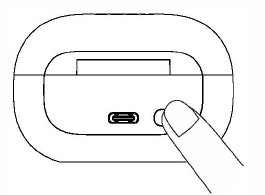
- Press and hold the RESET button on the charging box for 10 seconds to complete the reset.
Charging and Battery
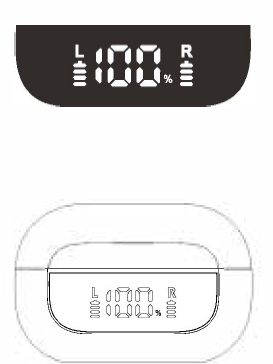
Charging Case Display On/Off
The display is turned off by default. It will turn on for 5seconds and then automatically turn off after opening the case, placing the earbuds back in the case, or pressing the reset button once. The display remains constantly on when charging.
Charging case Indicators
- When you place the earbuds in the charging case, the screen will show the battery levels of both the charging case and the earbuds. The screen will turn off after 5 seconds.
- While charging, the battery percentage of the charging case will flash on the screen. At the same time, it will show the AR buds' battery levels. The screen will turn off after 5 seconds.
- If you single-click the Reset button on the charging case, it will display the battery levels of both the charging case and the earbuds. The screen will turn off after 5 seconds.
TOZOApp
Download the TOZO app for UI customization. EO settings, and more.
- UI customization: Most of the controls can be customized in the app.
- EQ settings: There are lots of EQ settings you can choose in the app to optimize your experience while enjoying different music genres.
- Earbuds firmware update: The earbuds' firmware can be updated in the app. Once you connect the earbuds to the app, you will be informed if a new version of firmware is detected.
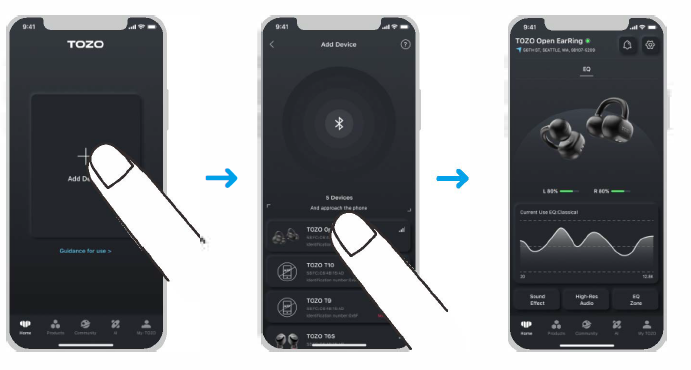
TOZO App Pairing
Step 1:
Download the TOZO app on your phone.
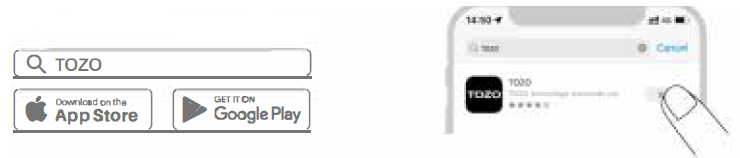
Step 2:
Pair your earbuds with Bluetooth.
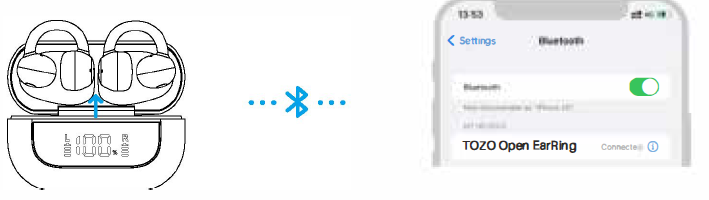
Step 3:
Pair your earbuds with the TOZO app.
Troubleshooting Guide for Tozo Open Ear Earbuds
- Issue: Earbuds not pairing with the device
Solution: Ensure Bluetooth is enabled and within 10m range. Reset earbuds by placing them back in the charging case and removing them again. Clear previous Bluetooth connections on your device and retry pairing.
Tip: Use the TOZO app for easier pairing and battery monitoring. - Issue: Low or no sound
Solution: Check volume settings on both earbuds and the connected device. Confirm earbuds are fully charged.
Tip: Clean the earbuds’ speaker mesh gently to remove debris. - Issue: Calls have background noise or poor clarity
Solution: Activate DSP call noise cancellation via the app or earbuds’ control. Use in quieter environments if possible. - Error Codes: No specific error codes, but the blinking LED indicates pairing mode or low battery.
- Preventive Measures: Avoid exposure to heavy rain despite the IPX6 rating; do not submerge earbuds. Store in a case when not in use to preserve battery life.
The tozo Open Ear Earbuds come with an 18-month warranty covering manufacturing defects. For support, contact TOZO’s customer service via their official website or authorized retailers[1][3][6].
Pros & Cons of tozo Open Ear Earbuds
Pros
- Excellent Battery Life: 12 hours per charge and 42 hours total with the case ensures long usage without frequent recharging.
- Comfortable Open-Ear Design: Allows situational awareness and pressure-free wear, ideal for active users.
- Bluetooth 5.3 & Multipoint: Stable connections with multiple devices simultaneously.
- IPX6 Waterproof Rating: Suitable for workouts and outdoor use, resisting sweat and splashes.
- DSP Call Noise Cancellation: Improves call clarity in noisy environments.
Cons
- No Active Noise Cancelling (ANC): Ambient noise is not fully blocked, which may be a downside in very noisy settings.
- No Fast or Wireless Charging: Charging takes around 1.5 hours and requires a USB-C cable.
- Open-Ear Sound Leakage: Sound may leak, making it less ideal for quiet public spaces.
- Price vs. Alternatives: Slightly above budget models but justifiable for features and comfort.
Compared to other open-ear earbuds, the tozo Open Earbuds offer a balanced package of comfort, battery life, and call quality, making them a strong choice for users prioritizing awareness and long playtime.
Customer Reviews of tozo Open Ear Earbuds
Users widely praise the tozo Open Ear Earbuds for their exceptional battery life and comfortable fit, especially for those who need to stay alert during use. Many highlight the clear call quality enhanced by DSP noise cancellation as a major plus. The lightweight, adjustable design receives compliments for all-day wear without discomfort.
Common complaints include the lack of active noise cancellation and occasional Bluetooth connection drops. Some users note that sound leakage can be distracting in quiet environments. Overall, the earbuds maintain an average rating of about 4 out of 5 stars across multiple retail sites.
Most reviewers recommend these earbuds for outdoor use, exercise, and multitasking scenarios, but suggest alternatives if full noise isolation is a priority. The affordability and feature set make them a popular choice among mid-range wireless earbuds.
Faqs
How do I set up my tozo Open Ear Earbuds for the first time?
What steps can I take if my tozo Open Ear Earbuds fail to pair or only one earbud works?
Can I use tozo Open Ear Earbuds with any Bluetooth-enabled device?
How do I properly wear the tozo Open Ear Earbuds for optimal comfort and sound quality?
What are the main touch controls available on the tozo Open Ear Earbuds and how do I use them?
How can I maintain and clean my tozo Open Ear Earbuds to ensure longevity?
What should I do if the sound quality of my tozo Open Ear Earbuds is poor or distorted?
How long does the battery last on tozo Open Ear Earbuds and how do I charge them?
More tozo manuals
- How to Pair: Tozo T6 Stereo Earbuds Instruction Guide
- How to Pair: Tozo T12 Pro Earbuds User Manual
- How to Pair: Tozo OPEN-EAR AIR CONDUCTION SPORT HEADPHONES User Manual
- Pairing: Tozo T12 Stereo Earbuds Instruction Guide
- Pairing: Tozo HA1 Wireless Headphones User Manual
- How to Pair: Tozo T9 True Wireless Stereo Earbuds User Manual
Leave a Comment