
Pairing: Tozo HA1 Wireless Headphones User Manual
Content
tozo HA1 Wireless Headphones
Introduction
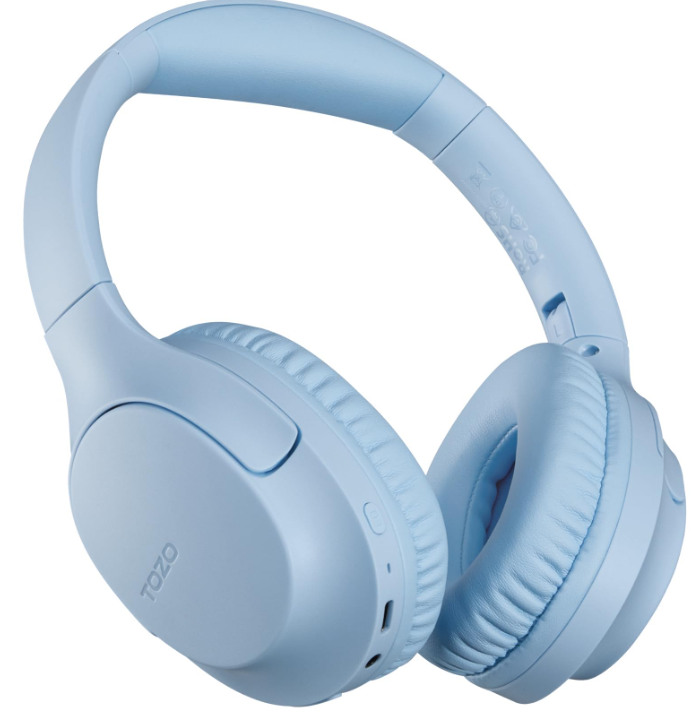
The tozo HA1 Wireless Headphones deliver an exceptional audio experience, combining advanced technology with a ser-focused design. Featuring a powerful 40mm dynamic driver and Bluetooth 5.4 connectivity, these over-ear headphones provide crystal-clear sound across a wide frequency range of 20 Hz to 20 kHz. Designed for music lovers, gamers, and remote workers alike, the HA1 excels in delivering deep bass, environmental noise cancellation (ENC), and extended playback time of up to 75 hours on a single charge.
These headphones are perfect for anyone seeking wireless freedom without compromising audio quality or comfort. Their foldable, adjustable headband and memory foam earcups ensure a snug fit for long listening sessions, whether at home, commuting, or during workouts. The inclusion of multiple EQ modes accessible via the TOZO app allows users to customize their sound profile, enhancing genres from classical to rock.
Equipped with Type-C fast charging and multi-device connectivity, the tozo HA1 supports seamless switching between calls and music, making it an ideal companion for busy professionals and casual listeners. Priced competitively around $40-$50, these headphones provide excellent value for money and are widely available through online retailers and authorized distributors.
Product description
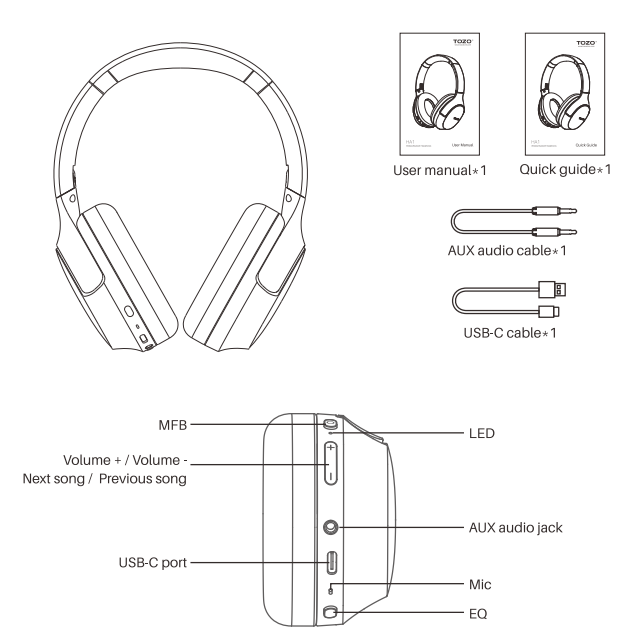
Specifications
- Speaker size
- $ 40.0mm
- APP
- Support TOZO APP
- Battery capacity
- 400mAh
- Input SVm 450mATransmission range
- > 10m
- Charging port
- USB-C
- Speaker impedance
- 320
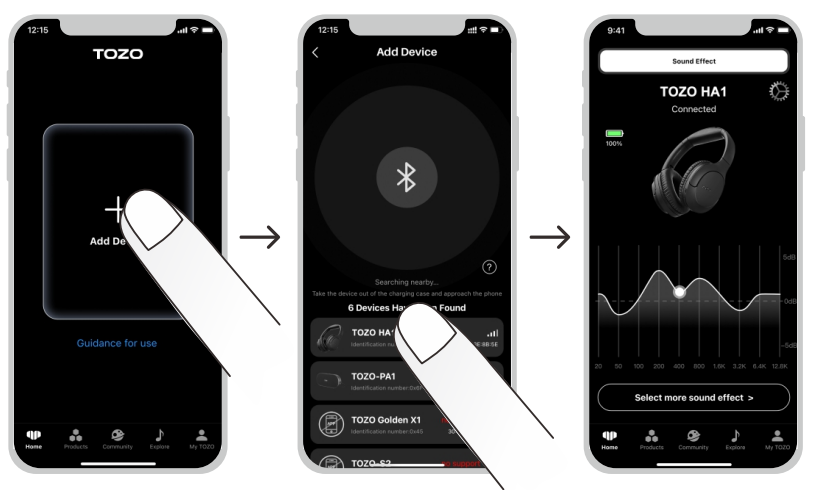
TOZO app pairing
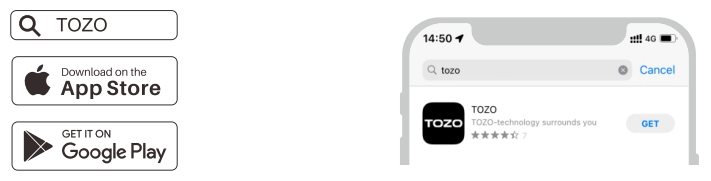
Step1:
TOZO APP can be downloaded from the TOZO website and Google Play, and Apple APP Store.
Step2:
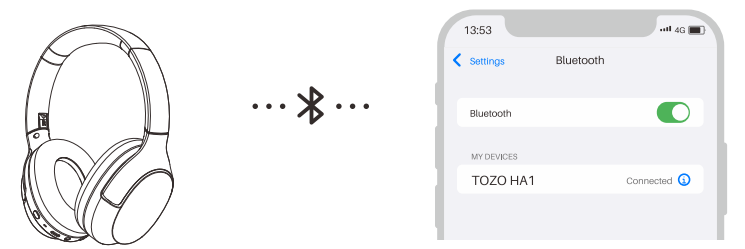
Bluetooth pairing with your headphones.
Step 3:
Open the TOZO APP and pair with your HA1.
Bluetooth multipoint feature
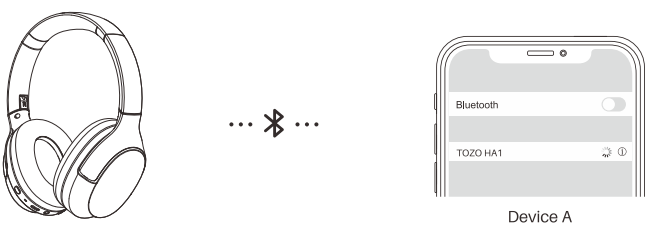
Step 1:
Connect the headset to Device A, then turn off its Bluetooth function, and the headset will auto turn connectable (LED blinks red and white, please don't turn off the headphones).
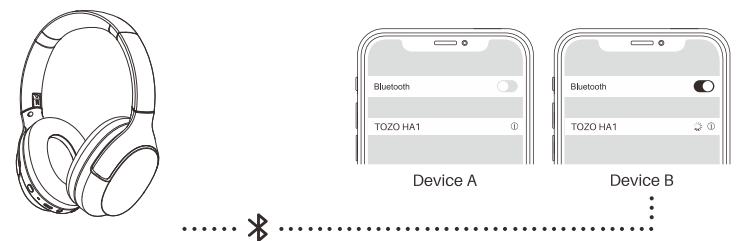
Step 2:
Turn on the Bluetooth on your Device B. Search for the 'TOZO HA1' and connect the headphones to the second mobile phone.
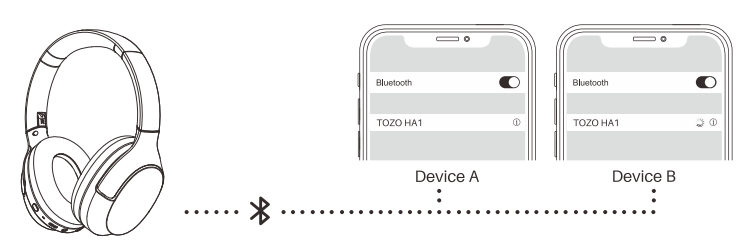
Step 3:
Turn on the Bluetooth on the Device A. Click on the connection record for the headphones to achieve a simultaneous connection of the headphones with two devices.
Troubleshooting Common Issues with tozo HA1 Wireless Headphones
Despite their robust design, users may encounter occasional challenges with the tozo HA1 Wireless Headphones. Here are common problems and their solutions:
- No Sound or Low Volume: Ensure the headphones are charged and connected via Bluetooth within a 10-meter range. Reset by powering off, then on again, or reconnect by forgetting the device in Bluetooth settings.
- Bluetooth Pairing Problems: Confirm the headphones are in pairing mode (LED blinking red and white). Restart both headphones and the source device. Clear Bluetooth cache on the device if necessary.
- Microphone or Call Quality Issues: Enable ENC (Environmental Noise Cancellation) via the TOZO app. Check if your phone’s call answering method settings need adjustment for compatibility.
- Battery Not Charging: Use the included USB Type-C cable and ensure the charging port is free of debris. Charge for at least 2 hours to full capacity.
Preventive measures include regularly updating firmware through the TOZO app and avoiding extreme temperatures or moisture exposure. The TOZO HA1 headphones come with a limited warranty—contact TOZO customer support for assistance at their official website or through authorized sellers.
Pros & Cons of tozo HA1 Wireless Headphones
Pros
- Long Battery Life: Up to 75 hours of music playback ensures extended use without frequent charging.
- High-Quality Sound: 40mm dynamic drivers and AAC/SBC codecs produce clear audio with deep bass.
- Comfort and Durability: Foldable design with adjustable headband and memory foam earcups for all-day wear.
- Multipoint Connectivity: Connect to two devices simultaneously, facilitating seamless switching.
- App Integration: The TOZO app allows EQ customization and firmware updates.
Cons
- Packaging: Minimal padding may risk damage during shipping compared to premium brands.
- Soundstage: Subjective variations—some users may find the sound less immersive than higher-end models.
- Limited Advanced Features: No active noise cancellation (ANC), only ENC for calls.
Overall, the tozo HA1 Wireless Headphones offer excellent value for money, competing well with alternatives like JBL or Anker Soundcore models in the budget wireless headphone segment.
Customer Reviews & Ratings for tozo HA1 Wireless Headphones
Users widely praise the tozo HA1 Wireless Headphones for their impressive battery life and sound clarity, often highlighting the convenience of multi-device connectivity and the comfort of the over-ear design. Many reviews give these headphones 4 to 4.5 stars out of 5.
Common compliments include:
- Strong bass response and balanced mids
- Clear call quality with ENC reducing background noise
- Responsive app with useful EQ presets
Some users note occasional Bluetooth connection drops or find the lack of full active noise cancellation a downside. However, the majority recommend the tozo HA1 for its affordability and reliable everyday performance, making it a smart buy for budget-conscious audiophiles and casual listeners.
Faqs
How do I set up tozo HA1 Wireless Headphones for the first time?
What should I do if my tozo HA1 Wireless Headphones won’t connect to Bluetooth?
Can I use tozo HA1 Wireless Headphones with two devices at the same time?
What are the key sound features of tozo HA1 Wireless Headphones for music lovers?
How long does the battery last on tozo HA1 Wireless Headphones and how long does it take to charge?
How can I improve call quality when using tozo HA1 Wireless Headphones?
Are tozo HA1 Wireless Headphones compatible with voice assistants, and how do I activate them?
What maintenance tips help extend the lifespan of tozo HA1 Wireless Headphones?
More tozo manuals
- Usage: Tozo HT2 Adaptive Hybrid Headphones User Manual
- How to Pair: Tozo OPEN-EAR AIR CONDUCTION SPORT HEADPHONES User Manual
- How to Use: Tozo HT1 Hi-Res Audio Over-Ear Headphones User Manual
- How to Pair: Tozo T6 Stereo Earbuds Instruction Guide
- How to Use: Tozo Golden X1 Earbuds User Manual
- How to Pair: Tozo Open Ear Earbuds User Manual
Leave a Comment