
How to Use: Tozo HT1 Hi-Res Audio Over-Ear Headphones User Manual
Content
Tozo HT1 Hi-Res Audio Over-Ear Headphones
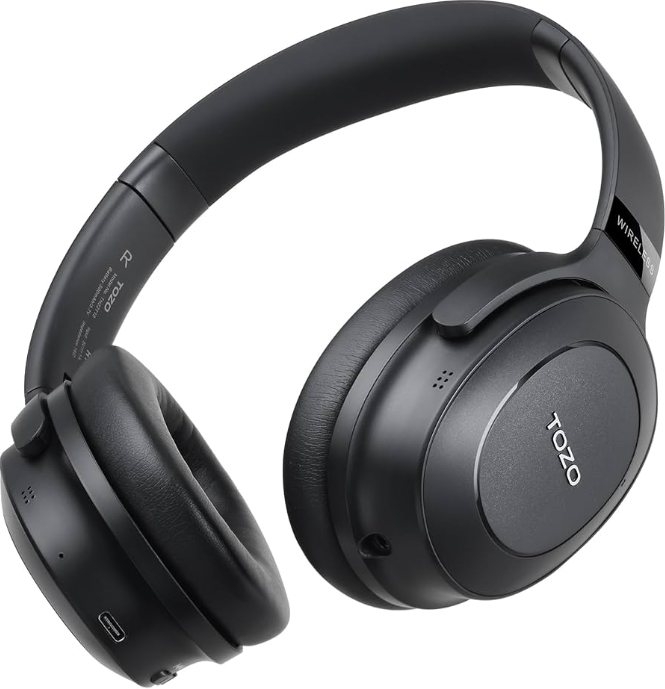
Introduction
The tozo HT1 Hi-Res Audio Over-Ear Headphones are designed for audiophiles and everyday listeners seeking premium sound quality and advanced noise cancellation. These wireless headphones combine cutting-edge hybrid Active Noise Cancellation (ANC) and environmental noise cancellation (ENC) technologies to deliver an immersive listening experience even in loud environments such as airplanes, busy offices, or public transport. Equipped with 40mm dynamic drivers featuring highly flexible silk diaphragms, the HT1 reproduces deep bass, clear midrange, and crisp treble, ensuring a balanced and dynamic sound signature ideal for music, calls, and multimedia.
With ultra-soft protein leather ear cups and an adjustable design, the HT1 offers exceptional comfort for long listening sessions — perfect for work-from-home setups, travel, or home entertainment. The headphones provide up to 40 hours of uninterrupted playback on a single charge, supported by a robust 500mAh battery. Additional customization is possible through the dedicated TOZO app, allowing users to tailor EQ settings to their personal audio preferences.
Targeted at users who value high-resolution audio, advanced noise reduction, and all-day comfort, the tozo HT1 is competitively priced in the mid-range wireless headphone market, generally available between $80 and $120 through authorized retailers and online platforms. Its versatile features suit commuters, remote workers, and casual listeners looking for premium wireless headphones with customizable sound and extended battery life.
Specifications of tozo HT1 Hi-Res Audio Over-Ear Headphones
- Driver Size: 40mm dynamic drivers with silk diaphragms for Hi-Res audio performance
- Audio Codec Support: AAC/SBC for high-quality wireless sound
- Noise Cancellation: Hybrid Active Noise Cancellation (ANC) plus ENC call noise reduction
- Bluetooth Version: 5.3 for stable, low-latency wireless connectivity
- Battery Capacity: 500mAh, enabling up to 40 hours of continuous playtime
- Charging Port: USB Type-C with approximately 2 hours to full charge
- Comfort Features: Ultra-soft protein leather ear cups with adjustable angle for different head shapes
- App Support: TOZO app for personalized EQ settings, firmware updates, and UI customization
- Frequency Response Range: 20Hz to 20kHz, delivering a wide audio spectrum
When compared with similar headphones like the TOZO HA1 or other mid-tier ANC headsets, the HT1 stands out due to its longer battery life (40h vs. 30-35h) and hybrid ANC technology, providing superior noise cancellation. Its silk diaphragm driver technology also offers a more refined sound quality, especially in bass and treble balance.
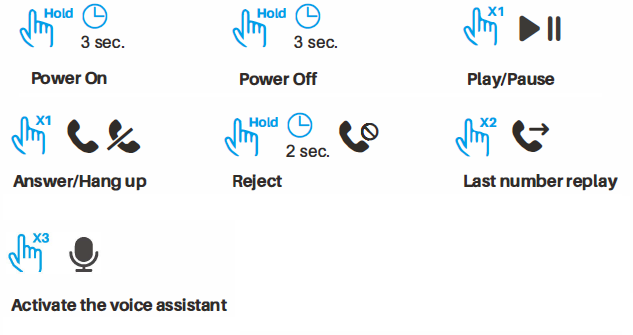
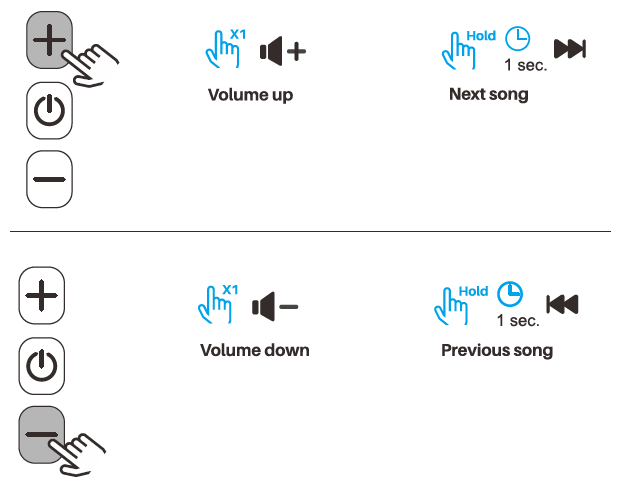
Key Function Guide
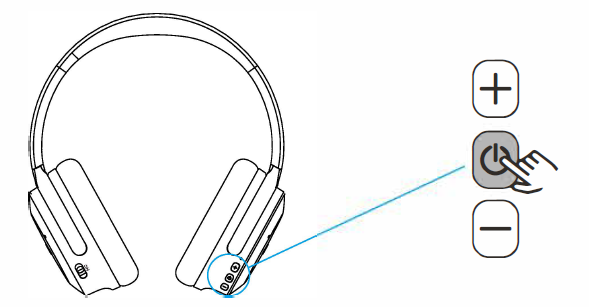
- X1: Press once
- X2: Press twice
- Hold: Press and hold
TOZO APP Pairing
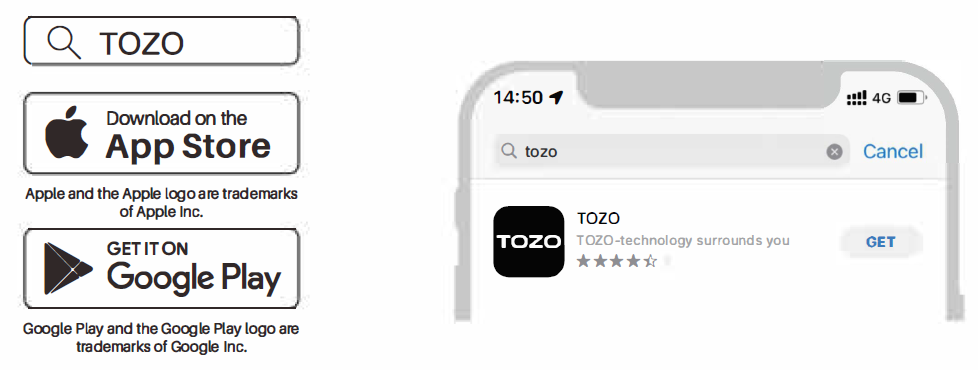
Step1:
TOZO APP can be downloaded from the TOZO website and Google Play,, and Apple APP Store.
Step2:
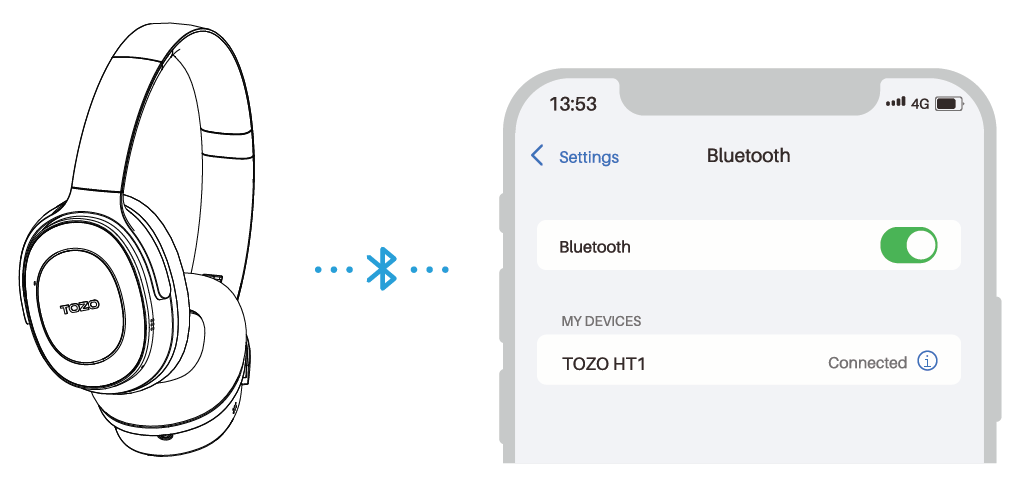
Bluetooth pairing with your headphones.
Step3:
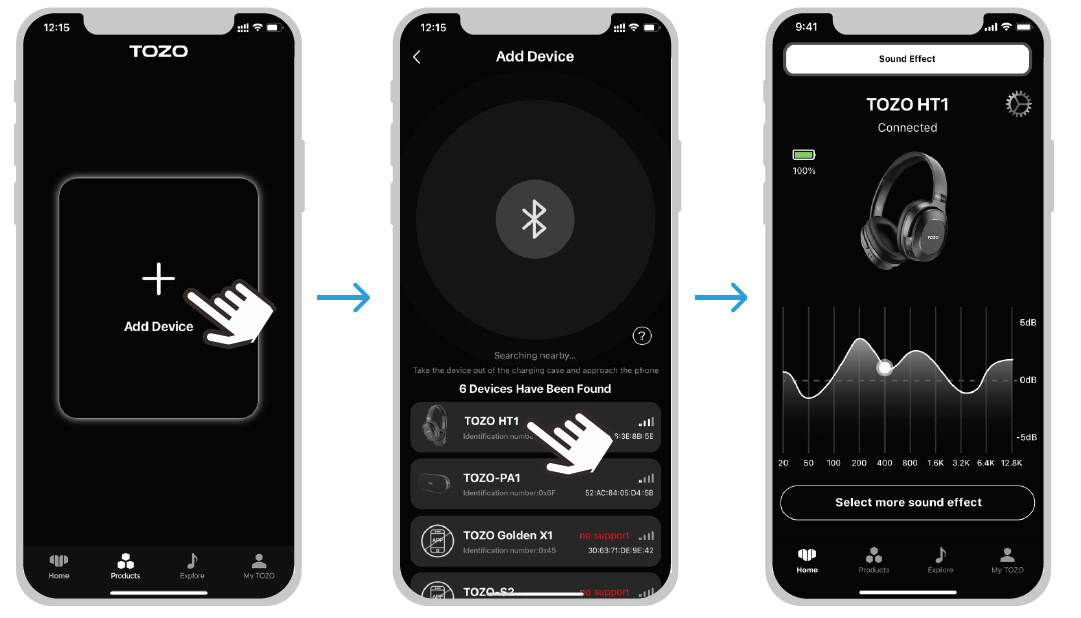
Open the TOZO APP and pair with your HT1.
Active Noise Reduction
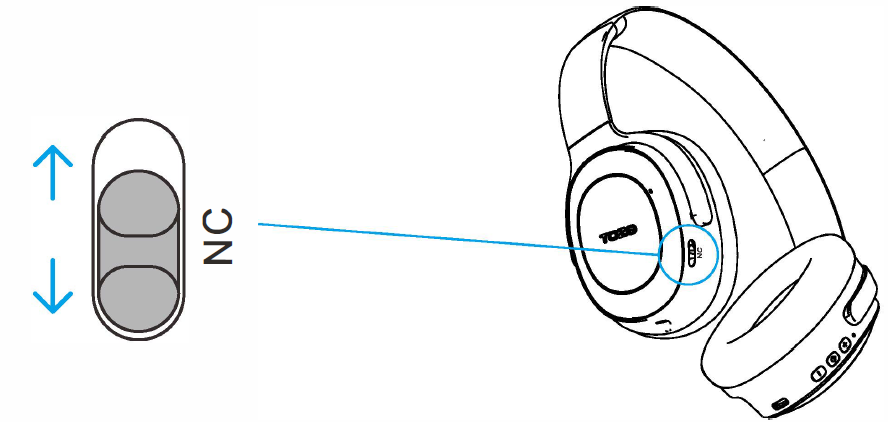
Toggle the NC switch to turn on the active noise cancellation function, and turn off to return to the regular mode. The active noise cancellation function can be used in both the on and off states.
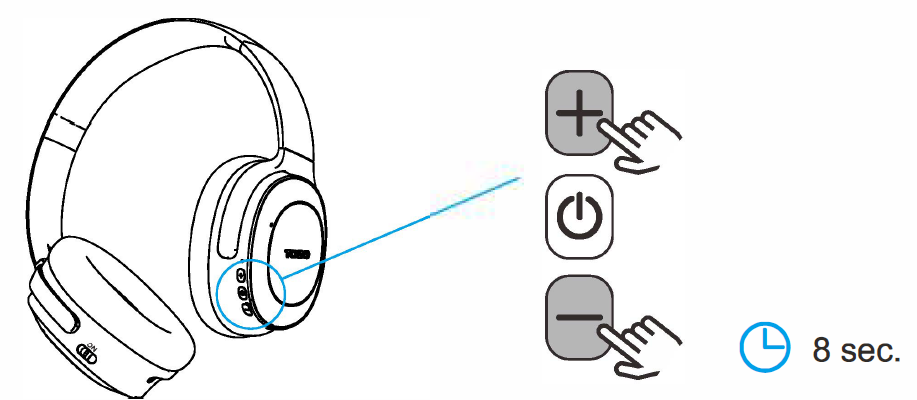
Restore Factory Settings
When the headset is switched on. Press and hold the plus and minus keys simultaneously for B seconds to restore the factory settings.
Charging
Low battery prompt:
When the battery power is lower than 20%, there will be a low battery warning. When the battery power is lower than 10%, the headset will automatically shut down.
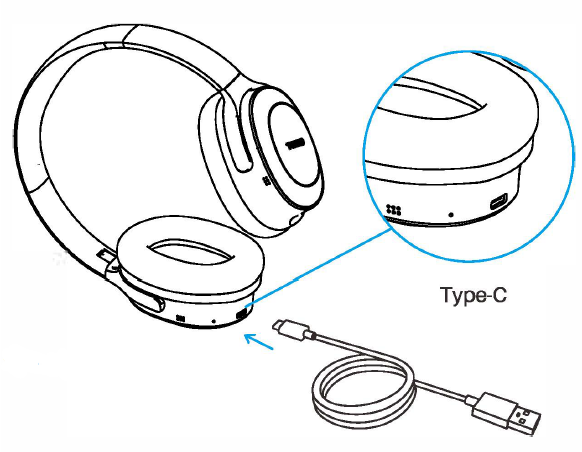
ON/OFF state charging:
The red light is always on, and will automatically turn off when the battery is fully charged.

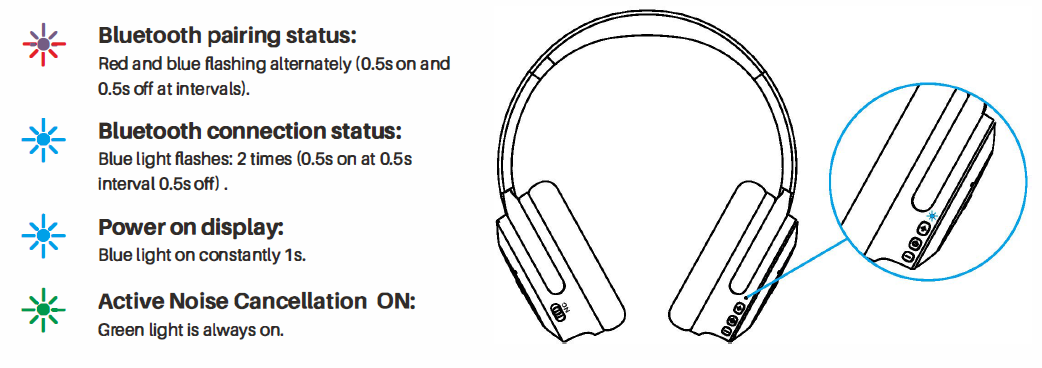
Indicator Light Status
Aux Audio Cable
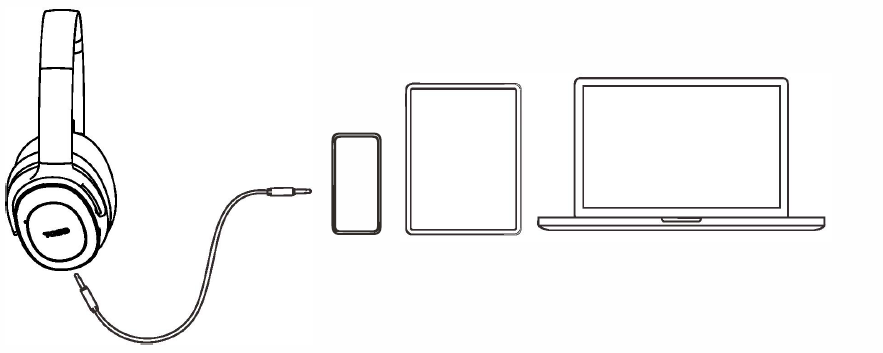
Plug in 3.5 cables and enjoy Hi-res sound quality without turning on the headphones.
Disclaimers
TOZO reserves the right of final interpretation of this manual, and the design and specifications are subject to change without notice.
Troubleshooting Guide for tozo HT1 Hi-Res Audio Over-Ear Headphones
- Issue: Headphones not pairing via Bluetooth
Solution: Ensure the headphones are in pairing mode by holding the power button until the LED flashes; remove previous Bluetooth pairings on your device, then try reconnecting. Restart your device if needed. - Issue: Noise cancellation is not working properly
Solution: Confirm ANC is activated via headphones or the TOZO app; clean ear cups to ensure proper seal; update firmware through the app for ANC improvements. - Issue: Low battery life or charging problems
Solution: Use the supplied USB Type-C charger; ensure the charging port is dry and clean; avoid overcharging; reset the headphones if battery drain persists. - Issue: Call quality is unclear or has noise interference
Solution: Verify ENC is enabled; ensure the microphone is not obstructed; reduce background noise; update firmware as needed.
Preventive measures include regularly cleaning the ear cushions, avoiding exposure to moisture, and keeping firmware up to date via the TOZO app. The product comes with a standard manufacturer's warranty covering manufacturing defects, and customer support can be reached through the official TOZO website or authorized reseller contacts for repairs and assistance.
Pros & Cons of tozo HT1 Hi-Res Audio Over-Ear Headphones
Pros
- Exceptional Battery Life: Up to 40 hours of uninterrupted playtime suits long trips and daily use without frequent charging.
- Advanced Noise Cancellation: Hybrid ANC combined with ENC delivers effective suppression of ambient noise for clear calls and immersive audio.
- Customizable Sound: The TOZO app allows detailed EQ adjustments, catering to audiophiles and casual listeners alike.
- Comfort & Fit: Soft protein leather ear cups with adjustable angles provide all-day comfort for diverse head shapes.
- Hi-Res Audio Quality: 40mm silk diaphragm drivers ensure crisp treble and punchy bass with balanced sound.
Cons
- Ear Cup Size: Some users report that the ear cups may feel slightly small for larger ears, impacting comfort.
- Bass Response: Bass can be intense or 'punchy,' which might not suit those preferring neutral sound signatures.
- App Dependency: Full EQ customization requires the TOZO app, which might not appeal to all users.
- Price Range: Mid-range prices may be higher than basic wireless headphones, but justified by features.
Customer Reviews and Feedback on tozo HT1 Hi-Res Audio Over-Ear Headphones
Customers consistently praise the tozo HT1 Hi-Res Audio Over-Ear Headphones for their superior noise cancellation and long battery life, often awarding the product an average rating of 4.6 out of 5 stars. Users highlight the clarity of calls even in noisy environments and the comfort of the protein leather ear cups for extended listening periods. The ability to customize sound using the TOZO app receives positive mentions, enhancing user satisfaction.
Common complaints include occasional discomfort for users with larger ears due to ear cup size and reports of bass levels being too strong or overwhelming for some. A few users have noted minor connectivity issues, typically resolved by firmware updates or resetting the device. Overall, the headphones are highly recommended for commuters, remote workers, and music lovers looking for a blend of quality audio, ANC performance, and comfort.
Faqs
How do I set up tozo HT1 Hi-Res Audio Over-Ear Headphones for the first time?
What should I do if my tozo HT1 Hi-Res Audio Over-Ear Headphones are not working properly?
Can I use tozo HT1 Hi-Res Audio Over-Ear Headphones with multiple devices simultaneously?
How often should I maintain my tozo HT1 Hi-Res Audio Over-Ear Headphones?
What are the key features that make tozo HT1 Hi-Res Audio Over-Ear Headphones different?
Can I customize the sound settings on my tozo HT1 Hi-Res Audio Over-Ear Headphones?
How do I update the firmware on my tozo HT1 Hi-Res Audio Over-Ear Headphones?
Are the tozo HT1 Hi-Res Audio Over-Ear Headphones compatible with all Bluetooth devices?
More tozo manuals
- How to Use: Tozo Golden X1 Earbuds User Manual
- Usage: Tozo HT2 Adaptive Hybrid Headphones User Manual
- Pairing: Tozo HA1 Wireless Headphones User Manual
- How to Pair: Tozo OPEN-EAR AIR CONDUCTION SPORT HEADPHONES User Manual
- How to Pair: Tozo T6 Stereo Earbuds Instruction Guide
- How to Pair: Tozo Open Ear Earbuds User Manual
Leave a Comment