
Usage: Tozo HT2 Adaptive Hybrid Headphones User Manual
Content
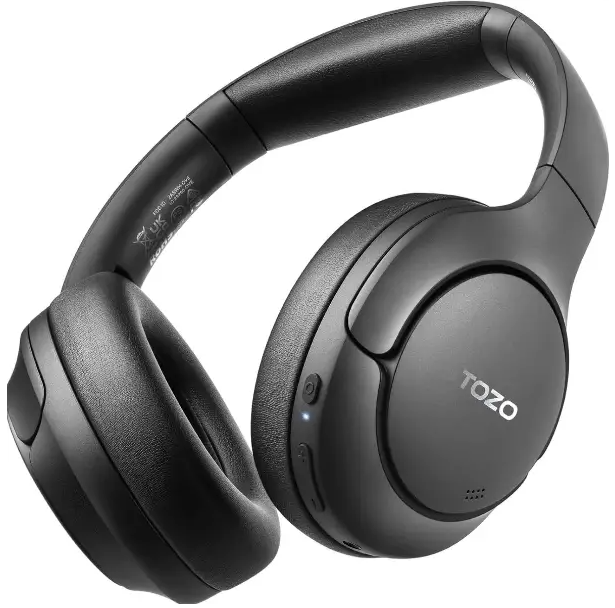
TOZO HT2 Adaptive Hybrid Headphones
Introduction
The TOZO HT2 Adaptive Hybrid Headphones are designed to offer a premium listening experience at an affordable price. These over-ear headphones feature adaptive hybrid active noise cancellation, Hi-Res Audio certification, and comfortable design elements perfect for extended use. Key benefits include long battery life, versatile connectivity options, and customizable sound via the TOZO app. The HT2 is ideal for commuters, travellers, and music enthusiasts seeking quality noise cancellation without breaking the bank. With a price range typically between $49.99 and $99, these headphones are widely available online and in-store.
Specifications
The TOZO HT2 is equipped with:
- Driver Size: 40mm dynamic drivers
- Frequency Response: 16Hz - 45kHz
- Audio Codecs: AAC/SBC
- Noise Control Modes: Noise Cancellation, Transparency Mode, Reduce Wind Noise, Leisure Mode, Normal Mode, Adaptive Mode
- Call Noise Cancellation: Tri-Mic ENC call noise reduction
- Bluetooth Version: Bluetooth 5.3
- Effective Bluetooth Range: 10m
- Battery Capacity: 500mAh
- Music Play Time (AAC, default setting, 50% volume): Up to 40 hours with ANC on and 60 hours without
- Charging Port: USB Type-C
- Weight: 254.5g
Compared to similar budget headphones, the TOZO HT2 offers impressive ANC performance and customizable EQ settings through the TOZO app.
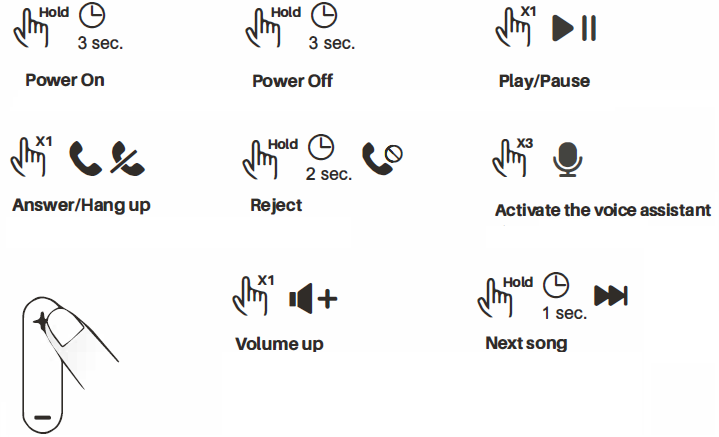
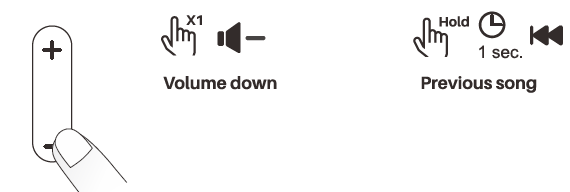
Key Function Guide
- X1: Press once
- X2: Press twice
- Hold: Press and hold
- X3: Press three times
TOZO APP Pairing
Step1:
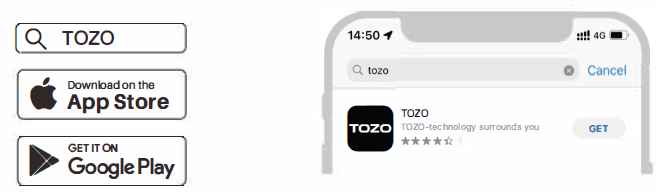
TOZO APP can be downloaded from the TOZO website and Google Play,, and Apple APP Store.
Step2:
Bluetooth pairing with your headphones.
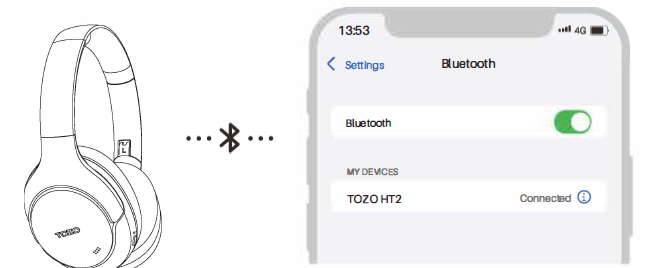
Step 3:
Open the TOZO APP and pair with your HT2.
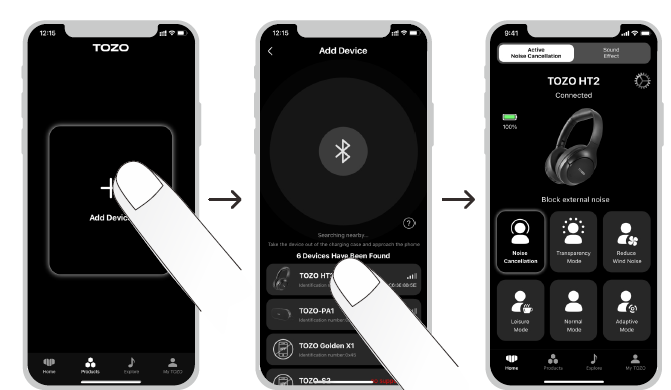
NC Button
About the normal noise cancellation mode
After the headphones are powered on, the default mode is normal noise cancellation mode. A single click of the NC button will turn off the noise cancellation mode, and another single click will enter the transparency mode. Click again to return to normal noise cancellation mode, and the cycle continues.
About returning to the normal noise cancellation mode
When the headphones are in the Adaptive Noise Cancelling Mode, double-click the NC button to return to the Normal Noise Cancelling Mode. (Note: You can only return to the Normal Noise Cancelling Mode by double-clicking the NC button in the Adaptive Noise Cancelling Mode.)
About the adaptive noise cancelling mode
- When the headphones are in the Normal Noise Cancelling Mode, double-click the NC button, and the headphones will emit two audio segments within 10 seconds, and then enter the Adaptive Noise Cancelling Mode.
- After entering the Adaptive Noise Cancelling Mode, it will replace the Normal Noise Cancelling Mode, and you can switch between various modes by single-clicking the NC button.
(Note: You can only enter the Adaptive Noise Cancelling Mode by double-clicking the NC button in the Normal Noise Cancelling Mode.
Game mode (low latency)
- When the headphones are turned on, press and hold the NC button for 2 seconds to enter the Game Mode with lower latency, accompanied by a voice prompt.
- While in Game Mode, press and hold the NC button for 2 seconds to exit the Game Mode, accompanied by a voice prompt.
- Entering or exiting Game Mode will not cause the current Noise Control mode to become invalid. For example, if the headphones were in ANC ON Mode before entering Game Mode, this mode will still be maintained after entering Game Mode.
.png)
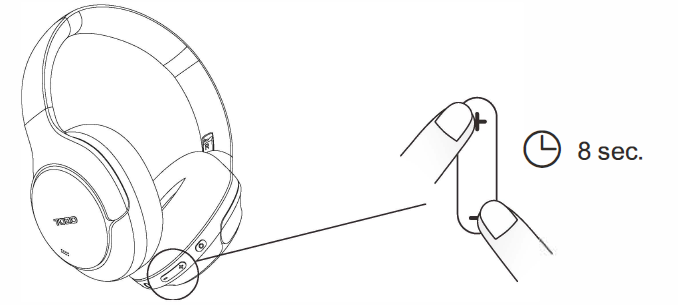
Restore Factory Settings
When the headset is switched on. Press and hold the plus and minus keys simultaneously for 8 seconds to restore the factory settings.
Charging
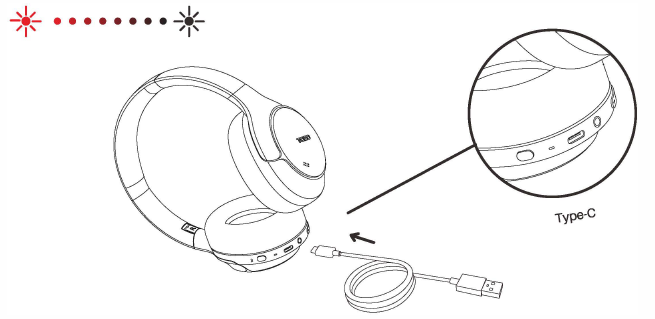
When the headphones are either powered on or powered off, plug in a Type-C charging cable, and the headphone power light will stay red while charging and turn off after fully charged.
(Note: Plugging in the charging cable while the headphones are powered on will result in the headphones automatically turning off.)
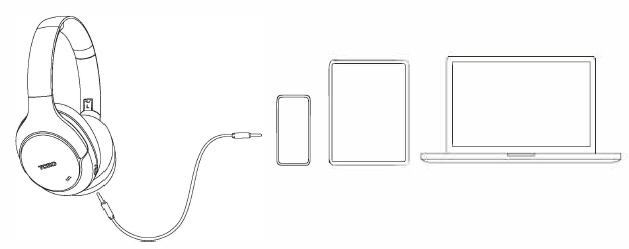
Aux Audio Cable
- When the headphones are powered off, insert a 3.5mm AUX audio cable to play music from a phone or other player to experience Hi-Res sound quality.
- When the headphones are powered on, inserting a 3.5mm AUX audio cable will automatically turn off the headphones.
(Note: Using this function while the headphones are charging is not recommended.)
Troubleshooting
Common issues and solutions for the TOZO HT2 include:
- Connection Issues: Ensure Bluetooth is enabled on both devices and try restarting the headphones.
- Noise Cancellation Not Working: Check ANC mode is enabled and ensure proper fit.
- Audio Quality Issues: Use the TOZO app to adjust EQ settings for better sound.
- Warranty and Support: Contact TOZO support for repair or replacement options.
Pros and Cons
Pros:
- Effective Noise Cancellation: Reduces ambient noise significantly for a budget option.
- Long Battery Life: Offers up to 60 hours of playback without ANC.
- Customizable Sound: The TOZO app allows for EQ adjustments and ANC mode switching.
- Affordable Price: Typically priced under $100.
Cons:
- Build Quality: Primarily plastic construction feels less premium.
- Volume Levels: May require listening at full volume for optimal sound.
- ANC Performance: Not as isolating as premium brands.
Customer Reviews
Users praise the TOZO HT2 for its affordability, effective noise cancellation, and comfortable design. Common complaints include the build quality and volume levels. Overall, the HT2 is rated highly for its value for money, with many users recommending it for budget-conscious buyers looking for reliable ANC headphones.
Faqs
How do I set up tozo HT2 Adaptive Hybrid Headphones for the first time?
What should I do if my tozo HT2 Adaptive Hybrid Headphones are not pairing with my device?
Can I use tozo HT2 Adaptive Hybrid Headphones with a wired connection?
How do I optimize the sound quality of my tozo HT2 Adaptive Hybrid Headphones?
What are the key features that make tozo HT2 Adaptive Hybrid Headphones different?
How often should I maintain and clean my tozo HT2 Adaptive Hybrid Headphones?
Can I use tozo HT2 Adaptive Hybrid Headphones in noisy environments?
Are tozo HT2 Adaptive Hybrid Headphones compatible with all devices?
Tags
More tozo manuals
- How to Use: Tozo HT1 Hi-Res Audio Over-Ear Headphones User Manual
- Pairing: Tozo HA1 Wireless Headphones User Manual
- How to Use: Tozo Golden X1 Earbuds User Manual
- How to Pair: Tozo OPEN-EAR AIR CONDUCTION SPORT HEADPHONES User Manual
- How to Pair: Tozo T6 Stereo Earbuds Instruction Guide
- How to Pair: Tozo Open Ear Earbuds User Manual
Leave a Comment