
How to Use: Tozo Golden X1 Earbuds User Manual
Content
tozo Golden X1 Earbuds
Introduction
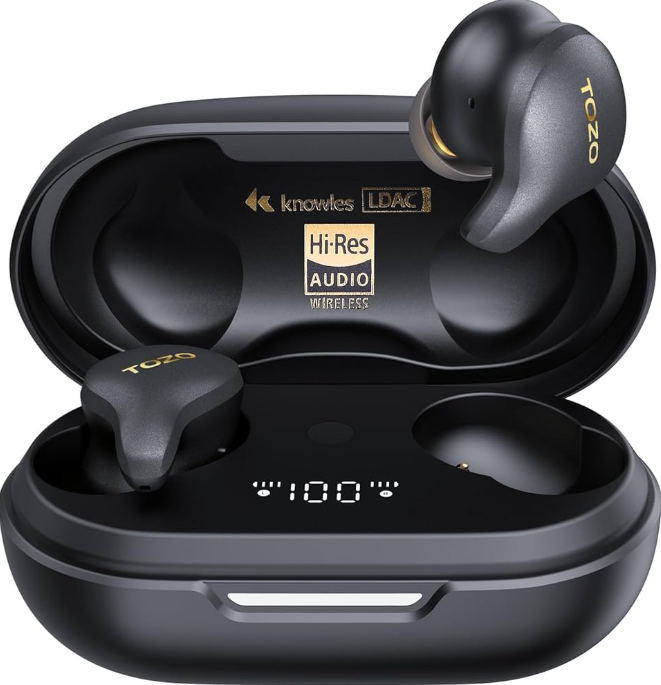
The tozo Golden X1 Earbuds represent a premium tier in the true wireless earbuds market, designed for audiophiles and everyday users who demand exceptional sound quality combined with cutting-edge technology. These earbuds boast a unique dual-driver system—comprising a dynamic 12mm driver and a Knowles balanced armature driver—delivering crisp highs, clear mids, and deep bass. With Hi-Res Audio certification and LDAC codec support, the Golden X1 ensures detailed and immersive listening experiences across all music genres.
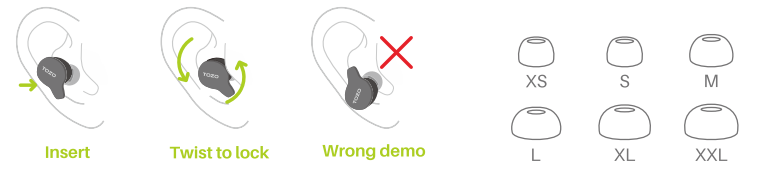
Built with an IPX6 water resistance rating, these earbuds are perfect for fitness enthusiasts and commuters who need durability against sweat and rain. They also feature active noise cancellation (ANC), transparency mode, and multipoint Bluetooth pairing, allowing seamless switching between devices. The ergonomically designed earbuds come with six sizes of ear tips for a secure, comfortable fit suitable for long listening sessions.
Targeted at music lovers seeking a premium audio experience without the ultra-high price tag of flagship models, the tozo Golden X1 is ideal for daily commutes, workouts, office use, and casual listening. Priced around USD $145 (~S$195), they offer excellent value by integrating advanced sound technology and versatile features typically found in more expensive models. Available through official TOZO stores and major online retailers, they are accessible globally with frequent promotions enhancing affordability.
Bluetooth pairing and wearing
Bluetooth pairing
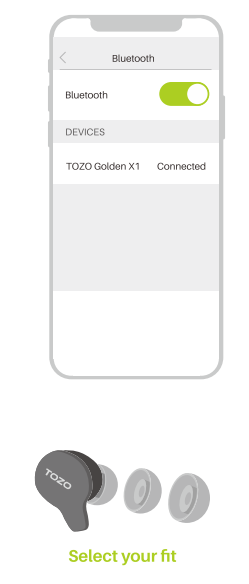
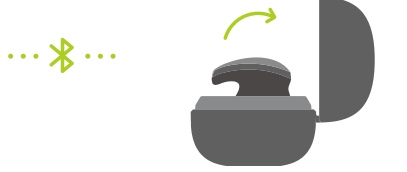
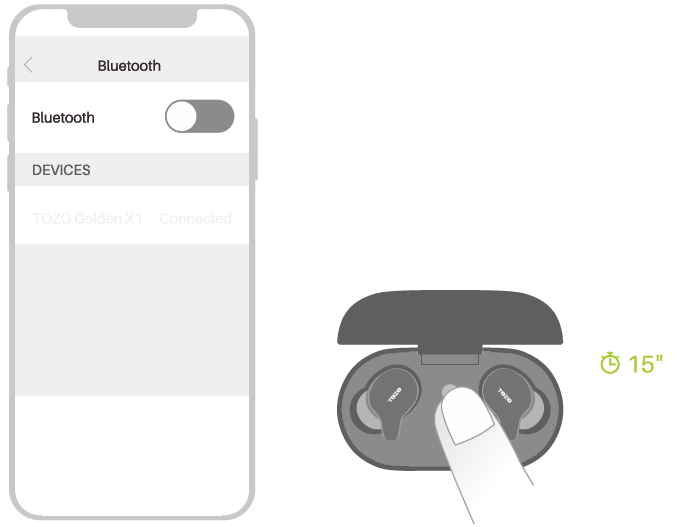
- Open the charging case and keep the earbuds in it. The two earbuds will power on and pair to each other immediately. Selecting the [TOZO Golden X1 l from the device list in your Bluetooth listing.
- If you need to pair with another new device, you can open the charging case and keep the earbuds in it, then hold the charging case button for 3 seconds to force the earbuds to enter the pairing state .
Smart touch control Power on/off
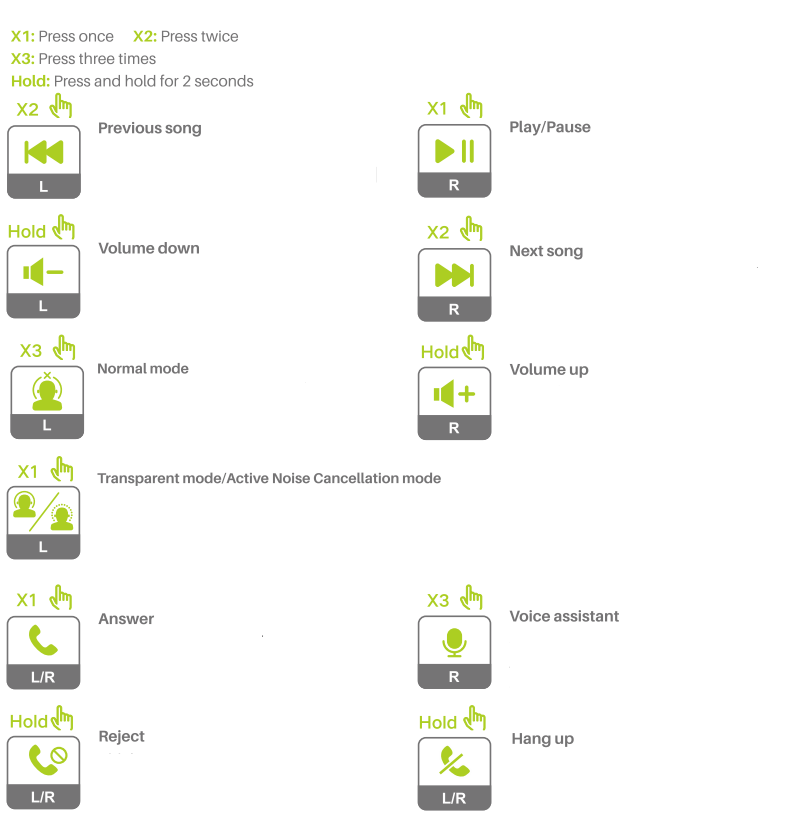
Power on/off
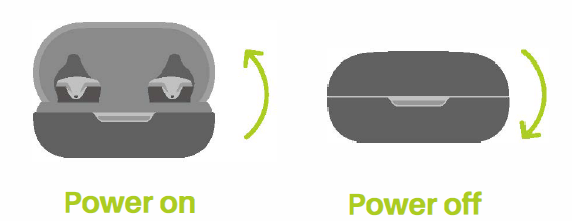
Power on:
Open the cover of the charging case, and the earbuds will power on automatically.
Power off:
Put the earbuds into the charging case, close the cover, and automatically power off.
Reset
If you accidentally get only one earbud working, or fail to pair each other, please reset the.m
- Place the earbuds into the charging case.
- Press and hold the case button for 15 seconds, then keep the lid is open and wait for 10 seconds before removing the earbuds. NOTE: In case there is [Connection Unsuccessful] in your devices, please delete all historical records of [TOZO Golden X1 land try the pairing process again.
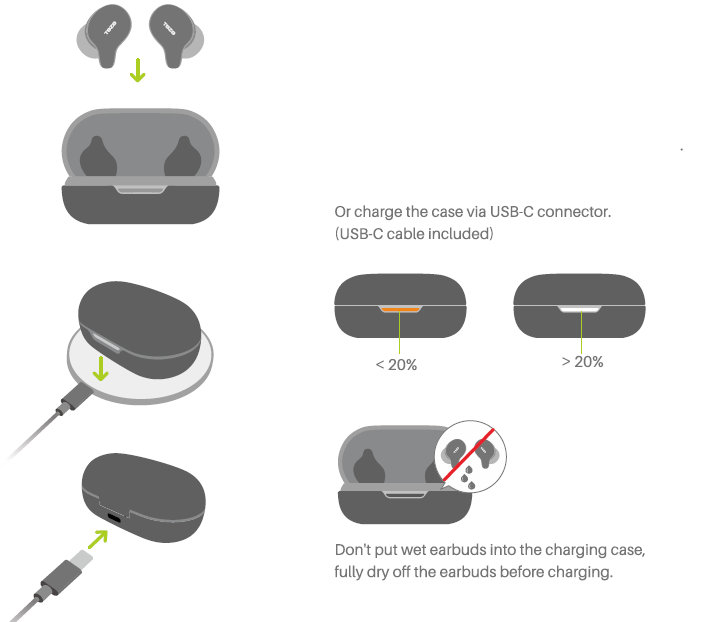
Charging
- Place the case with the light facing up on the wireless charger. (Wireless charging pad not included) Or charge the case via USB-C connector. (USB-C cable included)
Technical Specifications and Key Features of the tozo Golden X1 Earbuds
- Drivers: Dual drivers per earbud (12mm dynamic driver + Knowles balanced armature driver) for rich audio fidelity
- Frequency Response: 12 Hz to 44.1 kHz, supporting Hi-Res Audio playback
- Bluetooth Version: 5.3 for stable, low-latency connections up to 10 meters
- Audio Codec Support: LDAC, SBC, AAC — enabling 24-bit/96kHz streaming at up to 990 kbps
- Active Noise Cancellation (ANC): Hybrid ANC with six noise reduction modes blocking up to 90% of ambient noise
- Transparency Mode: Allows ambient sounds in for situational awareness without removing earbuds
- Battery Life: Up to 5 hours of playback per charge with ANC on; up to 8 hours with ANC off; total 32 hours with the charging case
- Charging: USB-C and wireless charging supported; rapid charge delivers ~1 hour of playtime from 8 minutes of charging
- Water Resistance: IPX6 rating suitable for sweat and water splashes
- Controls: Touch-sensitive controls for playback, calls, and ANC modes
- Additional Features: Multipoint Bluetooth pairing, custom EQ modes via companion app, OLED battery display on charging case
Compared to similar earbuds in the $150-$200 range, Tozo Golden X1 stands out with its dual-driver architecture, LDAC support, and hybrid ANC, features often found in higher-end models. The inclusion of multipoint pairing and wireless charging further enhances its competitive edge.
Troubleshooting Guide for Tozo Golden X1 Earbuds
- Issue: Earbuds not pairing with devices
Solution: Ensure Bluetooth is enabled on your device; press and hold the pairing button on the charging case until the LED flashes; clear Bluetooth cache or remove previously paired devices to reset connections. - Issue: No sound or unbalanced audio
Solution: Check earbud battery levels; reconnect earbuds; clean the earbuds’ speaker mesh to remove debris; adjust EQ settings in the companion app. - Issue: ANC not functioning correctly
Solution: Ensure firmware is updated via the TOZO app; toggle ANC off and on; fit earbuds snugly in ears; reset earbuds by placing them back in the case and removing them again. - Issue: Charging case or earbuds not charging
Solution: Use the included USB-C cable and compatible charger; ensure charging contacts are clean; avoid wireless charging mats with incompatible standards.
To prevent common issues, regularly update the earbuds’ firmware through the official TOZO app, avoid exposing the earbuds to extreme moisture beyond their IPX6 rating, and handle the charging case carefully. The product includes a limited manufacturer warranty covering defects, and TOZO customer support can be reached via their official website or authorized retailers for assistance.
Pros & Cons of tozo Golden X1 Earbuds: A Balanced Evaluation
- Pros:
- Exceptional sound quality with a dual-driver setup delivering deep bass and clear highs
- Hi-Res Audio and LDAC codec support enhance audio fidelity
- Effective hybrid ANC and customizable noise reduction modes
- Long battery life with fast charging and wireless charging support
- Multipoint Bluetooth pairing for convenient device switching
- Comfortable fit with multiple ear tip sizes, including extra small and extra large
- IPX6 water resistance is suitable for active use
- OLED charging case display provides a clear battery status
- Cons:
- Battery life could be longer compared to some flagship competitors (5 hours with ANC on)
- Custom EQ options require companion app usage, no onboard presets
- Relatively high initial list price, though often discounted
- May require occasional manual resets for connectivity issues
When compared to alternatives like Sony WF-1000XM5 or Bose QuietComfort Earbuds, the tozo Golden X1 offers comparable sound and ANC features at a lower price point, making it a strong value choice for audiophiles on a budget.
Customer Reviews and Feedback on tozo Golden X1 Earbuds
Users widely praise the tozo Golden X1 earbuds for their impressive sound clarity and bass response, highlighting the balanced armature and dynamic drivers' synergy in delivering a rich audio experience. The active noise cancellation feature is frequently remarked upon as effective, notably in noisy environments like public transport.
Common compliments include the comfortable fit with multiple ear tip options, long overall battery life with the charging case, and the convenience of wireless charging and multipoint connectivity. Customers appreciate the OLED display on the case, which clearly shows battery levels.
Some users report occasional Bluetooth pairing difficulties, typically resolved by resetting the earbuds. A few mention the ANC battery drain limiting continuous usage time to about five hours, though this is generally accepted, given the features offered. Overall, star ratings tend to average around 4 to 4.5 out of 5, with many recommending the earbuds for those seeking high-quality sound without premium flagship prices.
Faqs
How do I set up my tozo Golden X1 Earbuds for the first time with a smartphone?
What should I do if my tozo Golden X1 Earbuds are not charging properly?
How does the LDAC technology in tozo Golden X1 Earbuds enhance audio quality?
Are tozo Golden X1 Earbuds compatible with multipoint Bluetooth connections?
What active noise cancellation features do tozo Golden X1 Earbuds offer, and how effective are they?
How can I customize sound profiles on tozo Golden X1 Earbuds to match different music genres?
What is the water resistance rating of tozo Golden X1 Earbuds, and can I use them during workouts?
How should I clean and maintain my tozo Golden X1 Earbuds to ensure long-term performance?
More tozo manuals
- How to Use: Tozo HT1 Hi-Res Audio Over-Ear Headphones User Manual
- Usage: Tozo HT2 Adaptive Hybrid Headphones User Manual
- Pairing: Tozo HA1 Wireless Headphones User Manual
- How to Pair: Tozo OPEN-EAR AIR CONDUCTION SPORT HEADPHONES User Manual
- How to Pair: Tozo T6 Stereo Earbuds Instruction Guide
- How to Pair: Tozo Open Ear Earbuds User Manual
Leave a Comment