
How to Pair: Tozo OPEN-EAR AIR CONDUCTION SPORT HEADPHONES User Manual
Content
Tozo OPEN-EAR AIR CONDUCTION SPORT HEADPHONES
Introduction
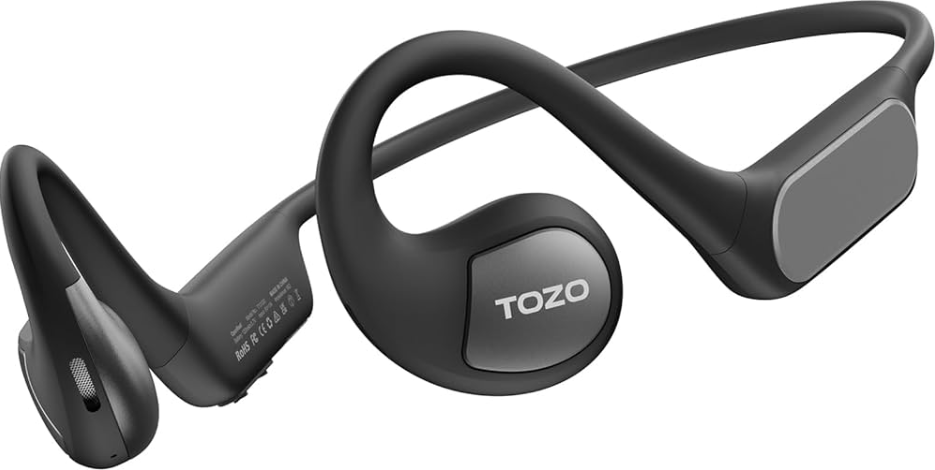
The tozo OPEN-EAR AIR CONDUCTION SPORT HEADPHONES redefine the way you experience audio during workouts, outdoor activities, and everyday use. Featuring an innovative open-ear design paired with advanced air conduction technology, these headphones deliver clear, immersive sound without blocking your ears. This ensures you stay aware of your surroundings while enjoying high-quality music or calls.
Designed for fitness enthusiasts, runners, cyclists, and anyone who values situational awareness, these sport headphones offer long-lasting comfort and secure fit with an ergonomic frame that rests lightly around your ears. Unlike traditional in-ear or bone conduction headphones, the TOZO OpenReal model transmits sound through air conduction, providing rich audio clarity without ear canal fatigue.
Equipped with Bluetooth 5.3 for a stable wireless connection and dual microphones with environmental noise cancellation (ENC), they provide crystal-clear calls even in noisy environments. With up to 16 hours of continuous playtime and fast magnetic charging, these headphones keep up with your active lifestyle.
Available globally through TOZO's official store and popular platforms like Amazon, Walmart, and eBay, the TOZO OPEN-EAR AIR CONDUCTION SPORT HEADPHONES typically retail between $25 to $40, offering excellent value for cutting-edge audio technology designed specifically for sports and active use.
Specifications of tozo OPEN-EAR AIR CONDUCTION SPORT HEADPHONES
- Type: Open-ear headphones with air conduction technology (not bone conduction)
- Driver: 16.2mm dynamic drivers delivering transparent, concert-like sound
- Frequency Response: 20Hz – 20kHz for full-range audio clarity
- Bluetooth Version: 5.3, ensuring a stable, low-latency wireless connection up to 10 meters
- Audio Codecs: AAC and SBC are supported for high-quality streaming
- Battery Capacity: 120mAh, providing up to 16 hours of continuous music playback at 50% volume
- Charging: Magnetic charging port with approximately 1 hour to full charge
- Call Features: Dual-mic Environmental Noise Cancellation (ENC) for clear calls in noisy settings
- Design: Ergonomic and lightweight, with a secure fit ideal for sports and outdoor use
- Water Resistance: Designed to handle sweat and light rain (check specific rating before exposure)
- Speaker size: <b 16.2mm
- Charging time: ≤1.5H
- Frequency range: 20Hz-20KHz
- Impedance: 160±15%
- Maximum ambient temperature: +40°C
- Transmission range: ≥10M
- Battery capacity: 120mAh
- Charging parameters: 5V=1A
- Product size and weight: 137x100x47mm; 29g
Compared to similar sport headphones like bone conduction models, the tozo OPEN-EAR AIR CONDUCTION SPORT HEADPHONES offer superior sound fidelity because they bypass bone conduction limitations, providing richer bass and clearer details, making them ideal for audiophiles engaged in active lifestyles.
Product list

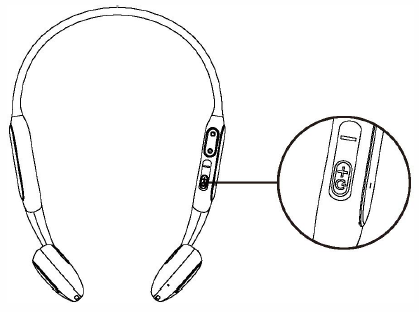
Power on/off
- Power on:
Press and hold the"+ /power" button for 2 seconds to turn on the headphones. - Power off:
Press and hold the ·+ /power· button for 4 seconds while not playing to turn off the headphones.
Power on white light: Battery level 50% Power on red light: Battery level s 50%
Wearing
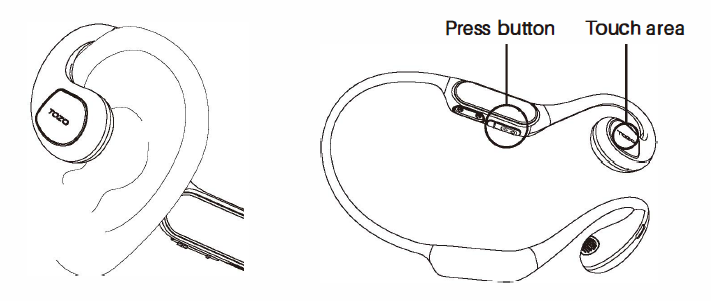
Please follow the illustration to hang the earphones on the ears, and adjust the earphones to ensure that the sound outlet is facing towards the ear canal..
Note: Only the right side has buttons and touch functions.
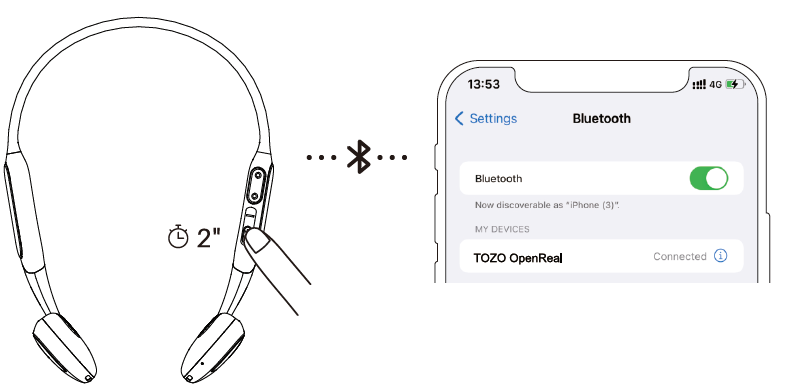
Bluetooth pairing
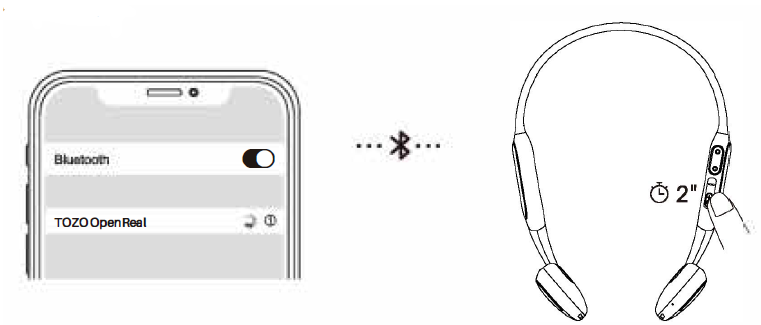
Press and hold the "+/ power" for 2 seconds to power on the earphones, then the red and white indicator lights will flash alternately.. Select [TOZO Open Real] from the device list in your Bluetooth listing.
Music control
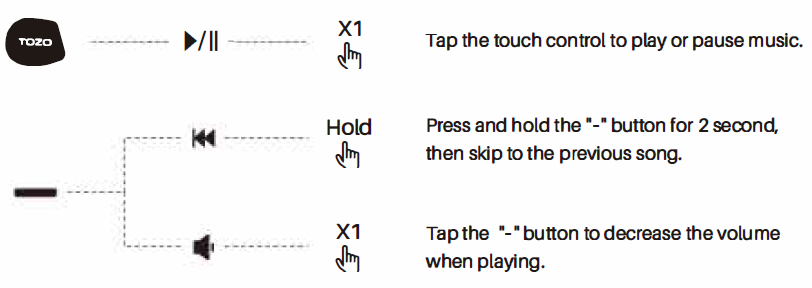
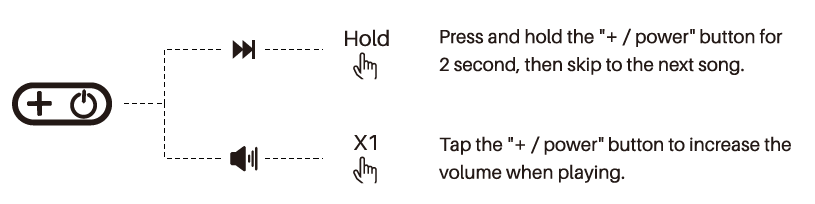
Calling control
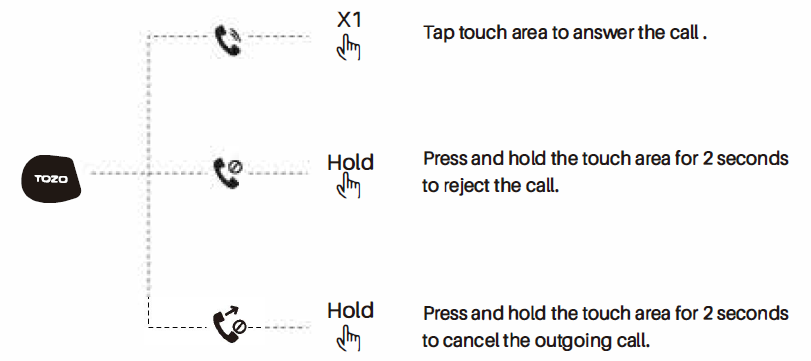
Voice Assistant

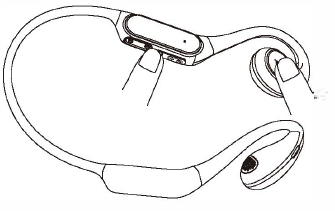
Reset
If one of the earphones does not work or fails to pair, please reset it:
Simultaneously press and hold the touch area and -· button for 5 seconds.
The indicator light will turn off and then flash red and white, that indicating the reset was successful.
Charging
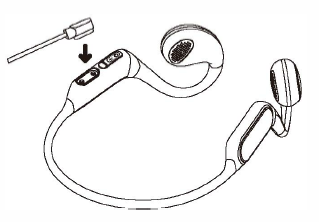
Please use the charging cable provided in the box to charge the earphones, align the pins on the charging cable with the charging port of the earphones.
They will magnetically attract together and begin to charge. The red light turning on indicates the earphones are in charging, and the red light turning off indicates charging is complete.
Troubleshooting Guide for tozo OPEN-EAR AIR CONDUCTION SPORT HEADPHONES
- No Sound or Low Volume: Ensure headphones are fully charged; verify Bluetooth connection is active and volume is adjusted via long press on left/right earbud.
- Bluetooth Pairing Issues: Reset Bluetooth on your device, remove the headphones from the paired list, and reconnect. Ensure your device supports Bluetooth 5.0 or higher.
- Intermittent Audio or Drops: Keep within the 10-meter Bluetooth range; avoid obstructions. Update device firmware via the TOZO app if available.
- Call Quality Problems: Clean microphone areas gently; check if the ENC feature is enabled; try testing in quieter environments to isolate background noise interference.
- Charging Problems: Use the original magnetic charging cable; clean charging contacts; ensure the power source is active.
Preventive measures include keeping the headphones dry, avoiding extreme temperatures, and regularly cleaning the ear contact areas. The product comes with a limited warranty covering manufacturing defects. For support, contact TOZO customer service via their official website or authorized retailers.
TOZO APP
Download the TOZO App for UI customization, EQ settings, and more.
- Ul customization: Most of the controls can be customized in the App .
- EQ settings: There are lots of EQ settings you can choose in the app to optimize your experience while enjoying different music genres.
- Earbuds firmware update: The earbuds' firmware can be updated in the App. You will be informed once the new version of firmware is detected when you connect the earphones to the App.
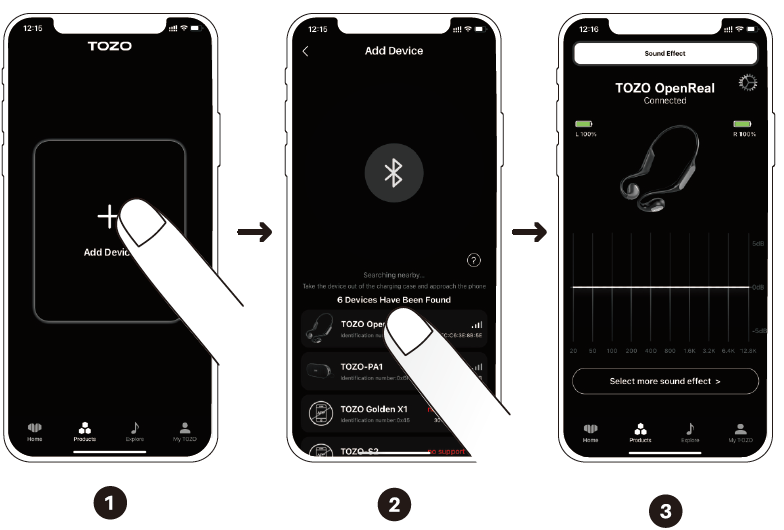
TOZO APP pairing
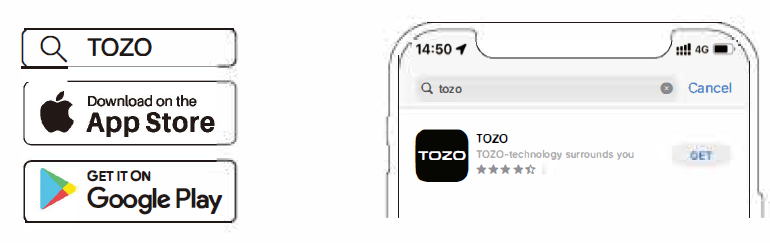
Step 1:
Download the TOZO App on your phone.
Step 2:
Bluetooth pairing with your earphones.
Step 3:
TOZO App pairing with your earphones.
Pros & Cons of tozo OPEN-EAR AIR CONDUCTION SPORT HEADPHONES
- Pros:
- Innovative open-ear design allows ambient awareness for safety during outdoor activities.
- High-quality 16.2mm dynamic drivers provide rich, transparent sound with deep bass.
- Long battery life (up to 16 hours) exceeds many competitors in the open-ear segment.
- Bluetooth 5.3 ensures a reliable wireless connection and low latency for multimedia.
- Dual-mic ENC technology enhances call clarity in noisy environments.
- Ergonomic, lightweight design offers all-day comfort without ear fatigue.
- Competitive pricing ($25–$40) offers excellent value for advanced features.
- Cons:
- Sound leakage can occur at high volumes due to the open-ear design, less ideal for quiet public spaces.
- Not waterproof; limited sweat and rain resistance means careful use during heavy workouts.
- The effective Bluetooth range is limited to approximately 10 meters, less than some premium models.
- Lacks customizable EQ without a companion app (though the app availability may vary).
Customer Reviews of tozo OPEN-EAR AIR CONDUCTION SPORT HEADPHONES
Users rate the tozo OPEN-EAR AIR CONDUCTION SPORT HEADPHONES highly, averaging around 4.4 out of 5 stars across major retailers. Customers consistently praise the excellent sound quality and long battery life, noting the headphones’ comfort during prolonged wear and secure fit for sports activities.
Common positive remarks include the clarity of calls thanks to dual-mic noise cancellation and the freedom of an open-ear design that keeps users aware of their environment. Some users mention minor sound leakage at maximum volume as a trade-off for situational awareness.
A few complaints focus on limited waterproofing and occasional Bluetooth connectivity drops beyond 10 meters. Overall, most reviewers recommend these headphones for athletes, outdoor enthusiasts, and anyone seeking a safe, comfortable alternative to traditional earbuds.
Faqs
How do I set up tozo OPEN-EAR AIR CONDUCTION SPORT HEADPHONES for first-time use?
What should I do if my tozo OPEN-EAR AIR CONDUCTION SPORT HEADPHONES are not connecting to Bluetooth?
Can I use tozo OPEN-EAR AIR CONDUCTION SPORT HEADPHONES with all Bluetooth-enabled devices?
How do the air conduction technology and open-ear design improve the listening experience on tozo OPEN-EAR AIR CONDUCTION SPORT HEADPHONES?
How can I optimize battery life and charging for my tozo OPEN-EAR AIR CONDUCTION SPORT HEADPHONES?
What do I need to do to maintain and clean my tozo OPEN-EAR AIR CONDUCTION SPORT HEADPHONES properly?
Why is the call quality clear on tozo OPEN-EAR AIR CONDUCTION SPORT HEADPHONES, and how does noise cancellation work?
Are the tozo OPEN-EAR AIR CONDUCTION SPORT HEADPHONES suitable for sports and outdoor activities?
More tozo manuals
- Pairing: Tozo HA1 Wireless Headphones User Manual
- How to Pair: Tozo T6 Stereo Earbuds Instruction Guide
- Usage: Tozo HT2 Adaptive Hybrid Headphones User Manual
- How to Pair: Tozo Open Ear Earbuds User Manual
- How to Use: Tozo HT1 Hi-Res Audio Over-Ear Headphones User Manual
- How to Pair: Tozo T12 Pro Earbuds User Manual
Leave a Comment