
How to Pair: Tozo T12 Pro Earbuds User Manual
Content
tozo T12 Pro Earbuds: Premium Wireless Audio Experience
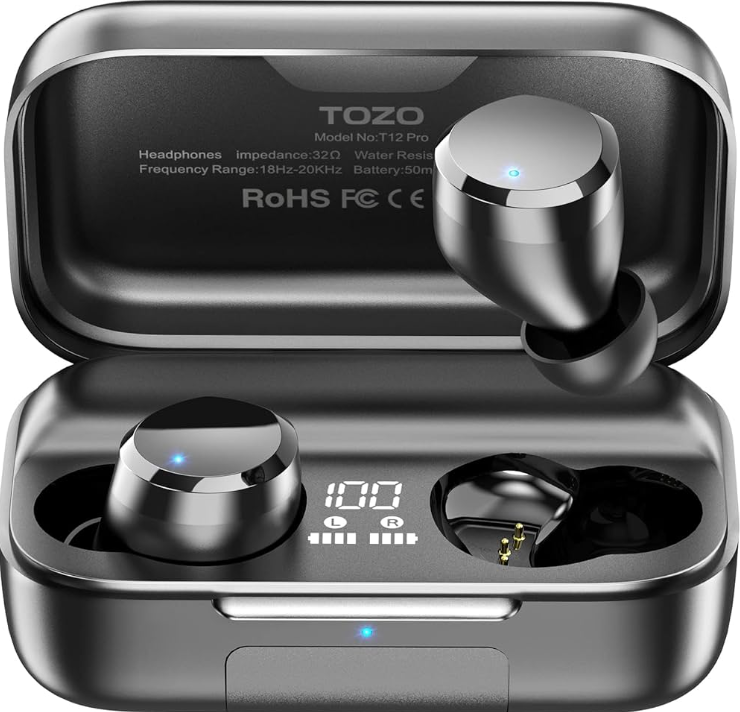
Introduction
The tozo T12 Pro Earbuds represent a high-end solution for true wireless audio, engineered to deliver exceptional sound quality, extended battery life, and advanced features tailored to today’s active lifestyles. Equipped with the latest Qualcomm QCC3040 chip and aptX audio codec, these earbuds offer crystal-clear, high-fidelity audio with deep bass and crisp treble, making them ideal for audiophiles and casual listeners alike.
Designed for people on the go, fitness enthusiasts, commuters, and remote workers, the tozo T12 Pro combines IPX8 waterproof rating with intuitive touch controls and noise reduction technology (CVC 8.0), ensuring a seamless listening experience even during workouts or outdoor activities. The lightweight design and multiple ear tip sizes provide a secure and comfortable fit for extended wear.
One of the standout features is the massive 2500mAh charging case that supports wireless charging and provides up to 160 hours of total playtime—far exceeding typical earbuds in this category. The earbuds themselves offer around 12 hours of continuous music playback on a single charge.
Available in sleek black, the tozo T12 Pro earbuds are competitively priced within the mid-range segment, usually retailing around $70 to $90, making them an attractive option for those seeking premium features without breaking the bank. They are widely available online through official stores and major retailers.
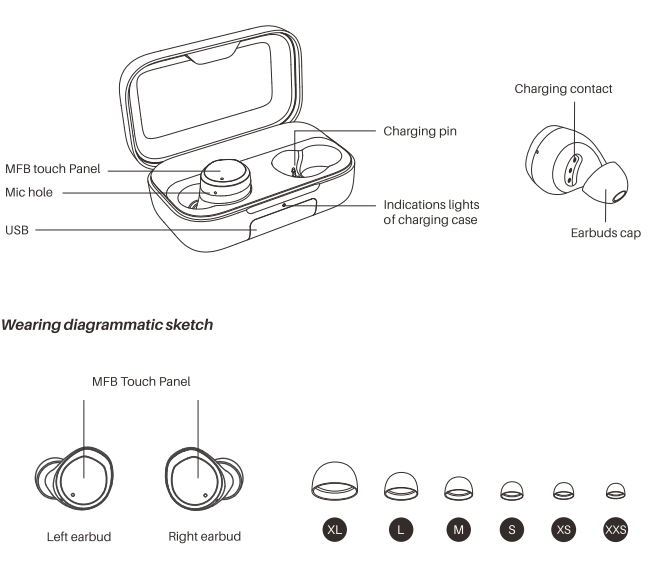
Product diagrammatic sketch
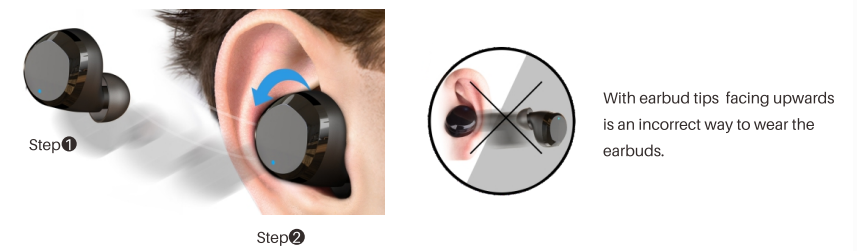
Wearing Steps
Step 1:
Ensure the earbud tip facing downwards, then place earbuds into ear.
Step 2:
Rotate earbuds back to auricle side to fit snugly.
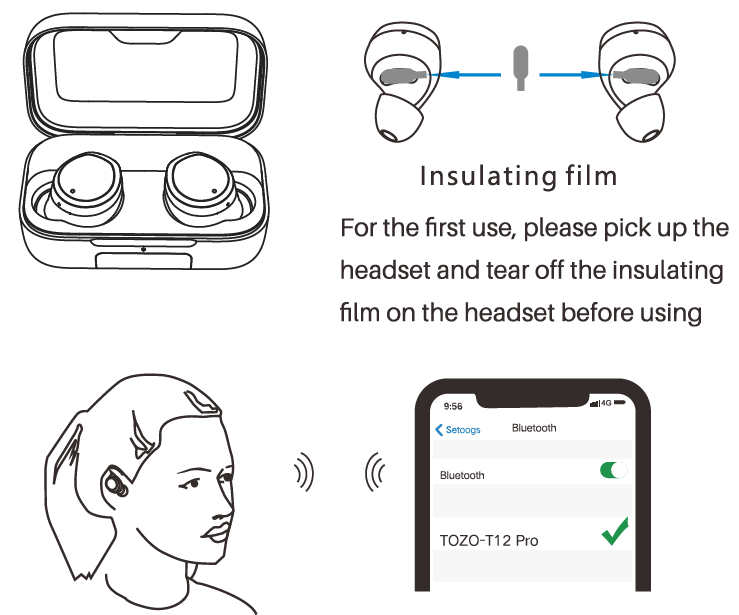
Operation of earbuds
How to pair
- Open the charging case, the two earbuds will automatically turn on and automatically connect to each other within 10 seconds.
- The left earbud flashes red and blue alternately(pairing mode).
- Search for pairing name[TOZO-T12 Pro] and select in your mobile.
- Smart charging case, after successfully connecting to the phone for the first time, you only need to open the charging case cover to use it again, and the earbud will automatically connect to the phone.
Another method of turning on & turning off Turn on:
Turn off:
- Press and hold the touch button for about 3 seconds to turn on (the headset is turned off without the charging case)
- When the headset is not playing music, press and hold the touch button for about 5 seconds to turn off.
Clear pairing list
In the pairing mode of the left and right earbuds, double-click and press the MFB button for 2 seconds.
Reset
Automatic reset when charging.
Charging case to charge mobile phones
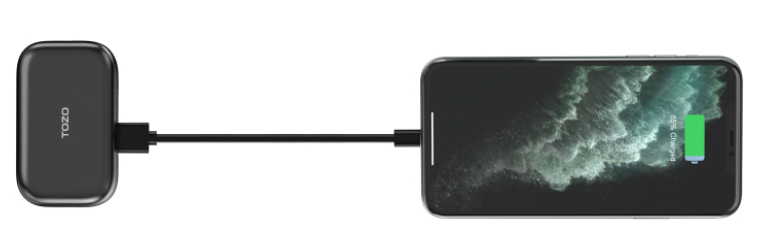
The charging case has large battery capacity, which can charge the mobile phone in an emergency.
Note: If only one of the two earbuds has sound, please put both earbuds into the charging case, and then take them again. If there is still no sound, please make sure the earbuds are in the pairing state and then press the touch button times quickly, then press and hold for 3S until it turns off (both headsets require the same operation), then put it back charging case and close the lid for 3S, take out the earbuds again to complete the setting.
Specification
- Support Bluetooth profile
- A2DP,AVRCP,AVDTP,AVCTP,HFP,SPP,HSP, TDS, MAP,PBAP,GAVDP,OPPV, RFCMM
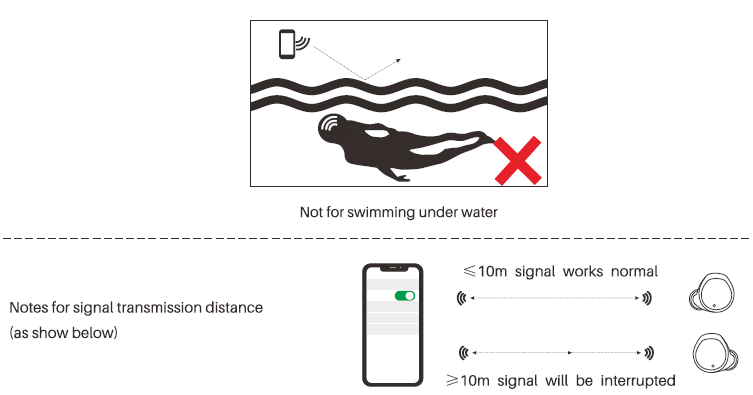
- Transmission Distance
- 210m
- Bluetooth working frequency
- 2.402GHz~2.480GHz
- Speaker type
- Ф10mm, 329*2
- Max power
- 25 mW
- Standby time
- 1 month
- Call time
- 5 hours (80% volume)
- Music playback time
- 8 hours (50% volume)
- Earbuds battery capacity
- 3.7V / 50mAh
- Charging time of earbuds
- 1.5 hours
Charging time of the charging case
- Type-C charging: 3.5 hours
- Wireless charging: 10 hours
Weight
- Charging case:104.5g(Bare case), earbuds : 6.4g(single)
- Size of the charging case
- 80x49x31 ÷0.5mm
Waterproof
- Waterproof for daily use (sweating, rain, washing face, showering, having a bath, etc, but not for swimming under water +)
- Please note that the phone's Bluetooth signal can not be transmitted underwater.
Troubleshooting tozo T12 Pro Earbuds: Solutions for Common Issues
Users may encounter occasional issues such as pairing difficulties, audio dropouts, or charging problems with the tozo T12 Pro earbuds. Below are common problems and their solutions:
- Pairing issues: Ensure the earbuds are fully charged, then open the charging case to activate pairing mode. If the left earbud flashes red and blue alternately, select "TOZO-T12 Pro" in your phone’s Bluetooth settings. To clear the pairing list, double-click and hold the multifunction button (MFB) for 2 seconds on both earbuds.
- Audio dropouts or latency: Confirm your device supports Bluetooth 5.0 and aptX codec. Keep the earbuds within 10 meters of the source device and avoid obstructions.
- Charging problems: Use the supplied USB-C cable or wireless charger for the case. Check for debris in charging contacts. The earbuds automatically reset when placed in the charging case.
- Call quality issues: Activate CVC 8.0 call noise cancellation and position the earbuds properly in your ear for clear microphone reception.
Preventive measures include regularly cleaning the earbuds, updating your device’s Bluetooth software, and storing earbuds in the charging case when not in use. The tozo T12 Pro comes with a limited warranty; for technical support, customers can contact TOZO’s official support via their website or authorized retailer channels.
Pros & Cons of tozo T12 Pro Earbuds: Honest Evaluation
Pros
- Exceptional battery life: Up to 160 hours total with wireless charging case—ideal for extended use without frequent recharging.
- High-quality sound: Qualcomm QCC3040 chip with aptX codec delivers clear highs, strong bass, and minimal distortion.
- Waterproof and durable: IPX8 rating protects against sweat and water immersion, suitable for sports and outdoor activities.
- Advanced noise cancellation: CVC 8.0 reduces background noise during calls for improved clarity.
- Wireless charging support: Convenient charging case with USB-C and wireless charging compatibility.
Cons
- Bulky charging case: Larger size due to 2500mAh battery may be less pocket-friendly compared to competitors.
- Sharp highs for sensitive ears: Some users report slightly bright treble that may cause discomfort.
- No dedicated app: Lack of an equalizer app limits sound customization options.
- Bluetooth version 5.0: While stable, it is not the latest Bluetooth 5.3 found in some rivals.
Compared to the original TOZO T12, the Pro model offers significantly longer battery life, active noise reduction, and aptX support, representing great value for the price.
Customer Reviews of tozo T12 Pro Earbuds: Real User Feedback
Users consistently praise the tozo T12 Pro earbuds for their outstanding battery longevity and sound quality. Many reviewers highlight the crisp, balanced audio and effective noise cancellation during calls, giving an average rating of 4.5 out of 5 stars.
Common compliments focus on the comfortable fit and waterproof rating, which suits gym use and outdoor activities well. The wireless charging case and digital battery display also receive positive remarks for convenience.
On the downside, some users mention the earbuds’ treble as being too sharp for sensitive ears, and a few report initial Bluetooth pairing challenges that were resolved with firmware updates or resetting. Overall, customers recommend the tozo T12 Pro as an excellent mid-tier option for those seeking quality wireless earbuds with long battery life and advanced features.
Faqs
How do I set up my tozo T12 Pro Earbuds for the first time?
What should I do if my tozo T12 Pro Earbuds are not connecting to my phone?
How can I use touch controls on tozo T12 Pro Earbuds to manage calls and music?
Are tozo T12 Pro Earbuds compatible with wireless charging pads?
How long does the battery last on tozo T12 Pro Earbuds during music playback?
What waterproof rating do the tozo T12 Pro Earbuds have, and can I use them while exercising?
How do I clean and maintain my tozo T12 Pro Earbuds to ensure longevity?
What can I do if my tozo T12 Pro Earbuds experience call quality or noise cancellation issues?
More tozo manuals
- How to Pair: Tozo Open Ear Earbuds User Manual
- Pairing: Tozo T12 Stereo Earbuds Instruction Guide
- How to Pair: Tozo T6 Stereo Earbuds Instruction Guide
- How to Pair: Tozo T9 True Wireless Stereo Earbuds User Manual
- How to Pair: Tozo OPEN-EAR AIR CONDUCTION SPORT HEADPHONES User Manual
- How to Pair: Tozo T10 True Wireless Stereo Earbuds Instruction Guide
Leave a Comment