
Version 10.0 Roku TV User Manual
Content
Introduction to Roku Version 10.0 Roku TV
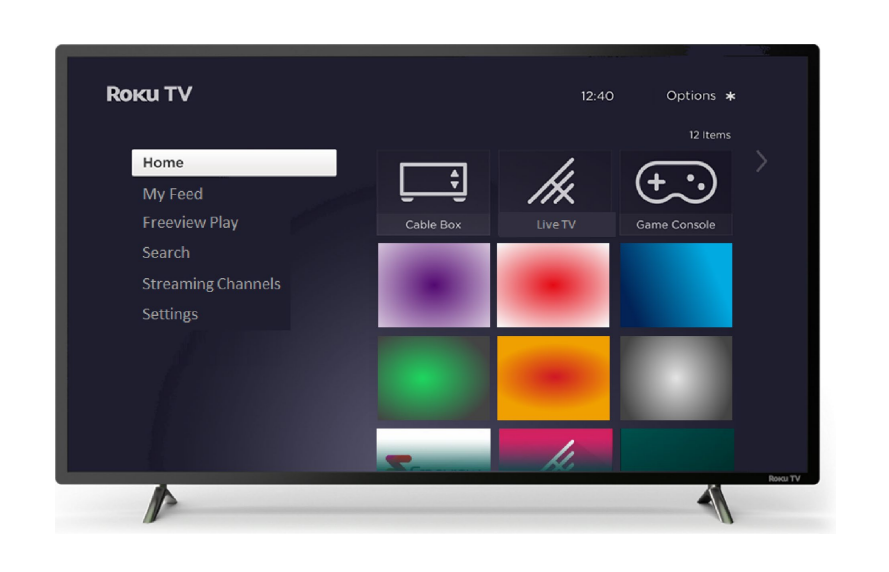
Roku Version 10.0 Roku TV is a smart TV platform update designed to make streaming faster, simpler, and more personalized. Built around Roku’s familiar home screen and content-first interface, it brings together live TV, on-demand movies, free channels, sports, and app-based entertainment in one place. This makes it a strong choice for households that want an easy-to-use smart TV experience without a complicated setup process.
The biggest benefits include quick access to popular streaming apps, improved Live TV Channel Guide controls, expanded Apple AirPlay support on compatible models, and continued automatic software updates that keep the TV current over time. Roku Version 10.0 Roku TV is especially appealing for families, cord-cutters, and casual viewers who want an affordable, all-in-one entertainment hub. It also works well for bedrooms, apartments, dorm rooms, and secondary TVs where simplicity matters more than advanced customization.
Estimated pricing varies by brand, screen size, and panel type, but Roku TV sets with this software experience are typically found in the budget to mid-range segment, often starting around the low hundreds and rising depending on display size and features. Availability is broad across major retail channels and online marketplaces, with support for many TV brands that license the Roku TV operating system. For buyers comparing smart TV platforms, Roku Version 10.0 Roku TV stands out for its clean interface, strong content discovery tools, and low learning curve.
Specifications for Roku Version 10.0 Roku TV
- Operating system: Roku TV software version 10.0 with automatic updates
- Streaming support: Popular free, subscription, and live TV apps in one interface
- Voice control: Supported on compatible remotes and the Roku mobile app
- Apple compatibility: Expanded AirPlay support on most compatible devices
- Live TV integration: Access to Live TV Channel Guide on supported Roku TVs
- Content discovery: Search, recommendations, Continue Watching, and What to Watch tools
- Connectivity: Wi-Fi networking, HDMI inputs, USB support on many models, and mobile app pairing
- Screen sharing: Supported on compatible Roku TV models through Apple ecosystem features
- Performance: Smooth navigation, quick app launching, and improved streaming responsiveness
- Comparison: Simpler and more streaming-focused than many Android TV and Fire TV interfaces
In practical use, Roku Version 10.0 Roku TV is designed for fast menu navigation and reliable app access rather than heavy customization. Compared with other smart TV systems, it emphasizes ease of use, broad channel availability, and straightforward content search.
Detailed Description of Roku Version 10.0 Roku TV
Roku Version 10.0 Roku TV functions as a smart entertainment platform that organizes streaming content around the user’s viewing habits. Instead of forcing viewers to jump between apps, it surfaces movies, shows, live channels, and free programming from a single home screen. Users can search across services, browse recommendations, and resume unfinished titles through a unified interface.
The system is built for real-world everyday use. A family can switch from broadcast TV to streaming news in seconds, while sports fans can browse live and upcoming games more easily. The platform also supports voice features on compatible devices, making it easier to launch apps, search titles, or control playback without typing. Build quality depends on the TV manufacturer, but the Roku interface itself is known for being lightweight, responsive, and stable across a wide range of televisions.
User experience is one of its biggest strengths. The layout is simple, the menus are easy to understand, and the content suggestions help users discover new programming without feeling overwhelmed. This makes Roku Version 10.0 Roku TV a practical choice for both first-time smart TV buyers and users upgrading from older streaming platforms.
Setup Guide for Roku Version 10.0 Roku TV
- Unbox the television, attach the stand or mount it securely, and place it on a stable surface.
- Connect the TV to power and turn it on using the included remote.
- Follow the on-screen language, region, and network setup prompts.
- Connect to a Wi-Fi network or use wired networking if the model supports it.
- Sign in to or create a Roku account to activate the TV and sync preferences.
- Add streaming apps from the channel store and log in to your subscriptions.
- Pair compatible remotes, smartphones, or voice assistants if your model supports them.
- Adjust picture, sound, and accessibility settings to match your preferences.
For best results, place the TV near a reliable internet connection and keep the firmware updated. If pairing fails, restart the TV and remote, then repeat the setup. Avoid blocking ventilation openings and keep the television away from heat sources or moisture. If wall mounting, use the correct bracket size and follow the manufacturer’s load rating carefully.
Troubleshooting Roku Version 10.0 Roku TV
Common issues usually involve network connectivity, remote pairing, app crashes, or delayed response after updates. If the TV will not connect to Wi-Fi, restart the router, move the TV closer to the access point, and re-enter the password carefully. If a streaming app freezes or fails to load, remove and reinstall the app, then reboot the television.
For error-related problems, general fixes include performing a system restart, checking for software updates, and resetting network settings when needed. If the remote becomes unresponsive, replace the batteries, reseat them, or pair the remote again. Preventive care includes keeping the software current, maintaining a strong internet signal, and avoiding power interruptions during updates.
Warranty and support options depend on the TV manufacturer, since the hardware is produced by partner brands. Users typically have access to manufacturer support, Roku help resources, and retailer warranty channels. For assistance, check the support section in the TV settings menu or contact the brand that sold the television.
Pros and Cons of Roku Version 10.0 Roku TV
Pros
- Easy-to-use interface that is ideal for beginners and non-technical users
- Strong content discovery tools with broad streaming app support
- Automatic updates help keep the TV current over time
- Good value for money, especially in budget and mid-range TV categories
- Useful live TV integration for cord-cutters and free-streaming users
- Works well as a simple family TV, bedroom TV, or guest-room display
Cons
- Less customizable than some Android TV platforms
- Hardware performance depends heavily on the TV brand and model
- Some advanced users may want more app-side flexibility
- Picture and sound quality vary by manufacturer, not just Roku software
- Premium alternatives may offer stronger gaming or smart-home integration
Compared with alternatives, Roku Version 10.0 Roku TV is best for users who want simplicity and low setup friction rather than a highly technical smart TV ecosystem.
Customer Reviews for Roku Version 10.0 Roku TV
Average user sentiment is generally positive, with many buyers rating the experience around 4 to 5 stars for ease of use and fast access to streaming content. Common praise includes the clean interface, quick navigation, and helpful search features. One typical comment is: “It took minutes to set up, and everything my family watches is easy to find.”
Frequent complaints focus on app performance differences between TV brands and occasional Wi-Fi issues in weak signal areas. Another common review notes: “The software is great, but the TV’s built-in speakers are only average.” Overall, most users recommend Roku Version 10.0 Roku TV for casual streaming, family use, and value-focused purchases. Buyers looking for premium picture processing or advanced gaming features may prefer to compare it with higher-end smart TV platforms before purchasing.
Faqs
How do I set up roku Version 10.0 Roku TV for the first time?
What should I do if roku Version 10.0 Roku TV is stuck on the startup or loading screen?
How do I connect roku Version 10.0 Roku TV to Wi‑Fi without losing activation or setup progress?
Does roku Version 10.0 Roku TV support Apple AirPlay and HomeKit?
Why are channels missing on roku Version 10.0 Roku TV after setup?
How can I improve the performance of roku Version 10.0 Roku TV if apps are slow or buffering?
What live TV and smart features are included with roku Version 10.0 Roku TV?
How often should I maintain roku Version 10.0 Roku TV, and what care steps matter most?
More roku manuals
Leave a Comment