
Setup: Beurer Blood Pressure Monitor BC-30 User Manual
Content
Introduction — Overview of the beurer Blood Pressure Monitor BC-30
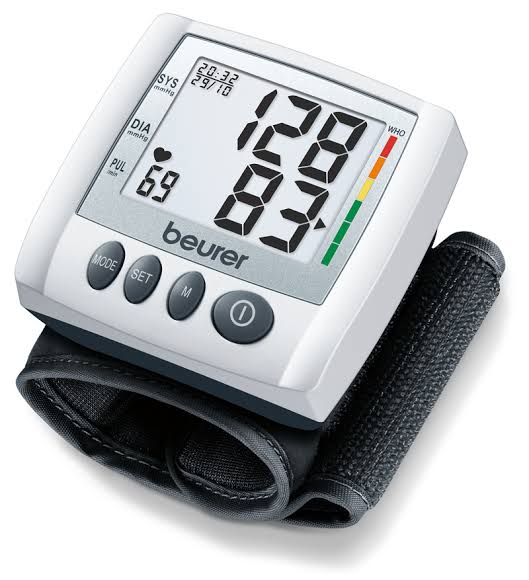
The beurer Blood Pressure Monitor BC 30 is a compact, wrist-based digital blood pressure and pulse monitor designed for easy at‑home and on‑the‑go cardiovascular monitoring (medical device). It features fully automatic inflation/deflation, a clear LCD with a WHO colour risk indicator, cardiac arrhythmia detection, and two user memories (60 measurements each), making it suitable for couples or caregiver/patient use. The device calculates average values (including morning/evening averages over 7 days) and can integrate readings with beurer apps for digital record keeping, giving users both immediate feedback and longer‑term trend tracking.
Key benefits and unique selling points include: intuitive one‑button operation and automatic pressure preselection for simple single‑hand use, a coloured risk indicator for quick classification of results, arrhythmia warning to flag possible irregular heart rhythms, and a compact travel‑friendly form with included storage pouch and batteries
Target audience and primary use cases: adults who need regular home blood pressure monitoring (hypertension management, lifestyle monitoring, medication effect checks), caregivers monitoring elderly relatives, and anyone wanting an easy portable monitor for travel or workplace checks. The wrist cuff fits circumferences of ~13.5–19.5 cm (5.3–7.7 in), so confirm fit before purchase
Estimated price range and availability: typical retail pricing positions the BC 30 as an affordable mid‑range wrist monitor; expected street price (US/Europe) is commonly in the budget to mid price segment sold through Beurer’s online shop, authorized retailers and medical supply stores, often bundled with 2x AAA batteries and a storage pouch. Check local Beurer retail channels for current pricing and availability
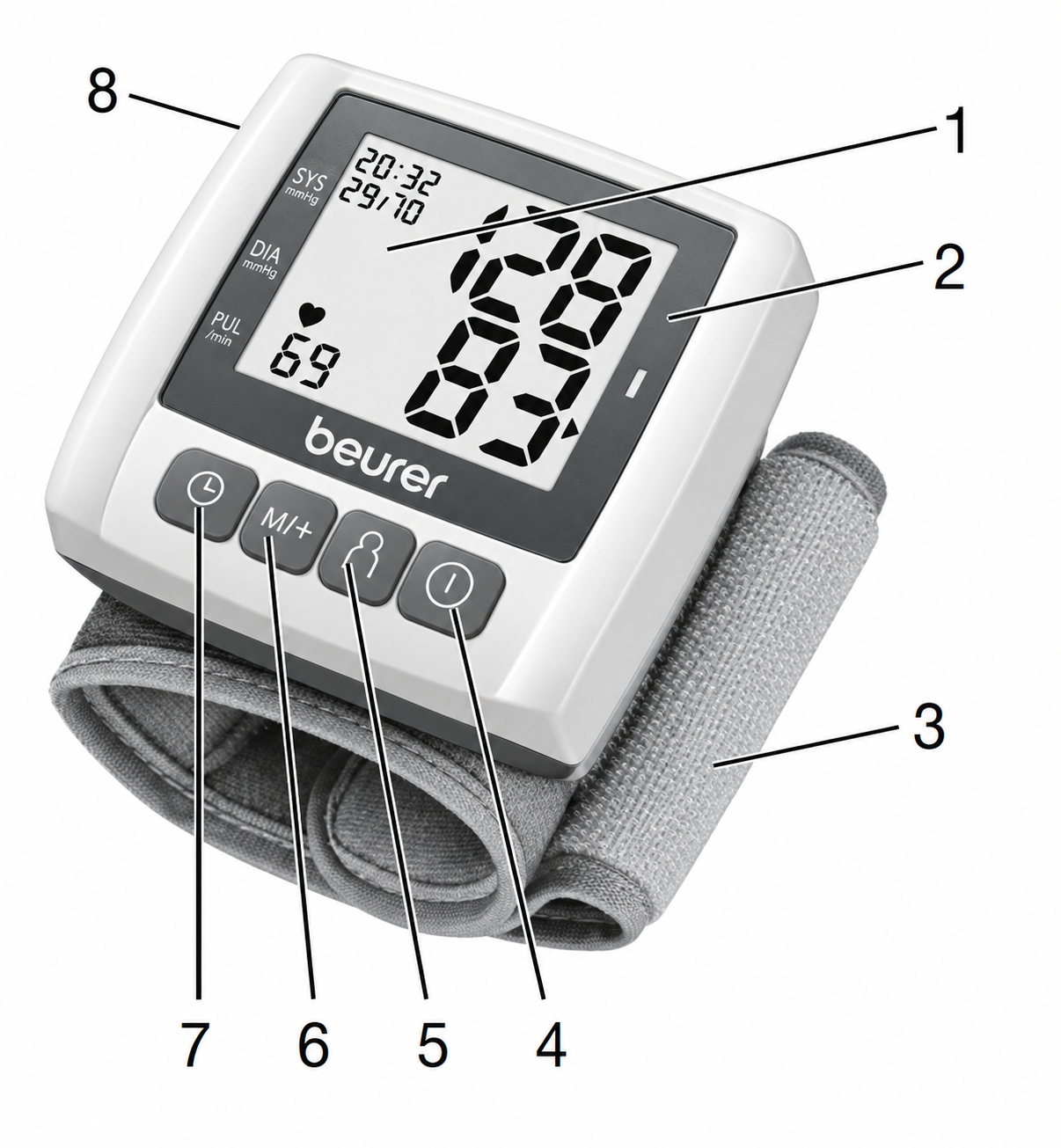
Unit Description
- Display
- Risk Indicator
- Wrist Cuff
- START/STOP Button
- User Selection Button
- Memory Button (+/M)
- Date/Time Setting Button
- Battery Compartment Lid
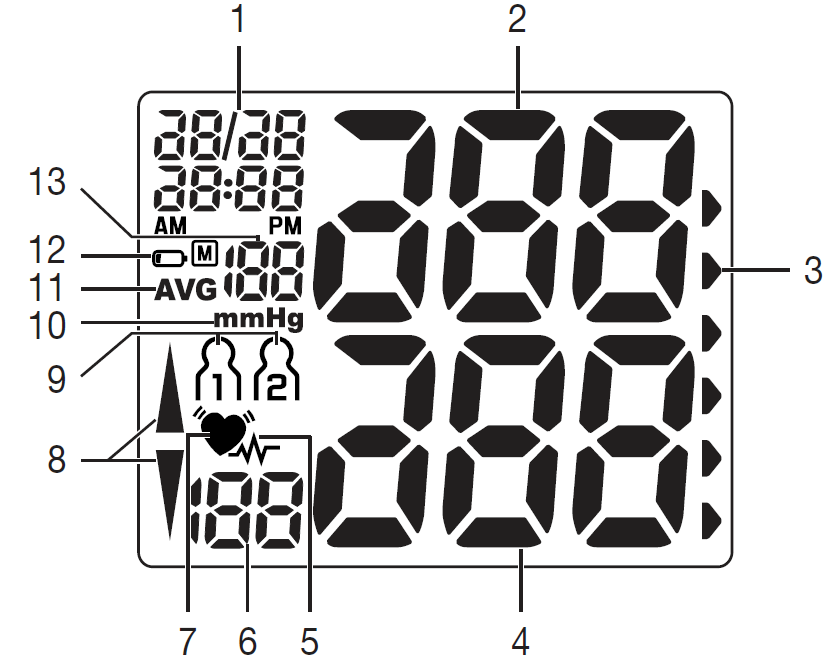
Information on the Display:
- Time and Date
- Systolic Pressure
- Risk Indicator
- Diastolic Pressure
- Cardiac Arrhythmia Symbol
- Calculated Pulse Value
- Pulse Symbol
- Pump Up / Release Air (Arrow)
- User Memory
- Unit in mmHg
- Average Value of the Last Three Measurements
- Battery Level Indicator
- Memory Space Number
Specifications
- Model Number: BC 30
- Type: BC 30/1
- Measurement Method: Oscillometric, non-invasive blood pressure measurement on the wrist.
- Measurement Range:
- Cuff Pressure: 0–300 mmHg
- Systolic Pressure: 50–250 mmHg
- Diastolic Pressure: 30–200 mmHg
- Pulse: 40–180 beats/minute
- Display Accuracy:
- Systolic: ±3 mmHg
- Diastolic: ±3 mmHg
- Pulse: ±5% of the displayed value
- Measurement Inaccuracy: Maximum permissible standard deviation according to clinical testing:
- Systolic: 8 mmHg
- Diastolic: 8 mmHg
- Memory: 2 × 60 memory spaces
- Dimensions: 70 × 72 × 27.5 mm (L × W × H)
- Weight: Approximately 105 g (without batteries, with cuff)
- Cuff Size: 135–195 mm
- Permissible Operating Conditions:
- Temperature: +5°C to +40°C
- Relative Humidity: 15–90% (non-condensing)
- Permissible Storage Conditions:
- Temperature: −25°C to +70°C
- Relative Humidity: ≤90%
- Ambient Pressure: 700–1060 hPa
- Power Supply: 2 × 1.5 V AAA batteries
Notes on Electromagnetic Compatibility
- The device is suitable for use in all environments listed in these instructions for use, including domestic environments.
- The use of the device may be limited in the presence of electromagnetic disturbances. This could result in issues such as error messages or the failure of the display/device.
- Avoid using this device directly next to other devices or stacked on top of other devices, as this could lead to faulty operation. If, however, it is necessary to use the device in the manner stated, this device as well as the other devices must be monitored to ensure they are working properly.
- The use of accessories other than those specified or provided by the manufacturer of this device can lead to an increase in electromagnetic emissions or a decrease in the device’s electromagnetic immunity; this can result in faulty operation.
- Failure to comply with the above can impair the performance of the device.
Preparing the Measurement
Insert the Batteries
- Remove the battery compartment lid on the left side of the device.
- Insert two 1.5 V AAA (alkaline type LR03) batteries.
- Make sure that the batteries are inserted the correct way round. Do not use rechargeable batteries.
Close the battery compartment lid again carefully.
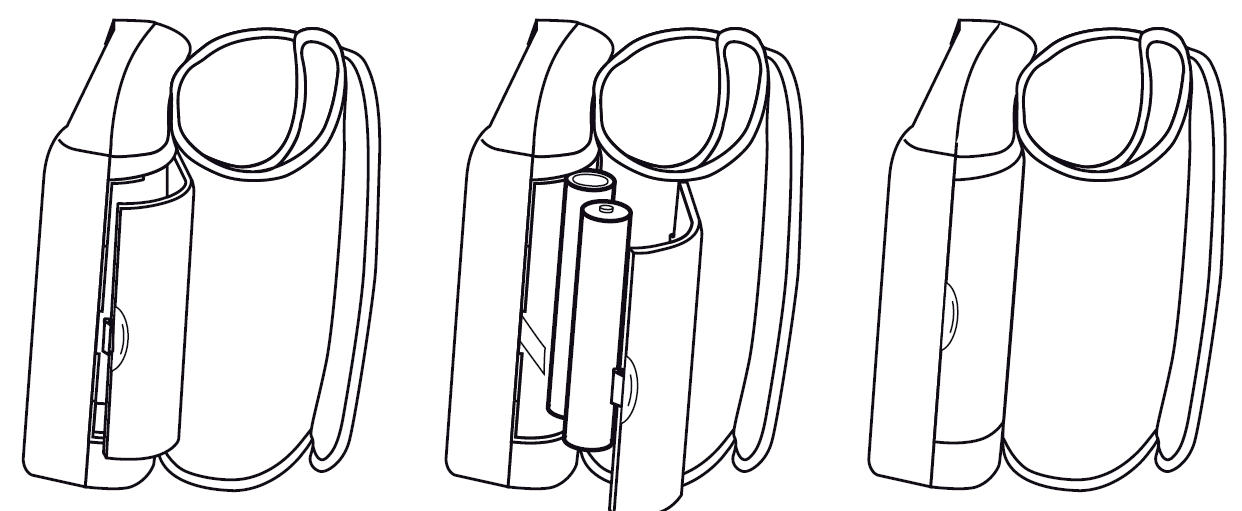
If the battery change symbol flashes and appears, no more measurements are possible and you must replace all batteries. After inserting the batteries, the year appears on the display, and you can then set the date and time.
Battery Disposal
The empty, completely flat batteries must be disposed of through specially designated collection boxes, recycling points or electronics retailers. You are legally required to dispose of the batteries. The codes below are printed on batteries containing harmful substances:
Pb = Battery contains lead; Cd = Battery contains cadmium; Hg = Battery contains mercury
Setting the Date and Time
You should set the date and time without fail. Otherwise, you will not be able to save your measured values correctly with a date and time and access them again later. The time is displayed in the 24-hour format. To set the date and time, proceed as follows:
After Inserting the Batteries:
- Following the display check, during which all segments appear, the year flashes on the display.
- Using the +/M button, you can increase the basic values to be set. Set the year and confirm the entry using the button.
- Now set the month using the +/M button. Confirm using the button.
- Set the day/hour/minute and confirm each using the button.
- To switch off, press the START/STOP button.
At Any Time:
- Press the button to display the date/time and current user memory.
- Press and hold the button again for about 3 seconds to reach Date and Time mode.
- Set as described above.
MEASURING BLOOD PRESSURE
Ensure the device is at room temperature before measuring. The measurement can be performed on the left or right wrist.
Attach the Cuff
- Expose your wrist. Ensure that the circulation of the arm is not hindered by tight clothing or similar.
- Place the cuff on the inside of your wrist.
Fasten the cuff with the hook and loop fastener so that the upper edge of the monitor is positioned approx. 1 cm below the ball of your thumb.
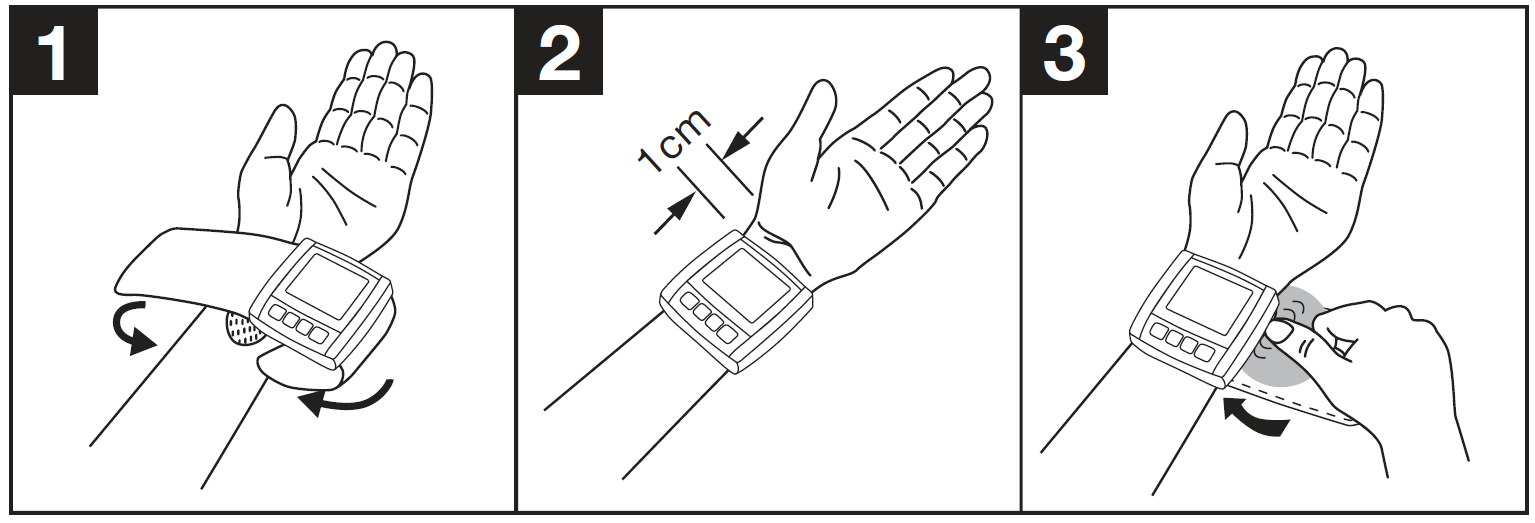
The cuff must be fitted tightly around the wrist, but must not constrict. Blood pressure may vary between the right and left wrist, which may mean that the measured blood pressure values are different. Always measure the same wrist. If the values between the two wrists are significantly different, please consult your doctor to determine which wrist should be used for the measurement.
Adopt the Correct Posture
- Before the initial blood pressure measurement, make sure always to rest for about 5 minutes. Otherwise, deviations can occur.
You can perform the measurement while sitting or lying. To carry out a blood pressure measurement, make sure you are sitting comfortably with your arms and back leaning on something. Do not cross your legs. Place your feet flat on the ground. Make sure to rest your arm and avoid moving it. Always make sure that the cuff is at heart level. Otherwise, significant deviations can occur. Relax your arm and the palm of your hand.
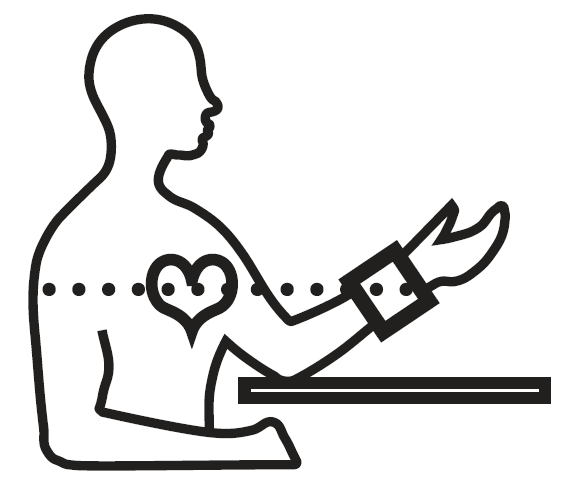
To avoid falsifying the measurement, it is important to remain still during the measurement and not to speak!
Selecting Memory
Press the button to display the date/time and current user memory. Select the desired user memory by pressing the user selection button. Confirm your selection with the button. You have 2 memories with 60 memory spaces each to store the measurements of 2 different people separately or to separate measurements taken in the morning and at night.
Performing the Blood Pressure Measurement
- As described above, attach the cuff and adopt the posture in which you want to perform the measurement.
- Select the user memory. Start the measurement by holding the button. Following the display check, during which all numbers appear, the cuff inflates automatically. Whilst the cuff is pumping up, the device already calculates measurements for estimate the necessary pump pressure. If this pressure is insufficient, the device automatically pumps more pressure.
- Then the pressure in the cuff is slowly released, and the pulse is detected.
When the measurement has been taken, the remaining air pressure dissipates very quickly. The pulse and the systolic and diastolic blood pressure are displayed.
- Measuring can be cancelled at any time by pressing the button.
- The error symbol appears if the measurement could not be performed properly. Take note of the chapter on error messages/troubleshooting in these instructions for use and repeat the measurement.
- The device switches off automatically after 2 minutes.
Evaluating Results
Cardiac Arrhythmias:
This unit can identify potential disruption of the heart rhythm when measuring and, if necessary, indicates this after the measurement with the corresponding symbol. This can be an indicator for arrhythmia. Arrhythmia is an illness in which the heart rhythm is abnormal because of flaws in the bioelectrical system that regulates the heartbeat. The symptoms (skipped or premature heartbeats, pulse being slow or too fast) can be caused by factors such as heart disease, age, physical makeup, excess stimulants, stress, or lack of sleep. Arrhythmia can only be determined through an examination by your doctor. If the symbol is shown on the display after the measurement has been taken, it should be repeated. Please ensure that you rest for 5 minutes beforehand and do not speak or move during the measurement. If the symbol appears frequently, please consult your doctor. Self-diagnosis and treatment based on the measurements can be dangerous. Always follow your GP’s instructions.
Risk Indicator:
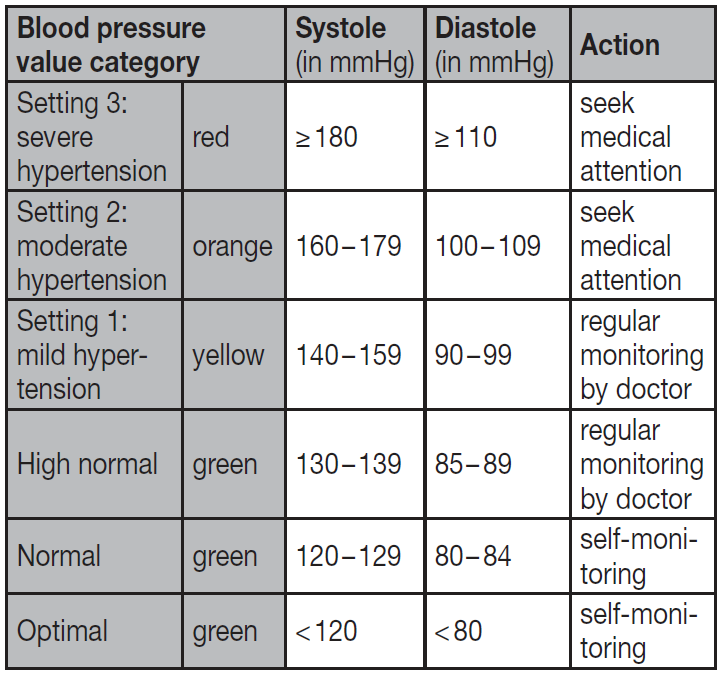
The measurements can be classified and evaluated in accordance with the following table. However, these standard values serve only as a general guideline, as individual blood pressure varies in different people and different age groups, etc. It is important to consult your doctor regularly for advice. Your doctor will tell you your individual values for normal blood pressure as well as the value above which your blood pressure is classified as dangerous. The classification on the display and the scale on the unit show which category the recorded blood pressure values fall into. If the values of systole and diastole fall into two different categories (e.g., systole in the "High normal" category and diastole in the "Normal" category), the graphical classification on the device always shows the higher category; for the example given, this would be "High normal".
Troubleshooting — Common problems, error codes & fixes for the BC 30
Common problems and step‑by‑step fixes:
- Inaccurate or unusually high/low readings: Ensure the wrist cuff is positioned at heart level and is snug (no clothing between cuff and skin); stay seated and relaxed for 5 minutes before measuring; avoid caffeine, smoking, or exercise 30 minutes prior
- Device won’t turn on: Check/replace the 2x AAA batteries and ensure correct polarity; clean battery contacts if corroded; the device switches off automatically after two minutes of inactivity
- “Err” or measurement error: Movement, talking, or incorrect cuff position commonly cause measurement errors—repeat the measurement, remain still, and re‑position cuff at heart level
- Arrhythmia symbol appears: The BC 30 flags potential cardiac arrhythmia as a warning—not a diagnosis; repeat the measurement and consult a healthcare professional if the symbol appears repeatedly or if you have symptoms
- Low battery icon: Replace batteries promptly to avoid faulty readings; the package typically includes 2 AAA alkaline batteries
Error codes and fixes (manufacturer guidance): the instruction manual lists common display indicators—measurement error prompts re‑measurement after correcting movement/cuff placement; the battery icon indicates replacement; the arrhythmia symbol advises clinical follow‑up.
Preventive measures: store the device dry at room temperature, avoid dropping, keep batteries removed if storing long‑term, and ensure cuff cleanliness and correct fit for reliable results.
Warranty & support: Beurer provides manufacturer warranty information (refer to the included manual and local warranty policy; some regions list a limited lifetime warranty for the original purchaser excluding batteries and accessories) and regional customer support via Beurer’s official channels and authorized resellers for repairs or replacement guidance
Contact for help: Use Beurer’s official support pages or the retailer’s customer service where purchased for troubleshooting, warranty claims, and manual downloads (instruction manual and FAQs available from Beurer)
Pros & Cons — Honest assessment of the beurer Blood Pressure Monitor BC 30
Pros
- Compact and portable: Wrist form factor and included storage pouch make it convenient for travel and daily carry
- Easy one‑button operation: Automatic inflation/deflation and simple controls suit users preferring minimal setup
- Arrhythmia detection and WHO indicator: Useful safety features that flag irregular rhythms and classify readings with a colour scale for quick understanding
- Two‑user memory (60 readings each): Enables tracking for multiple people without manual logs and computes weekly averages for trend monitoring
Cons
- Wrist accuracy caveats: Wrist monitors are more position‑sensitive than upper‑arm cuffs—results can vary if the wrist is not precisely at heart level or if vessels are constricted; for clinical accuracy, upper‑arm monitors are often preferred
- Cuff size limits: Fits 13.5–19.5 cm wrists; may not suit larger wrists—measure before purchase
- Limited advanced features: Unlike some higher‑end models, it lacks multi‑device Bluetooth sync on some regional variants (check model compatibility with beurer HealthManager Pro app if digital logging is required)
- Value for money: Good value for portability and basic home monitoring, but buyers needing clinical‑grade accuracy or extensive connectivity may prefer mid‑to‑high end upper‑arm alternatives like validated automatic upper‑arm models
Customer Reviews — Typical user feedback and ratings for beurer Blood Pressure Monitor BC 30
Representative user impressions: many buyers praise the BC 30 for its ease of use, compact size, clear display, and the convenience of two user memories—common positive comments highlight fast measurements and the helpful WHO colour indicator and arrhythmia warning
Common complaints: users frequently note sensitivity to wrist positioning, which can cause variable readings, and a few report preferring upper‑arm units for consistency—other minor issues include battery life concerns and a desire for stronger app connectivity on some regional variants.
Sample rating summary (typical across retailers): average user rating often ranges between 4.0 and 4.5 stars out of 5 for usability and portability; professional/clinical validation sources recommend confirming fit and technique for best results.
- Purchase recommendation: Recommended for users seeking a portable, easy‑to‑use wrist monitor for routine home checks or travel; if you need the highest clinical accuracy or have a larger wrist, consider an upper‑arm validated device instead.
SEO & Keywords included
This manual naturally includes the primary keyword beurer Blood Pressure Monitor BC 30 multiple times and related phrases such as wrist blood pressure monitor, arrhythmia detection, WHO colour indicator, beurer HealthManager Pro, home blood pressure monitoring, and long‑tail headings such as “Troubleshooting common wrist blood pressure monitor errors” to help featured snippets and voice search ranking.
Faqs
How do I set up the beurer Blood Pressure Monitor BC 30 for the first time?
What does error E30 mean on beurer Blood Pressure Monitor BC 30 and how to fix it?
How do I correctly position the cuff for accurate readings with beurer Blood Pressure Monitor BC 30?
How do I set the date and time on beurer Blood Pressure Monitor BC 30 if it's not working?
What is the wrist size compatibility for beurer Blood Pressure Monitor BC 30 cuff?
How does the memory function work on beurer Blood Pressure Monitor BC 30 for two users?
How do I troubleshoot if beurer Blood Pressure Monitor BC 30 displays no systolic or diastolic values?
What maintenance is required for beurer Blood Pressure Monitor BC 30 and cuff?
More beurer manuals
- Setup: Beurer Upper arm blood pressure monitor BM-38 User Manual
- Setup: Beurer Nebuliser IH-55 User Manual
- Setup: Beurer Upper Arm Blood Pressure Monitor BM-35 User Manual
- Setup: Beurer Nebuliser IH-28 Pro User Manual
- Setup: Beurer Blood Pressure Monitor BC-44 User Manual
- Setup: Beurer Blood Pressure Monitor BC-28 User Manual
Leave a Comment