
Setup: Beurer Blood Pressure Monitor BC-28 User Manual
Content
Introduction — Overview of the beurer Blood Pressure Monitor BC-28
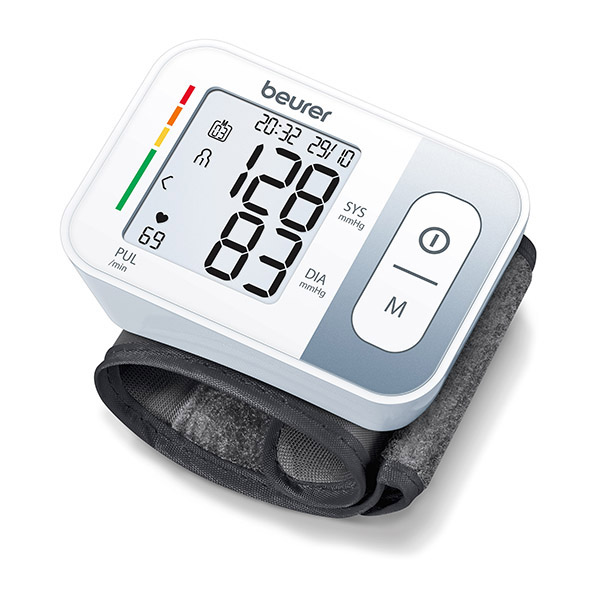
The beurer Blood Pressure Monitor BC 28 is a compact, fully automatic wrist blood pressure monitor designed for convenient self-measurement at home or on the go. It performs oscillometric, non‑invasive measurements of systolic and diastolic pressure plus pulse, displays results on a large, easy-to-read LCD, and classifies readings using a colour risk indicator for quick interpretation.
Key benefits and unique selling points include dual-user storage with 2 × 60 memory slots, automatic pressure preselection and deflation, arrhythmia detection that flags possible irregular heartbeats, and built‑in averaging functions (overall average and 7‑day morning/evening averages) to track trends over time. The device is lightweight (around 92 g without batteries), powered by two AAA/AA batteries (model listings vary), and fitted for wrist circumferences roughly 14.0–19.5 cm.
Target users are adults who need regular home monitoring (hypertensive patients, older adults, fitness-conscious users, or anyone tracking cardiovascular health) and users who prefer a portable wrist unit rather than an upper‑arm monitor. Typical use cases include daily morning/evening checks, travel, medication-effect monitoring, and quick spot measurements between clinical visits.
Estimated price range typically falls into the entry-to-mid consumer bracket (varies by market and retailer); most retailers list the BC 28 as an affordable wrist monitor in the moderate price band (check local suppliers for current pricing and availability). The product is widely available through Beurer’s site and authorized retailers in many countries.
Device Description
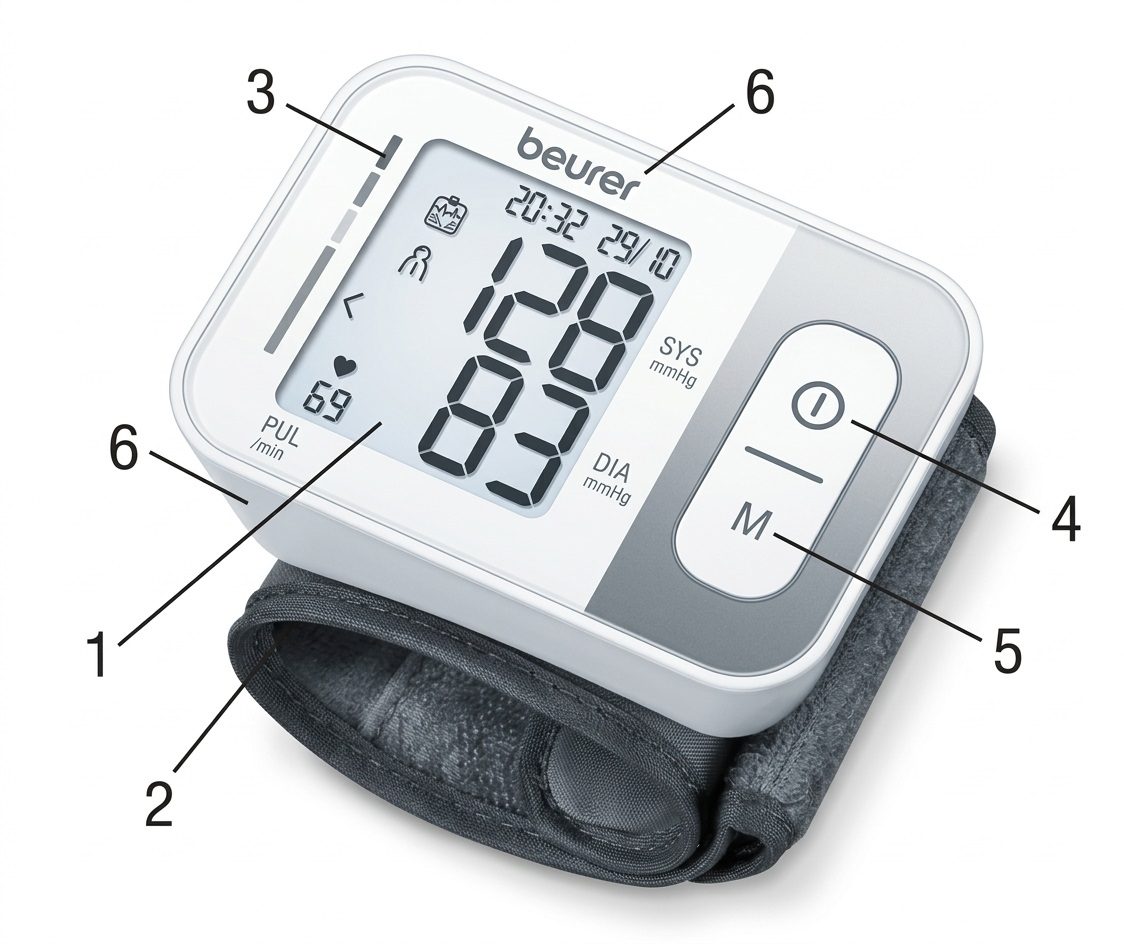
- Display
- Wrist cuff
- Risk indicator
- START/STOP button
- Memory button (M)
- Battery compartment lid
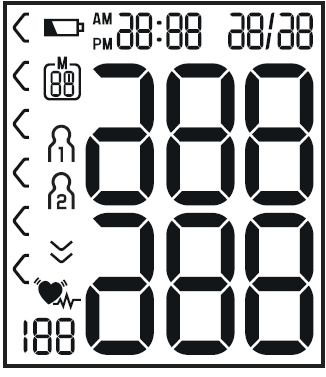
Information on the Display
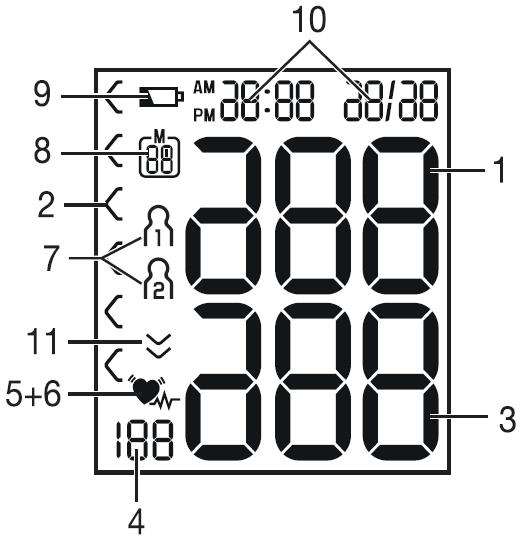
- Systolic pressure
- Risk indicator
- Diastolic pressure
- Calculated pulse rate
- Cardiac arrhythmia symbol
- Pulse symbol
- User memory
- Memory space number / Memory display:
- Average value (A)
- Morning average (AM)
- Evening average (PM)
- Battery replacement symbol
- Time and date
- Release air (arrow)
Quick technical specifications
- Measurement method: Oscillometric, wrist measurement; systolic 60–250 mmHg, diastolic 40–199 mmHg, pulse 40–180 bpm.
- Accuracy: ±3 mmHg for pressure, ±5% for pulse (manufacturer specification).
- Cuff/wrist circumference: Approx. 14.0–19.5 cm.
- Memory: 2 users × 60 measurements; average calculations and 7‑day morning/evening averages.
- Power: 2 × 1.5 V AAA/AA batteries; battery life ~170 measurements (varies by source).
- Included accessories: storage box, user manual and batteries (varies by retailer).
Intended Use
The wrist blood pressure monitor serves as a non-invasive way of measuring and monitoring arterial blood pressure and pulse values in adults with wrist circumferences of 14–19.5 cm. This allows you to quickly and easily measure your blood pressure and pulse, save the measurements, and display the development of the measurements. The recorded values are classified and evaluated graphically. You are also warned of possible existing cardiac arrhythmia.
Notes on Use
- In order to ensure comparable values, always measure your blood pressure at the same time of day.
- Do not measure within 30 minutes of eating, drinking, smoking, or exercising.
- Before the initial blood pressure measurement, make sure to rest for about 5 minutes.
- Furthermore, if you want to take several measurements in succession, make sure to wait for at least 1 minute between the individual measurements. Repeat the measurement if you are unsure of the measured value.
- The measured values taken by you are for your information only. They are no substitute for a medical examination. Discuss the measured values with your doctor and never base any medical decisions on them (e.g., medicines and their dosages).
- Using the blood pressure monitor outside your home environment or while on the move (e.g., while travelling in a car, ambulance, or helicopter, or while undertaking physical activity such as playing sports) can influence the measurement accuracy and cause incorrect measurements.
- Do not use the blood pressure monitor on newborns or patients with pre-eclampsia. We recommend consulting a doctor before using the blood pressure monitor during pregnancy.
- In the case of restricted circulation in the arm as a result of chronic or acute vascular diseases (including vascular constriction), the accuracy of the wrist measurement is limited. In this case, you should use an upper arm blood pressure monitor instead.
This device is not intended for use by people (including children) with restricted physical, sensory, or mental skills or a lack of experience and/or knowledge unless they are supervised by a person responsible for their safety or receive instructions from this person on how to use the device. Supervise children around the device to ensure they do not play with it.
- Cardiovascular diseases may lead to incorrect measurements or have a detrimental effect on measurement accuracy. The same applies to very low blood pressure, diabetes, circulatory disorders, arrhythmias, chills, or shaking.
- The blood pressure monitor must not be used in connection with a high-frequency surgical unit.
- Only use the device on people whose wrist circumference is within the specified measurement range.
- Please note that when inflating, the functions of the affected limb may be impaired.
- During the blood pressure measurement, blood circulation must not be stopped for an unnecessarily long time. If the device malfunctions, remove the cuff from the wrist.
- Do not allow sustained pressure in the cuff or frequent measurements. The resulting restriction of blood flow may cause injury.
Instructions for Storage and Maintenance
- The blood pressure monitor is made from precision and electronic components. The accuracy of the measured values and the service life of the device depend on careful handling:
- Protect the device from impacts, humidity, dirt, significant temperature fluctuations, and direct sunlight.
- Do not drop the device.
- Do not use the device in the vicinity of strong electromagnetic fields, and keep it away from radio systems or mobile telephones.
- We recommend removing the batteries if the device will not be used for a prolonged period of time.
Notes on Handling Batteries
- If your skin or eyes come into contact with battery fluid, rinse the affected areas with water and seek medical assistance.
- Choking Hazard: Small children may swallow batteries and choke on them. Therefore, store batteries out of the reach of small children.
- Observe the plus (+) and minus (-) polarity signs.
- If a battery has leaked, put on protective gloves and clean the battery compartment with a dry cloth.
- Protect batteries from excessive heat.
- Risk of Explosion: Do not throw batteries into a fire.
- Do not charge or short-circuit batteries.
- If the device is not to be used for a relatively long period, remove the batteries from the battery compartment.
- Use identical or equivalent battery types only.
- Always replace all batteries at the same time.
- Do not use rechargeable batteries.
- Do not disassemble, split, or crush the batteries.
Notes on Electromagnetic Compatibility
- The device is suitable for use in all environments listed in these instructions for use, including domestic environments.
- The use of the device may be limited in the presence of electromagnetic disturbances. This could result in issues such as error messages or failure of the display or device.
- Avoid using this device directly next to other devices or stacked on top of other devices, as this could lead to faulty operation. If it is necessary to use the device in this manner, monitor this device and the other devices to ensure they are working properly.
- The use of accessories other than those specified or provided by the manufacturer of this device can lead to an increase in electromagnetic emissions or a decrease in the device's electromagnetic immunity. This can result in faulty operation.
- Failure to comply with the above instructions can impair the performance of the device.
Initial Use
Inserting the Battery
- Remove the battery compartment lid on the left side of the device.
- Insert two 1.5 V micro (alkaline type LR03) batteries.
- Make sure that the batteries are inserted correctly according to the polarity markings. Do not use rechargeable batteries.
- Carefully close the battery compartment lid again.
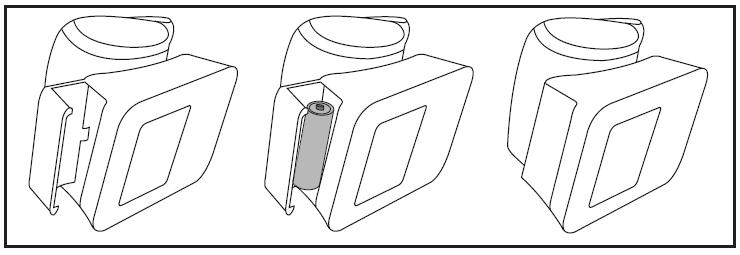
If the battery replacement symbol is displayed, you can no longer perform any measurements and must replace all batteries.
Setting the Hour Format, Date, and Time
It is essential that you set the date and time. Otherwise, you will not be able to save your measured values correctly with a date and time or access them again later.
Before Initial Use and After Each Battery Replacement
When inserting the batteries into the device, you will be taken to the relevant menu automatically. If the batteries have already been inserted: With the device switched off, press and hold the START/STOP button for approximately 5 seconds. In this menu, you can adjust the following settings in succession:

Hour Format
- Press and hold the START/STOP button for 5 seconds or insert the batteries. The full display appears.
- Select the desired hour format using the memory button M and confirm with the START/STOP button.
Date
The year flashes on the display.
- Select the desired year using the memory button M and confirm with the START/STOP button.
The month flashes on the display.
- Select the desired month using the memory button M and confirm with the START/STOP button.
The day flashes on the display.
- Select the desired day using the memory button M and confirm with the START/STOP button.
If the hour format is set to 12h, the day/month display sequence is reversed.
Time
The hours flash on the display.
- Select the desired hour using the memory button M and confirm with the START/STOP button.
The minutes flash on the display.
- Select the desired minute using the memory button M and confirm with the START/STOP button.
Once all the data has been set, the device switches off automatically.
Usage
Ensure the device is at room temperature before measuring. The measurement can be performed on the left or right wrist.
Attaching the Cuff
Expose your wrist. Ensure that the circulation in your arm is not hindered by tight clothing or similar restrictions.
- Place the cuff on the inside of your wrist.
- Fasten the cuff with the hook-and-loop fastener so that the upper end of the display is approximately 1 cm below the heel of your hand.
- The cuff must fit tightly around the wrist but must not constrict it.
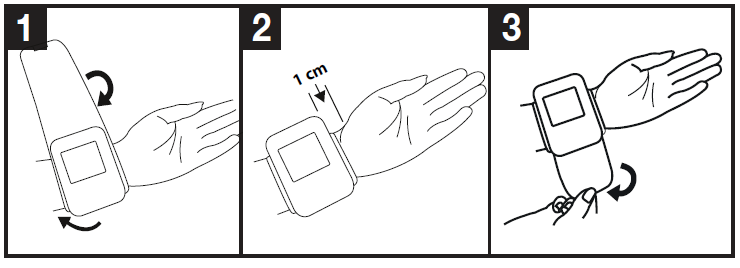
Blood pressure may vary between the right and left arms, which may mean that the measured blood pressure values are different. Always measure the same arm. If the values between the two arms are significantly different, please consult your doctor to determine which arm should be used for the measurement.
Adopting the Correct Posture
- Before the initial blood pressure measurement, make sure to rest for about 5 minutes. Otherwise, deviations can occur.
- You can measure while sitting or lying down. To take your blood pressure, make sure you are sitting comfortably with your arms and back supported. Do not cross your legs. Place your feet flat on the ground. Support your arm and bend it. Always make sure that the cuff is at heart level. Otherwise, significant deviations can occur. Relax your arm and the palm of your hand.
- To avoid falsifying the measurement, it is important to remain still during the measurement and not to speak.
- Wait for at least 1 minute before taking another measurement.
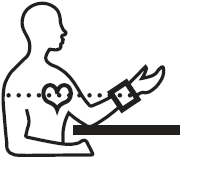
Performing the Blood Pressure Measurement
As described above, attach the cuff and adopt the posture in which you want to perform the measurement.
- Press the START/STOP button to start the blood pressure monitor. All display indicators will illuminate briefly.
- The last measured value is displayed, and the blood pressure monitor automatically begins the measurement after 3 seconds.
You can cancel the measurement at any time by pressing the START/STOP button. As soon as a pulse is detected, the pulse symbol will be displayed.
- Systolic pressure, diastolic pressure, and pulse measurements are displayed.
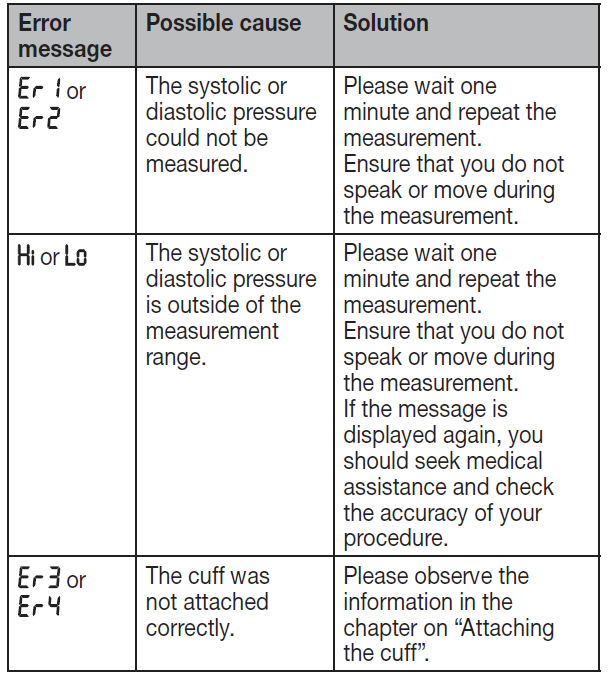
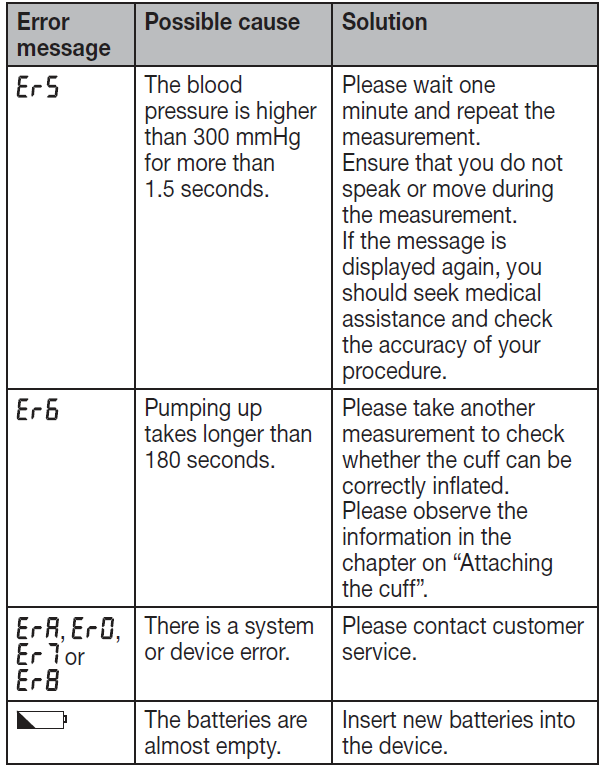
- An error indication appears if the measurement has not been performed properly. Refer to the error messages and troubleshooting section in these instructions for use, and repeat the measurement.
Now select the desired user memory by pressing the memory button M. If you do not select a user memory, the measurement is stored in the most recently used user memory. The relevant user memory symbol appears on the display.
- Press the START/STOP button to switch off the blood pressure monitor. The measurement is then stored in the selected user memory.
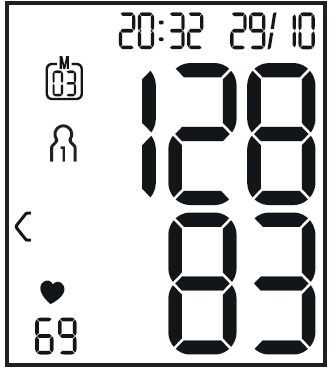
If you forget to turn off the device, it will switch off automatically after approximately 1 minute. In this case, the value is also stored in the selected or most recently used user memory. Wait for at least 1 minute before taking another measurement.
Evaluating Results
Cardiac Arrhythmia
This device can identify potential disruptions of the heart rhythm during measurement and, if necessary, indicates this after the measurement with the cardiac arrhythmia symbol. This can be an indicator of arrhythmia. Arrhythmia is a condition in which the heart rhythm is abnormal because of disturbances in the bioelectrical system that regulates the heartbeat. The symptoms (skipped or premature heartbeats, a pulse that is too slow or too fast) can be caused by factors such as heart disease, age, physical characteristics, excessive stimulants, stress, or lack of sleep. Arrhythmia can only be diagnosed through an examination by your doctor. If the cardiac arrhythmia symbol is shown on the display after the measurement has been taken, repeat the measurement. Please ensure that you rest for 5 minutes beforehand and do not speak or move during the measurement. If the symbol appears frequently, please consult your doctor. Self-diagnosis and treatment based on the measurements can be dangerous. Always follow your doctor's instructions.
Risk Indicator
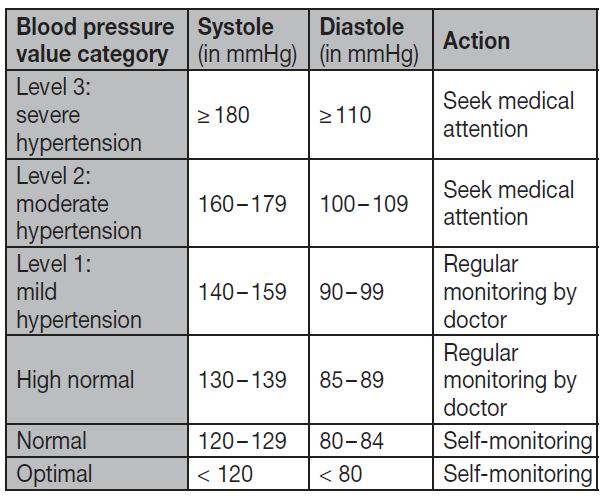
The measurements can be classified and evaluated in accordance with the blood pressure classification table. However, these standard values serve only as a general guideline, as individual blood pressure varies between people and different age groups. It is important to consult your doctor regularly for advice. Your doctor will tell you your individual values for normal blood pressure, as well as the value above which your blood pressure is classified as dangerous. The classification on the display and the scale on the device show which category the recorded blood pressure values fall into. If the systolic and diastolic values fall into two different categories (e.g., systolic pressure in the "High Normal" category and diastolic pressure in the "Normal" category), the graphical classification on the device always shows the higher category. In the example given, this would be "High Normal."
Cleaning and Maintenance
- Clean the device and cuff carefully using a slightly damp cloth only.
- Do not use any cleaning agents or solvents.
- Under no circumstances should you hold the device and cuff under water, as this can cause liquid to enter and damage the device and cuff.
- If you store the device and cuff, do not place heavy objects on them. Remove the batteries.
Troubleshooting — Common Problems, Error Codes & Support
Common issues and simple fixes for the beurer Blood Pressure Monitor BC 28 are listed below.
- Low or no power: The device will not switch on or shows incomplete readings — replace both batteries with fresh AAA/AA batteries and ensure correct polarity in the compartment; weak batteries reduce accuracy and battery life (~170 measurements per charge typical).
- Inaccurate or fluctuating readings: Ensure wrist is at heart level during measurement and remain still and silent while the device measures; remove heavy clothing and sit with back supported and legs uncrossed. Repeat measurement after 2–3 minutes if a value seems inconsistent.
- “E” or error displays/measurement failure: Reposition cuff so it fits snugly on the wrist (14.0–19.5 cm circumference), ensure cuff and wrist are warm, and retry. If repeated failures occur, remove batteries for 1 minute then reinstall and attempt a fresh measurement.
- Arrhythmia warning: The device may display an arrhythmia indicator when an irregular pulse is detected; this is a warning to seek medical advice and is not a diagnosis—record the measurement and consult your healthcare provider.
- Memory or date/time issues: Reset date/time per the manual and verify memory usage (2 × 60 storage). If memory behaves erratically, clear stored values following the user manual instructions and re-enter date/time.
Preventive measures: calibrate measurement technique (wrist at heart level, rest 5 minutes before measurement), use on correct wrist circumference, avoid smoking/exercising 30 minutes prior, and store the device between -20 °C and 55 °C and under non‑condensing humidity conditions to prolong life.
Warranty & support: The BC 28 is sold as a medical device and typically includes a manufacturer warranty—refer to your retailer or Beurer’s regional support pages for specific warranty length and terms. For official manufacturer support, contact Beurer GmbH (Söflinger Straße 218, 89077 Ulm, Germany) or use Beurer’s product support channels listed on their website; retailers also provide after‑sales assistance and returns.
Pros & Cons — Honest Assessment of beurer Blood Pressure Monitor BC 28
- Pros — Compact & portable: Small wrist design and light weight make the BC 28 ideal for travel and quick checks away from home.
- Pros — User features: Dual‑user memory (2 × 60), automatic averaging (including 7‑day morning/evening averages), arrhythmia detection and colour-coded risk indicator simplify tracking and interpretation.
- Pros — Ease of use: One-button start/stop, clear LCD and automatic pressure control reduce operator error for non‑technical users.
- Cons — Wrist measurement limitations: Wrist monitors can be more sensitive to position and movement than validated upper-arm devices; accurate results require strict technique and may show greater variability in some users.
- Cons — Clinical validation: Independent sources note limited public clinical validation data for this specific model—users needing clinical accuracy should consider upper‑arm monitors with published validation studies.
- Value for money: For users prioritizing portability and convenience, the BC 28 offers good value with practical features (memory, averages, arrhythmia alert); for users requiring the highest clinical accuracy, a validated upper-arm monitor may offer better value despite higher cost.
Customer Reviews — Real User Feedback & Ratings
Typical customer feedback for the beurer Blood Pressure Monitor BC 28 mixes praise for convenience and criticisms about wrist-monitor sensitivity. Many users report the BC 28 is easy to use, compact for travel and useful for daily tracking, often awarding 4 out of 5 stars for usability and design.
Common complaints include occasional inconsistent readings if the wrist isn’t held at heart level, and requests for clearer calibration/validation information—some reviewers recommend confirming readings against a clinical upper-arm monitor or doctor’s measurement.
Example testimonial (typical): “Great for travel — small, intuitive and stores readings for two users. Make sure you follow the positioning instructions for accurate results.” Average star rating reported by retailers varies by region; prospective buyers are advised to compare with validation‑rated alternatives if medical decisions depend on absolute accuracy.
SEO & Keywords — Integrated Search Terms and Long‑Tail Headings
This manual uses the primary keyword beurer Blood Pressure Monitor BC 28 naturally throughout the content and includes related and semantic keywords such as “wrist blood pressure monitor,” “arrhythmia detection,” “dual user memory,” “blood pressure tracking,” and long‑tail phrases like “how to use beurer BC 28 wrist BP monitor” to improve discoverability in search and voice queries.
Where to get help
For product support, warranty enquiries, or technical assistance, contact Beurer customer service via the regional support channels listed on the official Beurer website (Beurer GmbH, Söflinger Straße 218, 89077 Ulm, Germany) or contact your local authorized retailer for returns and service.
Faqs
How do I set up the beurer Blood Pressure Monitor BC 28 for the first time?
What should I do if the beurer Blood Pressure Monitor BC 28 shows an error message during measurement?
How do I properly position the cuff on the beurer Blood Pressure Monitor BC 28 for accurate readings?
Can the beurer Blood Pressure Monitor BC 28 connect to a smartphone app like beurer HealthManager Pro?
How do I access stored measurements and averages on the beurer Blood Pressure Monitor BC 28?
What batteries are required for the beurer Blood Pressure Monitor BC 28 and how do I replace them?
How do I maintain and clean the beurer Blood Pressure Monitor BC 28 for long-term accuracy?
Why might my beurer Blood Pressure Monitor BC 28 give inconsistent blood pressure readings?
More beurer manuals
- Setup: Beurer Nebuliser IH-28 Pro User Manual
- Setup: Beurer Speaking Upper Arm Blood Pressure Monitor BM-49 User Manual
- Setup: Beurer Nebuliser IH-55 User Manual
- Setup: Beurer Upper Arm Blood Pressure Monitor BM 28 User Manual
- Setup: Beurer Blood Pressure Monitor BC-30 User Manual
- Setup: Beurer Upper Arm Blood Pressure Monitor BM-48 User Manual
Leave a Comment