
Bowers and Wilkins Pi7-S2 True Wireless Earbuds User Manual
Content
Introduction to Bowers and Wilkins Pi7-S2 True Wireless Earbuds
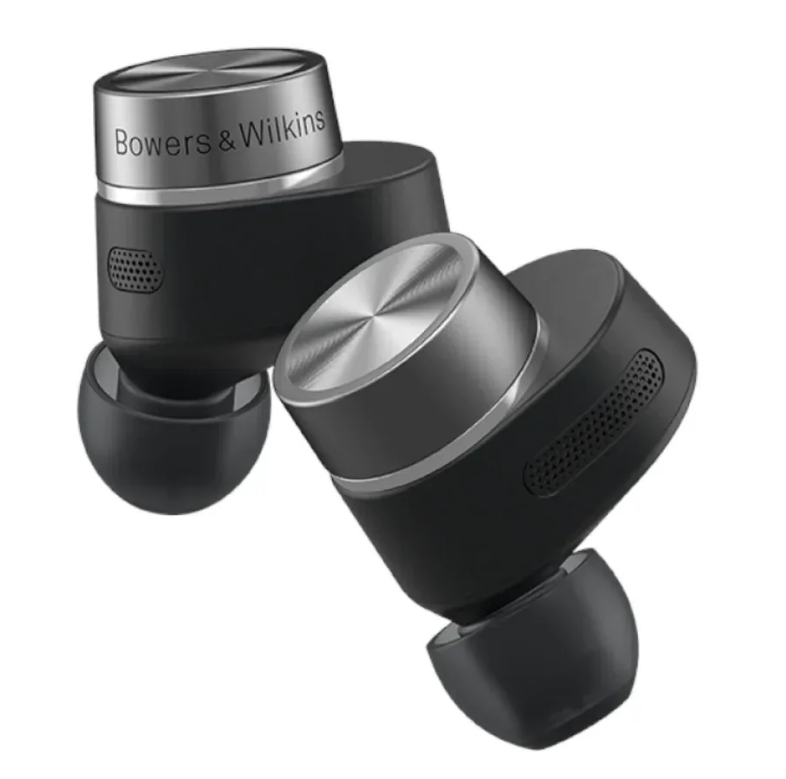
The Bowers and Wilkins Pi7-S2 True Wireless Earbuds are premium noise-cancelling earbuds built for listeners who want audiophile-grade sound in a compact, everyday design. Known for their two-driver architecture, adaptive noise cancellation, and wireless audio retransmission through the charging case, these earbuds stand out in the crowded premium true wireless market. They are especially appealing to commuters, frequent travelers, remote workers, and music fans who value rich detail, strong call quality, and a luxurious listening experience.
One of the biggest selling points of the Pi7-S2 is its high-fidelity sound signature, powered by 9.2 mm dynamic drivers paired with balanced armature tweeters. This design helps deliver deep bass, clear mids, and crisp highs with impressive separation. The earbuds also support aptX Adaptive, aptX HD, AAC, and SBC, making them compatible with a wide range of phones and tablets. Adaptive ANC and three microphones per earbud further improve performance by reducing background noise and keeping calls clear.
As a premium model, the Bowers and Wilkins Pi7-S2 True Wireless Earbuds typically sit in the upper price range, often around $399 / £349 / AU$700 depending on region and retailer. Availability can vary by country and color option, with stock sometimes limited because this is a flagship-level product. For buyers comparing premium earbuds, the Pi7-S2 competes closely with flagship offerings from Sony, Apple, and Sennheiser while emphasizing sound quality and elegant industrial design.
Specifications for Bowers and Wilkins Pi7-S2 True Wireless Earbuds
- Driver setup: 9.2 mm dynamic driver plus balanced armature driver for a two-way sound design.
- Bluetooth: Bluetooth 5.0 with aptX Adaptive support for higher-quality wireless playback.
- Audio codecs: aptX Adaptive, aptX HD, aptX Classic, AAC, and SBC.
- Noise control: Adaptive Active Noise Cancellation with ambient pass-through support.
- Microphones: Three microphones per earbud for calls and ANC performance.
- Battery life: Up to 5 hours per charge with ANC off, plus 16 additional hours from the charging case.
- Fast charging: About 15 minutes of charging provides around 2 hours of playback.
- Charging: Wireless charging and USB-C charging supported.
- Special feature: Audio retransmission from the charging case through the 3.5 mm analogue input.
- Water resistance: IP54 rating for the earbuds only.
- Weight: 7 g per earbud and 47 g for the charging case.
Compared with rivals such as the Sony WF-1000XM5 and Apple AirPods Pro, the Pi7-S2 focuses more on premium sound tuning and analog-to-wireless retransmission, while many competitors emphasize longer battery life or deeper app ecosystems. For users who prioritize audio performance first, this model remains highly competitive.
Setup Guide for Bowers and Wilkins Pi7-S2 True Wireless Earbuds
Getting started with the Bowers and Wilkins Pi7-S2 True Wireless Earbuds is straightforward. First, fully charge the earbuds and charging case using the USB-C cable or a wireless charger. If the case battery is low, connect it before pairing to avoid interruptions during setup. Next, remove both earbuds from the case so they enter pairing mode automatically. On your phone, tablet, or laptop, open Bluetooth settings and select the Pi7-S2 from the list of available devices.
After pairing, install the companion app if available in your region to access configuration options such as ANC settings, wear sensing behavior, and firmware updates. You can also switch between noise cancellation and ambient pass-through depending on whether you are commuting, working in an office, or walking outdoors. For best results, choose ear tips that create a secure seal, since fit directly affects bass response and noise isolation.
If pairing fails, reset the earbuds by placing them back in the case, closing the lid, and repeating the pairing process. Keep the earbuds away from excessive moisture during setup, and avoid charging them near water or extreme heat. Because the case also supports audio retransmission, connect the 3.5 mm input or USB-C source only after confirming compatibility with your playback device.
Troubleshooting Bowers and Wilkins Pi7-S2 True Wireless Earbuds
Common issues with the Pi7-S2 usually involve pairing, charging, or inconsistent sound. If one earbud does not connect, place both buds back in the charging case, close it for a few seconds, then try pairing again. If audio cuts out, check Bluetooth distance, remove interference from other wireless devices, and confirm that the source device supports the selected codec. Some users also notice weaker bass when the ear tip seal is poor, so testing a different ear tip size often solves the problem.
If the charging case does not power the earbuds, clean the charging contacts with a dry, soft cloth and make sure the case has enough charge. A full reset is often the best fix when the earbuds stop responding. While specific error codes are not commonly exposed to users, repeated connection failure usually indicates the earbuds need re-pairing or a firmware refresh through the companion app.
To prevent problems, keep the earbuds dry, store them in the case when not in use, and avoid exposing them to dust or sweat for long periods. The IP54 rating protects against light splashes and dust, but not full water immersion. For warranty or service support, contact Bowers and Wilkins customer support through the official support channel for your region, or reach out to the authorized retailer where the earbuds were purchased.
Pros and Cons of Bowers and Wilkins Pi7-S2 True Wireless Earbuds
Pros
- Excellent sound quality with a rich, detailed tuning that suits premium music listening.
- Two-driver design delivers strong separation, clear vocals, and refined treble.
- Adaptive ANC helps reduce everyday noise on trains, planes, and in offices.
- Wireless audio retransmission is a unique feature for travel and in-flight entertainment.
- Fast charging is useful when you need quick listening time before heading out.
Cons
- Battery life is shorter than some competitors, especially at this price level.
- Bluetooth 5.0 is functional, but not as current as newer premium earbuds.
- The price is high, so value for money depends on how much you prioritize sound quality.
- ANC is strong, but some rivals cancel more low-frequency noise more aggressively.
- The companion app and ecosystem are less feature-rich than those of some mainstream brands.
For buyers comparing premium earbuds, the Pi7-S2 is best viewed as a sound-first product. It is a strong alternative to Sony and Apple models if detailed audio and elegant design matter more than maximum battery life or broader smart features.
Customer Reviews of Bowers and Wilkins Pi7-S2 True Wireless Earbuds
User feedback for the Bowers and Wilkins Pi7-S2 True Wireless Earbuds is generally positive, with many owners praising the clarity, stereo separation, and luxurious build quality. A common rating pattern among reviewers is around 4 to 4.5 out of 5 stars, especially from listeners who use the earbuds for music, podcasts, and travel.
Typical praise includes strong vocals, effective noise cancellation, and the convenience of quick charging. Common complaints focus on the premium price, average battery life, and the fact that some users want more advanced app controls. One frequent comment is that these earbuds sound better than many mainstream rivals but cost significantly more.
Purchase recommendations often come from users who value high-end audio over all else. If you want a luxury true wireless model with standout sound, the Pi7-S2 is easy to recommend. If long battery life or deep ecosystem integration is your priority, a different flagship model may offer better overall value.
Faqs
How do I set up Bowers and Wilkins Pi7-S2 True Wireless Earbuds for the first time?
Why are my Bowers and Wilkins Pi7-S2 True Wireless Earbuds not pairing or connecting properly?
Do Bowers and Wilkins Pi7-S2 True Wireless Earbuds support multipoint Bluetooth connection?
How does adaptive noise cancellation work on Bowers and Wilkins Pi7-S2 True Wireless Earbuds?
Can I use Bowers and Wilkins Pi7-S2 True Wireless Earbuds with Android and iPhone devices?
Why does the battery on my Bowers and Wilkins Pi7-S2 True Wireless Earbuds drain faster with ANC on?
How do I get the best sound quality from Bowers and Wilkins Pi7-S2 True Wireless Earbuds?
How should I clean and maintain Bowers and Wilkins Pi7-S2 True Wireless Earbuds for long-term use?
More bowers and wilkins manuals
- Bowers and Wilkins CC6 Center Channel Speaker User Manual
- Bowers and Wilkins 800 Series Center Channel Speaker HTM1-D3 User Manual
- Bowers and Wilkins Series-80 Floorstanding Speaker 802 F Special User Manual
- Bowers and Wilkins Standmount & Bookshelf Loudspeaker 606 User Manual
- Installation: Bowers and Wilkins CCM6 Series In-Ceiling Speaker Instruction Manual
- Bowers and Wilkins CWM Cinema 6 In-Wall Speaker User Manual
Leave a Comment