
Setup & Pairing: Dangbei DBOX02 Pro Smart Projector User Manual
Content
Dangbei DBOX02 Pro Smart Projector
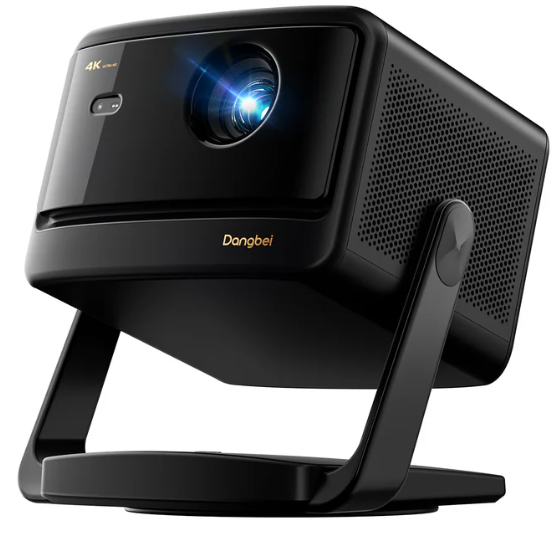
Introduction
The Dangbei DBOX02 Pro Smart Projector redefines home entertainment with its advanced 4K laser projection, seamless smart features, and user-friendly design. Engineered for both cinephiles and gamers, this projector delivers stunningly vivid images with 2000 ISO lumens of brightness, making it suitable for viewing in both dark home theaters and bright living spaces—even with ambient light present. Its ALPD laser light source ensures speckle-free, color-fringing-free visuals, while the 108% Rec 709 color gamut and HDR10+ support bring movies, shows, and games to life with cinematic color and contrast.
What sets the dangbei DBOX02 Pro apart is its plug-and-play simplicity. The built-in stand offers 360° horizontal rotation and 120° vertical tilt, allowing for effortless placement and adjustment. InstanPro AI Image Setup automatically optimizes focus, keystone, and brightness, adapting to any room layout or lighting condition. Integrated Google TV provides instant access to over 10,000 apps, including licensed Netflix, YouTube, Prime Video, Disney+, and HBO Max—no external streaming devices required.. Dual HDMI 2.1 ports support 4K 120Hz gaming, catering to console and PC gamers seeking ultra-responsive gameplay.
Ideal for families, movie lovers, and gamers, the Dangbeiei DBOX02 Pro Smart Projector is perfect for indoor movie nights, outdoor screenings, and immersive gaming sessions. Its compact, elegant design fits any modern decor, and the projector’s 40" to 300" screen flexibility adapts to spaces large and small. Estimated to retail in the $1,500–$2,000 range, it’s widely available through major electronics retailers and direct from Dangbei’s official store, with fast shipping, a 1-year warranty, and a 30-day money-back guarantee.
Specifications
Core Technical Details
- Display Technology: DLP (0.47" DMD chip)
- Resolution: 4K UHD (3840 x 2160)
- Brightness: 2000 ISO Lumens (LaserVibe™ light source)
- Color Gamut: 108% Rec 709
- HDR Support: HDR10+, HDR10, HLG
- 3D Support: Yes (Left-Right, Top-Bottom, Blu-ray 3D)
- Aspect Ratio: 16:9 / 4:3
- Projection Size: 40" – 300"
- Throw Ratio: 1.27:1
- Digital Zoom: 100% – 50%
- Gaming: 4K @120Hz via dual HDMI 2.1 ports
- Operating System: Google TV with licensed apps (Netflix, YouTube, Prime Video, Disney+, HBO Max)
- Audio: Built-in stereo speakers, DTS: X, Dolby Audio
- Connectivity: Dual HDMI 2.1, Bluetooth 5.2/BLE, Wi-Fi, USB
- Dimensions: 246.8 x 262.6 x 215.6 mm
- Weight: 4.8 kg
- Power Consumption: 110W
- Noise Level: <24dB (Standard Mode)
Smart Features & Performance
The Dangbei DBOX02 Pro Smart Projector stands out with its InstanPro AI Image Setup, which combines auto focus, auto keystone, screen fit, obstacle avoidance, eye protection, and real-time brightness adjustment for a hassle-free setup. The integrated stand allows for flexible placement, and the projector’s laser light source ensures long-lasting performance (up to 30,000 hours). Compared to similar 4K laser projectors, the DBOX02 Pro offers higher brightness, superior color accuracy, and more versatile placement options, rivaling premium models from established brands at a competitive price point.
Packing List
Before using this product, please check that all items are included in the box.
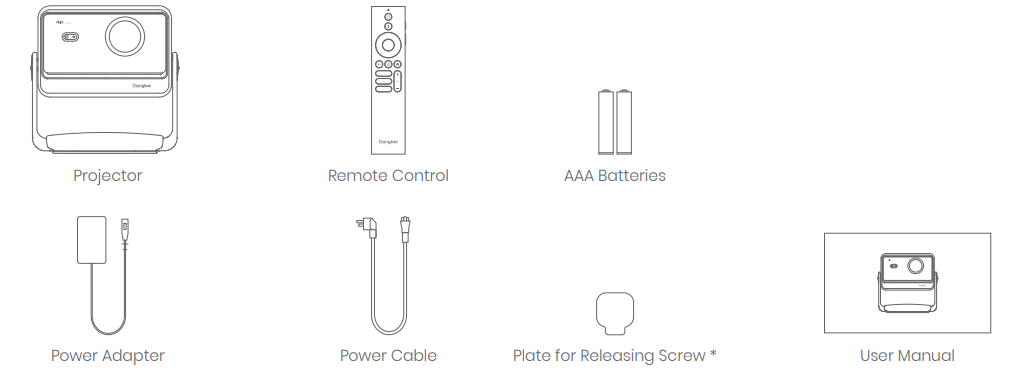
Usage of the Plate for Releasing the Screw:
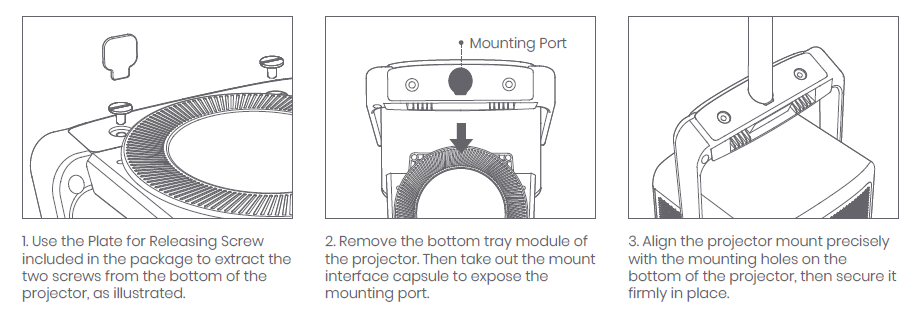
When using the projector with a floor stand or ceiling mount, the Plate for Releasing Screw can be used to remove the two screws at the designated positions on the bottom of the projector. After removal, the corresponding mount can be installed.
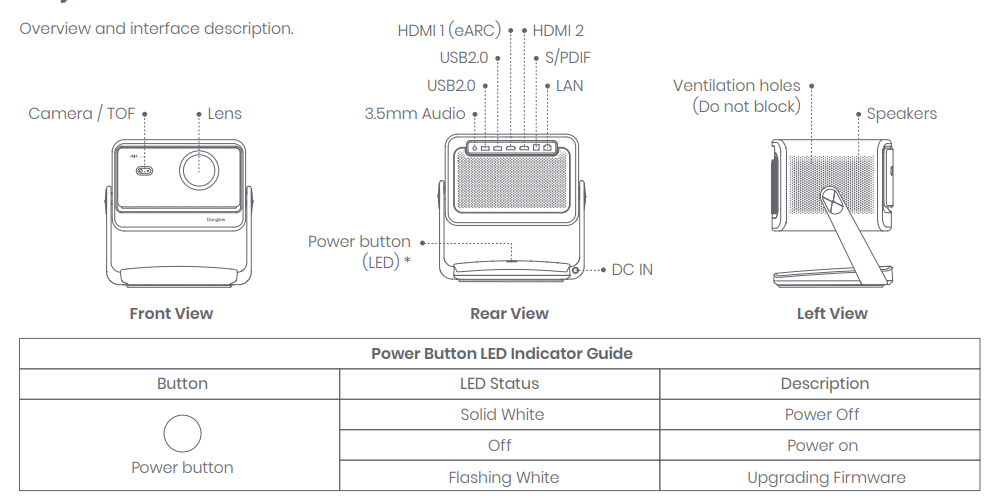
Projector Overview
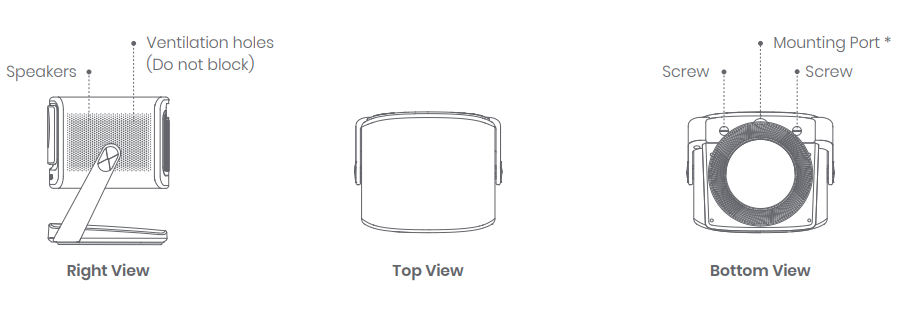
Number of screw holes: 1
Screw hole specifications: M25 metric thread hole (≈0.98"), depth 0.39 inches
Instructions for Installing an External Mount or Stand
Note: When using a dedicated ceiling mount or floor stand, the mount or stand must be purchased separately.
Remote Control Overview
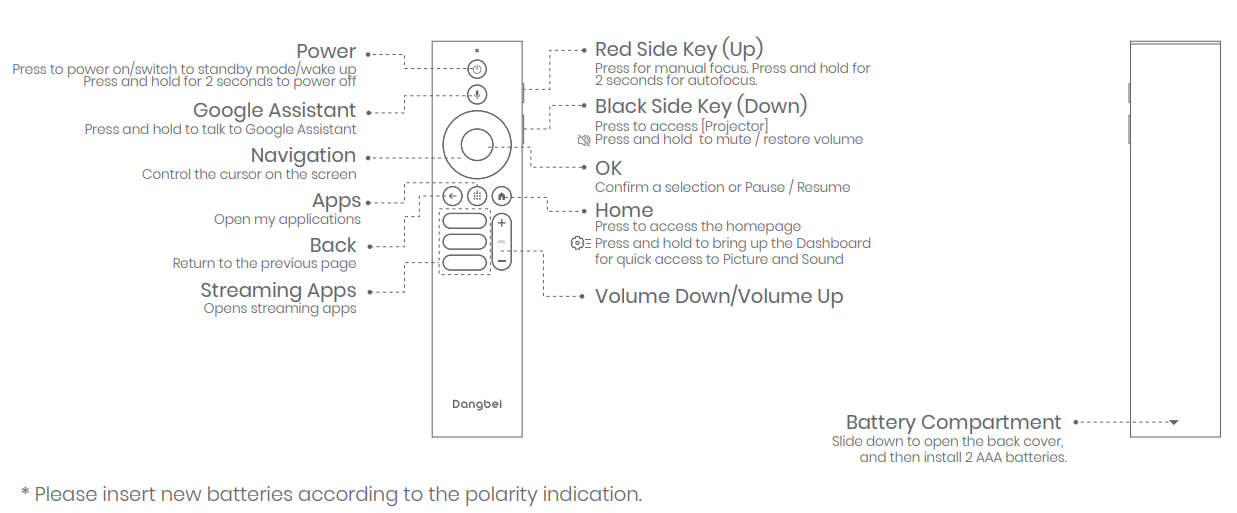
- Open the battery compartment cover of the remote control.
- Install 2 AAA batteries .
- Put back the battery compartment cover.
Getting Started
Placement
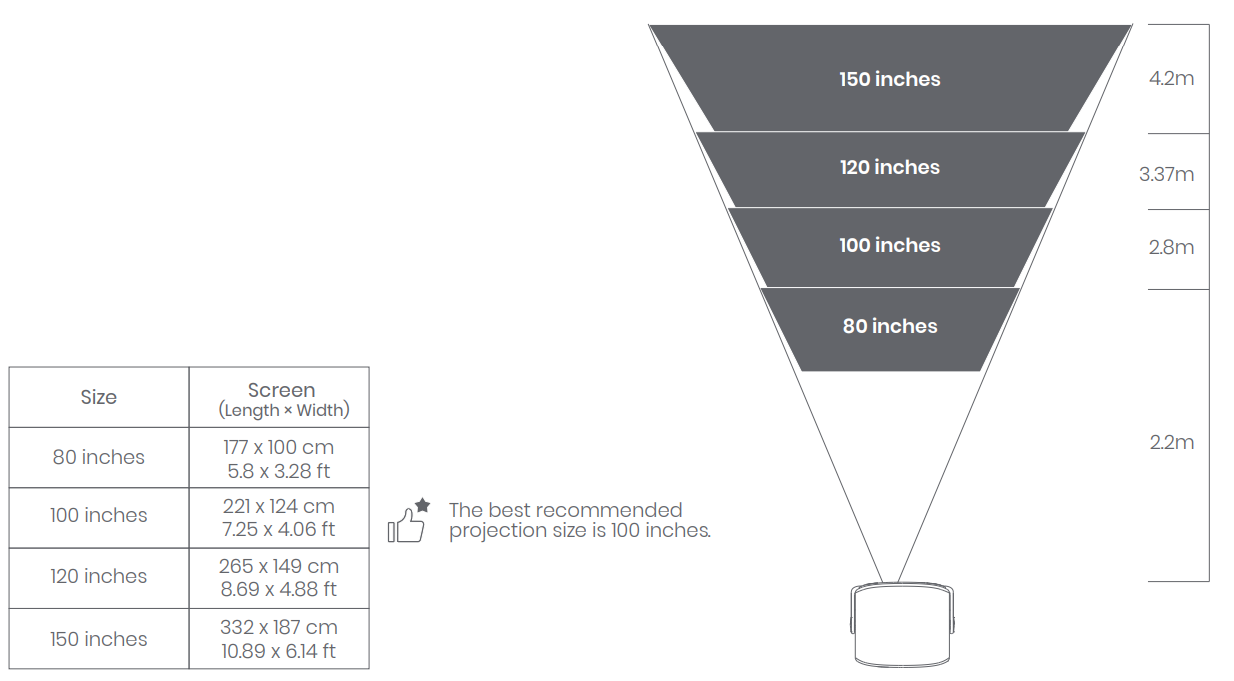
Position the projector on a stable, flat surface in front of the projection surface. A flat and white projection surface is recommended. Please follow the instructions below to determine the distance between the projector and the projection surface.
And the corresponding projection size:
Power on
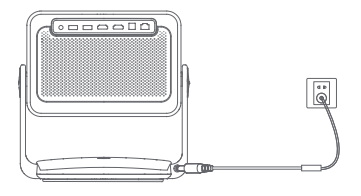
- Connect the projector to the power outlet.
- Press the power button on the projector or remote control to turn on the projector.
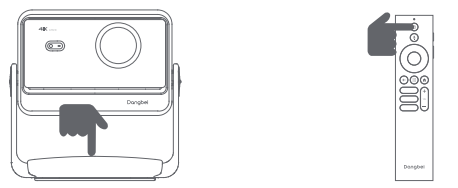
Standby Mode / Power off
Press the power button on the projector or remote control to enter standby mode.
Press and hold the power button on the projector or remote control for 2 seconds to turn off the projector.
Remote Control Pairing
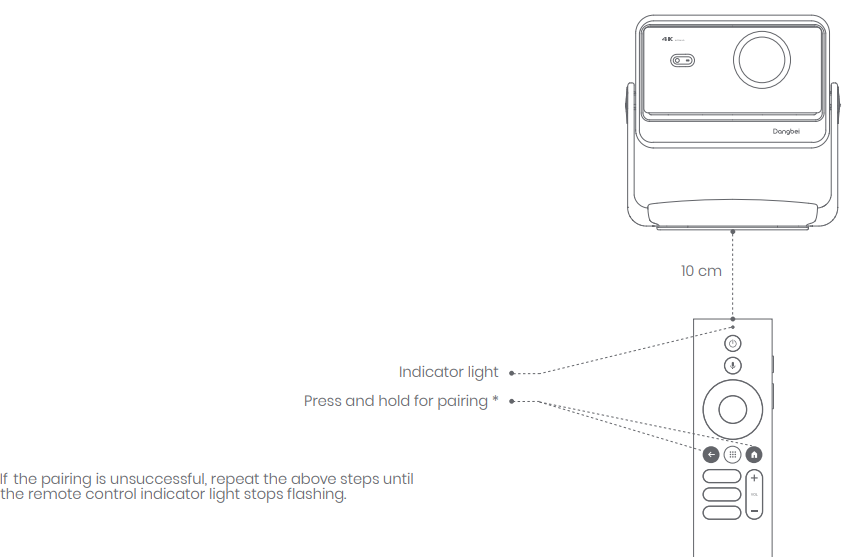
- Turn on the projector and wait for the Bluetooth pairing prompt on the screen. ㆍ
- Bring the remote control within 10 cm / 0.33 ft of the projector.
- Simultaneously press and hold the
 keys. Release the keys after the indicator light starts flashing.
Troubleshooting
No audio output
- Check if you have pressed and held the black side key on the remote control,l as this may mute the projector.
- Check if the projector interface "HDMI 1 (eARC)" or Bluetooth is connected to an external audio device.
No image output
- Press the power button located on the projector stand.
- The power button indicator light will turn off if the projector enters projection mode successfully.
- Ensure that the power adaptor has a power output.
No network
- Enter settings, and check the network connection status in the network option.
- Ensure that the network cable is correctly inserted into the projector interface "LAN".
- Ensure that the router is correctly configured.
Blurry Image
- Adjust the focus or keystone.
- The projector and screen/wall must be positioned at an effective distance.
- The projector lens is not clean.
Non-rectangular Image
- Place the projector perpendicular to the screen/wall if the keystone correction function is not used.
- Use the keystone correction function to adjust the display.
Automatic keystone correction failed
- Ensure that the Camera/TOF on the front panel is not blocked or dirty.
- The best automatic keystone correction distance is 2.0-4.0m, horizontal ±30°.
Autofocus failure
- Ensure that the Camera/TOF on the front panel is not blocked or dirty.
- The best autofocus distance is 2.0-4.0m, horizontal ±20°.
Smart Eye Protection failed
- Ensure that the Camera/TOF on the front panel is not blocked or dirty
- The optimal sensing range is located around the center of the image. Being too close to the edges may result in the eye protection feature not triggering.
Intelligent Screen Fit failure
- Ensure that the projector is correctly positioned, so that the projected image extends beyond the edges of the screen.
- Ensure that the projection screen has a colored border/frame on all four sides, so that the projector can recognize the frame.
The Remote Control is unresponsive.
- Ensure that the remote control is successfully paired via Bluetooth. If the pairing is successful, the LED light will flash once when you press any button. When you press and hold any button, the LED light will remain solid.
- If the pairing is unsuccessful, the LED light will flash three times when you press any button. When you press and hold any button, the LED light will flash three times and then remain solid.
- Check if the power indicator is still on without pressing any buttons. If it is, check the status of the remote control buttons to ensure they are not being pressed.
- Ensure that there are no interferences or obstructions between the projector and the remote control.
- Check the battery and installation polarity.
Connect the Bluetooth devices.
- Enter settings, open the [Remotes&Accessories] to pair more Bluetooth devices.
Preventive Measures
Keep the projector in a cool, dry place. Use a surge protector. Regularly clean the lens and vents. Avoid direct sunlight on the projector body.
Warranty & Support
The Dangbei DBOX02 Pro comes with a 1-year warranty and a 30-day money-back guarantee. For technical support, contact Dangbeii customer service via their official website or the support email provided in the user manual. Keep your purchase receipt and serial number for warranty claims.
Pros & Cons
Advantages
- Stunning 4K Laser Image: Bright, vivid visuals with excellent color accuracy and HDR support, even in well-lit rooms.
- Smart, User-Friendly Setup: InstanPro AI automates focus, keystone, and brightness for effortless installation.
- Versatile Placement: Built-in stand allows 360° rotation and 120° tilt for flexible positioning.
- Comprehensive Smart Features: Google TV integration with licensed streaming apps and access to thousands of additional applications.
- Gaming-Ready: Dual HDMI 2.1 ports support 4K 120Hz gaming, appealing to console and PC gamers.
- Quiet Operation: Low noise level (<24dB) ensures an immersive viewing experience.
Limitations
- Premium Price: Higher cost compared to entry-level projectors, though competitive within the 4K laser category.
- No Built-in Battery: Requires a power outlet, limiting portability for outdoor use without access to electricity.
- Limited Built-in Speaker Power: While audio quality is decent, serious audiophiles may prefer external sound systems.
- Size & Weight: Slightly bulkier than ultra-portable projectors, though still manageable for most home setups.
Value for Money: The Dangbei DBOX02 Pro Smart Projector delivers exceptional performance and features for its price, rivaling more expensive models from leading brands. Its combination of brightness, smart capabilities, and gaming support makes it a compelling choice for home entertainment enthusiasts seeking a high-end, all-in-one solution.
Customer Reviews
Users consistently praise the Dangbei DBOX02 Pro for its brilliant image quality, even in rooms with ambient light, and its effortless setup thanks to advanced auto-adjustment features. Many highlight the convenience of having licensed streaming apps built in, eliminating the need for external devices. The projector’s versatile placement options and robust build quality also receive positive feedback.
Common compliments include the vivid colors, sharp 4K detail, and smooth gaming performance at high refresh rates. A few users note that while the built-in speakers are adequate for casual viewing, a dedicated sound system enhances the experience. The lack of a battery is occasionally mentioned as a drawback for fully portable use, but most agree the projector excels as a home cinema centerpiece.
Overall, the Dangbei DBOX02 Pro Smart Projector earns high marks for its performance, ease of use, and smart features, with many customers recommending it as a top-tier option for those seeking a premium 4K laser projector with all the modern conveniences.
Faqs
How do I set up the dangbei DBOX02 Pro Smart Projector for the first time?
What should I do if the dangbei DBOX02 Pro Smart Projector image is blurry or out of focus?
Can I use the dangbei DBOX02 Pro Smart Projector for gaming with a 120Hz refresh rate?
How do I connect external speakers or headphones to the dangbei DBOX02 Pro Smart Projector?
What streaming apps are available on the dangbei DBOX02 Pro Smart Projector?
How do I troubleshoot no sound from the dangbei DBOX02 Pro Smart Projector?
What is the recommended screen size and distance for the dangbei DBOX02 Pro Smart Projector?
How do I maintain and clean the dangbei DBOX02 Pro Smart Projector?
More dangbei manuals
Leave a Comment